
WPF Surface Chart - 3D Surface Visualization Control
- Find the optimum combination between two sets of data.
- Rotate the chart to different angles easily.
- Utilize contour and wireframe support.

.NET 10 support now available
Trusted by the world’s leading companies

Overview
The WPF Surface Chart control is a high-performance, visually stunning, three-dimensional surface chart. It shows a three-dimensional surface that connects a set of data points.
Data binding in WPF Surface Chart
The WPF Surface Chart supports data binding. You can display data in a grid table format.
Types
The WPF Surface Chart covers the major types required in markets, like surface and contour, with respective wireframe combinations.
Surface

Surface charts are used to explore the relationships among three-dimensional data.
Wireframe surface
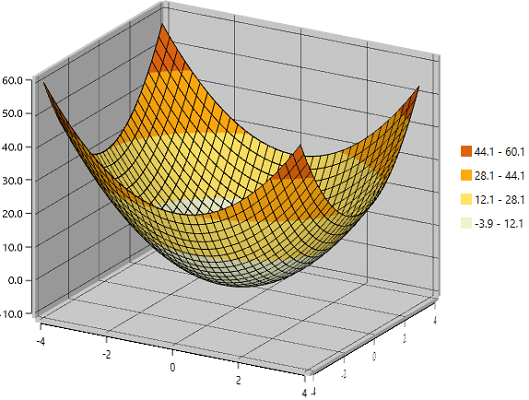
You can draw the wireframe or mesh for a surface chart.
Contour

Contours represent three-dimensional relationships in two dimensions.
Wireframe contour

You can draw the wireframe or mesh for the contour chart.
Surface axis
A surface axis is used to locate a data point inside the surface area.
Label customization

Customize the look and feel of the default labels of WPF Surface Chart.
Tick customization

Define your own style for ticks in WPF Surface Chart.
Surface wall
A surface wall is used to create the three-dimensional view effect.
Wall color customization

Define your own style for a wall with the help of the color and thickness properties.
Transparent wall

You can hide the wall by setting a transparent color to the surface wall.
Color bar
A color bar contains a set of colors that map to a range of values in a surface chart. A color bar can be docked around the plotting area, including its customizable labels and icons.
Icon customization

Change the type of color bar to built-in shapes such as circles, rectangles, crosses, or diamonds to improve readability of a chart.
Position customization
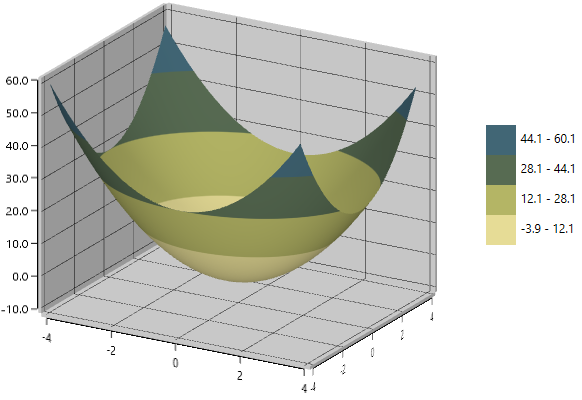
Customize the positioning of the color bar to anywhere in the WPF Surface Chart.
Rotation
You can adjust the default view to another direction by rotating the surface chart.

Gradient
The WPF Surface Chart control supports gradient brushes.

Surface chart palettes
The control comes with more built-in palettes and also supports custom palettes.

WPF Surface Chart Code Example
Easily get started with the WPF Surface Chart using a few simple lines of XAML or C# code example as demonstrated below. Also explore our WPF Surface Chart Example that shows you how to render and configure the XAML Surface Chart in WPF.
<Window xmlns:syncfusion="clr-namespace:Syncfusion.UI.Xaml.Charts;assembly=Syncfusion.SfChart.WPF"> <syncfusion:SfSurfaceChart /> </Window>using Syncfusion.UI.Xaml.Charts; using System.Windows; namespace SurfaceChartExample { public partial class MainWindow : Window { public MainWindow() { InitializeComponent(); SfSurfaceChart surface = new SfSurfaceChart(); this.Content = surface; } } }Not sure how to create your first WPF Surface Chart? Our documentation can help.
I’d love to read it now145+ WPF CONTROLS
ALL CONTROLS
DATA VISUALIZATION
MODERN THEMES
LAYOUT
NAVIGATION
INPUT CONTROLS
BUTTONS
BUSINESS INTELLIGENCE
DATA SCIENCE
MISCELLANEOUS
LISTS & DROPDOWN
NOTIFICATION
FILE VIEWERS & EDITORS
CONVERSATIONAL UI
Frequently Asked Questions
Why should you choose Syncfusion WPF Surface Chart?
The Surface Chart shows a three-dimensional surface that connects a set of data points.- Support for a color bar.- Built-in palettes.- Support for gradient brushes.- Perspective and orthographic views.- Contour and wireframe support.- Simple configuration and API. - Extensive demos and documentation to help you learn quickly and get started with WPF Surface Chart.
Can I download and utilize the Syncfusion WPF Surface Chart for free?
No, this is a commercial product and requires a paid license. However, a free community license is also available for companies and individuals whose organizations have less than $1 million USD in annual gross revenue, 5 or fewer developers, and 10 or fewer total employees.
How do I get started with Syncfusion WPF Surface Chart?
A good place to start would be our comprehensive getting started documentation.
Our Customers Love Us
Having an excellent set of tools and a great support team, Syncfusion® reduces customers’ development time.Here are some of their experiences.

Excellent experience with Syncfusion!
Syncfusion is a product that makes life easier! I use it to create Blazor applications (server side and webassembly) and the controls speed up development a lot. Furthermore, if needed, it is possible to ask for direct support that is never long in coming!

Andrea Scarpante, 
Sydea srl
The complete component set
It is the most complete component set available. Also very handy is the fact that there is a community edition, this gives me the opportunity to test thing at home without buying a separate license.

Johan Visser, 
H and T Pawnbrokers
Rated by users across the globe



Syncfusion WPF Resources
Learning  Documentation
Documentation 


Awards
Greatness—it’s one thing to say you have it, but it means more when others recognize it. Syncfusion® is proud to hold the following industry awards.






