Bringing AI to your Oracle Database (via MCP Servers), is quite simple – it can be setup in less than 5 minutes. However, for the best experience, and to protect your data, it takes a bit more thought and preparation.
I’m sharing what we have learned over the past few months, so hopefully I can give you a head-start if you’re just beginning your organization’s AI journey with your database.
I’m going to break these down by category, and in no particular order, except for the very most important one first, security.
But first, I want to share a little video that I think you might enjoy. It shows what this technology (MCP!) is all about, how it works, and what it can do.
Security
Start in a safe place. No, let me rephrase that. Don’t add AI to a system that hasn’t been prepped for Agents/AI.
💡⚠️ This is both a tip and a word of caution: the SQLcl MCP Server can be used to do more than run queries!
Our MCP Server gives your Agent the opportunity to ALSO:
- create, drop, alter, truncate tables
- create users, change their passwords, grant/revoke privs and roles
- insert, update, delete, merge data
- manage statistics, read an execution plan, suggest and create indexes
What the Agent can do is limited by it’s training data (what it knows how to do, what kind of Oracle SQL/PLSQL code it can generate), by what it’s been asked to do – perhaps you give it the code directly or indirectly, but finally and most importantly, by what the database will allow it to do. So use Oracle Database accounts (users) that can only:
- query specific tables or views, in a different schema*
- execute specific stored procedures, in a different schema*
- only see the portions of data in those tables and views that is not sensitive or PII
- use a limited amount of server resources (memory, CPU)
So if the intent for your Agents is to only be ‘helping with reports’ or ‘answering business questions’ – then the database environment needs prepped with an account that’s setup to do just that.
Theoretical Example database user for Agentic Reporting
*in a different schema
Instead of utilizing a database connection as the application user, instead create a user with limited views/access to the application schema objects, via views, synonyms, and PL/SQL APIs.
A user can drop their own table, so…let’s avoid that altogether!
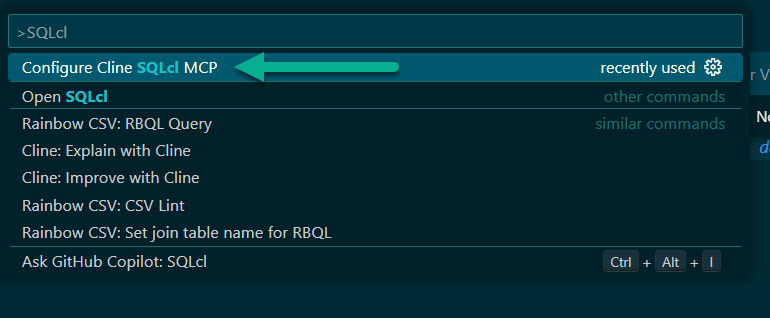
-- THIS IS AN EXAMPLE, ONLY -- USER will not own anything, only query/execute a controlled list of database objects -- use great passwords, grant minimum roles CREATE USER mcp_agent_proxy IDENTIFIED BY "y50}i6D5O8hN"; grant CONNECT; -- grant only what is needed grant READ on REPORTING.SALE_BY_QTR_ROLLUP_MV TO mcp_agent_proxy; grant EXECUTE on REPORTING.REQUEST_REFRESH_SALES_MV TO mcp_agent_proxy; -- add user to the proper consumer group, guards against runway, bad queries EXEC DBMS_RESOURCE_MANAGER_PRIVS.GRANT_SWITCH_CONSUMER_GROUP ( GRANTEE_NAME => 'MCP_AGENT_PROXY', CONSUMER_GROUP => 'FIVE_PERCENT_CPU', GRANT_OPTION => FALSE ); ALTER USER mcp_agent_proxy SET INITIAL_CONSUMER_GROUP = five_percent_cpu; --enable auditing...Then in SQLcl (or using SQL Developer Extension for VS Code), we’ll save this connection, with a decent name, and our Agents will now be able to interface with the database via our MCP Server.
SQL> connect -save MCP-Reporting -savepwd mcp_agent_proxy@localhost:1521/freepdb1 Password? (**********?) Name: MCP-Reporting Connect String: localhost:1521/freepdb1 User: mcp_agent_proxy Password: ****** Connected. SQL> In my prompts I can refer to it by name or by reference, as long as it sounds anything like ‘MCP’ or ‘Reporting.’
Use Cases
This topic ties in directly with security. The uses cases will dictate a big part of how security and locking down the database and its resources will need to be accomplished.
This is the most frequently asked question we encounter – “What kind of stuff can we do with this thing?” I want you to spend a moment and think about what causes you, your team, your organization the most amount stress or difficulty.
Employ Agents as your personal tech assistant!
Example: I needed to generate some test data for an app I’m pretending to build. I perfectly know how to do this, but I also don’t want to spend the 15-20 minutes to setup the code to write the code to do this, nor do I want to research some real looking data.
So with this prompt…
connect to my raptor database add 25 rows to the table, 'BAD_NAME_42', this data should look like online retail orders the first column, A is an ID, any unique number will do the second columb, B, is a string, use this field to store a base64 string, it can be random. the 3rd column, C, is a JSON object. Use it to create actual order data, with json attributes such as "date_of_sale", "products: [ "product_name", "quantity". "price", "description", "quantity" ], "total_price" each order should have realistic data, mode the data off of popular pokemon cards and characters. be consistent with the price for each item if you are reusing products across orders. Each order should have at least 1 product, but no more than 10.My agent puts together the plan (My plan, it’s in my prompt!), and engages the LLM to generate the code, and runs it for me. Which I can now browser, via the database…

Developers are gonna dev. Where are your bottlenecks? What’s preventing the code from shipping faster?
- code reviews taking too long? engage an agent!
- writing test code is a chore? engage an agent!
- taking too long to onboard new devs? engage an agent!
- …insert your problem here
DevOps and system administrators keep everyone and everything happy. How could they be more efficient, more preventative and less ad-hoc firefighters?
- resource planning, keeping backups fast and predictable a problem? engage an agent!
- system is slow…ugh time to comb AWR reports, check indexes, stats…engage an agent!
Analysts (the people that live in BI Publisher) keep the business running. They always need more reports, more data…
- Natural Language to SQL is real, and actually works. Engage an agent.
Your database is awesome because it has all of our data, but… the LLM will need context to generate good SQL
While it’s cool that all of your data is in a database, that could also overwhelm the Agent/LLM as it attempts to undertand your schema and generate SQL queries. You see, not everyone has the best designed data models out there, or perhaps folks have purchased applications that didn’t like using plain language table names.
If your schemas has 300 or 3000 tables, then it’s going to be expensive, frustrating, and slow to have your Agent stumble it’s way through your questions.
Solution? You need to provide context to your agent!
- beef up your prompts, if your Pokemon e-tail sales data is stored in a table named BAD_TABLE_NAME_42, you’ll need to inform your agent of that, when asking for Pokemon sales numbers from last quarter
- when you’re setting up your MCP database user, create synonyms or views called ‘RETAIL_SALES’, that point to the BAD_TABLE_NAME_42
- OR, provide schema enrichment for the AI, in your database! Kris demonstrated this in Juan Loaiza’s Oracle AI World AI Database Keynote! I’ve fast-forwarded the video, just click the ‘play’ button!
Stay tuned to see our schema enrichment feature drop in our next Visual Studio Code extension update! We’ll also. have a new MCP Tool to help with things a bit in this area 🙂