
The <sub> tag is used to define the subscript text that appears half a character below the line and is rendered in a smaller font. The subscript text can often be used for defining chemical formulas.
You must use the <sub> tag only for typographical reasons. It shouldn’t be used for styling purposes. If you want to change the vertical position of a text, you can use the CSS vertical-align property with the "sub" value.
To define superscript text, use the <sup> tag.
Syntax
The <sub> tag comes in pairs. The content is written between the opening (<sub>) and closing (</sub>) tags.
Example of the HTML <sub> tag:
<!DOCTYPE html> <html> <head> <title>Title of the document</title> </head> <body> <p>Formula of water - H<sub>2</sub>O, formula of alcohol - C<sub>2</sub>H<sub>5</sub>ОН</p> </body> </html>Result
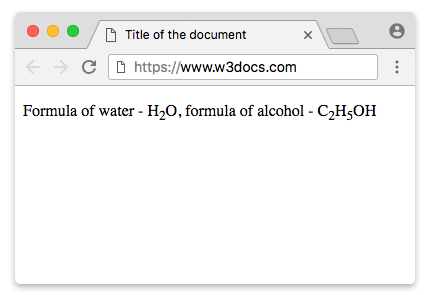
Example of the HTML <sub> tag used with the <sup> tag:
<!DOCTYPE html> <html> <head> <title>Title of the document</title> </head> <body> <p> The formula of water is H<sub>2</sub>O, and the formula of alcohol is C<sub>2</sub>H<sub>5</sub>ОН </p> <p> E = mc<sup>2</sup>, where E — kinetic energy, m — mass, c — the speed of light. </p> </body> </html>Example of the HTML <sub> tag used with the CSS vertical-align property:
<!DOCTYPE html> <html> <head> <title>Title of the document</title> <style> sub { vertical-align: sub; font-size: small; } </style> </head> <body> <h1>Example of the sub tag</h1> <p> Here is some text <sub>with the sub tag</sub>. </p> <p> Lorem ipsum dolor sit amet, consectetur adipiscing elit, sed do eiusmod tempor incididunt ut labore et dolore magna aliqua. Ut enim ad minim veniam, quis ... </p> <p> Reference site about Lorem Ipsum,<sub> giving information on its origins</sub>, as well as a random Lipsum generator. </p> </body> </html>Attributes
The <sub> tag supports the Global attributes and the Event Attributes.
How to style <sub> tag?
Common properties to alter the visual weight/emphasis/size of text in <sub> tag:
- CSS font-style property sets the style of the font. normal | italic | oblique | initial | inherit.
- CSS font-family property specifies a prioritized list of one or more font family names and/or generic family names for the selected element.
- CSS font-size property sets the size of the font.
- CSS font-weight property defines whether the font should be bold or thick.
- CSS text-transform property controls text case and capitalization.
- CSS text-decoration property specifies the decoration added to text, and is a shorthand property for text-decoration-line, text-decoration-color, text-decoration-style.
Coloring text in <sub> tag:
- CSS color property describes the color of the text content and text decorations.
- CSS background-color property sets the background color of an element.
Text layout styles for <sub> tag:
- CSS text-indent property specifies the indentation of the first line in a text block.
- CSS text-overflow property specifies how overflowed content that is not displayed should be signalled to the user.
- CSS white-space property specifies how white-space inside an element is handled.
- CSS word-break property specifies where the lines should be broken.
Other properties worth looking at for <sub> tag:
- CSS text-shadow property adds shadow to text.
- CSS text-align-last property sets the alignment of the last line of the text.
- CSS line-height property specifies the height of a line.
- CSS letter-spacing property defines the spaces between letters/characters in a text.
- CSS word-spacing property sets the spacing between words.
Browser support
 |  |  |  |  |
|---|---|---|---|---|
| ✓ | ✓ | ✓ | ✓ | ✓ |
Practice Your Knowledge
What is the correct usage and syntax for the HTML <sub> tag as per the w3docs.com guide?

Correct!

Incorrect!
Quiz Time: Test Your Skills!
Ready to challenge what you've learned? Dive into our interactive quizzes for a deeper understanding and a fun way to reinforce your knowledge.