
Reduce your server's resource usage by moving MySQL temporary directory to tmpfs
For sites that have lots of slow queries, disk access is often the bottleneck. For these slow queries, MySQL writes temporary tables to disk, populates them with intermediate results, then query them again for the final result.
We all know that the disk is the slowest part in a computer, because it is limited by being mechanical, rather than electronic. One way of mitigating this is to tell MySQL to use memory rather than disk for temporary tables.
This is often done by creating either a RAM Disk, or the easier to use tmpfs. Both are a portion of the server's RAM memory made to emulate a disk with slightly different details: RAM disk has a file system on it that can be ext3 or anything, while tmpfs is its own file system type.
Since memory access is much faster than a disk, this improves performance, and decreases load on the server by not causing pile up bottlenecks on disks.
We describe here methods to achieve this goal.
Method 1: Using an existing tmpfs directory
Rather than creating a new ram disk or tmpfs mount, we first search for one that is already on your server.
# df -h Filesystem Size Used Avail Use% Mounted on ... tmpfs 1.6G 260K 1.6G 1% /run ...
This tells us that the the /run filesystem is of type temporary file system, and has 1.6 GB allocated for it.
# mount ... tmpfs on /run type tmpfs (rw,noexec,nosuid,size=10%,mode=0755) ...
On Ubuntu 12.04 LTS, the directory /run/mysqld already exists and is allocated to a tmpfs with sufficient space for temporary files.
Save yourself some grief and do not try to create your custom directory under /run (e.g. mysqlslow), because it will not survive reboots, and MySQL will not start after a reboot.
So, all we need is telling MySQL to use this directory.
To do this, create a file called /etc/mysql/conf.d/local.cnf. By using this file, and not editing /etc/mysql/my.cnf, we don't have Ubuntu updated overwrite your changes.
Add this to the file:
[mysqld] tmpdir = /run/mysqld
Then restart MySQL
service mysql restart
Then make sure that the new value is now in effect:
# mysql mysql> SHOW VARIABLES LIKE 'tmpdir'; +---------------+-------------+ | Variable_name | Value | +---------------+-------------+ | tmpdir | /run/mysqld | +---------------+-------------+
Method 2: Creating a new tmpfs directory
If you are not running Ubuntu 12.04 LTS, then you may not have a ready made RAM disk that you can use, and you have to create one.
Here are the steps to create a the tmpfs directory:
Create the tmp directory
# mkdir -p /var/mysqltmp
Set permissions
# chown mysql:mysql /var/mysqltmp
Determine mysql user id
# id mysql
Edit /etc/fstab
And add the following line, replacing your specific mysql user id and group id instead of the 105 and 114 below:
tmpfs /var/mysqltmp tmpfs rw,gid=105,uid=114,size=256M,nr_inodes=10k,mode=0700 0 0
Mount the new tmpfs partition
# mount -a
Change your MySQL configuration
# vi /etc/mysql/conf.d/local.cnf
Change, or add the following line:
tmpdir = /var/mysqltmp
Restart MySQL
/etc/init.d/mysql restart
Or, for Ubuntu 12.04:
service mysql restart
How much of a difference does it make?
How much of a difference can you expect from moving MySQL's temporary files from disk to a RAM? Significant, if your server has lots of slow queries.
Here are the graphs from a site that was suffering considerably because of a large number of logged in users (averaging 250 at peak hours, and exceeding 400 at times), and some other factors.
Using a RAM disk made a noticeable difference.
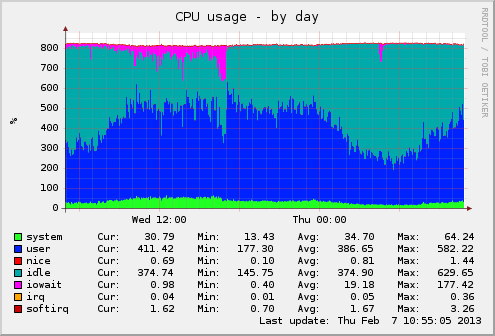
CPU usage. Note how much iowait (magenta) before and after the change:
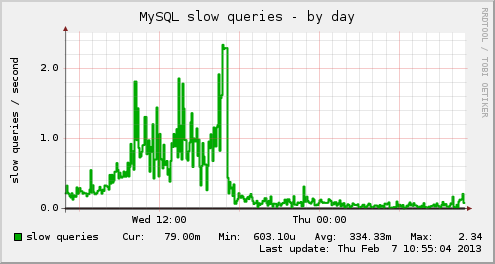
And how many slowqueries per second before and after the change:
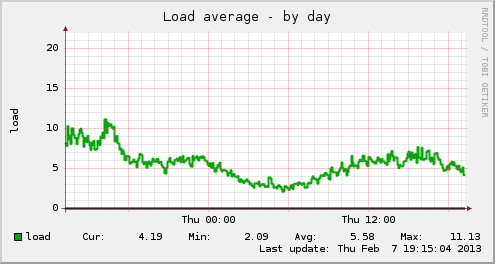
The server's load is less too:
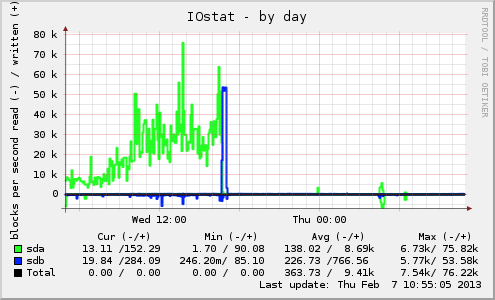
The Input Outputs per second on sda (where the /tmp is, which was the destination for slow queries before the change.


Most Comments