MS-RAG
Multi-Source Enhanced Retrieval-Augmented Generation Framework (MS-RAG)
Introduction
Large Language Models (LLMs) are powerful, but they can only answer based on the data they were trained on. When users need up-to-date or domain-specific information — such as internal documents, proprietary databases, or the latest reports — LLMs alone fall short.
Retrieval-Augmented Generation (RAG) bridges this gap by retrieving relevant information from external knowledge sources and feeding it as context to the LLM before generating a response. This ensures answers are grounded in real data rather than memorized patterns.
DB-GPT implements a Multi-Source RAG (MS-RAG) framework that goes beyond basic document Q&A. It supports multiple knowledge sources (documents, URLs, databases, knowledge graphs), multiple retrieval strategies (vector, keyword, graph, hybrid), and integrates deeply with the DB-GPT agent and workflow ecosystem.
Architecture
Overall Pipeline
The MS-RAG pipeline consists of four stages:
Knowledge Source → Chunking → Indexing → Retrieval → LLM Generation
- Knowledge Loading —
KnowledgeFactoryautomatically routes data sources (files, URLs, text) to the appropriateKnowledgeimplementation based on type and file extension. - Chunking —
ChunkManagersplits loaded documents into manageable chunks using configurable strategies (by size, page, paragraph, separator, or markdown headers). - Indexing —
Assemblerclasses (Embedding, BM25, Summary, DBSchema) persist chunks into the appropriate index store (vector database, full-text engine, or knowledge graph). - Retrieval & Generation — At query time,
Retrieverfetches relevant chunks, optionalQueryRewriteexpands the query, andRankerre-ranks results before the LLM generates the final answer.
Assembler Pipeline
The BaseAssembler defines a unified pipeline that connects all stages:
Knowledge.load() → ChunkManager.split() → Assembler.persist() → Assembler.as_retriever()
DB-GPT provides four specialized assemblers:
| Assembler | Purpose | Index Backend |
|---|---|---|
| EmbeddingAssembler | Vector similarity RAG (most common) | Vector Store (Chroma, Milvus, etc.) |
| BM25Assembler | Keyword-based full-text retrieval | Elasticsearch |
| SummaryAssembler | Summary-based RAG for long documents | Vector Store |
| DBSchemaAssembler | Database schema retrieval for Text2SQL | Vector Store |
Knowledge Sources
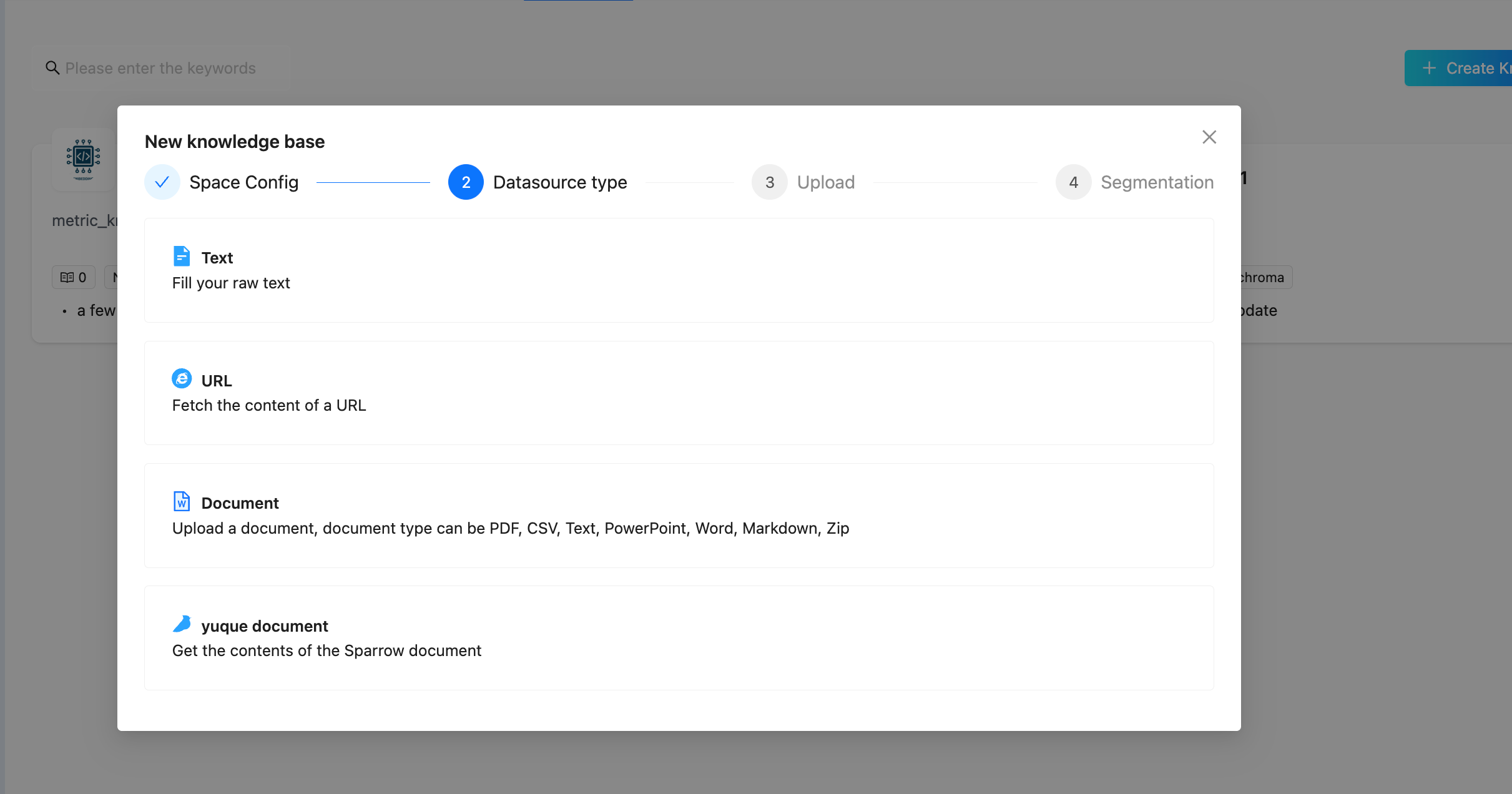
DB-GPT supports loading knowledge from multiple source types. In the Web UI, you can select a datasource type when uploading:
Datasource Types
| Type | Description | Example |
|---|---|---|
| Document | Upload files in various formats | PDF, Word, Excel, CSV, Markdown, PowerPoint, TXT, HTML, JSON, ZIP |
| URL | Fetch and index web page content | Any accessible HTTP/HTTPS URL |
| Text | Directly input raw text | Paste text content in the UI |
| Yuque | Import from Yuque documentation platform | Yuque document links |
Supported Document Formats
| Format | Extension | Knowledge Class |
|---|---|---|
.pdf | PDFKnowledge | |
| CSV | .csv | CSVKnowledge |
| Markdown | .md | MarkdownKnowledge |
| Word (docx) | .docx | DocxKnowledge |
| Word (legacy) | .doc | Word97DocKnowledge |
| Excel | .xlsx | ExcelKnowledge |
| PowerPoint | .pptx | PPTXKnowledge |
| Plain Text | .txt | TXTKnowledge |
| HTML | .html | HTMLKnowledge |
| JSON | .json | JSONKnowledge |
Storage Types
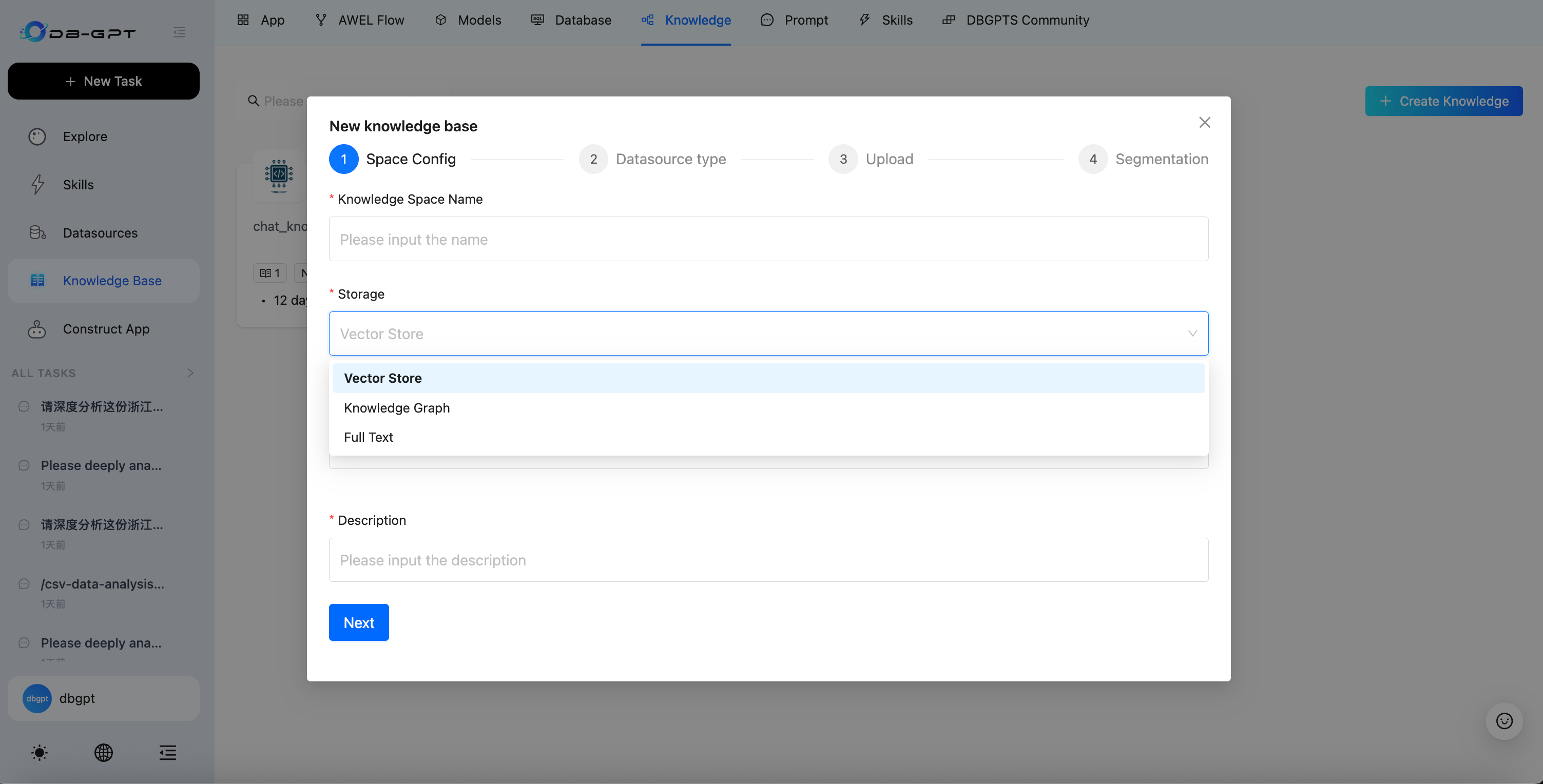
When creating a knowledge base, you can choose from three storage types:
| Storage Type | Description | Best For |
|---|---|---|
| Vector Store | Stores document embeddings for semantic similarity search | General-purpose document Q&A |
| Knowledge Graph | Stores entities and relationships as a graph structure | Domain knowledge with complex entity relationships |
| Full Text | Full-text index for keyword-based retrieval | Exact term matching and keyword search |
Vector Store Backends
| Backend | Description | Install Extra |
|---|---|---|
| ChromaDB | Default embedded vector database, zero setup | storage_chromadb |
| Milvus | Distributed vector database for production scale | storage_milvus |
| PGVector | PostgreSQL extension for vector operations | storage_pgvector |
| Weaviate | Cloud-native vector search engine | storage_weaviate |
| Elasticsearch | Full-text + vector hybrid search | storage_elasticsearch |
| OceanBase | Cloud-native distributed database | storage_oceanbase |
Knowledge Graph Backends
| Backend | Description |
|---|---|
| TuGraph | High-performance graph database by Ant Group |
| Neo4j | Popular open-source graph database |
| MemGraph | In-memory graph database for low-latency queries |
Full-Text Backends
| Backend | Description |
|---|---|
| Elasticsearch | Industry-standard full-text search engine |
| OpenSearch | AWS-managed search and analytics suite |
Retrieval Strategies
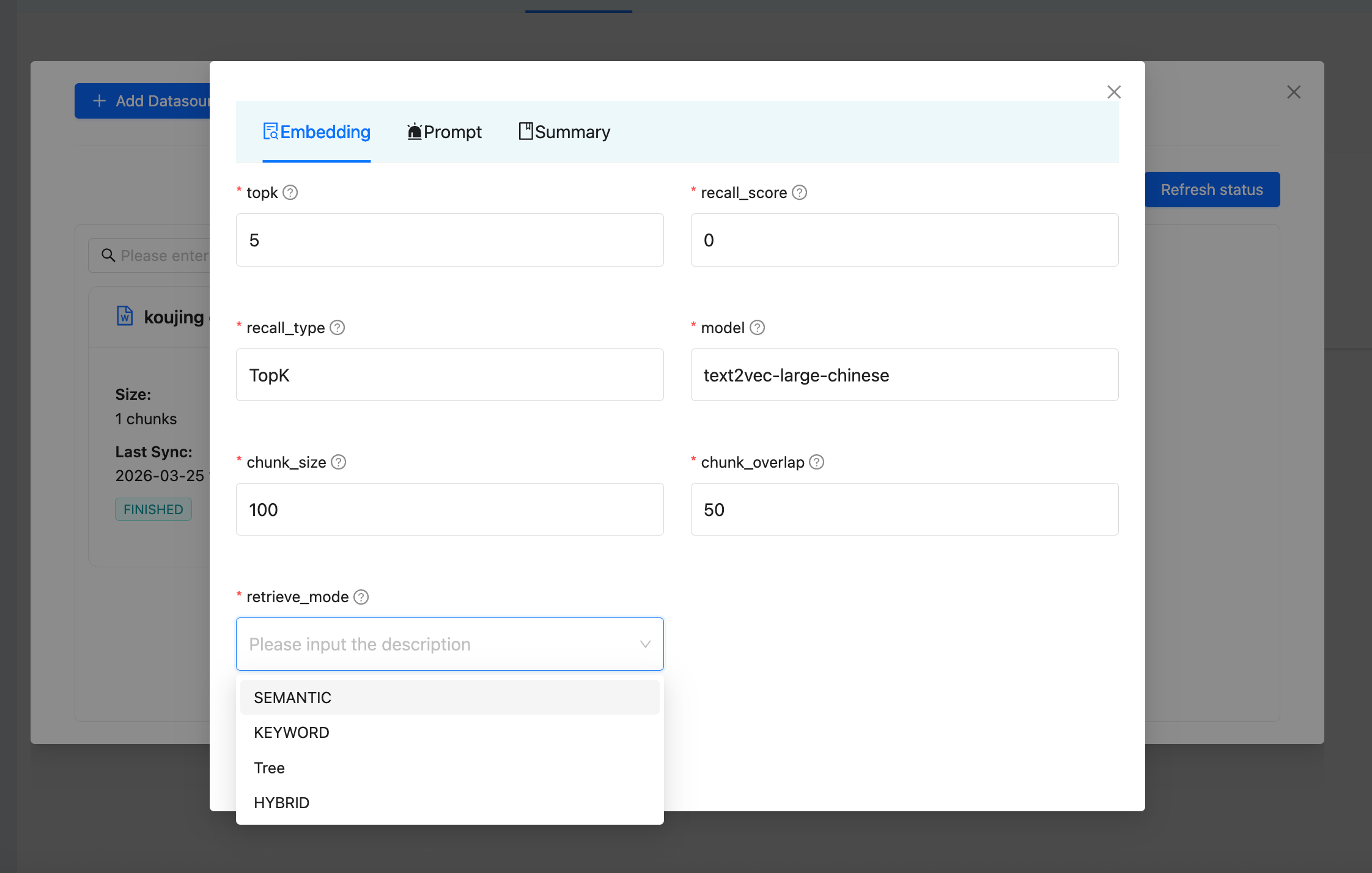
DB-GPT offers multiple retrieval modes. You can configure the retrieve mode in the knowledge base settings:
| Strategy | Description | Backend Required |
|---|---|---|
| Semantic | Vector similarity search using embeddings | Vector Store |
| Keyword | BM25-based keyword matching | Elasticsearch |
| Hybrid | Combines vector + keyword search with Reciprocal Rank Fusion (RRF) | Vector Store + Elasticsearch |
| Tree | Tree-structured retrieval for hierarchical documents | Vector Store |
Query Enhancement
Beyond basic retrieval, DB-GPT provides advanced query processing:
- Query Rewrite — Uses an LLM to expand and rephrase the original query into multiple search queries for better recall.
- Reranking — After initial retrieval, a reranker model re-scores and re-orders the results for higher precision.
Supported Rerankers
| Reranker | Type | Description |
|---|---|---|
| CrossEncoderRanker | Local | Uses sentence-transformers CrossEncoder models |
| QwenRerankEmbeddings | Local | Qwen3-Reranker via transformers |
| OpenAPIRerankEmbeddings | API | Compatible with OpenAI-style rerank APIs |
| RRFRanker | Algorithm | Reciprocal Rank Fusion for merging multi-source results |
| DefaultRanker | Algorithm | Simple score-based sorting |
Chunking Strategies
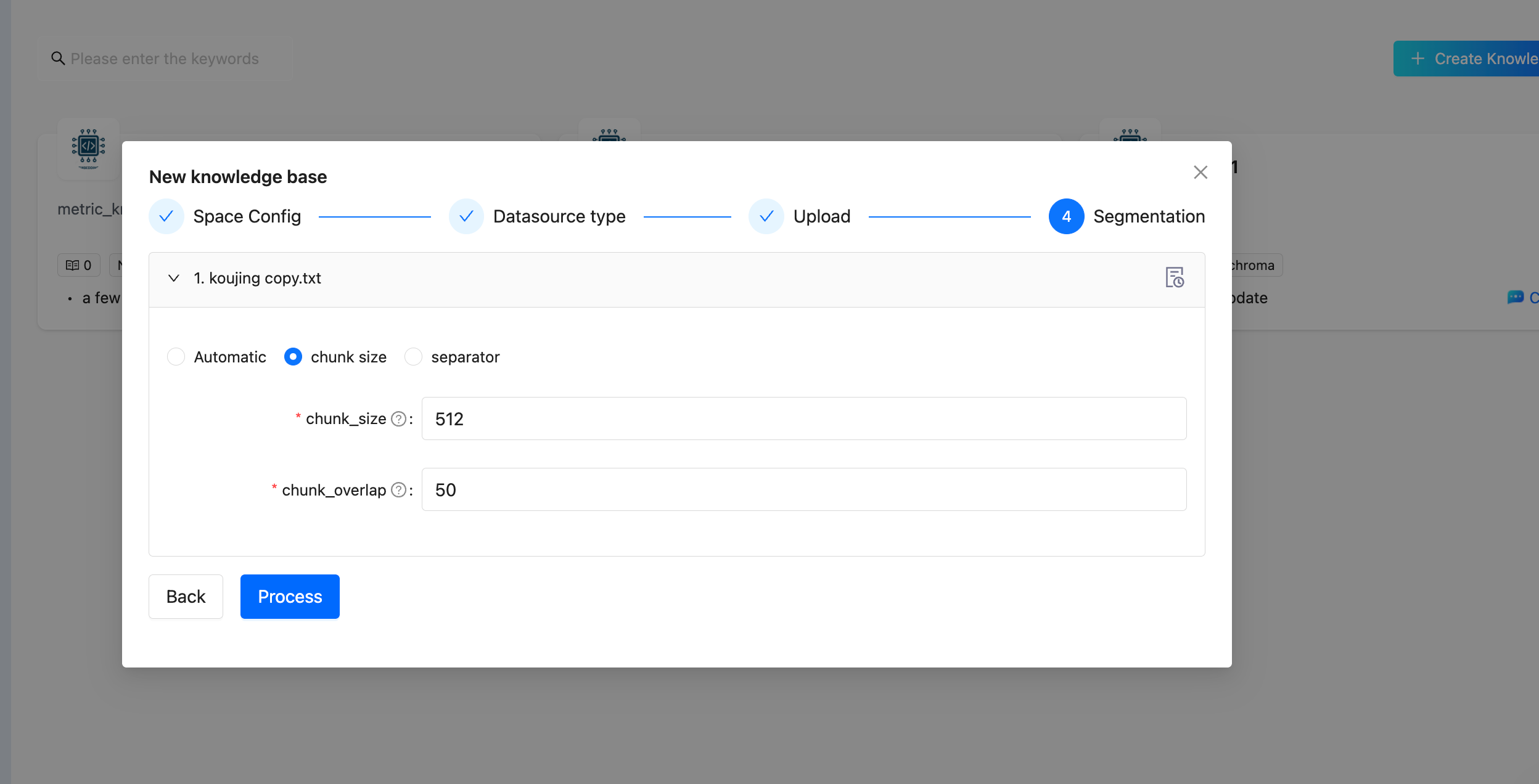
Document chunking is a critical step in RAG quality. DB-GPT supports multiple chunking strategies:
| Strategy | Splitter | Description |
|---|---|---|
| Chunk by Size | RecursiveCharacterTextSplitter | Split by character count with configurable size and overlap (default: 512 / 50) |
| Chunk by Page | PageTextSplitter | Split at page boundaries (useful for PDFs) |
| Chunk by Paragraph | ParagraphTextSplitter | Split at paragraph boundaries |
| Chunk by Separator | SeparatorTextSplitter | Split at custom separator strings |
| Chunk by Markdown Header | MarkdownHeaderTextSplitter | Split at markdown heading levels |
Chunking Parameters
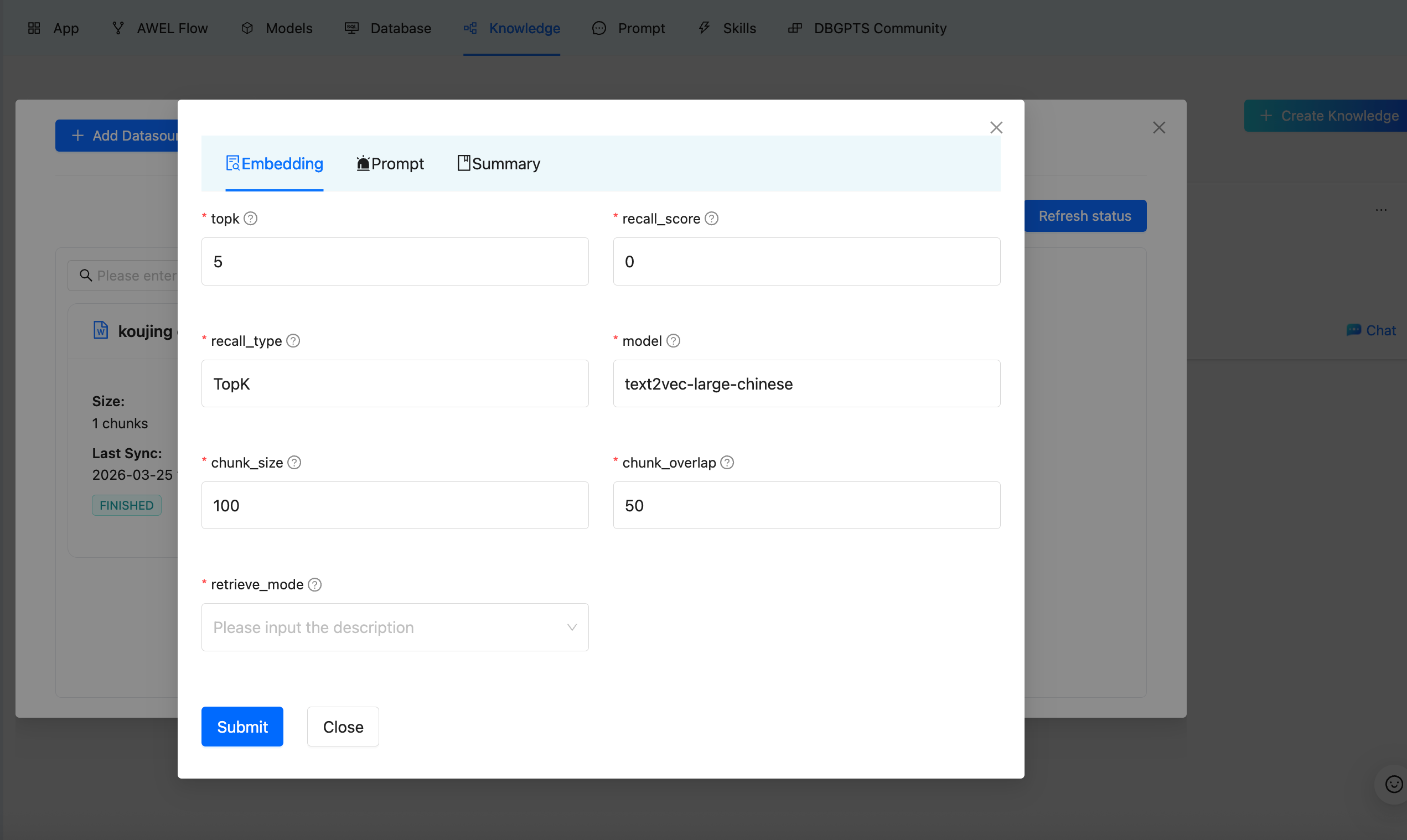
| Parameter | Description | Default |
|---|---|---|
| chunk_size | Maximum characters per chunk | 512 |
| chunk_overlap | Overlapping characters between adjacent chunks | 50 |
| topk | Number of chunks to retrieve per query | 5 |
| recall_score | Minimum relevance score threshold | 0 |
| recall_type | Recall strategy (TopK) | TopK |
| model | Embedding model to use | Depends on configuration |
Embedding Models
DB-GPT supports a wide range of embedding models for converting text into vector representations:
Local Models
| Model | Class | Description |
|---|---|---|
| HuggingFace | HuggingFaceEmbeddings | General-purpose HuggingFace models |
| BGE Series | HuggingFaceBgeEmbeddings | BAAI BGE models with instruction support (Chinese/English) |
| Instructor | HuggingFaceInstructEmbeddings | Instruction-following embedding models |
Remote API Models
| Provider | Class | Description |
|---|---|---|
| OpenAI-compatible | OpenAPIEmbeddings | Any OpenAI-compatible embedding API |
| Jina | JinaEmbeddings | Jina AI embedding service |
| Ollama | OllamaEmbeddings | Local Ollama embedding server |
| Tongyi (Aliyun) | TongyiEmbeddings | Alibaba Cloud DashScope |
| Qianfan (Baidu) | QianfanEmbeddings | Baidu Wenxin platform |
| SiliconFlow | SiliconFlowEmbeddings | SiliconFlow embedding service |
Knowledge Graph RAG
Beyond traditional vector-based RAG, DB-GPT supports Knowledge Graph RAG for structured knowledge retrieval.
How It Works
- Triplet Extraction — An LLM extracts entities and relationships from documents as (subject, predicate, object) triplets.
- Graph Storage — Triplets are stored in a graph database (TuGraph, Neo4j, or MemGraph).
- Graph Retrieval — At query time, the
GraphRetrievercombines four sub-strategies:- Keyword-based — Match graph nodes by extracted keywords
- Vector-based — Semantic similarity search on graph node embeddings
- Text-based — Convert natural language to graph query language (Text2GQL) via LLM
- Document-based — Retrieve through document-graph associations
- Community Summarization — Summarize graph communities for high-level understanding.
Usage
Creating a Knowledge Base (Web UI)
Step 1 — Open Knowledge Management
Navigate to the Knowledge section in the sidebar.
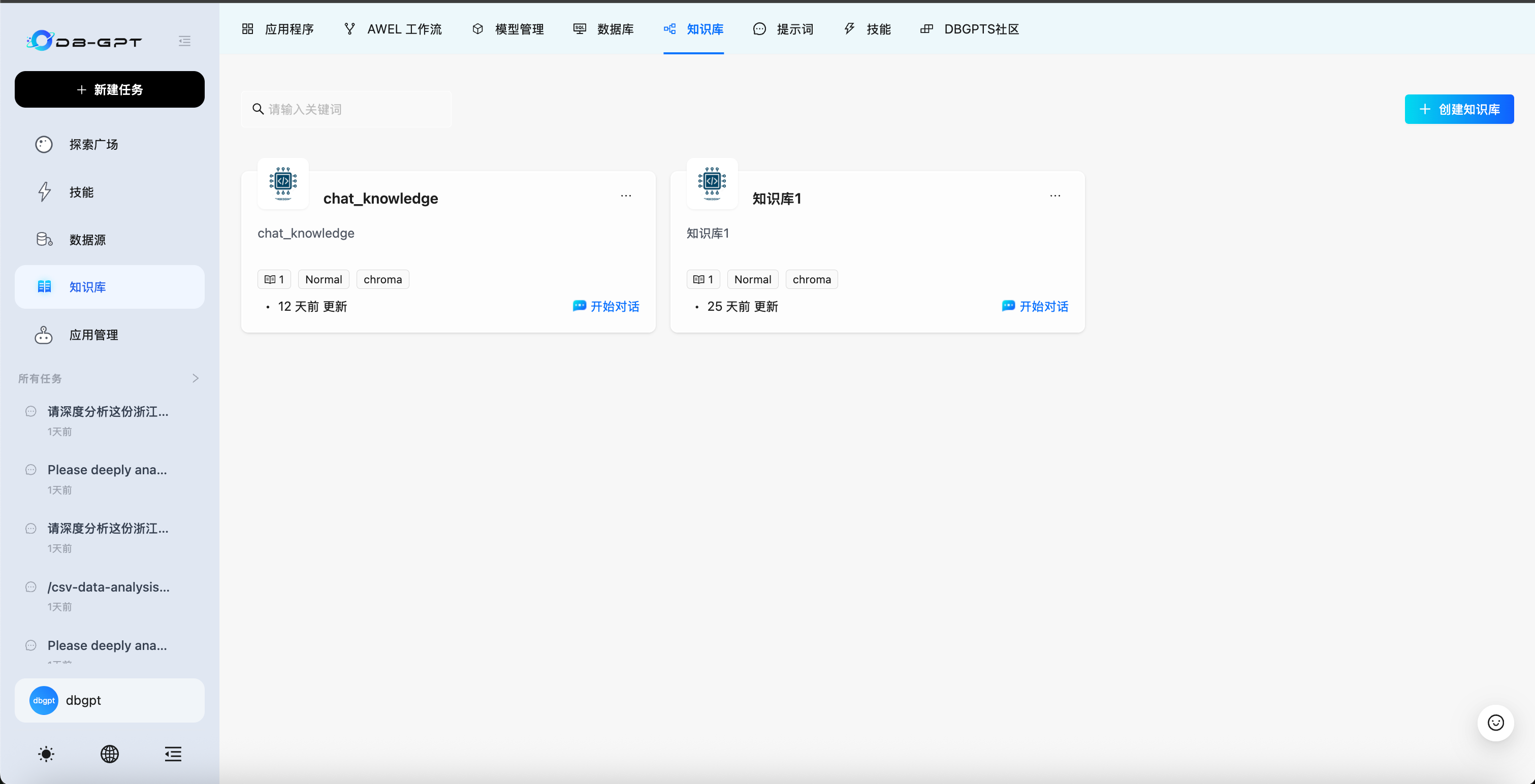
Step 2 — Create and Configure
- Click Create to start a new knowledge base.
- Select the Storage Type (Vector Store, Knowledge Graph, or Full Text).
- Choose the Embedding Model and configure chunk parameters.
Step 3 — Upload Data
Select a datasource type and upload your content. Supported types include Document (PDF, Word, Excel, CSV, etc.), URL, Text, and Yuque.
Step 4 — Configure Chunking
Choose a chunking strategy and set parameters:
Step 5 — Configure Retrieval Strategy (Optional)
You can configure the retrieval strategy for your knowledge base. DB-GPT supports multiple retrieve modes — Semantic, Keyword, Hybrid, and Tree — to suit different query scenarios. Select the mode that best fits your use case in the knowledge base settings.
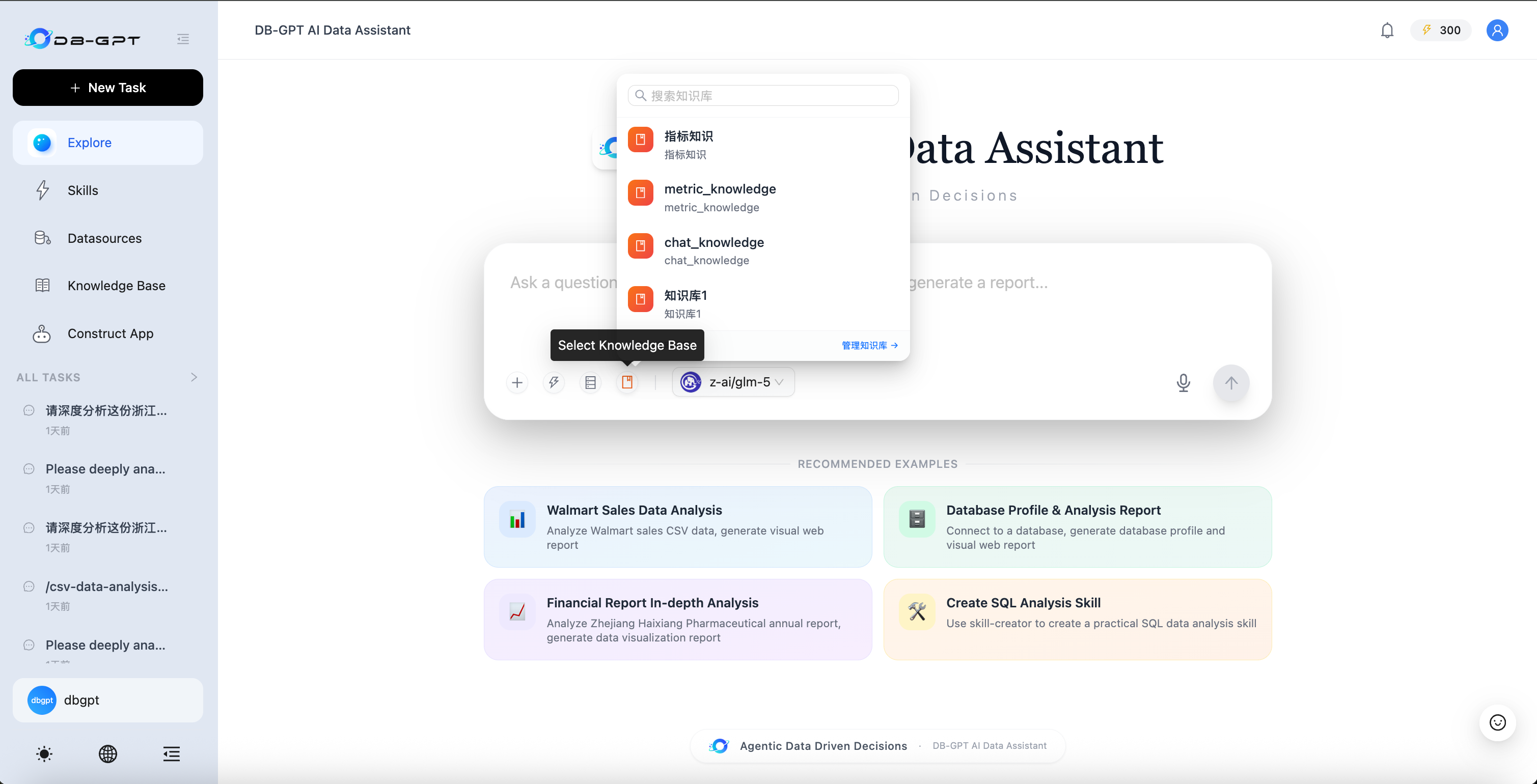
Step 6 — Chat with Your Knowledge
Go to Chat, click the knowledge base icon in the chat input toolbar, select your knowledge base from the dropdown, and start asking questions.
Programmatic Usage (Python API)
from dbgpt.rag import Chunk
from dbgpt_ext.rag.assembler import EmbeddingAssembler
from dbgpt_ext.rag.knowledge import KnowledgeFactory

# Load knowledge from a file
knowledge = KnowledgeFactory.create(file_path="your_document.pdf")

# Build the embedding index
assembler = await EmbeddingAssembler.aload_from_knowledge(
 knowledge=knowledge,
 index_store=your_vector_store,
 embedding_model=your_embedding_model,
)
assembler.persist()

# Retrieve relevant chunks
retriever = assembler.as_retriever(top_k=5)
chunks = await retriever.aretrieve("What is the main topic?")
Next Steps
| Topic | Link |
|---|---|
| Knowledge Base Web UI Guide | Knowledge Base |
| RAG Concepts | RAG |
| Graph RAG Setup | Graph RAG |
| AWEL RAG Operators | AWEL |
| Source Code | GitHub |