FormInput
Since 4.3
API Reference
Overview
FormInput is a wrapping control intended for using Webix widgets as Form controls. It inherits from Fieldset.
This control renders a section with a label to place a widget into it. It allows making all Form elements look alike thus creating a whole and attractive UI.
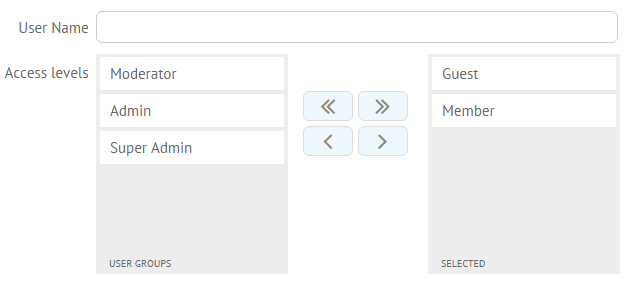
Initialization
To render a FormInput inside of the Form, use the following configuration:
// a control to be inserted into a form input var list1 = { view:"dbllist", data:[ {id:"1", value:"Guest"}, {id:"2", value:"Member"}, {id:"3", value:"Moderator"} ] }; // form input initialization webix.ui({ view:"forminput", name:"access", body:list1, labelWidth: 140, labelAlign:"right", label:"Access levels" });
Related sample: Double List as Form Input
Main Configuration Properties
- body - (object) FormInput body object that contains a control or a widget
- label - (string) text label of the wrapped widget used as a Form control
- labelAlign - (string) the alignment of a label towards its container, "left" by default
- labelWidth - (number) the width of the label, 80 by default
Creating Custom Form Inputs
You can easily place a widget of any complexity into Form with the help of FormInput. It will look and behave the same as other Form controls. For example, let's add a Grid as a Form control:
- specify the grid configuration
var grid = { view:"datatable", autoheight:true, select:true, columns:[ { id:"fname", header:"First Name", fillspace: 1}, { id:"lname", header:"Last Name", fillspace: 1}, { id:"email", header:"Email", fillspace: 1}, ], data:[ { fname:"Alex", lname:"Brown", email:"alex.brown@gmail.com" }, { fname:"Julia", lname:"Welner", email:"juliaw@gmail.com" }, { fname:"Maksim", lname:"Resvik", email:"resvik12@hotmail.com" } ] }
- initialize a Form and insert the grid config into the body of the FormInput view:
webix.ui({ view:"form", elementsConfig:{ labelWidth: 140, labelAlign:"right" }, rows:[ { view:"text", label:"User Name" }, { view:"forminput", label:"Embedded Grid", body:grid }, { view:"button", value:"Save", inputWidth: 200, align:"right" } ] });
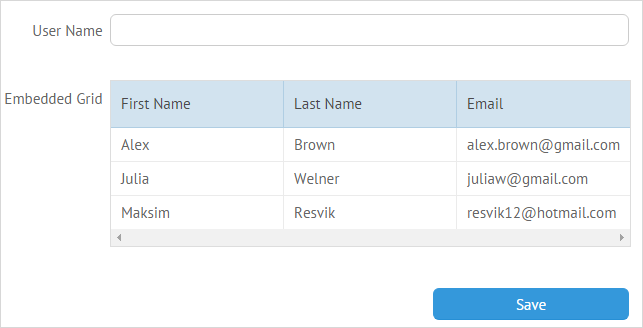
Related sample: Custom Form Inputs
Back to top