6

I am trying to publish my feature service using the Boundless GeoServer. It appears that in order to have edit capabilities (I want to be able to add new points to an existing point layer tied to my PostGIS db and edit attributes in existing points if necessary), I have to use the WFS (Web Features Service) in the dashboard. I followed the instructions and set it up with transaction level capabilities connected to my workspace.
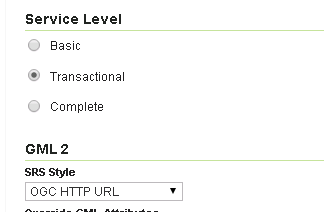
enter image description here

​However, when I go to preview the layers in GeoExplorer, I get the "transaction support not enabled" error when I use edit to create or edit. I then tried checking in Demos (as directed by this link: http://suite.opengeo.org/opengeo-docs/sysadmin/wfst/index.html) to test and see if my transaction support was enabled. It came back that for my user and password it was not enabled.

Is this somehow tied to a role or password?
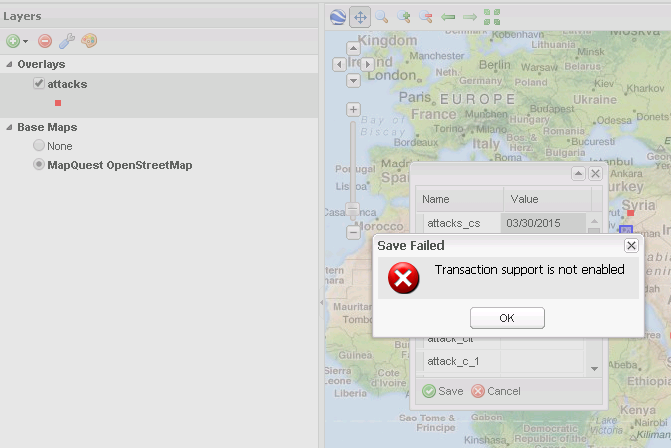
enter image description here

2
  • does this work with demo supplied? WFS_transactionInsert.xml suite.opengeo.org/opengeo-docs/sysadmin/wfst/index.html Commented Mar 31, 2015 at 20:29
  • No, I tried the demo supplied to test it, but it returns a response saying Transaction support is not enable for that user. Commented Apr 2, 2015 at 1:18

1 Answer 1

8

You'll need to enable Transactional in the global WFS settings in the Services section of the side menu. Be careful with the workspace-specific service settings because they don't usually do what people think they do. Those settings only come into effect when you use the virtual endpoints such as http://localhost:8080/geoserver/myworkspace/wfs, but they have no effect when you are using the regular http://localhost:8080/geoserver/wfs endpoint.

You should also make sure that transactional WFS is secured so that unauthenticated users can't modify your data.

3
  • When you say enable in the "Global WFS Settings," are you talking about something different than the WFS under the Services tab on the left side? I tried looking in Settings>Global but I didn't see anything about WFS or setting transaction level. Thanks. Commented Apr 2, 2015 at 1:33
  • Edited to make it a bit clearer. But yes, the Services section has global settings for each of the different services (WMS, WFS, WCS and WPS). Commented Apr 2, 2015 at 15:47
  • I was confused about what you meant when you said "global." I finally figured out that if I just didn't assign it to the specific workspace, it would work. Thanks bosth! Commented Apr 3, 2015 at 20:58

Start asking to get answers

Find the answer to your question by asking.

Ask question

Explore related questions

See similar questions with these tags.