-- mode: markdown; mode: visual-line; fill-column: 80 --



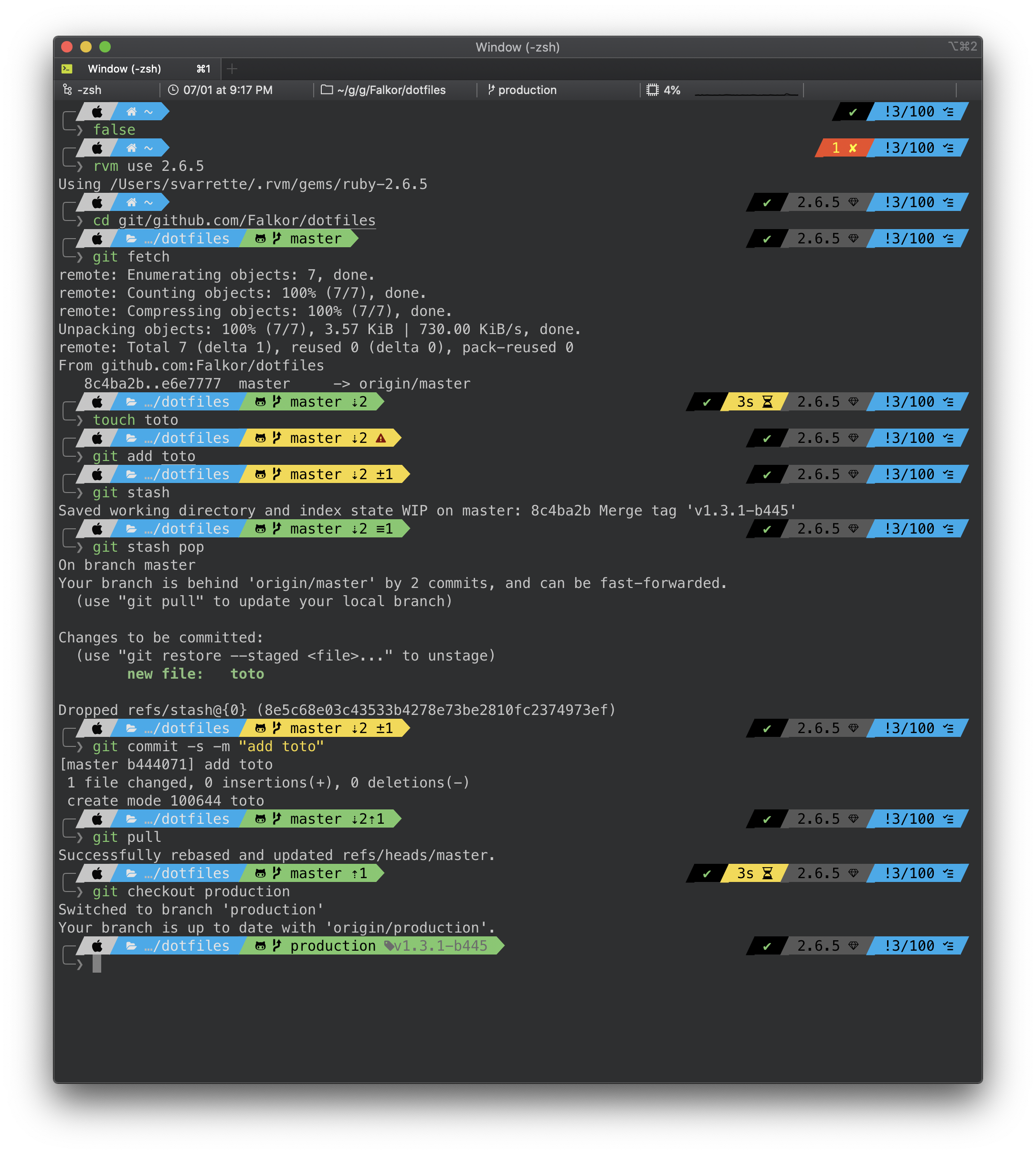
______ _ _ _ _____ _ __ _ _ | ____| | | | ( ) | __ \ | | / _(_) | | |__ __ _| | | _____ _ __/ ___ | | | | ___ | |_| |_ _| | ___ ___ | __/ _` | | |/ / _ \| '__|/ __| | | | |/ _ \| __| _| | |/ _ \ __| | | | (_| | | < (_) | | \__ \ | |__| | (_) | |_| | | | | __\__ \ |_| \__,_|_|_|\_\___/|_| |___/ |_____/ \___/ \__|_| |_|_|\___|___/ Copyright (c) 2011-2025 Sebastien Varrette aka Falkor These are my configuration files for bash, zsh, git, vim etc. so as to set up a system the way I like it. For instance, here is a screenshot of my terminal illustrating its behaviour on classical contexts commonly met on a daily usage of interactions with git repositories etc.
Warning: Use these dotfiles at your own risk!
In the sequel, when providing a command, $> denotes a prompt and is not part of the commands.
You should install the following elements to use the full functionality of these config files:
- bash
- bash-completions
- zsh
- zsh-completions
- screen
- git
- subversion
- vim
- screen
On Mac OS, assuming you have installed HomeBrew (you really should), you can use brew/Brewfile.minimal to install these dependencies as follows:
# Install brew bundle -- see https://github.com/Homebrew/homebrew-bundle $> brew tap Homebrew/bundle # Collect the Brewfile $> curl -o /tmp/Brewfile https://raw.githubusercontent.com/Falkor/dotfiles/master/brew/Brewfile.minimal # Install Falkor's dotfile dependencies $> brew bundle --file=/tmp/Brewfile -vOn Linux:
# Debian / Ubuntu $> sudo apt-get install git git-flow bash-completion screen curl subversion zsh fonts-font-awesomeUsing curl (adapt the --all option to whatever you prefer -- see below table):
$> curl -fsSL https://raw.githubusercontent.com/Falkor/dotfiles/master/install.sh | bash -s -- --allThis repository is hosted on Github. You can clone the repository wherever you want. Personally, I like to keep it in ~/git/github.com/Falkor/dotfiles, with ~/.dotfiles.falkor.d as a symlink. This behaviour will be reflected in the install.sh script i.e. if it is invoked from a directory that differs from ~/.dotfiles.falkor.d, a symlink will be created toward the place where your cloned this repository.
Otherwise, to clone this repository directly into ~/.dotfiles.falkor.d/, proceed as follows
$> git clone https://github.com/Falkor/dotfiles.git ~/.dotfiles.falkor.d /!\ IMPORTANT: Once cloned, initiate your local copy of the repository by running:
$> cd ~/.dotfiles.falkor.d $> make setup This will initiate the Git submodules of this repository and setup the git flow layout for this repository.
Now to install all my dotfiles, run:
$> make installThe above make install command actually runs (see .Makefile.after):
$> ./install.sh --all # Equivalent of 'make install'Note that by default (i.e. without option), the install.sh script does nothing except cloning the Falkor/dotfiles directory if it does not yet exists (in ~/.dotfiles.falkor.d by default).
- if you do not want to install everything but only a subpart, kindly refer to the below table to find the proper command-line argument to use. Ex:
$> ./install.sh --zsh --vim --git- if you want to install everything in a row, use as suggested above the
--alloption
Upgrading is normally as simple as:
$> make -C ~/.config/dotfiles.falkor.d update OR, if you prefer a more atomic approach:
$> cd ~/.config/dotfiles.falkor.d $> make update Note that if you wish to upgrade the Git submodules to the latest version, you should run:
$> make upgrade You can use install.sh --delete to remove Falkor's dotfiles.
/!\ IMPORTANT: pay attention to use the options matching you installation package.
- if you install all dotfiles, run:
$> ./install.sh --delete --all # OR make uninstall- if you install only a subpart of the dotfiles, adapt the command line option. Ex:
$> ./install.sh --delete --zsh --vim --git| Tools | Type | Installation | Documentation |
|---|---|---|---|
| Bourne-Again shell (bash) | shell | ./install.sh --bash | bash/README.md |
| zsh / Oh-my-zsh | shell | ./install.sh --zsh | oh-my-zsh/README.md |
| VI iMproved (vim) | editor | ./install.sh --vim | vim/README.md |
| GNU Emacs | editor | ./install.sh --emacs | emacs/README.md |
Git --fast-version-control | VCS | ./install.sh --git | git/README.md |
| GNU screen | terminal multiplexers | ./install.sh --screen | screen/README.md |
As mentioned above, if you want to install all dotfiles in one shot, just use
$> ./install.sh --all # OR 'make install' You can submit bug / issues / feature request using the Falkor/dotfiles Project Tracker
If you want to contribute to the code, you shall be aware of the way this repository is organized and developed. These elements are detailed on docs/contributing/
This project is released under the terms of the GPL-3.0 licence.

You can find of course many other resources in terms dotfiles repositories. I suggest you to take a look at the following places I inspired:
- Your unofficial guide to dotfiles on GitHub
- My friend H.Cartiaux's dotfiles
- Holman's does dotfiles, for his idea of bundling the homebrew configuration
- Mathias’s dotfiles, for featuring
~/.osxi.e. sensible hacker defaults for OS X; - Awesome dotfiles, a curated list of dotfiles resources. Inspired by the awesome list thing.
- Carlo's dotfiles