DDBMSP is a fast, fault-tolerant, queryable, actor-based distributed hash table implemented on top of the Microsoft Orleans Framework
DDBMSP is a student project implementing a Distributed Hash Table with stream aggregation built-in. Unfortunately it is not yet a fully-features, generic database. The data types are hard-coded to the project's specifications.
DDBMSP is a .Net Core application and is buildable and runnable on all .Net Core supported platform. The Silos are configured to connect to a local Consul agent by default. We provide a docker-compose.yml file, that provides a convenient way to build and bootstrap a complete running DDBMSP setup.
To clone the solution, run:
$ git clone https://github.com/HippoBaro/DDBMSP.git --recursive DDBMSP depends on a custom
Orleans.StorageProvider.Redisplugin to provide persistence over a Redis server. It is included in the repository via a submodule.
To build the solution locally, including all DDBMSP tools, run:
$ dotnet restore && dotnet build The
dotnet restorecommand will pull all dependency from the Nuget central package repository.
This repository provides a docker-compose.yml file as an easy-to-use way to build and run a complete DDBMSP stack on any Docker host. To build the DDBMSP images:
$ docker-compose build This will create the following images:
- A Redis image that provides persistence to the data,
../datais mapped as a volume by default. - A Consul image that provides node discovery utilities
- A DDBMSP Silo image. Our database engine
- A DDBMSP Frontend image. Provides a very simple web interface to go through the data, expose on port
80by default - A DDBMSP CLI image. CLI to interact with the DDBMSP cluster.,
../exportcliis mapped as a volume by default.
You can then run the cluster with:
$ docker-compose up -d The
-dargument is optional and runs the cluster in the background.
It will take a few seconds for all resources to be allocated, bootstrapped and for the cluster to get up & running. ### Run the CLI inside the docker-compose cluster
To launch an instance of a DDBMSP CLI inside a running cluster, do:
$ docker-compose run cli The CLI will launch and automatically discover the cluster's nodes via the Consul agent.
$ docker-compose scale silo=[SCALE_TARGET] TheSCALED_TARGETis the number of desired instances of the siloservice. docker-composewill create or destroy running instances accordingly.
No other user input is necessary to take down or create Silos. The data is guarantied to stay safe in the persistence layer. Data present on the destroyed node will be pulled back from storage if needed by another running node upon access
We tried to keep the dev-ops related work to a minimum when interacting with the DDBMSP cluster.
The Silos do not require any user input to function.
The silo must be launched after the consul agent. If not, the silo will be unable to register itself to the membership table and will fail.
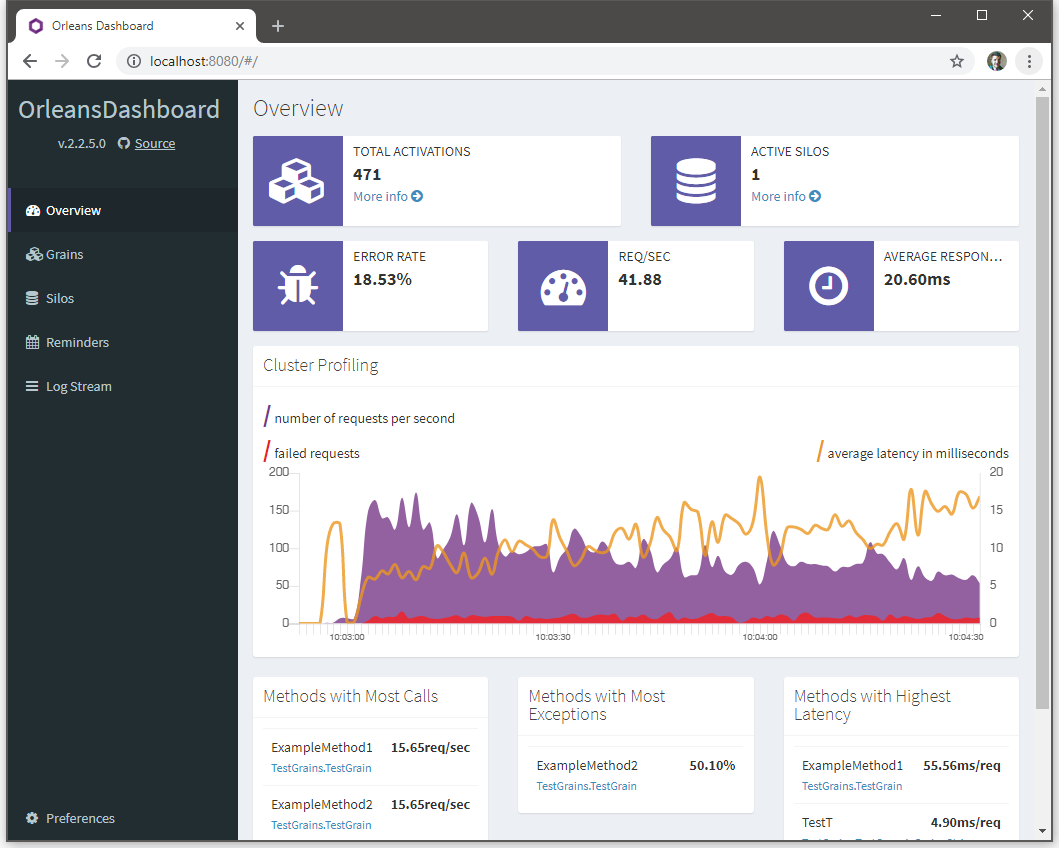
Every Silo expose a web-based dashboard on port 8080 by default.
If running through
docker-compose, note that the exposed port will be, by default, randomized by the Docker engine. To get the host-exposed port, rundocker psand check the exposed port of the silo container.
See Orleans Dashboard for more information on what is provided by the dashboard.
The frontend is a demontration of a use-case for the database. The web interface is available on port 5000 by default.

Most of the database data interaction and querying are achieved through the CLI, including batch insert and querying.
The CLI provides a data generation utility.
$ dotnet run cli generate --help or, for docker-compose
$ docker-compose run cli generate --help Output:
DDBMSP 1.0.0 Copyright (C) 2018 DDBMSP.CLI -u, --users Required. The total number of user to generate -a, --articles Required. The total number of articles to generate -c, --activities Required. The total number of activities to generate -o, --output The output file. Default: out.ddbmsp --help Display this help screen. --version Display version information. Example:
This example generates the full dataset:
$ docker-compose run cli generate -u 10000 -a 200000 -c 1000000 -o out.ddbmsp The generate utility will output a binary-encoded file.
The CLI can then be used to insert bulk data inside
$ dotnet run cli populate --help or, for docker-compose
$ docker-compose run cli populate --help Output:
DDBMSP 1.0.0 Copyright (C) 2018 DDBMSP.CLI -i, --input File to populate from. Default: out.ddbmsp --help Display this help screen. --version Display version information. Example:
This exemple generates the full dataset:
$ docker-compose run cli populate -i out.ddbmsp The populate utility will connect to the cluster and upload the content of the specified file.
Querying is achieved through the interactive mode of the CLI:
$ dotnet run cli interact or, for docker-compose
$ docker-compose run cli interact DDBMSP has a powerful querying engine built-in that leverage the embedded Roselyn compiler. As such, all queries are expressed directly in C#.
To commit a new query, use the query commit command:
DDBMSP 1.0.0 Copyright (C) 2018 DDBMSP.CLI -n, --name Required. Name of the to-be-created query -r, --ressource Required. Resource to query from -t, --type Required. Expected return type of the query (ex. bool, int, IEnumerable<ArticleState>, etc. -s, --selector Required. Linq selection predicate -a, --aggregator Required. Linq map-reduce aggregation --help Display this help screen. --version Display version information. A query is composed by the following two main elements:
- A
selectorC# expression that will be used to match items in each buckets of the distributed hash table - A
aggregatorC# expression that is used to combine/reduce the different results
Here is an example fetching the number of Activities for all articles:
query commit -n ActivitiesCount -r Activity -t int -s "Elements.Sum(e => e.Count())" -a "Selected.Sum()" To execute a named query, use the query commit command:
DDBMSP 1.0.0 Copyright (C) 2018 DDBMSP.CLI -n, --name Required. Name of the to-be-executed query -p, --pipe Name of the variable to pipe result into --help Display this help screen. --version Display version information. You can optionally pipe the result of the query into a local, CLI-scoped variable to use it in further query.
The stats CLI utility is very simple and is used to get internal metrics on how distributed the data is. It also provides the total number of resources handled by the system.
$ dotnet run cli stats or, for docker-compose
$ docker-compose run cli stats The CLI provides a read-only simple benchmark utility that resport key metric including throughput and latencies (avg, 95, 99, 99.9).
$ dotnet run cli benchmark --help or, for docker-compose
$ docker-compose run cli benchmark --help Output:
DDBMSP 1.0.0 Copyright (C) 2018 DDBMSP.CLI -t, --time Required. Time to benchmark the cluster in seconds -j, --jobs Required. Concurrent benchmarking jobs to spawn -i, --input File to benckmark with. Default: out.ddbmsp --help Display this help screen. --version Display version information. DDBMSP.CLI -- CLI executable Benchmark -- Benchmark utility Core -- Core code for the CLI Interactive -- Code for the REPL interactive CLI DDBMSP.Common -- Common library containing shared code between CLI and Silo QueryEngine -- The Query engine intergration with Roselyn compiler DDBMSP.Entities -- The data structures used in the project Article Core -- Interfaces and base classes used throughout the entities definitions Enums Query Search User UserActivity DDBMSP.Frontend.Web -- The ASP.Net-powered HTTP frontend Controllers -- MVC controllers Views -- MVC Razor views wwwroot -- static assets DDBMSP.Grains -- Actor code Aggregators -- Contains the aggregation actors Core -- Distributed hash table actor def. and IO persisted grain base classes Querier -- Grains responsable for handling queries Worker -- StatelessWorkers used throughout the system DDBMSP.Interfaces -- All interfaces used by other projects to interact with the Silo DDBMSP.Silo -- Executable that bootstrap a silo and load grain definition in memory