Enable browser-based video calling and voice communication in your web application with this WebRTC SDK integration guide. MirrorFly's customizable white-label solution delivers pre-built WebRTC functionality with straightforward client-side implementation and extensive configuration options. This readme details required libraries, dependency management, supplementary capabilities, and step-by-step setup instructions.
MirrorFly helps build omni-channel communication apps for any kind of business
- In-app Messaging - Connect users individually or as groups via instant messaging features.
- HD Video Calling - Engage users over face-to-face conversations anytime, and from anywhere.
- HQ Voice Calling - Deliver crystal clear audio calling experiences with latency as low as 3ms.
- AI Voice Agent - Build custom AI voicebots that can understand, act and respond to user questions.
- AI Chatbot - Deploy white-label AI chatbots that drive autonomous conversations across any web or mobile app.
- Live Streaming - Broadcast video content to millions of viewers around the world, within your own enterprise app.
The requirements for the Audio & Video Chat SDK for Android are:
- Android: Lollipop 5.0 (API Level 21) or higher
- Java: Version 7 or higher
- Gradle: 8.6.0 or higher
- Kotlin: 2.0.20 or higher
- targetSdkVersion / compileSdkVersion: 35 or above
Step 1: Register here to get a MirrorFly User account.
Step 2: Login to your Account
Step 3: Get the License key from the application Info’ section
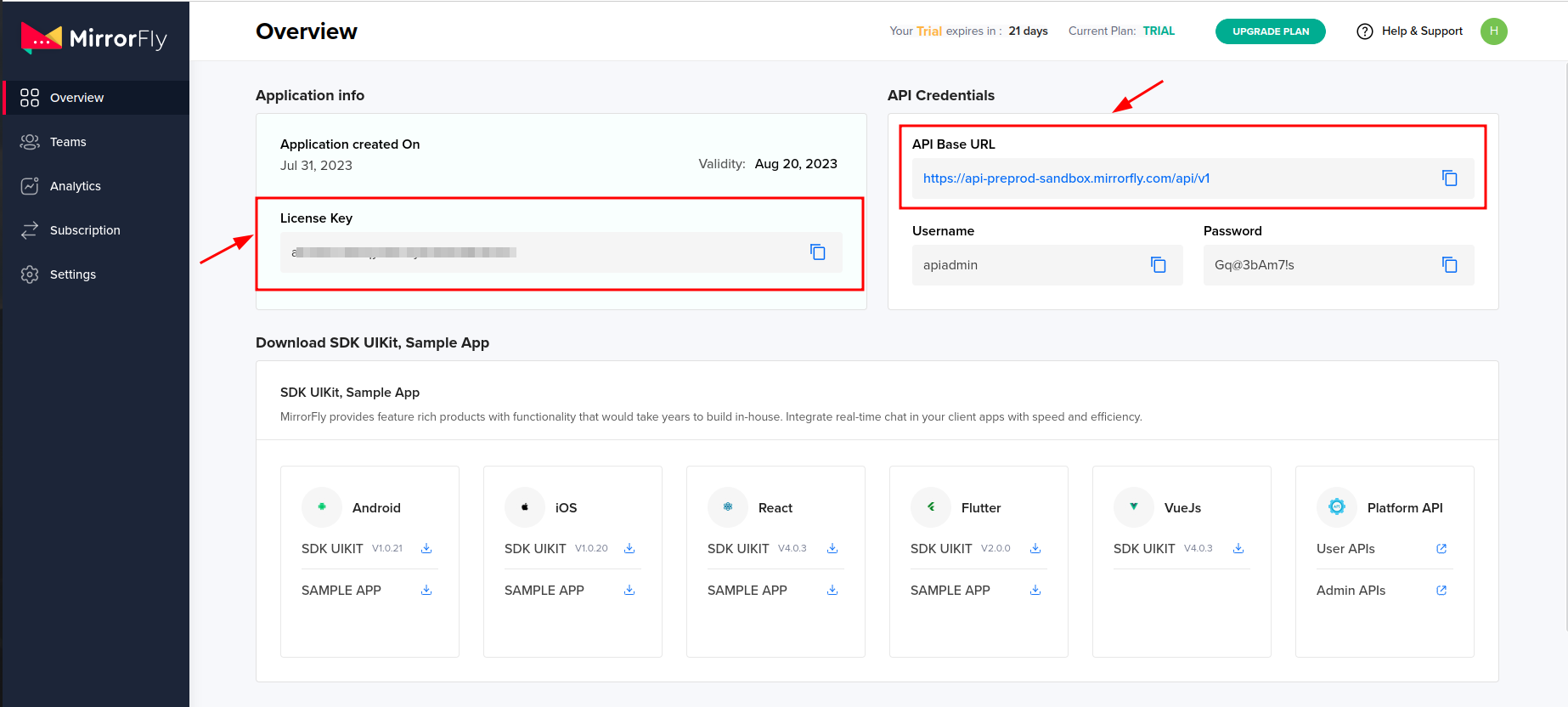
Step 1: Create a new project or open an existing project in Android Studio.
Step 2:
- For Gradle 6.8 or higher, add the following code to your settings.gradle file.
- For Gradle 6.7 or lower, add the code to your root build.gradle file.
dependencyResolutionManagement { repositories { jcenter() maven { url "https://repo.mirrorfly.com/release" } } }Step 3: Add the following dependencies in the app/build.gradle file.
dependencies { implementation 'com.mirrorfly.sdk:mirrorflysdk:7.13.31' }Step 4: Add the below line in the gradle.properties file, to avoid imported library conflicts.
android.enableJetifier=trueStep 5: Add required runtime permissions for calls click here
ChatManager.initializeSDK("LICENSE_KEY", (isSuccess, throwable, data) -> { if (isSuccess) { Log.d("TAG", "initializeSDK success "); } else { Log.d("TAG", "initializeSDK failed with reason " + data.get("message")); } });<?xml version="1.0" encoding="utf-8"?> <manifest xmlns:android="http://schemas.android.com/apk/res/android" package="com.example.uikitapplication"> <application android:name=".MyApplication" android:icon="@mipmap/ic_launcher" android:label="@string/app_name" android:roundIcon="@mipmap/ic_launcher_round" android:theme="@style/AppTheme"> <activity android:name=".MainActivity"> <intent-filter> <action android:name="android.intent.action.MAIN" /> <category android:name="android.intent.category.LAUNCHER" /> </intent-filter> </activity> </application> </manifest>FlyCore.registerUser(USER_IDENTIFIER, (isSuccess, throwable, data) -> { if (isSuccess) { Boolean isNewUser = (Boolean) data.get("is_new_user"); String userJid = (String) data.get("userJid"); JSONObject responseObject = (JSONObject) data.get("data"); String username = responseObject.getString("username"); } });After successful registration, the Chat SDK automatically attempts to connect to the chat server.
ChatManager.setConnectionListener(new ChatConnectionListener() { @Override public void onConnected() {} @Override public void onDisconnected() {} @Override public void onConnectionFailed(@NonNull FlyException e) {} @Override public void onReconnecting() {} });@Override public void onCreate() { super.onCreate(); CallManager.setCallActivityClass(CALL_UI_ACTIVITY.class); CallManager.setMissedCallListener((isOneToOneCall, userJid, groupId, callType, userList, callMetaDataArray) -> { // show missed call notification }); CallManager.setCallHelper(new CallHelper() { @NonNull @Override public String getNotificationContent(@NonNull String callDirection, CallMetaData[] callMetaDataArray) { return CallNotificationHelper.getNotificationMessage(); } }); CallManager.setCallNameHelper(new CallNameHelper() { @NonNull @Override public String getDisplayName(@NonNull String jid, CallMetaData[] callMetaDataArray) { return ContactManager.getDisplayName(jid); } }); }<activity android:name="YOUR_CALL_ACTIVITY" android:configChanges="screenSize|smallestScreenSize|screenLayout|orientation" android:excludeFromRecents="true" android:launchMode="singleTask" android:resizeableActivity="false" android:screenOrientation="portrait" android:supportsPictureInPicture="true" android:showOnLockScreen="true" android:turnScreenOn="true" android:taskAffinity="call.video" tools:targetApi="o_mr1" />CallManager.configureCallActivity(ACTIVITY); CallManager.bindCallService(); CallManager.unbindCallService();FlyUtils.getJid(USER_NAME);CallManager.makeVoiceCall("TO_JID", CALL_METADATA, (isSuccess, flyException) -> { if (isSuccess) { Log.d("MakeCall", "call success"); } });CallManager.answerCall((isSuccess, flyException) -> { if (isSuccess) { Log.d("AnswerCall", "call answered success"); } });CallManager.declineCall();CallManager.disconnectCall();- Self-hosted – Deploy your client on your own data centers, private cloud or third-party servers.
- Cloud – Host your client on MirrorFly’s multi-tenant cloud servers.
Learn more: https://www.mirrorfly.com
- Developer Documentation
- Product Tutorials
- MirrorFly Flutter Solution
- Dart Documentation
- Pub.dev Documentation
- NPM Documentation
Need a tech team to build your enterprise app? Hire a full team of experts. From concept to launch, we handle every step of the development process.
Our experts are available 24/7 to help you.
Visit our careers page: https://www.mirrorfly.com/careers