Home
-
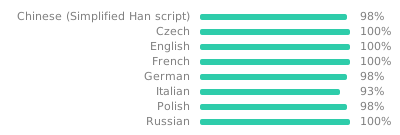
Localization:
-
Advanced label properties editor:
- Label presets.
- Import/export label presets.
- Change print direction (controls from what side image will be encoded).
- Adding label presets yourself.
- Label shapes: rectangle, rounded rectangle, circle.
- Double (cable) labels. Tail length and tail position can be configured.

- Mirroring for double (cable) labels.
-
Label designer:
-
Autosaving last used label size.
-
Adding text, basic figures, images.
-
Text autosize supported.
-
Query system fonts (supported on desktop browsers).

-
Add custom fonts

-
-
Adding icons.
- Add user SVG icons to library.
-
Adding images by drag and drop.
-
Adding QR codes (#9) with advanced options.
-
Adding Barcodes (#10).
-
Adding ArUco markers (#119)
-
Importing ZPL labels as images via Labelary API.
-
Importing PDF.
-
Keyboard shortcuts:
-
Ctrl + Vinsert image or text from clipboard (#29) -
Ctrl + D- clone object -
Ctrl + Z- undo -
Ctrl + YorCtrl + Shift + Z- redo -
→↓↑←- move selected objects -
DelorBackspace- delete selected objects -
Esc- discard selection
-
-
Zoom with mouse wheel (#59)
-
Cloning objects.
-
Deleting objects.
-
Centering objects (on double labels too).
-
Arrangement (send to front/back).
-
Undo/redo.
-
Some text controls (alignment, size, etc.).
-
Basic templating (dates currently supported):
- You can insert current datetime with
{dt}. - Dates can be formatted:
{dt | DD.MM.YYYY}. Day.js is used for date formatting. - Objects with templating support: Text, Barcode (Code 128), QR Code.
- You can insert current datetime with
-
Batch printing with CSV data.
- Use
$timesas column name to set row repeat count.
- Use
-
-
Save/load menu:
- Export/import label to localStorage or file system in JSON format.
- Export label to PNG.
- Label thumbnails.
- Show localStorage used space, warn if data is too big.
- Export label as URL. NiimBlue supports two types of data:
https://niim.blue/#load=<base64_of_gzipped_label_json>https://niim.blue/#uload=<base64_of_label_json>
-
Print preview:
- You can see how your label will look like before printing.
- Print offset (#41)
- Print with OS printer (Chrome print dialog). *
- Currently have some DPI problems so images may be blurry. Currently I don't know how to fix it.
- Remember your most used print preview dialog parameters.
- Print without preview if printer is connected (use saved parameters).
- Post-processing algorithms (Threshold, Dither) for image rasterization.
- If printer exists in models library, some parameters will be suggested (label types, print direction, etc.).
-
Experimental standalone apps:
-
Firmware flasher. Collected firmware images are hosted here.
- locally store the RFID barcode, and associate it with the most recent user-selected label size for that barcode
- Override image post-processing algorithm for each image.
- Warn on unsaved changed.
- Maybe discard selection by clicking on page background.
- Printer settings menu (debug menu rework).
- Variables menu.
- Rework canvas scaling (https://codepen.io/Fjonan/pen/QwLgEby as reference maybe).
- Query fonts from Android app.
- Implement multi-page prints natively.
- Set what pages to print in multi-page prints (CSV).
- Make app work offline (service workers).
- UI/UX improvements. If you have any proposals - feel free to create an issue or pull request.
- The rest of what I've forgotten.
- Packets not sending anymore in certain situations (after print cancel, on error).
- Inserted icon is not vertically centered.
- Added element invisible sometimes.
- Confirmation dialogs don't work when installed as a PWA.
* Implemented partially or needs some tweaks.
See niimbluelib (hardware interface) features here.
I originally wanted to just create a library to work with NIIMBOT printers via Web Bluetooth. So the name came up with [NIIM]BOT [Blue]tooth (lib). Later I decided to make a complete application and split the project into two: NiimBlue and NiimBlueLib.
Running own instance with Docker
Testing with Arch linux (Artix for example)
Discord Chat (troubleshooting, testing and other)