- 【Main Feature】AnWave UI - Manage downloaded AMD/NVIDIA drivers
- 【Main Feature】AMD Radeon Software Customize Setup
- 【Main Feature】Advanced Cleanup Utility
- 【Main Feature】NVIDIA Power Management
- 【Main Feature】Windows Key-Point
- 【Main Feature】Microsoft Defender Uninstaller
- Microsoft .NET Framework 4.5 or newer
- Microsoft Windows 10 or newer
- 64-bit operating system
This is a personal project developed using Visual Studio 2022 C#. Includes AMD Radeon Software Customize Setup, For customizing AMD Software: Adrenalin Edition installation. and NVIDIA Power Management, For used to create GPU power profiles for each application. and Microsoft Defender Uninstaller, For used to remove Microsoft Defender components. and Windows Key-Point, Best Windows 10 or 11 Settings Options Organizer. and AnWave Advanced Cleanup Utility, Cleanup AMD and NVIDIA graphics card drivers and application utilities.
https://youtu.be/AnxMkhC1bHg?si=cvi8pWJhVf9ik73R
I use WinRAR version 7.0 or above to compress files. It is recommended to use the latest version of WinRAR to open files.
Download AMD or NVIDIA drivers
Note: Please download the offline version of the driver.
【AMD】AMD Radeon™ Series graphics card driver
【NVIDIA】NVIDIA Driver download
Installing AMD Software: Adrenalin Edition or GeForce Game Ready Set the path to the AMD/NVIDIA driver. Press the [Extract] button to start decompressing. After a while, press the [Custom] button to open the AMD Radeon Software Customize Setup interface or press [Install] to start installing the driver.
-
In the [Executable File Package (*.exe)] Tab, select a version from [Driver Version] menu to start the installation.
-
In the [Extracted Packed] Tab, select a unpacked driver from tree view to start the installation.

In the AnWave window menu [Feature] > [Advanced Cleanup Utility Center], open the AnWave Advanced Cleanup Utility Center window and select an option for the cleaning process.
- Supports for AMD Ryzen™ Chipset Driver, AMD Software: Adrenalin Edition, AMD Software: PRO Edition, AMD ROCm™ Software, AMD Privacy View, AMD Chatbot, AMD Install Manager, NVIDIA GeForce Game Ready Driver, NVIDIA Studio Driver, NVIDIA Geforce Experience, NVIDIA App, NVIDIA Broadcast, NVIDIA FrameView, NVIDIA CUDA Toolkit and NVIDIA Power Management cleanup.

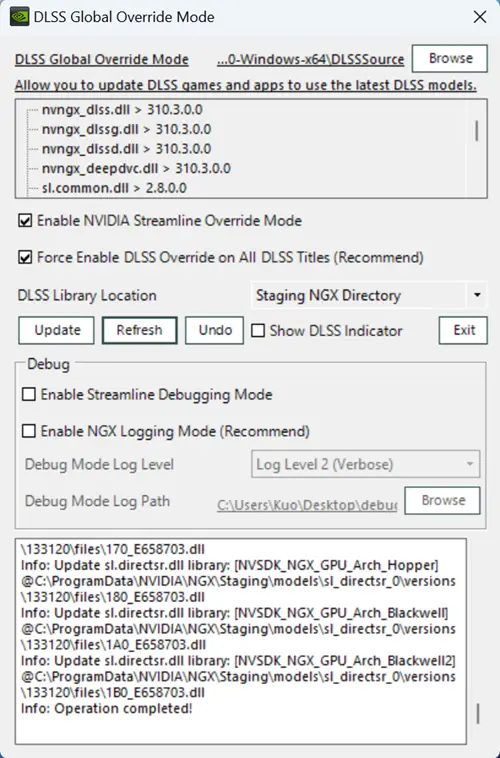
Allow you to update DLSS games and apps to use the latest DLSS models.
DLSS Global Override Mode Recommend
-
NVIDIA GeForce R566.36 or later.
-
NVIDIA DLSS version 3.1.11 or later.
-
Download AnWave or NVIDIA DLSS Global Override Mode Standalone.
-
Extract and place these DLSS *.dll files in the same location as nvidiaDlssGlom.exe.
-
Run nvidiaDlssGlom.exe and click 'Update' button.
※Restore Microsoft Dolby Digital Decoder/Encoder MFT (and WordPad) support in Windows 11, version 24H2
Microsoft has removed the AC-3 codec (Dolby Digital) and WordPad features in Windows 11 24H2 or higher builds. Now, you can use this toolkit to install AC-3 codec (Dolby Digital) and WordPad FoD and re-enable these features.
【1】Dolby AC-3 Features On Demand for Microsoft Windows (Server) operating system version 24H2.
【2】WordPad Features On Demand for Microsoft Windows (Server) operating system version 24H2.
-
Download AnWave.
-
Run AnWave.exe. Menu > System > Features on Demand Optional > Bringing back Dolby AC-3 or Bringing back WordPad.
Playing Dolby Digital audio using Microsoft.ZuneMusic (aka Microsoft Media Player) requires the installation of Microsoft Dolby Audio Extensions. Download


Some applications and hardware device drivers may be incompatible with memory integrity. This incompatibility can cause devices or software to malfunction and in rare cases may result in a boot failure (blue screen). Such issues may occur after memory integrity has been turned on or during the enablement process itself. If compatibility issues occur, see Troubleshooting for remediation steps.
Run msinfo32.exe or Disable Memory Integrity and VBS Enablement in AnWave to check Credential Guard & VBS Key Isolation and Memory Integrity status.

-
Run AnWave.exe. Menu > System > Disable Memory Integrity and VBS Enablement.
-
Click 'Start' to disable Memory Integrity and VBS Enablement or 'Re-enable VBS and Memory Integrity' to enable Memory Integrity and VBS Enablement.
May require resetting (Facial recognition, Fingerprint recognition and PIN) Windows Hello configuration.

- Run Windows PowerShell, copy all the text in the text box and paste the (Ctrl + V) PowerShell, then press Enter on your keyboard.

- Reboot to continue disable (re-enable) VBS Enablement.


Microsoft Defender Uninstaller is a utility tool for uninstalling Windows Defender. Microsoft Defender Uninstaller is included with AnWave, and a standalone version is also available for download. Microsoft Defender Uninstaller Standalone Download
See 【AnWave】Microsoft Defender Uninstaller
HOW TO: Run AnWave.exe. Menu > System > Disable Memory Integrity and VBS Enablement.


HOW-TO
[1] Download official Adrenalin 24.1.1 WHQL or latest version.
[2] Download AnWave latest version.
[3] In AMD Radeon Software Customize Setup, Advanced Tab > Additional > Enable Install Legacy DirectX 11 UMD Support and Pop-up Interface Allows Users to Configure DirectX 11 API Mode options in Experimental group box. and install.
Or in Applied Install Profile, Enable Install Legacy DirectX 11 UMD Support and Pop-up Interface Allows Users to Configure DirectX 11 API Mode options. and install.
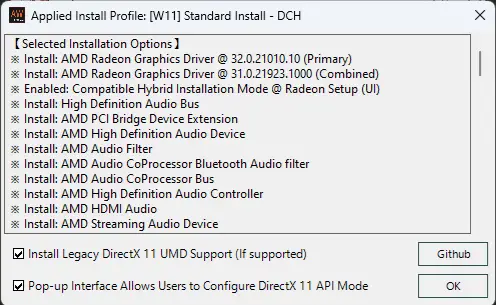
See 【HOW-TO】Install Legacy DX11 driver into Adrenalin 24.x.x and Disable DXNAVI on RDNA2 architecture
【AnWave】NVIDIA Power Management:#3
【AMD Ryzen】AMD Ryzen CPU - Precision Boost Overdrive (PBO) Google Spreadsheets:#13
===================================================
https://www.amd.com/en/support/download/drivers.html
https://www.nvidia.com/en-us/drivers/
https://www.nvidia.com/en-us/geforce/drivers/
===================================================
AnWave 2024 | AMD Radeon Software Customize Setup @ forums.guru3d.com
AnWave 2024 | NVIDIA Power Management @ forums.guru3d.com
【原創】AnWave 2024 | GPU 專用的進階清理公用程式、自訂 AMD 顯示卡驅動程式安裝、NVIDIA 電源管理工具
https://forum.gamer.com.tw/C.php?bsn=60030&snA=629234&tnum=0
【原創】AnWave Windows Key-Point - Windows 設定選項管理器 | 設定商務用 Windows Update 輕鬆設定管理工具
https://forum.gamer.com.tw/C.php?bsn=60030&snA=645785&tnum=1
【其他】AnWave Advanced Cleanup Utility 專門清理 AMD 晶片組、AMD 或 NVIDIA 圖形驅動公用程式
https://forum.gamer.com.tw/C.php?bsn=60030&snA=663817&tnum=1
