
Zero-Click SSID Command Injection Framework




For authorized security testing and research only. This tool is designed for IoT security professionals to evaluate device behavior under abnormal WiFi SSID input conditions. Use ethically, legally, and only on devices you own or have written authorization to test.
The payload library includes RCE-class strings (e.g.
|reboot|,$(cmd), netcat bind shells) that would achieve command execution if the target firmware passes SSIDs to a shell unsanitized. These are standard penetration-testing primitives, not weaponized exploit chains.CommandInWiFi does not include device-specific exploits, confirmed 0-day payloads, or operational attack tooling. Its focus is behavioral detection: crash, reboot, and anomaly analysis through black-box observation.
Detection does not equal exploitation. Confirming root cause requires separate target-side analysis (device logs, kernel debug, firmware reversing).
As the project supports custom payloads, researchers may extend it independently for their authorized testing needs.
Hunt beyond limits.
Every WiFi-enabled device runs a background daemon (wpa_supplicant, NetworkManager, or a vendor-specific service) that continuously scans for nearby networks and parses their SSID strings - without any user interaction. No tap, no connect, no prompt. The SSID is read from the 802.11 beacon frame and processed automatically.
If the target firmware has a code flaw - passing the SSID string unsanitized to a shell call, system(), popen(), or a log pipeline - the SSID content executes as a command.
// Common IoT firmware pattern - SSID reaches shell unsanitized char cmd[128]; snprintf(cmd, sizeof(cmd), "iwconfig wlan0 essid %s", ssid); system(cmd); // If ssid = "|reboot|" → executes: iwconfig wlan0 essid |reboot|// Logging without format string protection printf(ssid); // If ssid = "%s%s%s%s" → crash via invalid memory read# Python-based IoT service os.popen(f"nmcli dev wifi connect '{ssid}'") # Shell metachar injectionThis framework is designed for black-box testing - testing devices you don't have root, JTAG, or serial console access to. You can't attach a debugger to a smart doorbell or an off-the-shelf router.
What you CAN observe externally:
- Behavioral signals: device reboots, disconnects rapidly, or stops responding after exposure to a specific SSID
- Timing analysis: a device that connects and disconnects within seconds likely crashed processing the SSID
- Correlation: if SSID =
|reboot|and the device reboots - that's not a coincidence, that's confirmed command execution
Once a triggering payload is identified, target-side analysis (device logs, kernel debug, firmware reverse engineering) is done separately as a second phase to determine root cause.
Deep dive: See ATTACK_MODEL.md for full technical analysis - 30+ real-world CVEs, vulnerable code patterns across every payload category, 802.11 beacon frame internals, and academic references.
CommandInWiFi broadcasts crafted WiFi SSIDs from an ESP32/ESP8266 to test how nearby IoT devices handle malicious SSID names. Vulnerable firmware may:
- Crash or reboot when parsing a poisoned SSID
- Execute commands if SSID text reaches a shell/system call (
system(),popen()) - Leak memory via format string specifiers in SSID (
printf(ssid)) - Corrupt config files via serialization injection in stored SSIDs
- Trigger XSS when SSID is rendered in web dashboards without sanitization
- Exploit Java IoT via JNDI/Log4Shell lookups in SSID logging paths
- Inject HTTP headers via CRLF sequences in SSID reflected in responses
The tool includes a web dashboard for managing payloads, flashing firmware, monitoring serial output, real-time device tracking, automated vulnerability detection, and recording test results - all from your browser.

+-----------------------------------------------------------------------+ | COMMANDINWIFI SYSTEM | +-----------------------------------------------------------------------+ +---------------------------+ | Web Dashboard | | (Browser UI) | | | | +-----+ +------+ +----+ | | | Pay | | Seri | | Re | | | | loa | | al | | su | | | | ds | | Mon | | lt | | | +-----+ +------+ +----+ | +---------|-----|-----------+ REST API | | WebSocket (HTTP) | | (ws://serial) v v +---------------------------+ | FastAPI Backend | | (dashboard/app.py) | | | | +----------+ +--------+ | | | SQLite | | Serial | | | | Database | | Manager| | | | (CRUD) | | (I/O) | | | +----------+ +--------+ | +--------------|-------------+ | USB Serial (115200 baud) | CIW Protocol (line-based) v +---------------------------+ | ESP32 / ESP8266 | | (CommandInWiFi.ino) | | | | WiFi AP Mode | | CIW Protocol Handler | +---------------------------+ | Beacon Frames | (Malicious | SSIDs) | v +---------------------------+ | Target IoT Devices | | | | Scan WiFi -> Parse SSID | | Connect -> Process SSID | | | | Possible outcomes: | | - Crash / Reboot | | - Command Execution | | - Memory Leak | | - Config Corruption | +---------------------------+ +-------------------+ +-------------------+ +-------------------+ | PAYLOAD DEPLOY | | SSID BROADCAST | | VULN DETECTION | +-------------------+ +-------------------+ +-------------------+ Dashboard ESP Firmware Serial Manager | | | | 1. Select payloads | | | 2. Click "Deploy" | | | | | |--- POST /api/deploy ------->| | | | | | 3. CIW:CLEAR | | |--- serial write ----------->| | | | CIW:OK:CLEAR | |<--- serial read ------------| | | | | | 4. CIW:ADD:<base64> | | |--- serial write ----------->| | | (for each payload) | CIW:OK:ADD:<index> | |<--- serial read ------------| | | | | | 5. CIW:START | | |--- serial write ----------->| | | | CIW:OK:START:<count> | |<--- serial read ------------| | | | | | | 6. WiFi.softAP(ssid) | | |--- broadcast SSID --------->| | | | | | CIW:SSID:<current_ssid> | |<--- serial read ------------|--- track SSID change ------>| | | | | | 7. Target connects to AP | | | | | | CIW:STA_CONNECT:<mac>|<ssid>| |<--- serial read ------------|--- log connect time ------->| | | | | | 8. Target disconnects | | | | | | CIW:STA_DISCONNECT:<mac> | |<--- serial read ------------|--- analyze timing --------->| | | duration < 10s? | | = possible crash | | | | | CRASH alert -->| | | via WebSocket | |<--- ws://serial ------------|<----------------------------| +------------------+ | ESP Broadcasts | | Malicious SSID | +--------+---------+ | v +------------------------+ | Target device connects | | to malicious AP | +--------+---------------+ | CIW:STA_CONNECT:<mac>|<ssid> Serial Manager logs connect time | v +------------------------+ | Target disconnects | +--------+---------------+ | CIW:STA_DISCONNECT:<mac>|<ssid> | +-------+-------+ | | v v +-----------+ +--------------+ | duration | | duration | | < 10s | | >= 10s | +-----------+ +--------------+ | | v v +-----------+ +--------------+ | SSID just | | Normal | | rotated? | | disconnect | | (< 5s) | | (no alert) | +-----+-----+ +--------------+ | +-----+-----+ | NO | YES v v +-----------+ +--------------+ | CRASH | | Filtered | | DETECTED | | (false | | | | positive) | +-----------+ +--------------+ | v +-------------------+ | Cooldown check | | (30s per MAC) | +--------+----------+ | v +-------------------+ | Alert shown in | | Vuln Alerts panel | | Save to Results | +-------------------+ - 157 payloads across 14 attack categories (pre-loaded)
- Web Dashboard - manage payloads, deploy to ESP, monitor serial, record results
- One-Click Flash - compile and flash firmware to ESP32/ESP8266 from the dashboard
- Board Selection - choose target board (ESP32 or ESP8266) before flashing
- Real-Time Serial Monitor - see CIW protocol messages, deploy progress, ESP output live
- Real-Time Device Tracking - see devices connecting/disconnecting from the malicious AP
- Automated Vulnerability Detection - time-based crash detection
- Quick disconnect detection (device disconnects within 10 seconds of connecting)
- False-positive filtering (SSID rotation disconnects excluded)
- Per-device cooldown (30s) to prevent alert spam from crash-looping devices
- Auto-Save Results - detected vulnerabilities can be saved directly to the results database
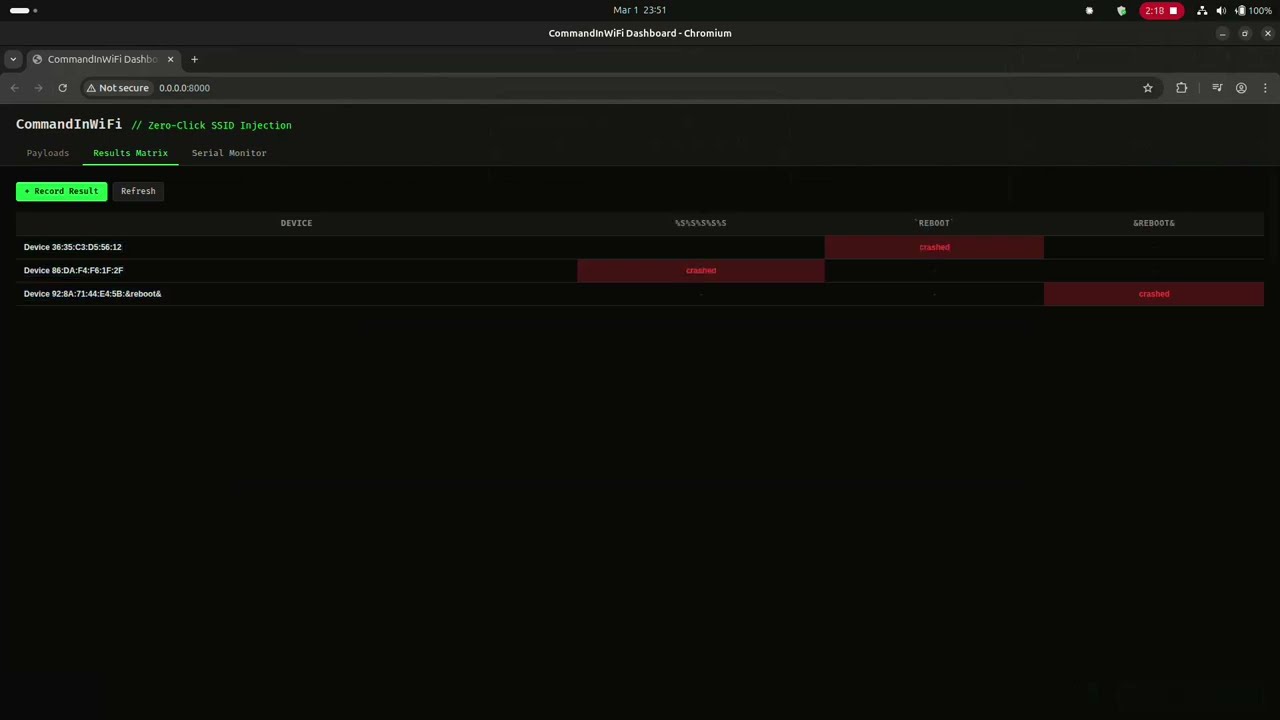
- Results Matrix - track which payloads crash/reboot which devices
- CIW Protocol - custom serial protocol for remote payload deployment
- Open AP - SSIDs broadcast without password for maximum visibility
- Cross-Platform Firmware - single codebase supports both ESP32 and ESP8266
CommandInWiFi-Zeroclick/ ├── CommandInWiFi.ino # ESP firmware (Arduino, ESP32 + ESP8266) ├── platformio.ini # PlatformIO build config (both boards) ├── src/ │ └── CommandInWiFi.ino # Symlink for PlatformIO build ├── code-python/ │ ├── micrypython-ciw.py # MicroPython firmware (alternative) │ └── install.sh # MicroPython flash helper ├── dashboard/ │ ├── __init__.py │ ├── app.py # FastAPI backend (REST + WebSocket) │ ├── database.py # SQLite schema + 157 default payloads │ ├── serial_manager.py # Serial I/O, deploy, flash, vuln detection │ ├── requirements.txt # Python dependencies │ ├── templates/ │ │ └── index.html # Dashboard HTML │ └── static/ │ ├── app.js # Dashboard frontend logic │ └── style.css # Dark theme styles ├── poc/ # Proof-of-concept screenshots ├── LICENSE # MIT License - Hardware: ESP32 or ESP8266 board (NodeMCU, DevKit, etc.) + USB cable
- Software: Python 3.10+, pip
git clone https://github.com/V33RU/CommandInWiFi-Zeroclick.git cd CommandInWiFi-Zeroclick python3 -m venv .venv source .venv/bin/activate # Linux/macOS # .venv\Scripts\activate # Windows pip install -r dashboard/requirements.txtuvicorn dashboard.app:app --host 0.0.0.0 --port 8000Open http://localhost:8000 in your browser.
- Plug in your ESP via USB
- Go to Serial Monitor tab
- Select your serial port (e.g.
/dev/ttyUSB0) - Choose board type: ESP32 or ESP8266
- Click Flash Firmware
- Watch compilation and flash progress in real-time
- Go to Payloads tab
- Select payloads (click rows or use Select All)
- Click Deploy Selected
- Dashboard switches to Serial Monitor - watch the ESP receive and broadcast
- Serial Monitor - see live ESP output (SSID changes, device events)
- Connected Devices panel - real-time list of devices on the malicious AP
- Vulnerability Alerts panel - automatic crash detection (quick disconnect < 10s)
- Results Matrix - record which payloads cause crashes/reboots on target devices
| Category | Count | Description |
|---|---|---|
wifi_cmd | 25 | Shell command injection via pipe, backtick, semicolon, subshell, PowerShell, BusyBox |
wifi_overflow | 26 | Buffer overflow / boundary fuzzing (32/64/128-byte boundaries + off-by-one). Note: WiFi.softAP() truncates at 32 bytes; >32-byte payloads require raw frame injection. |
wifi_fmt | 15 | Format string attacks (%s, %n, %x for crash/leak/write) |
wifi_probe | 14 | Malformed SSIDs (null bytes, control chars, Unicode edge cases, WiFi Direct spoof) |
wifi_esc | 8 | Terminal/log escape injection (ANSI codes in SSID) |
wifi_serial | 13 | Serialization injection (JSON/XML/SQL/template/CSV/DDE/YAML/PHP in SSID) |
wifi_enc | 8 | Encoding normalization attacks (fullwidth Unicode, URL-encode) |
wifi_chain | 8 | Multi-SSID chain attacks (split payload across sequential SSIDs) |
wifi_heap | 8 | Memory corruption primitives (heap metadata, canary patterns) |
wifi_xss | 8 | XSS / Web UI injection (SSIDs rendered unsanitized in IoT dashboards) |
wifi_path | 6 | Path traversal (SSID used in filesystem paths by firmware) |
wifi_crlf | 6 | CRLF / HTTP header injection (SSID reflected in HTTP responses) |
wifi_jndi | 6 | JNDI / Expression Language (Log4Shell, Spring EL in Java-based IoT) |
wifi_nosql | 6 | NoSQL / LDAP injection (MongoDB operators, LDAP filter injection) |
The dashboard communicates with the ESP via a line-based serial protocol:
| Command | Description |
|---|---|
CIW:CLEAR | Clear payload queue |
CIW:ADD:<base64> | Add payload (base64-encoded SSID) |
CIW:START | Start broadcasting queued payloads |
CIW:STOP | Stop broadcasting |
CIW:STATUS | Request current status |
| Response | Description |
|---|---|
CIW:BOOT | ESP has booted and is ready |
CIW:OK:CLEAR | Queue cleared successfully |
CIW:OK:ADD:<index> | Payload added at queue index |
CIW:OK:START:<count> | Broadcasting started with N payloads |
CIW:OK:STOP | Broadcasting stopped |
CIW:STATUS:<state>:<count>:<index> | Current state, payload count, SSID index |
CIW:SSID:<ssid_text> | Currently broadcasting this SSID |
CIW:STA_CONNECT:<mac>|<ssid> | Device connected to AP |
CIW:STA_DISCONNECT:<mac>|<ssid> | Device disconnected from AP |
CIW:DEVICE:<ip>|<mac> | Periodic device list entry |
CommandInWiFi detects vulnerable devices using time-based crash detection (works on both ESP32 and ESP8266):
1. Quick Disconnect Detection
When a device connects to the malicious AP and disconnects within a short threshold (< 10 seconds), this suggests the device crashed while processing the SSID after connection.
Device connects -> Processes SSID -> Crashes -> Disconnects (< 10s) ^^^ CRASH detected 2. False Positive Filtering
When the ESP rotates to a new SSID (via WiFi.softAP()), all connected stations are forcibly disconnected. These expected disconnects are filtered out by tracking SSID change timestamps and ignoring disconnects within a 5-second window.
3. Per-Device Cooldown
To prevent alert spam from devices stuck in a crash-reboot loop, a 30-second cooldown is applied per MAC address. The same device won't trigger duplicate alerts within this window.
| Method | Endpoint | Description |
|---|---|---|
GET | /api/payloads | List payloads (optional ?category= filter) |
POST | /api/payloads | Create payload |
PUT | /api/payloads/{id} | Update payload |
DELETE | /api/payloads/{id} | Delete payload |
GET | /api/results | List all results (optional ?device_name= filter) |
GET | /api/results/matrix | Get device vs payload results matrix |
POST | /api/results | Record test result |
GET | /api/serial/ports | List available serial ports |
POST | /api/serial/connect | Connect to serial port |
POST | /api/serial/disconnect | Disconnect serial |
GET | /api/serial/status | Get serial connection status |
POST | /api/deploy | Deploy selected payloads to ESP |
POST | /api/deploy/stop | Stop ESP broadcasting |
GET | /api/deploy/status | Get deploy status |
GET | /api/devices | Get connected devices and vuln events |
POST | /api/devices/save-result | Auto-save detected vulnerability to results DB |
POST | /api/firmware/flash | Compile and flash firmware (with board selection) |
WS | /ws/serial | Real-time serial monitor WebSocket |
For ESP32 boards running MicroPython instead of Arduino:
cd code-python # Edit install.sh with your port bash install.sh # Then upload the script ampy --port /dev/ttyUSB0 put micrypython-ciw.py main.pyThe MicroPython version supports the same CIW protocol and works with the dashboard.

ESP broadcasting crafted SSIDs - visible in WiFi scanner

Target device crashes/reboots when exposed to malicious SSID
| Issue | Fix |
|---|---|
| No serial ports found | Check USB connection, install CP2102/CH340 drivers |
| Flash fails | Close Arduino IDE / other serial monitors (only one app can use the port) |
| ESP shows factory SSID | Flash the CommandInWiFi firmware first via Dashboard |
pio not found error | Run pip install platformio in your venv |
| Permission denied on port | sudo chmod 666 /dev/ttyUSB0 or add user to dialout group |
| Ubuntu can't find NodeMCU | sudo apt remove brltty (conflicts with USB serial) |
| False vuln alerts | Expected during SSID rotation. System filters disconnects within 5s of SSID change |
- Attack Model - Full Technical Analysis - 30+ CVEs, vulnerable code patterns, 802.11 internals, academic papers
- WiFiDemon iOS 0-day - CVE-2021-30800 (Jamf)
- D-Link SSID Command Injection - CVE-2023-45208 (RedTeam Pentesting)
- Marvell Avastar WiFi RCE - CVE-2019-6496 (CERT/CC)
- Broadpwn - CVE-2017-9417 (Exodus Intelligence)
- Windows WiFi RCE - CVE-2024-30078 (CYFIRMA)
- MediaTek Zero-Click - CVE-2024-20017 (SonicWall)
- wpa_supplicant P2P SSID Overflow - CVE-2015-1863 (w1.fi)
- FreeBSD WiFi Heap Overflow - CVE-2022-23088 (ZDI)
- Over The Air: Exploiting Broadcom's WiFi Stack (Google Project Zero)
- SSID Confusion - CVE-2023-52424 (Mathy Vanhoef)
- DD-WRT SSID Script Injection (WithSecure)
- OS Command Injection (PortSwigger)
- Zero-Click WiFi Attacks (Kaspersky)
MIT License - see LICENSE