This is a very simple Node.js based Azure web app post deployment hook that notifies deployment status to Slack via an incoming webhook. 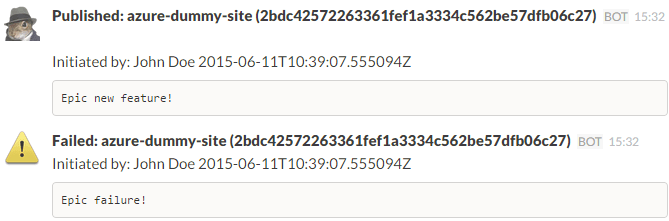
- Set up an incoming webhook integration in your Slack team.
- Configure an environment variable named
slackhookuriwith the value of the above Slack web hook uri. In Azure you do it via the application settings - Add the uri to your Azure web app Kudu portal web hooks, you reach it via
https://{your azure web app}.scm.azurewebsites.net/webhooks - Optionally you can add an channel query parameter to the hook reuse the Slack hook and override which channel post deployment notifies to i.e.
https://{your azure web post deployment app}.azurewebsites.net/?channel=%40devlead
You can deploy the web project using the button below 
- Have Node.js installed, that should be the only dependency
- From command line be in the repositories directory and type
node server.js(default uri locally ishttp://localhost:1337/) - From another command line be in the repositories directory and type
node test.js - If alls well you should see an message on Slack
{ "id": "2bdc42572263361fef1a3334c562be57dfb06c27", "status": "success", "statusText": "", "authorEmail": "test@test.com", "author": "John Doe", "message": "Epic new feature!", "progress": "", "deployer": "", "receivedTime": "2015-06-11T09:58:46.9983824Z", "startTime": "2015-06-11T10:39:02.1322211Z", "endTime": "2015-06-11T10:39:07.555094Z", "lastSuccessEndTime": "2015-06-11T10:39:07.555094Z", "complete": true, "siteName": "azure-dummy-site" }