NodePass is an elegant, efficient TCP tunneling solution that creates secure communication bridges between network endpoints. By establishing a control channel secured with TLS encryption, NodePass facilitates seamless data transfer through otherwise restricted network environments. Its server-client architecture allows for flexible deployment scenarios, enabling access to services across firewalls, NATs, and other network barriers. With its intelligent connection pooling, minimal resource footprint, and straightforward command syntax, NodePass provides developers and system administrators with a powerful yet easy-to-use tool for solving complex networking challenges without compromising on security or performance.
- Features
- Requirements
- Installation
- Usage
- Configuration
- Examples
- How It Works
- Architectural Principles
- Data Transmission Flow
- Signal Communication Mechanism
- Connection Pool Architecture
- Common Use Cases
- Troubleshooting
- Contributing
- Discussion
- License
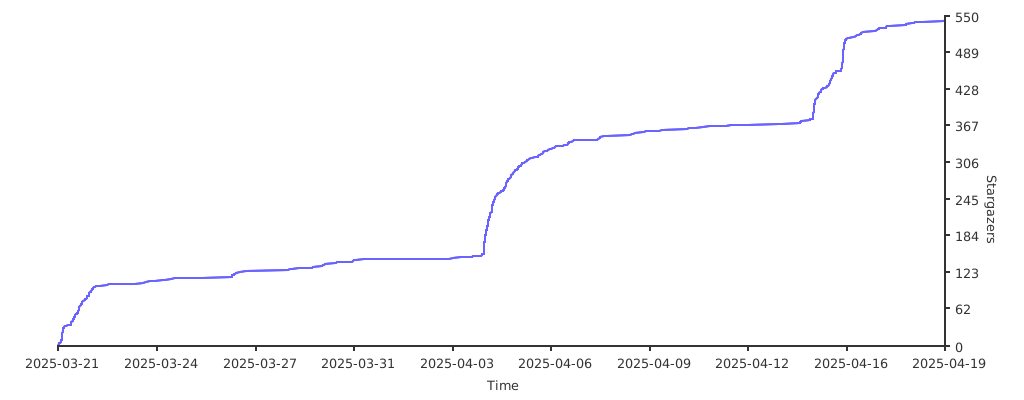
- Stargazers
- 🔄 Dual Operating Modes: Run as a server to accept connections or as a client to initiate them
- 🌐 TCP/UDP Protocol Support: Tunnels both TCP and UDP traffic for complete application compatibility
- 🔒 TLS Encrypted Communication: All tunnel traffic is secured using TLS encryption
- 🔌 Efficient Connection Pooling: Optimized connection management with configurable pool sizes
- 📊 Flexible Logging System: Configurable verbosity with five distinct logging levels
- 🛡️ Resilient Error Handling: Automatic connection recovery and graceful shutdowns
- 📦 Single-Binary Deployment: Simple to distribute and install with minimal dependencies
- ⚙️ Zero Configuration Files: Everything is specified via command-line arguments and environment variables
- 🚀 Low Resource Footprint: Minimal CPU and memory usage even under heavy load
- ♻️ Automatic Reconnection: Seamlessly recovers from network interruptions
- 🧩 Modular Architecture: Clean separation between client, server, and common components
- 🔍 Comprehensive Debugging: Detailed connection tracing and signal monitoring
- ⚡ High-Performance Data Exchange: Optimized bidirectional data transfer mechanism
- 🧠 Smart Connection Management: Intelligent handling of connection states and lifecycles
- 📈 Scalable Semaphore System: Prevents resource exhaustion during high traffic
- 🔄 URL-Based Signaling Protocol: Elegant and extensible communication between endpoints
- 🛠️ Configurable Pool Dynamics: Adjust connection pool behavior based on workload
- 🔌 One-Time Connection Pattern: Enhanced security through non-reused connections
- 📡 Dynamic Port Allocation: Automatically manages port assignments for secure communication
- Go 1.24 or higher (for building from source)
- Network connectivity between server and client endpoints
- Admin privileges may be required for binding to ports below 1024
Download the latest release for your platform from our releases page.
go install github.com/yosebyte/nodepass/cmd/nodepass@latest# Clone the repository git clone https://github.com/yosebyte/nodepass.git # Build the binary cd nodepass go build -o nodepass ./cmd/nodepass # Optional: Install to your GOPATH/bin go install ./cmd/nodepassNodePass is available as a container image on GitHub Container Registry:
# Pull the container image docker pull ghcr.io/yosebyte/nodepass:latest # Run in server mode docker run -d --name nodepass-server -p 10101:10101 -p 8080:8080 \ ghcr.io/yosebyte/nodepass server://0.0.0.0:10101/0.0.0.0:8080 # Run in client mode docker run -d --name nodepass-client \ -e MIN_POOL_CAPACITY=32 \ -e MAX_POOL_CAPACITY=512 \ -p 8080:8080 \ ghcr.io/yosebyte/nodepass client://nodepass-server:10101/127.0.0.1:8080For Linux systems, you can use our interactive management script for easy installation and service management:
bash <(curl -sL https://cdn.yobc.de/shell/nodepass.sh)This script provides an interactive menu to:
- Install or update NodePass
- Create and configure multiple nodepass services
- Manage (start/stop/restart/delete) nodepass services
- Set up systemd services automatically
- Configure client and server modes with customizable options
NodePass creates a secure tunnel with TLS encryption for control signals and efficient TCP/UDP connections for data transfer. It operates in two complementary modes:
nodepass server://<tunnel_addr>/<target_addr>?log=<level>tunnel_addr: Address for the TLS tunnel endpoint that clients will connect to (e.g., 10.1.0.1:10101)target_addr: Address where the server listens for incoming connections (TCP and UDP) that will be tunneled to clients (e.g., 10.1.0.1:8080)log: Log level (debug, info, warn, error, fatal)
In server mode, NodePass:
- Listens for TLS tunnel connections on
tunnel_addr - Listens for incoming TCP and UDP traffic on
target_addr - When a connection arrives at
target_addr, it signals the connected client through the secure tunnel - Creates a data channel for each connection and forwards traffic to the client
Example:
nodepass server://10.1.0.1:10101/10.1.0.1:8080?log=debugnodepass client://<tunnel_addr>/<target_addr>?log=<level>tunnel_addr: Address of the NodePass server's tunnel endpoint to connect to (e.g., 10.1.0.1:10101)target_addr: Local address where traffic will be forwarded to (e.g., 127.0.0.1:8080)log: Log level (debug, info, warn, error, fatal)
In client mode, NodePass:
- Connects to the server's TLS tunnel endpoint at
tunnel_addr - Listens for signals from the server through the secure tunnel
- When a signal is received, connects to the server's remote endpoint
- Establishes a local connection at
target_addrand forwards traffic
Example:
nodepass client://10.1.0.1:10101/127.0.0.1:8080?log=infoNodePass uses a minimalist approach with command-line parameters and environment variables:
debug: Verbose debugging information - shows all operations and connectionsinfo: General operational information (default) - shows startup, shutdown, and key eventswarn: Warning conditions - only shows potential issues that don't affect core functionalityerror: Error conditions - shows only problems that affect functionalityfatal: Critical conditions - shows only severe errors that cause termination
| Variable | Description | Default | Example |
|---|---|---|---|
SEMAPHORE_LIMIT | Maximum number of concurrent connections | 1024 | export SEMAPHORE_LIMIT=2048 |
MIN_POOL_CAPACITY | Minimum connection pool size | 16 | export MIN_POOL_CAPACITY=32 |
MAX_POOL_CAPACITY | Maximum connection pool size | 1024 | export MAX_POOL_CAPACITY=4096 |
UDP_DATA_BUF_SIZE | Buffer size for UDP packets | 8192 | export UDP_DATA_BUF_SIZE=16384 |
UDP_READ_TIMEOUT | Timeout for UDP read operations | 5s | export UDP_READ_TIMEOUT=10s |
REPORT_INTERVAL | Interval for health check reports | 5s | export REPORT_INTERVAL=10s |
SERVICE_COOLDOWN | Cooldown period before restart attempts | 5s | export SERVICE_COOLDOWN=3s |
SHUTDOWN_TIMEOUT | Timeout for graceful shutdown | 5s | export SHUTDOWN_TIMEOUT=10s |
# Start a server tunneling traffic to a local web server nodepass server://0.0.0.0:10101/127.0.0.1:8080?log=debug # Start a server with increased connection limit export SEMAPHORE_LIMIT=2048 nodepass server://10.1.0.1:10101/10.1.0.1:5432?log=info# Connect to a remote NodePass server and expose a service locally nodepass client://server.example.com:10101/127.0.0.1:8080 # Connect with optimized pool settings for high-throughput scenarios export MIN_POOL_CAPACITY=32 export MAX_POOL_CAPACITY=2048 nodepass client://10.1.0.1:10101/127.0.0.1:3000?log=debug# Server side (inside secured network) nodepass client://server.example.com:10101/db.internal:5432 # Client side (outside the firewall) nodepass server://:10101/127.0.0.1:5432 # Connect to database locally psql -h 127.0.0.1 -p 5432 -U dbuser -d mydatabase# Service A (providing API) nodepass server://0.0.0.0:10101/127.0.0.1:8081?log=warn # Service B (consuming API) nodepass client://service-a:10101/127.0.0.1:8082 # Service C (consuming API) nodepass client://service-a:10101/127.0.0.1:8083 # All services communicate through encrypted channel# Central management server nodepass server://0.0.0.0:10101/127.0.0.1:8888?log=info # IoT device 1 nodepass client://mgmt.example.com:10101/127.0.0.1:80 # IoT device 2 nodepass client://mgmt.example.com:10101/127.0.0.1:80 # All devices securely accessible from management interface# Production API access tunnel nodepass server://0.0.0.0:10101/api.production:443?log=warn # Development environment nodepass client://tunnel.example.com:10101/127.0.0.1:3000 # Testing environment nodepass client://tunnel.example.com:10101/127.0.0.1:3001 # Both environments can access production API securely# Create a network for the containers docker network create nodepass-net # Deploy NodePass server docker run -d --name nodepass-server \ --network nodepass-net \ -p 10101:10101 \ ghcr.io/yosebyte/nodepass server://0.0.0.0:10101/web-service:80?log=info # Deploy a web service as target docker run -d --name web-service \ --network nodepass-net \ nginx:alpine # Deploy NodePass client docker run -d --name nodepass-client \ -p 8080:8080 \ ghcr.io/yosebyte/nodepass client://nodepass-server:10101/127.0.0.1:8080?log=info # Access the web service via http://localhost:8080NodePass creates a network tunnel with a secure control channel:
-
Server Mode:
- Sets up listeners: tunnel (TLS-encrypted), remote (unencrypted), and target (for both TCP and UDP)
- Accepts incoming connections on the tunnel endpoint
- When a client connects to the target (via TCP) or sends data (via UDP), it signals the client through the secure tunnel
- The client then establishes a connection to the remote endpoint (unencrypted)
- Data is exchanged between the target and remote connections
-
Client Mode:
- Connects to the server's tunnel endpoint using TLS (encrypted control channel)
- Listens for signals from the server through this secure channel
- When a signal is received, connects to the server's remote endpoint (unencrypted data channel)
- Establishes a connection to the local target address (TCP or UDP as needed)
- Data is exchanged between the remote and local target connections
-
Protocol Support:
- TCP: Full bidirectional streaming with persistent connections
- UDP: Datagram forwarding with configurable buffer sizes and timeouts
- Both protocols use the same signaling mechanism but different handling patterns
NodePass is built on several core architectural principles that ensure its reliability, security, and performance:
The codebase maintains clear separation between:
- Command Layer: Handles user input and configuration (in
cmd/nodepass) - Service Layer: Implements the core client and server logic (in
internal) - Common Layer: Provides shared functionality between client and server components
- Uses Go's context package for proper cancellation propagation
- Enables clean shutdown of all components when termination is requested
- Prevents resource leaks during service termination
- Implements automatic reconnection with configurable cooldown periods
- Gracefully handles network interruptions without user intervention
- Uses comprehensive error logging for troubleshooting
- Employs TLS encryption for all tunnel traffic
- Generates in-memory TLS certificates when needed
- Follows principle of least privilege in network communications
- Uses connection pooling to minimize connection establishment overhead
- Implements semaphore patterns for concurrency control
- Provides configurable limits to prevent resource exhaustion
NodePass establishes a bidirectional data flow through its tunnel architecture, supporting both TCP and UDP protocols:
-
Connection Initiation:
[Target Client] → [Target Listener] → [Server: Target Connection Created]- For TCP: Client establishes persistent connection to target listener
- For UDP: Server receives datagrams on UDP socket bound to target address
-
Signal Generation:
[Server] → [Generate Unique Connection ID] → [Signal Client via TLS-Encrypted Tunnel]- For TCP: Generates a
tcp://<connection_id>signal - For UDP: Generates a
udp://<connection_id>signal when datagram is received
- For TCP: Generates a
-
Connection Preparation:
[Server] → [Create Unencrypted Remote Connection in Pool] → [Wait for Client Connection]- Both protocols use the same connection pool mechanism with unique connection IDs
-
Data Exchange:
[Target Connection] ⟷ [Exchange/Transfer] ⟷ [Remote Connection (Unencrypted)]- For TCP: Uses
conn.DataExchange()for continuous bidirectional data streaming - For UDP: Individual datagrams are forwarded with configurable buffer sizes
- For TCP: Uses
-
Signal Reception:
[Client] → [Read Signal from TLS-Encrypted Tunnel] → [Parse Connection ID]- Client differentiates between TCP and UDP signals based on URL scheme
-
Connection Establishment:
[Client] → [Retrieve Connection from Pool] → [Connect to Remote Endpoint (Unencrypted)]- Connection management is protocol-agnostic at this stage
-
Local Connection:
[Client] → [Connect to Local Target] → [Establish Local Connection]- For TCP: Establishes persistent TCP connection to local target
- For UDP: Creates UDP socket for datagram exchange with local target
-
Data Exchange:
[Remote Connection (Unencrypted)] ⟷ [Exchange/Transfer] ⟷ [Local Target Connection]- For TCP: Uses
conn.DataExchange()for continuous bidirectional data streaming - For UDP: Reads single datagram, forwards it, waits for response with timeout, then returns response
- For TCP: Uses
-
TCP Exchange:
- Persistent connections for full-duplex communication
- Continuous data streaming until connection termination
- Error handling with automatic reconnection
-
UDP Exchange:
- One-time datagram forwarding with configurable buffer sizes (
UDP_DATA_BUF_SIZE) - Read timeout control for response waiting (
UDP_READ_TIMEOUT) - Optimized for low-latency, stateless communications
- One-time datagram forwarding with configurable buffer sizes (
Both protocols benefit from the same secure signaling mechanism through the TLS tunnel, ensuring protocol-agnostic control flow with protocol-specific data handling.
NodePass uses a sophisticated URL-based signaling protocol through the TLS tunnel:
-
Remote Signal:
- Format:
remote://<port> - Purpose: Informs the client about the server's remote endpoint port
- Timing: Sent periodically during health checks
- Format:
-
TCP Launch Signal:
- Format:
tcp://<connection_id> - Purpose: Requests the client to establish a TCP connection for a specific ID
- Timing: Sent when a new TCP connection to the target service is received
- Format:
-
UDP Launch Signal:
- Format:
udp://<connection_id> - Purpose: Requests the client to handle UDP traffic for a specific ID
- Timing: Sent when UDP data is received on the target port
- Format:
-
Signal Generation:
- Server creates URL-formatted signals for specific events
- Signal is terminated with a newline character for proper parsing
-
Signal Transmission:
- Server writes signals to the TLS tunnel connection
- Uses a mutex to prevent concurrent writes to the tunnel
-
Signal Reception:
- Client uses a buffered reader to read signals from the tunnel
- Signals are trimmed and parsed into URL format
-
Signal Processing:
- Client places valid signals in a buffered channel (signalChan)
- A dedicated goroutine processes signals from the channel
- Semaphore pattern prevents signal overflow
-
Signal Execution:
- Remote signals update the client's remote address configuration
- Launch signals trigger the
clientOnce()method to establish connections
- Buffered channel with configurable capacity prevents signal loss during high load
- Semaphore implementation ensures controlled concurrency
- Error handling for malformed or unexpected signals
NodePass implements an efficient connection pooling system for managing network connections:
-
Pool Types:
- Client Pool: Pre-establishes connections to the remote endpoint
- Server Pool: Manages incoming connections from clients
-
Pool Components:
- Connection Storage: Thread-safe map of connection IDs to net.Conn objects
- ID Channel: Buffered channel for available connection IDs
- Capacity Management: Dynamic adjustment based on usage patterns
- Connection Factory: Customizable connection creation function
-
Connection Creation:
- Connections are created up to the configured capacity
- Each connection is assigned a unique ID
- IDs and connections are stored in the pool
-
Connection Acquisition:
- Client retrieves connections using connection IDs
- Server retrieves the next available connection from the pool
- Connections are validated before being returned
-
Connection Usage:
- Connection is removed from the pool when acquired
- Used for data exchange between endpoints
- No connection reuse (one-time use model)
-
Connection Termination:
- Connections are closed after use
- Resources are properly released
- Error handling ensures clean termination
-
Capacity Control:
MIN_POOL_CAPACITY: Ensures minimum available connectionsMAX_POOL_CAPACITY: Prevents excessive resource consumption- Dynamic scaling based on demand patterns
-
Pool Managers:
ClientManager(): Maintains the client connection poolServerManager(): Manages the server connection pool
-
One-Time Connection Pattern: Each connection in the pool follows a one-time use pattern:
- Created and placed in the pool
- Retrieved once for a specific data exchange
- Never returned to the pool (prevents potential data leakage)
- Properly closed after use
-
Automatic Pool Size Adjustment:
- Pool capacity dynamically adjusts based on real-time usage patterns
- If connection creation success rate is low (<20%), capacity decreases to minimize resource waste
- If connection creation success rate is high (>80%), capacity increases to accommodate higher traffic
- Gradual scaling prevents oscillation and provides stability
- Respects configured minimum and maximum capacity boundaries
- Scales down during periods of low activity to conserve resources
- Scales up proactively when traffic increases to maintain performance
- Self-tuning algorithm that adapts to varying network conditions
- Separate adjustment logic for client and server pools to optimize for different traffic patterns
-
Efficiency Considerations:
- Pre-establishment reduces connection latency
- Connection validation ensures only healthy connections are used
- Proper resource cleanup prevents connection leaks
- Interval-based pool maintenance balances resource usage with responsiveness
- Optimized connection validation with minimal overhead
-
🚪 Remote Access: Access services on private networks from external locations without VPN infrastructure. Ideal for accessing development servers, internal tools, or monitoring systems from remote work environments.
-
🧱 Firewall Bypass: Navigate through restrictive network environments by establishing tunnels that use commonly allowed ports (like 443). Perfect for corporate environments with strict outbound connection policies or public Wi-Fi networks with limited connectivity.
-
🏛️ Legacy System Integration: Connect modern applications to legacy systems securely without modifying the legacy infrastructure. Enables gradual modernization strategies by providing secure bridges between old and new application components.
-
🔒 Secure Microservice Communication: Establish encrypted channels between distributed components across different networks or data centers. Allows microservices to communicate securely even across public networks without implementing complex service mesh solutions.
-
📱 Remote Development: Connect to development resources from anywhere, enabling seamless coding, testing, and debugging against internal development environments regardless of developer location. Supports modern distributed team workflows and remote work arrangements.
-
☁️ Cloud-to-On-Premise Connectivity: Link cloud services with on-premise infrastructure without exposing internal systems directly to the internet. Creates secure bridges for hybrid cloud architectures that require protected communication channels between environments.
-
🌍 Geographic Distribution: Access region-specific services from different locations, overcoming geographic restrictions or testing region-specific functionality. Useful for global applications that need to operate consistently across different markets.
-
🧪 Testing Environments: Create secure connections to isolated testing environments without compromising their isolation. Enables QA teams to access test systems securely while maintaining the integrity of test data and configurations.
-
🔄 API Gateway Alternative: Serve as a lightweight alternative to full API gateways for specific services. Provides secure access to internal APIs without the complexity and overhead of comprehensive API management solutions.
-
🔒 Database Protection: Enable secure database access while keeping database servers completely isolated from direct internet exposure. Creates a secure middle layer that protects valuable data assets from direct network attacks.
-
🌐 Cross-Network IoT Communication: Facilitate communication between IoT devices deployed across different network segments. Overcomes NAT, firewall, and routing challenges common in IoT deployments spanning multiple locations.
-
🛠️ DevOps Pipeline Integration: Connect CI/CD pipelines securely to deployment targets in various environments. Ensures build and deployment systems can securely reach production, staging, and testing environments without compromising network security.
- Verify firewall settings allow both TCP and UDP traffic on the specified ports
- Check that the tunnel address is correctly specified in client mode
- Ensure TLS certificates are properly generated
- Increase log level to debug for more detailed connection information
- Verify network stability between client and server endpoints
- For UDP tunneling issues, check if your application requires specific UDP packet size configurations
- For high-volume UDP applications, consider increasing the UDP_DATA_BUF_SIZE
- If UDP packets seem to be lost, try adjusting the UDP_READ_TIMEOUT value
- Check for NAT traversal issues if operating across different networks
- Inspect system resource limits (file descriptors, etc.) if experiencing connection failures under load
- Verify DNS resolution if using hostnames for tunnel or target addresses
-
Adjust
MIN_POOL_CAPACITYbased on your minimum expected concurrent connections- Too low: Increased latency during traffic spikes as new connections must be established
- Too high: Wasted resources maintaining idle connections
- Recommended starting point: 25-50% of your average concurrent connections
-
Configure
MAX_POOL_CAPACITYto handle peak loads while preventing resource exhaustion- Too low: Connection failures during traffic spikes
- Too high: Potential resource exhaustion affecting system stability
- Recommended starting point: 150-200% of your peak concurrent connections
-
Set
SEMAPHORE_LIMITbased on expected peak concurrent tunneled sessions- Too low: Rejected connections during traffic spikes
- Too high: Potential memory pressure from too many concurrent goroutines
- Recommended range: 1000-5000 for most applications, higher for high-throughput scenarios
- Optimize TCP settings on both client and server:
- Adjust TCP keepalive intervals for long-lived connections
- Consider TCP buffer sizes for high-throughput applications
- Enable TCP BBR congestion control algorithm if available
- Ensure sufficient system resources on both client and server:
- Monitor CPU usage during peak loads
- Track memory consumption for connection management
- Verify sufficient network bandwidth between endpoints
- Implement connection tracking to identify bottlenecks
- Monitor connection establishment success rates
- Track data transfer rates to identify throughput issues
- Measure connection latency to optimize user experience
-
For high-throughput applications:
export MIN_POOL_CAPACITY=64 export MAX_POOL_CAPACITY=4096 export SEMAPHORE_LIMIT=8192 export REPORT_INTERVAL=2s
-
For low-latency applications:
export MIN_POOL_CAPACITY=32 export MAX_POOL_CAPACITY=1024 export SEMAPHORE_LIMIT=2048 export REPORT_INTERVAL=1s
-
For resource-constrained environments:
export MIN_POOL_CAPACITY=8 export MAX_POOL_CAPACITY=256 export SEMAPHORE_LIMIT=512 export REPORT_INTERVAL=10s
Contributions are welcome! Please feel free to submit a Pull Request.
- Fork the repository
- Create your feature branch (
git checkout -b feature/amazing-feature) - Commit your changes (
git commit -m 'Add some amazing feature') - Push to the branch (
git push origin feature/amazing-feature) - Open a Pull Request
Thank you to all the developers and users in the NodeSeek community for your feedbacks. Feel free to reach out anytime with any technical issues.
This project is licensed under the MIT License - see the LICENSE file for details.