SwiftyMarkdown converts Markdown files and strings into NSAttributedStrings using sensible defaults and a Swift-style syntax. It uses dynamic type to set the font size correctly with whatever font you'd like to use.
SwiftyMarkdown now features a more robust and reliable rules-based line processing and character tokenisation engine. It has added support for images stored in the bundle (), codeblocks, blockquotes, and unordered lists!
Line-level attributes can now have a paragraph alignment applied to them (e.g. h2.aligment = .center), and links can be optionally underlined by setting underlineLinks to true.
It also uses the system color .label as the default font color on iOS 13 and above for Dark Mode support out of the box.
Support for all of Apple's platforms has been enabled.
pod 'SwiftyMarkdown'
In Xcode, File -> Swift Packages -> Add Package Dependency and add the GitHub URL.
Read Markdown from a text string...
let md = SwiftyMarkdown(string: "# Heading\nMy *Markdown* string") md.attributedString()...or from a URL.
if let url = Bundle.main.url(forResource: "file", withExtension: "md"), md = SwiftyMarkdown(url: url ) { md.attributedString() }If you want to use a different string once SwiftyMarkdown has been initialised, you can now do so like this:
let md = SwiftyMarkdown(string: "# Heading\nMy *Markdown* string") md.attributedString(from: "A **SECOND** Markdown string. *Fancy!*")The attributed string can then be assigned to any label or text control that has support for attributed text.
let md = SwiftyMarkdown(string: "# Heading\nMy *Markdown* string") let label = UILabel() label.attributedText = md.attributedString()*italics* or _italics_ **bold** or __bold__ ~~Linethrough~~Strikethroughs. `code` # Header 1 or Header 1 ==== ## Header 2 or Header 2 --- ### Header 3 #### Header 4 ##### Header 5 ##### ###### Header 6 ###### Indented code blocks (spaces or tabs) [Links](http://voyagetravelapps.com/)  [Referenced Links][1] ![Referenced Images][2] [1]: http://voyagetravelapps.com/ [2]: <Name of asset in bundle> > Blockquotes - Bulleted - Lists - Including indented lists - Up to three levels - Neat! 1. Ordered 1. Lists 1. Including indented lists - Up to three levels Compound rules also work, for example:
It recognises **[Bold Links](http://voyagetravelapps.com/)** Or [**Bold Links**](http://voyagetravelapps.com/) Images will be inserted into the returned NSAttributedString as an NSTextAttachment (sadly, this will not work on watchOS as NSTextAttachment is not available).
Set the attributes of every paragraph and character style type using straightforward dot syntax:
md.body.fontName = "AvenirNextCondensed-Medium" md.h1.color = UIColor.redColor() md.h1.fontName = "AvenirNextCondensed-Bold" md.h1.fontSize = 16 md.h1.alignmnent = .center md.italic.color = UIColor.blueColor() md.underlineLinks = true md.bullet = "🍏"On iOS, Specified font sizes will be adjusted relative to the the user's dynamic type settings.
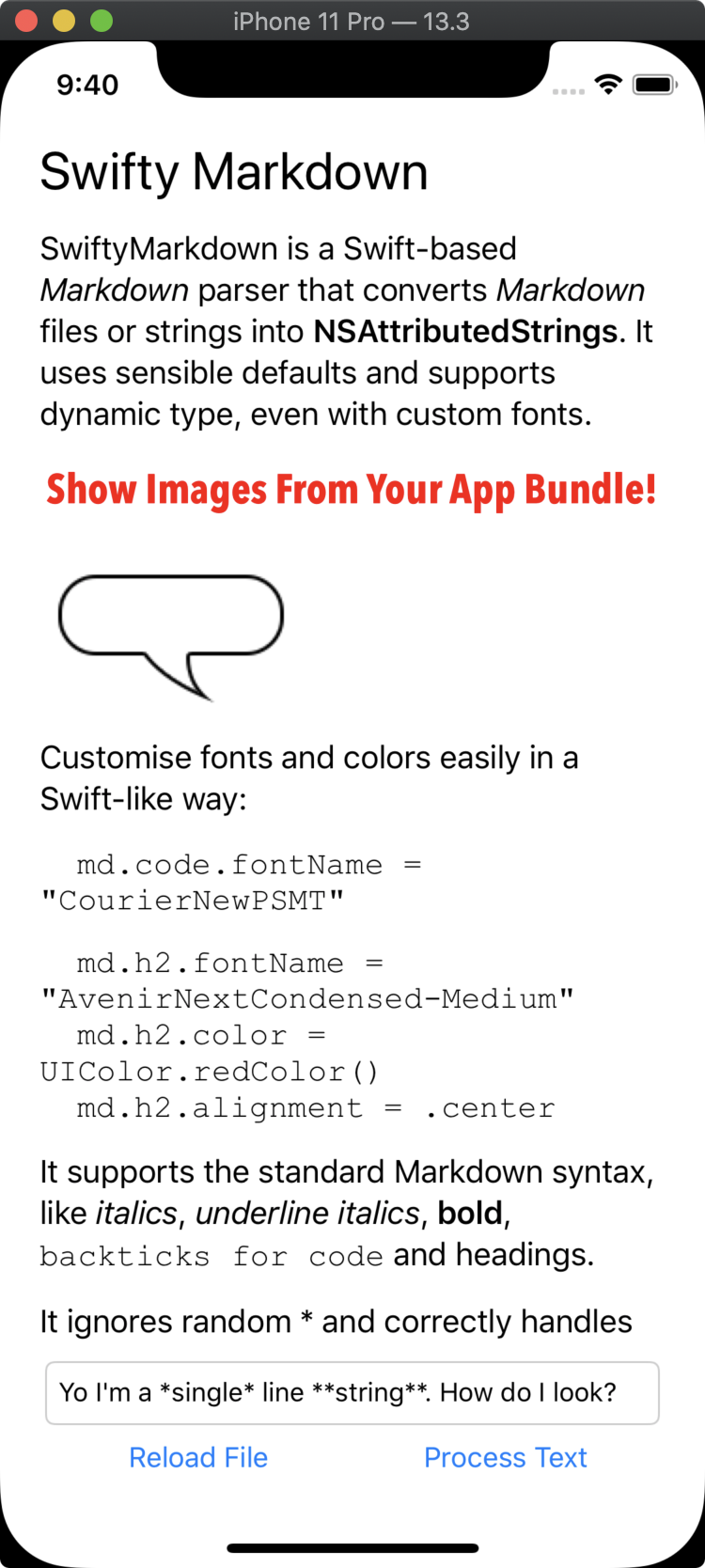
There's an example project included in the repository. Open the Example/SwiftyMarkdown.xcodeproj file to get started.
SwiftyMarkdown recognises YAML front matter and will populate the frontMatterAttributes property with the key-value pairs that it fines.
h1.fontName : String h1.fontSize : CGFloat h1.color : UI/NSColor h1.fontStyle : FontStyle h1.alignment : NSTextAlignment h2.fontName : String h2.fontSize : CGFloat h2.color : UI/NSColor h2.fontStyle : FontStyle h2.alignment : NSTextAlignment h3.fontName : String h3.fontSize : CGFloat h3.color : UI/NSColor h3.fontStyle : FontStyle h3.alignment : NSTextAlignment h4.fontName : String h4.fontSize : CGFloat h4.color : UI/NSColor h4.fontStyle : FontStyle h4.alignment : NSTextAlignment h5.fontName : String h5.fontSize : CGFloat h5.color : UI/NSColor h5.fontStyle : FontStyle h5.alignment : NSTextAlignment h6.fontName : String h6.fontSize : CGFloat h6.color : UI/NSColor h6.fontStyle : FontStyle h6.alignment : NSTextAlignment body.fontName : String body.fontSize : CGFloat body.color : UI/NSColor body.fontStyle : FontStyle body.alignment : NSTextAlignment blockquotes.fontName : String blockquotes.fontSize : CGFloat blockquotes.color : UI/NSColor blockquotes.fontStyle : FontStyle blockquotes.alignment : NSTextAlignment link.fontName : String link.fontSize : CGFloat link.color : UI/NSColor link.fontStyle : FontStyle bold.fontName : String bold.fontSize : CGFloat bold.color : UI/NSColor bold.fontStyle : FontStyle italic.fontName : String italic.fontSize : CGFloat italic.color : UI/NSColor italic.fontStyle : FontStyle code.fontName : String code.fontSize : CGFloat code.color : UI/NSColor code.fontStyle : FontStyle strikethrough.fontName : String strikethrough.fontSize : CGFloat strikethrough.color : UI/NSColor strikethrough.fontStyle : FontStyle underlineLinks : Bool bullet : StringFontStyle is an enum with these cases: normal, bold, italic, and bolditalic to give you more precise control over how lines and character styles should look. For example, perhaps you want blockquotes to default to having the italic style:
md.blockquotes.fontStyle = .italicOr, if you like a bit of chaos:
md.bold.fontStyle = .italic md.italic.fontStyle = .boldSwiftyMarkdown uses a rules-based line processing and customisation engine that is no longer limited to Markdown. Rules are processed in order, from top to bottom. Line processing happens first, then character styles are applied based on the character rules.
For example, here's how a small subset of Markdown line tags are set up within SwiftyMarkdown:
enum MarkdownLineStyle : LineStyling { case h1 case h2 case previousH1 case codeblock case body var shouldTokeniseLine: Bool { switch self { case .codeblock: return false default: return true } } func styleIfFoundStyleAffectsPreviousLine() -> LineStyling? { switch self { case .previousH1: return MarkdownLineStyle.h1 default : return nil } } } static public var lineRules = [ LineRule(token: " ",type : MarkdownLineStyle.codeblock, removeFrom: .leading), LineRule(token: "=",type : MarkdownLineStyle.previousH1, removeFrom: .entireLine, changeAppliesTo: .previous), LineRule(token: "## ",type : MarkdownLineStyle.h2, removeFrom: .both), LineRule(token: "# ",type : MarkdownLineStyle.h1, removeFrom: .both) ] let lineProcessor = SwiftyLineProcessor(rules: SwiftyMarkdown.lineRules, default: MarkdownLineStyle.body)Similarly, the character styles all follow rules:
enum CharacterStyle : CharacterStyling { case link, bold, italic, code } static public var characterRules = [ CharacterRule(primaryTag: CharacterRuleTag(tag: "[", type: .open), otherTags: [ CharacterRuleTag(tag: "]", type: .close), CharacterRuleTag(tag: "[", type: .metadataOpen), CharacterRuleTag(tag: "]", type: .metadataClose) ], styles: [1 : CharacterStyle.link], metadataLookup: true, definesBoundary: true), CharacterRule(primaryTag: CharacterRuleTag(tag: "`", type: .repeating), otherTags: [], styles: [1 : CharacterStyle.code], shouldCancelRemainingTags: true, balancedTags: true), CharacterRule(primaryTag: CharacterRuleTag(tag: "*", type: .repeating), otherTags: [], styles: [1 : CharacterStyle.italic, 2 : CharacterStyle.bold], minTags:1 , maxTags:2), CharacterRule(primaryTag: CharacterRuleTag(tag: "_", type: .repeating), otherTags: [], styles: [1 : CharacterStyle.italic, 2 : CharacterStyle.bold], minTags:1 , maxTags:2) ]These Character Rules are defined by SwiftyMarkdown:
public struct CharacterRule : CustomStringConvertible { public let primaryTag : CharacterRuleTag public let tags : [CharacterRuleTag] public let escapeCharacters : [Character] public let styles : [Int : CharacterStyling] public let minTags : Int public let maxTags : Int public var metadataLookup : Bool = false public var definesBoundary = false public var shouldCancelRemainingRules = false public var balancedTags = false } primaryTag: Each rule must have at least one tag and it can be one ofrepeating,open,close,metadataOpen, ormetadataClose.repeatingtags are tags that have identical open and close characters (and often have more than 1 style depending on how many are in a group). For example, the*tag used in Markdown.tags: An array of other tags that the rule can look for. This is where you would put theclosetag for a custom rule, for example.escapeCharacters: The characters that appear prior to any of the tag characters that tell the scanner to ignore the tag.styles: The styles that should be applied to every character between the opening and closing tags.minTags: The minimum number of repeating characters to be considered a successful match. For example, setting theprimaryTagto*and theminTagto 2 would mean that**foo**would be a successful match wheras*bar*would not.maxTags: The maximum number of repeating characters to be considered a successful match.metadataLookup: Used for Markdown reference links. Tells the scanner to try to look up the metadata from this dictionary, rather than from the inline result.definesBoundary: In order for open and close tags to be successful, theboundaryCountfor a given location in the string needs to be the same. Setting this property totruemeans that this rule will increase theboundaryCountfor every character between its opening and closing tags. For example, the[rule defines a boundary. After it is applied, the string*foo[bar*]becomes*foobar*with a boundaryCount00001111. Applying the*rule results in the output*foobar*because the opening*tag and the closing*tag now have differentboundaryCountvalues. It's basically a way to fix the**[should not be bold**](url)problem in Markdown.shouldCancelRemainingTags: A successful match will mark every character between the opening and closing tags as complete, thereby preventing any further rules from being applied to those characters.balancedTags: This flag requires that the opening and closing tags be of exactly equal length. E.g. If this is set to true,**foo*would result in**foo*. If it was false, the output would be*foo.
If you want to only support a small subset of Markdown, it's now easy to do.
This example would only process strings with * and _ characters, ignoring links, images, code, and all line-level attributes (headings, blockquotes, etc.)
SwiftyMarkdown.lineRules = [] SwiftyMarkdown.characterRules = [ CharacterRule(primaryTag: CharacterRuleTag(tag: "*", type: .repeating), otherTags: [], styles: [1 : CharacterStyle.italic, 2 : CharacterStyle.bold], minTags:1 , maxTags:2), CharacterRule(primaryTag: CharacterRuleTag(tag: "_", type: .repeating), otherTags: [], styles: [1 : CharacterStyle.italic, 2 : CharacterStyle.bold], minTags:1 , maxTags:2) ]If you wanted to create a rule that applied a style of Elf to a range of characters between "The elf will speak now: %Here is my elf speaking%", you could set things up like this:
enum Characters : CharacterStyling { case elf func isEqualTo( _ other : CharacterStyling) -> Bool { if let other = other as? Characters else { return false } return other == self } } let characterRules = [ CharacterRule(primaryTag: CharacterRuleTag(tag: "%", type: .repeating), otherTags: [], styles: [1 : CharacterStyle.elf]) ] let processor = SwiftyTokeniser( with : characterRules ) let string = "The elf will speak now: %Here is my elf speaking%" let tokens = processor.process(string)The output is an array of tokens would be equivalent to:
[ Token(type: .string, inputString: "The elf will speak now: ", characterStyles: []), Token(type: .repeatingTag, inputString: "%", characterStyles: []), Token(type: .string, inputString: "Here is my elf speaking", characterStyles: [.elf]), Token(type: .repeatingTag, inputString: "%", characterStyles: []) ]Did you know that SKLabelNode supports attributed text? I didn't.
let smd = SwiftyMarkdown(string: "My Character's **Dialogue**") let label = SKLabelNode() label.preferredMaxLayoutWidth = 500 label.numberOfLines = 0 label.attributedText = smd.attributedString()