
This is a Ultra RadioGroup for Android.That mean you can do something awesome The AOSP RadioGroup can't. For example, you can check layout in XRadioGroup.
- Add a layout(like LinearLayout ect.) to a RadioGroup.
- Set some item state "fixed". The "fixed" items will stay their state until be clicked.
- Something other you want, you can open issue let me know.
Yes.
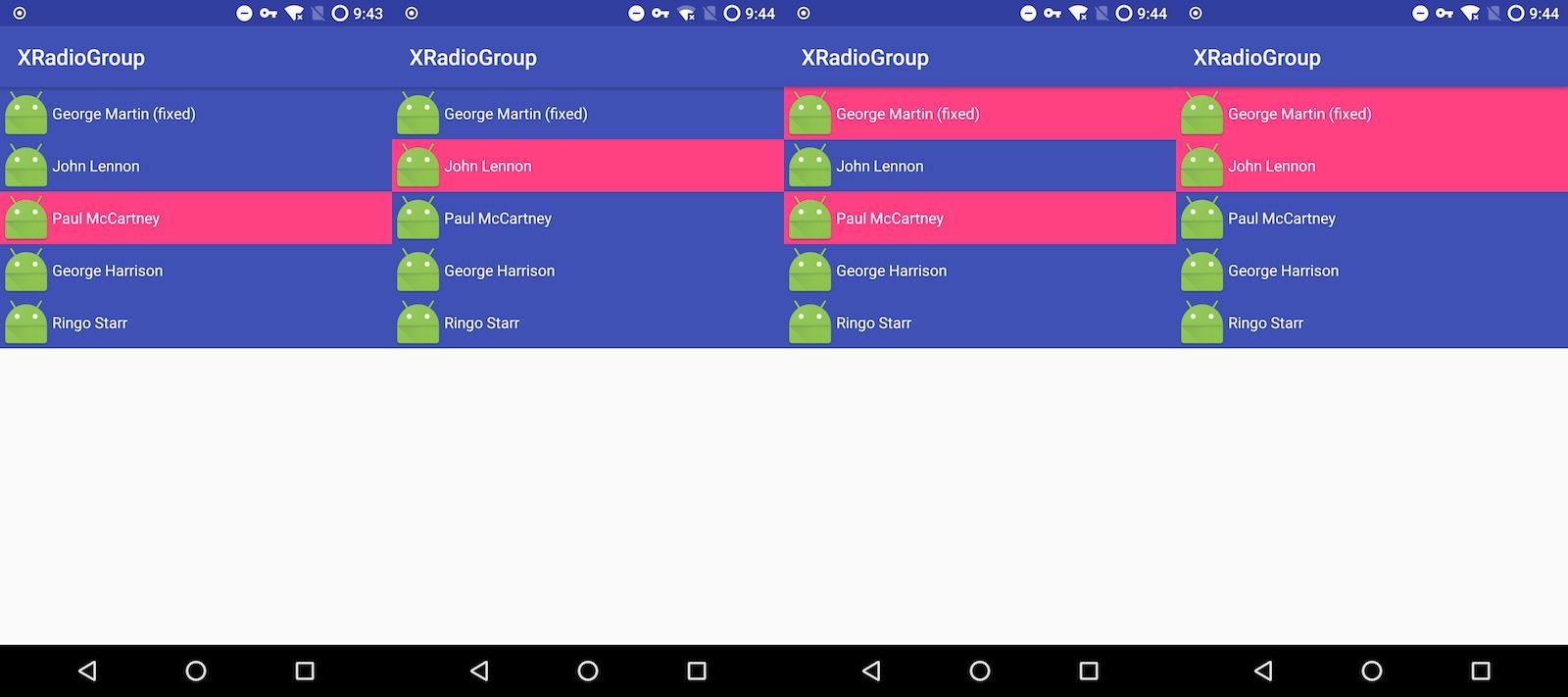
- add dependencies in your gradle
in your project build.gradle
allprojects { repositories { jcenter() // this is xradiogroup remote repo maven { url 'https://dl.bintray.com/jiakaiyang/android' } } }in your app build.gradle
dependencies { // add xradiogroup to your app compile 'com.jiakaiyang:xradiogroup-android:v0.9' }- XLinearRadioGroup and XLinearRadioItem is the LinearLayout implement for XRadioGroup and XRadioItem. You can use it in your project.
<?xml version="1.0" encoding="utf-8"?> <FrameLayout xmlns:android="http://schemas.android.com/apk/res/android" xmlns:tools="http://schemas.android.com/tools" xmlns:xradio="http://schemas.android.com/apk/res-auto" android:layout_width="match_parent" android:layout_height="match_parent" tools:context="com.jiakaiyang.xradiogroup.MainActivity"> <!-- You can use it like this in your layout xml. And check the app module for the detail --> <com.jiakaiyang.xradiogroup.lib.groups.XLinearRadioGroup android:layout_width="match_parent" android:layout_height="match_parent" android:orientation="vertical"> <com.jiakaiyang.xradiogroup.lib.items.XLinearRadioItem android:layout_width="match_parent" android:layout_height="wrap_content" android:background="@drawable/bg_item" android:clickable="true" android:orientation="horizontal" xradio:checked="true"> <ImageView android:layout_width="wrap_content" android:layout_height="wrap_content" android:src="@mipmap/ic_launcher" /> <TextView android:layout_width="wrap_content" android:layout_height="wrap_content" android:layout_gravity="center_vertical" android:text="John Lennon" android:textColor="@android:color/white" /> </com.jiakaiyang.xradiogroup.lib.items.XLinearRadioItem> <com.jiakaiyang.xradiogroup.lib.items.XLinearRadioItem android:layout_width="match_parent" android:layout_height="wrap_content" android:background="@drawable/bg_item" android:clickable="true" android:orientation="horizontal"> <ImageView android:layout_width="wrap_content" android:layout_height="wrap_content" android:src="@mipmap/ic_launcher" /> <TextView android:layout_width="wrap_content" android:layout_height="wrap_content" android:layout_gravity="center_vertical" android:text="Paul McCartney" android:textColor="@android:color/white" /> </com.jiakaiyang.xradiogroup.lib.items.XLinearRadioItem> <com.jiakaiyang.xradiogroup.lib.items.XLinearRadioItem android:layout_width="match_parent" android:layout_height="wrap_content" android:background="@drawable/bg_item" android:clickable="true" android:orientation="horizontal"> <ImageView android:layout_width="wrap_content" android:layout_height="wrap_content" android:src="@mipmap/ic_launcher" /> <TextView android:layout_width="wrap_content" android:layout_height="wrap_content" android:layout_gravity="center_vertical" android:text="George Harrison" android:textColor="@android:color/white" /> </com.jiakaiyang.xradiogroup.lib.items.XLinearRadioItem> <com.jiakaiyang.xradiogroup.lib.items.XLinearRadioItem android:layout_width="match_parent" android:layout_height="wrap_content" android:background="@drawable/bg_item" android:clickable="true" android:orientation="horizontal"> <ImageView android:layout_width="wrap_content" android:layout_height="wrap_content" android:src="@mipmap/ic_launcher" /> <TextView android:layout_width="wrap_content" android:layout_height="wrap_content" android:layout_gravity="center_vertical" android:text="Ringo Starr" android:textColor="@android:color/white" /> </com.jiakaiyang.xradiogroup.lib.items.XLinearRadioItem> </com.jiakaiyang.xradiogroup.lib.groups.XLinearRadioGroup> </FrameLayout> - Or you can implement your own XRadioGroup and XRadioItem.
class YourXRadioGroup implements XRadioGroup { // this class has some base function for XRadioGroup // you can use it help you to build your own XRadioGroup private XRadioGroupImpl xRadioGroup; // TODO: implement the method } class YourXRadioItem implements XRadioItem { // this class has some base function for XRadioGroup // you can use it help you to build your own XRadioGroup private XRadioItemImpl xRadioItem; // TODO: implement the method }- Add FrameLayout and other layout implements for XRadioGroup.
- Add child view of item stated drawable, the state of the child view will be same to the Item.
- Add Checkable implements for some View.
v0.9
- Add base function for XRadioGroup.
- Add LinearLayout implement for XRadioGroup and XRadioItem.