
Middleware that aims to connect to a Paradox Alarm panel, exposing the interface for monitoring and control via several technologies. With this interface it is possible to integrate Paradox panels with HomeAssistant, OpenHAB, Homebridge or other domotics system that supports MQTT, as well as several IM methods.
It supports MG/SP/EVO panels connected through a serial port, which is present in all panels (TTL 5V), or through a USB 307 module. It also has beta support to connections using the IP150 module, both directly (firmware version <4.0), and through the SITE ID (firmware versions >4.0).
Support for Magellan and Spectra panels is very stable. Support for EVO panels is being added, so YMMV. If you find a bug, please report it.
For further information and detailed usage refer to the Wiki.
If you are having issues, or wish to discuss new features, join us at our Gitter community
On Android, if you install MQTT Dash, and follow the instructions you will automatically get a panel like this: 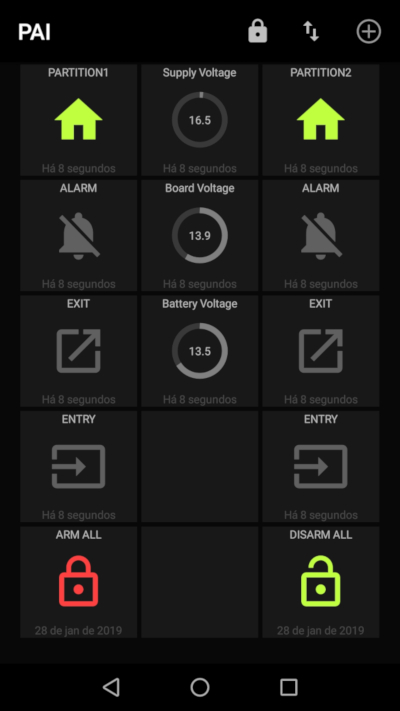


If you have docker running, this will be the easiest way:
mkdir /opt/pai/etc mkdir /opt/pai/log wget https://raw.githubusercontent.com/jpbarraca/pai/master/config/pai.conf.example -O /opt/pai/etc edit /opt/pai/etc/pai.conf as needed docker run -it -v /opt/pai/etc:/etc/pai:ro -v /opt/pai/log:/var/log/pai --device=/dev/tty.YOUR_SERIAL_PORT jpbarraca/pai You also try jpbarraca/pai:latest
The docker images do not have support for Signal.
or simply:
docker run -it -v <confFolder>/pai.conf:/etc/pai/pai.conf jpbarraca/pai - Download the files in this repository and place it in some directory
git clone https://github.com/jpbarraca/pai.git - Copy
config/pai.conf.exampleto/etc/pai/pai.confand edit it to match your setup. The file uses Python syntax.
mkdir -p /etc/pai cp config/pai.conf.example /etc/pai/pai.conf edit /etc/pai/pai.conf as needed python3 run.py Alternatively see #Configuration section for supported file locations.
- Install the python 3.6 and its requirements.
pip3 install -r requirements.txt If some requirement fail to install, this may not be critical.
gi,pygobjectandpydbusare only required when using SignalPushbullet.pyandws4pyare only required when using Pushbulletchumpis only required when using Pushoverpaho_mqttis only required for MQTT supportpyserialis only required when connecting to the panel directly through the serial port or using a GSM modem.
See config/pai.conf.example for all configuration options.
Configuration file should be placed in one of these locations:
- /etc/pai/pai.conf
- /usr/local/etc/pai/pai.conf
- ~/.local/etc/pai.conf
As project was initially designed for SP/MG panels. EVO panels require some configuration fine tuning.
Set these settings
STATUS_REQUESTS = list(range(1, 6)) PARTITIONS_CHANGE_NOTIFICATION_IGNORE = [ 'arm_full', 'exit_delay', 'all_zone_closed', 'ready', 'stay_instant_ready', 'force_ready', 'entry_delay', 'auto_arming_engaged' ]If you use Serial connection you need to set SERIAL_BAUD:
SERIAL_BAUD = 38400 # or 57600 if you have changed default setting in Babywarepython3 run.py If something goes wrong, you can edit the configuration file to increase the debug level.
Tested in the following environment:
- Python > 3.5.2
- Mosquitto MQTT Broker >v 1.4.8
- OrangePi 2G-IOT, NanoPi NEO, and Raspberry Pi 3 through their built in Serial Port (with a level shifter!), or a USB RS232 TTL adapter (CP2102, PL2303, CH340, etc..)
- Ubuntu Server 16.04.3 LTS
- Paradox MG5050, SP7000 and EVO panels
- Signal Cli through a DBUS interface
- Pushbullet.py
- SIM900 module through a serial port
- João Paulo Barraca - @jpbarraca - Main code and MG/SP devices
- Ion Darie - @iondarie - Homebridge integration
- Jevgeni Kiski - @yozik04 - EVO devices
This work is inspired or uses parts from the following projects:
- Tertiush at https://github.com/Tertiush/ParadoxIP150v2
- Spinza at https://github.com/spinza/paradox_mqtt
Paradox, MG5050 and IP150 are registered marks of PARADOX. Other brands are owned by their respective owners.
The code was developed as a way of integrating personally owned Paradox systems, and it cannot be used for other purposes. It is not affiliated with any company and it doesn't have have commercial intent.
The code is provided AS IS and the developers will not be held responsible for failures in the alarm systems, or any other malfunction.