

koko is a simple tool which connects between Docker containers/linux netns processes with veth devices/vxlan of linux kernel. Using koko, you can simply make point-to-point connection for containers without linux bridges.
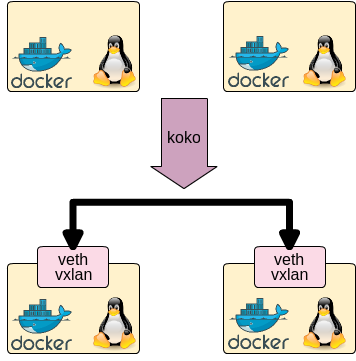
koko supports following container:
- Docker
- Linux netns namespace (i.e. 'ip netns' or see 'man ip-netns' for its detail)
koko supports following linux interface to connect above:
- veth: Virtual Ethernet Interface
- vxlan: Virtual eXtensible Local Area Network
See releases page.
- golang 1.7 or later
koko is written in go, so following commands makes koko single binary. Build and put it in your container host.
go get github.com/redhat-nfvpe/koko koko takes two arguments: two endpoints of container and koko connects both. koko supports veth for two containers in one host and vxlan for two containers in separate host.
./koko {-c <linkname> | -d <container>,<linkname>[,<IP addr>/<prefixlen>,...] | -n <netns name>,<linkname>[,<IP addr>/<prefixlen>,...]| -p <pid>,<linkname>[,<IP addr>/<prefixlen>,...]| -c <linkname> } {-d <container>,<linkname>[,<IP addr>/<prefixlen>,...] | -n <netns name>,<linkname>[,<IP addr>/<prefixlen>,...]| -p <pid>,<linkname>[,<IP addr>/<prefixlen>,...]| -c <linkname> } Connecting containers which are in separate hosts with vxlan. Following command makes vxlan interface and put this interface into given container with/without IP address.
./koko {-c <linkname> | -d <container>,<linkname>[,<IP/mirror>,...] | -n <netns name>,<linkname>[,<IP/mirror>,...]| -p <pid>,<linkname>[,<IP/mirror>,...] } -x <parent interface>,<remote endpoint IP addr>,<vxlan id> <IP/mirror> = {<IP addr>/<prefixlen> | mirror:{ingress|egress|both},<mirror IF>} Connecting containers which are in separate hosts with vlan. Following command makes vlan interface and put this interface into given container with/without IP address.
./koko {-c <linkname> | -d <container>,<linkname>[,<IP/mirror>,...] | -n <netns name>,<linkname>[,<IP/mirror>,...]| -p <pid>,<linkname>[,<IP/mirror>,...] } -V <parent interface>,<vlan id> <IP/mirror> = {<IP addr>/<prefixlen> | mirror:{ingress|egress|both},<mirror IF>} Connecting containers which are in separate hosts with macvlan. Following command makes macvlan interface and put this interface into given container with/without IP address.
./koko {-c <linkname> | -d <container>,<linkname>[,<IP/mirror>,...] | -n <netns name>,<linkname>[,<IP/mirror>,...]| -p <pid>,<linkname>[,<IP/mirror>,...] } -M <parent interface>,<macvlan mode, {default|private|vepa|bridge|passthru}> <IP/mirror> = {<IP addr>/<prefixlen> | mirror:{ingress|egress|both},<mirror IF>} koko -D and koko -N deletes veth interface or vxlan interface. In case of veth, peering interface is also removed in this command.
./koko {-D <container>,<linkname> | -N <netns name>,<linkname> } In case of 'egress' (and 'both'), the target interface (i.e. ) needs to be configured to have a queue because veth does not have tx queue in default (see moby/moby#33162 for the details). ip link set <mirror IF> qlen <queue length> sets queue length to corresponding veth device.
-cis to create veth and put it in current namespace-Cis to delete veth in current namespace-dis to create interface and put it in docker container namespace-Dis to delete interface of docker container namespace-eis to create interface and put it in cri-o container namespace-Eis to delete interface of cri-o container namespace-nis to create interface and put it in linux netns namespace-Nis to delete interface of linux netns namespace-pis to create interface and put it in pid's netns namespace-Pis to delete interface of pid's netns namespace-Xis to create vxlan interface-Vis to create vlan interface-Mis to create macvlan interface-his to show help-vis to show version
./koko -h Please see Examples in Wiki.
# connect between docker containers with IPv4 address sudo ./koko -d centos1,link1,192.168.1.1/24 -d centos2,link2,192.168.1.2/24 # connect between docker containers with IPv6 address sudo ./koko -d centos1,link1,2001:DB8::1/64 -d centos2,link2,2001:DB8::2/64 # connect between docker containers with IPv4/IPv6 address sudo ./koko -d centos1,link1,192.168.1.1/24,2001:DB8::1/64 -d centos2,link2,192.168.1.2/24,2001:DB8::2/64 # connect between netns namespaces sudo ./koko -n testns1,link1,192.168.1.1/24 -n testns2,link2,192.168.1.2/24 # connect between docker container and netns namespace sudo ./koko -d centos1,link1,192.168.1.1/24 -n testns2,link2,192.168.1.2/24 # create vxlan interface and put it into docker container sudo ./koko -d centos1,link1,192.168.1.1/24 -x eth1,10.1.1.1,1 - Document
- Tomofumi Hayashi (s1061123)
- Doug Smith (dougbtv)
- Antonio Ojea (aojea)