Application example built with Angular 15 and adding the social media share buttons component using the ngx-sharebuttons library.
This post was made on my blog in portuguese and on the DEV Community.

Before you start, you need to install and configure the tools:
- git
- Node.js and npm
- Angular CLI
- IDE (e.g. Visual Studio Code)
1. Let's create the application with the Angular base structure using the @angular/cli with the route file and the SCSS style format.
ng new angular-sharebuttons ? Would you like to add Angular routing? Yes ? Which stylesheet format would you like to use? SCSS [ https://sass-lang.com/documentation/syntax#scss ] CREATE angular-sharebuttons/README.md (1065 bytes) CREATE angular-sharebuttons/.editorconfig (274 bytes) CREATE angular-sharebuttons/.gitignore (604 bytes) CREATE angular-sharebuttons/angular.json (3291 bytes) CREATE angular-sharebuttons/package.json (1082 bytes) CREATE angular-sharebuttons/tsconfig.json (783 bytes) CREATE angular-sharebuttons/.browserslistrc (703 bytes) CREATE angular-sharebuttons/karma.conf.js (1437 bytes) CREATE angular-sharebuttons/tsconfig.app.json (287 bytes) CREATE angular-sharebuttons/tsconfig.spec.json (333 bytes) CREATE angular-sharebuttons/src/favicon.ico (948 bytes) CREATE angular-sharebuttons/src/index.html (305 bytes) CREATE angular-sharebuttons/src/main.ts (372 bytes) CREATE angular-sharebuttons/src/polyfills.ts (2820 bytes) CREATE angular-sharebuttons/src/styles.scss (80 bytes) CREATE angular-sharebuttons/src/test.ts (788 bytes) CREATE angular-sharebuttons/src/assets/.gitkeep (0 bytes) CREATE angular-sharebuttons/src/environments/environment.prod.ts (51 bytes) CREATE angular-sharebuttons/src/environments/environment.ts (658 bytes) CREATE angular-sharebuttons/src/app/app-routing.module.ts (245 bytes) CREATE angular-sharebuttons/src/app/app.module.ts (393 bytes) CREATE angular-sharebuttons/src/app/app.component.scss (0 bytes) CREATE angular-sharebuttons/src/app/app.component.html (24617 bytes) CREATE angular-sharebuttons/src/app/app.component.spec.ts (1115 bytes) CREATE angular-sharebuttons/src/app/app.component.ts (225 bytes) ✔ Packages installed successfully.2. Install and configure the Bootstrap CSS framework. Do steps 2 and 3 of the post Adding the Bootstrap CSS framework to an Angular application.
3. Install the @angular/cdk, @fortawesome/angular-fontawesome, @fortawesome/fontawesome-svg-core, @fortawesome/free-brands-svg-icons, @fortawesome/free-solid-svg-icons and ngx-sharebuttons libraries.
npm install @angular/cdk @fortawesome/angular-fontawesome @fortawesome/fontawesome-svg-core @fortawesome/free-brands-svg-icons @fortawesome/free-solid-svg-icons ngx-sharebuttons4. Configure the ngx-sharebuttons library. Change the angular.json file and add the circles-dark-theme.scss file as below.
"styles": [ "node_modules/bootstrap/scss/bootstrap.scss", "node_modules/bootstrap-icons/font/bootstrap-icons.css", "node_modules/ngx-sharebuttons/themes/circles.scss", "node_modules/ngx-sharebuttons/themes/modern.scss", "src/styles.scss" ],5. Import the ShareButtonsModule and ShareIconsModule modules. Change the app.module.ts file and add the lines as below.
import { ShareButtonsModule } from 'ngx-sharebuttons/buttons'; import { ShareIconsModule } from 'ngx-sharebuttons/icons'; imports: [ BrowserModule, AppRoutingModule, ShareButtonsModule, ShareIconsModule, ],6. Remove the contents of the AppComponent class from the src/app/app.component.ts file.
7. Remove the contents of the src/app/app.component.html file. Add the buttons component as below.
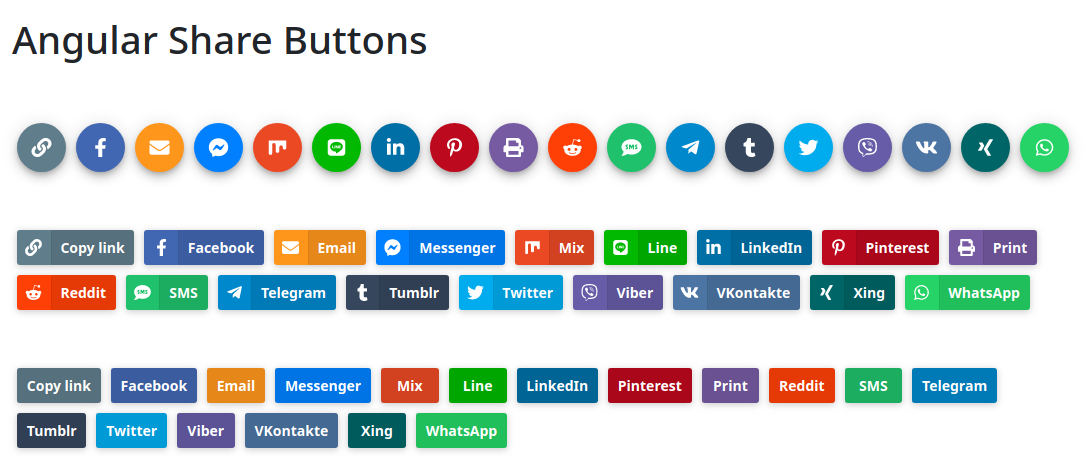
<div class="container-fluid py-3"> <h1>Angular Share Buttons</h1> <share-buttons theme="circles-dark" [include]="['copy', 'facebook', 'email', 'messenger', 'mix', 'line', 'linkedin', 'pinterest', 'print', 'reddit', 'sms', 'telegram', 'tumblr', 'twitter', 'viber', 'vk', 'xing', 'whatsapp']" [showIcon]="true" [showText]="false" url="https://rodrigo.kamada.com.br/" description="Angular Share Buttons" twitterAccount="rodrigokamada" class="pt-5"> </share-buttons> <share-buttons theme="modern-dark" [include]="['copy', 'facebook', 'email', 'messenger', 'mix', 'line', 'linkedin', 'pinterest', 'print', 'reddit', 'sms', 'telegram', 'tumblr', 'twitter', 'viber', 'vk', 'xing', 'whatsapp']" [showIcon]="true" [showText]="true" url="https://rodrigo.kamada.com.br/" description="Angular Share Buttons" twitterAccount="rodrigokamada" class="pt-5"> </share-buttons> <share-buttons theme="modern-dark" [include]="['copy', 'facebook', 'email', 'messenger', 'mix', 'line', 'linkedin', 'pinterest', 'print', 'reddit', 'sms', 'telegram', 'tumblr', 'twitter', 'viber', 'vk', 'xing', 'whatsapp']" [showIcon]="false" [showText]="true" url="https://rodrigo.kamada.com.br/" description="Angular Share Buttons" twitterAccount="rodrigokamada" class="pt-5"> </share-buttons> </div>8. Run the application with the command below.
npm start > angular-sharebuttons@1.0.0 start > ng serve ✔ Browser application bundle generation complete. Initial Chunk Files | Names | Size vendor.js | vendor | 3.84 MB styles.css | styles | 277.56 kB polyfills.js | polyfills | 128.52 kB scripts.js | scripts | 76.67 kB main.js | main | 11.54 kB runtime.js | runtime | 6.64 kB | Initial Total | 4.33 MB Build at: 2021-08-22T20:20:39.646Z - Hash: b18162a20902dbc8f4cf - Time: 20556ms ** Angular Live Development Server is listening on localhost:4200, open your browser on http://localhost:4200/ ** ✔ Compiled successfully.9. Ready! Access the URL http://localhost:4200/ and check if the application is working. See the application working on GitHub Pages and Stackblitz.
1. Clone the repository.
git clone git@github.com:rodrigokamada/angular-sharebuttons.git2. Install the dependencies.
npm ci3. Run the application.
npm start