Application example built with Angular 15 and adding the notification component using the ngx-toastr library.
This tutorial was posted on my blog in portuguese and on the DEV Community in english.

Before you start, you need to install and configure the tools:
- git
- Node.js and npm
- Angular CLI
- IDE (e.g. Visual Studio Code)
1. Let's create the application with the Angular base structure using the @angular/cli with the route file and the SCSS style format.
ng new angular-toastr ? Would you like to add Angular routing? Yes ? Which stylesheet format would you like to use? SCSS [ https://sass-lang.com/documentation/syntax#scss ] CREATE angular-toastr/README.md (1059 bytes) CREATE angular-toastr/.editorconfig (274 bytes) CREATE angular-toastr/.gitignore (604 bytes) CREATE angular-toastr/angular.json (3255 bytes) CREATE angular-toastr/package.json (1076 bytes) CREATE angular-toastr/tsconfig.json (783 bytes) CREATE angular-toastr/.browserslistrc (703 bytes) CREATE angular-toastr/karma.conf.js (1431 bytes) CREATE angular-toastr/tsconfig.app.json (287 bytes) CREATE angular-toastr/tsconfig.spec.json (333 bytes) CREATE angular-toastr/src/favicon.ico (948 bytes) CREATE angular-toastr/src/index.html (299 bytes) CREATE angular-toastr/src/main.ts (372 bytes) CREATE angular-toastr/src/polyfills.ts (2820 bytes) CREATE angular-toastr/src/styles.scss (80 bytes) CREATE angular-toastr/src/test.ts (788 bytes) CREATE angular-toastr/src/assets/.gitkeep (0 bytes) CREATE angular-toastr/src/environments/environment.prod.ts (51 bytes) CREATE angular-toastr/src/environments/environment.ts (658 bytes) CREATE angular-toastr/src/app/app-routing.module.ts (245 bytes) CREATE angular-toastr/src/app/app.module.ts (393 bytes) CREATE angular-toastr/src/app/app.component.scss (0 bytes) CREATE angular-toastr/src/app/app.component.html (24617 bytes) CREATE angular-toastr/src/app/app.component.spec.ts (1097 bytes) CREATE angular-toastr/src/app/app.component.ts (219 bytes) ✔ Packages installed successfully.2. Install and configure the Bootstrap CSS framework. Do steps 2 and 3 of the post Adding the Bootstrap CSS framework to an Angular application.
3. Install the ngx-toastr library.
npm install ngx-toastr4. Configure the ngx-toastr library. Change the angular.json file and add the toastr.css file as below.
"styles": [ "node_modules/bootstrap/scss/bootstrap.scss", "node_modules/ngx-toastr/toastr.css", "src/styles.scss" ],5. Import the BrowserAnimationsModule and ToastrModule modules. Change the app.module.ts file and add the lines as below.
import { BrowserAnimationsModule } from '@angular/platform-browser/animations'; import { ToastrModule } from 'ngx-toastr'; imports: [ BrowserModule, BrowserAnimationsModule, ToastrModule.forRoot({ timeOut: 150000, // 15 seconds closeButton: true, progressBar: true, }), AppRoutingModule, ],6. Remove the contents of the AppComponent class from the src/app/app.component.ts file. Import the ToastrService service and create the showSuccess, showInfo, showWarning and showError methods as below.
import { Component } from '@angular/core'; import { ToastrService } from 'ngx-toastr'; @Component({ selector: 'app-root', templateUrl: './app.component.html', styleUrls: ['./app.component.scss'], }) export class AppComponent { constructor(private toastrService: ToastrService) { } public showSuccess(): void { this.toastrService.success('Message Success!', 'Title Success!'); } public showInfo(): void { this.toastrService.info('Message Info!', 'Title Info!'); } public showWarning(): void { this.toastrService.warning('Message Warning!', 'Title Warning!'); } public showError(): void { this.toastrService.error('Message Error!', 'Title Error!'); } }7. Remove the contents of the src/app/app.component.html file. Add the buttons as below.
<div class="container-fluid py-3"> <h1>Angular Toastr</h1> <div class="d-grid gap-2 col-4 mx-auto"> <button type="button" class="btn btn-sm btn-success" (click)="showSuccess()">Success</button> <button type="button" class="btn btn-sm btn-info" (click)="showInfo()">Info</button> <button type="button" class="btn btn-sm btn-warning" (click)="showWarning()">Warning</button> <button type="button" class="btn btn-sm btn-danger" (click)="showError()">Error</button> </div> </div>8. Run the application with the command below.
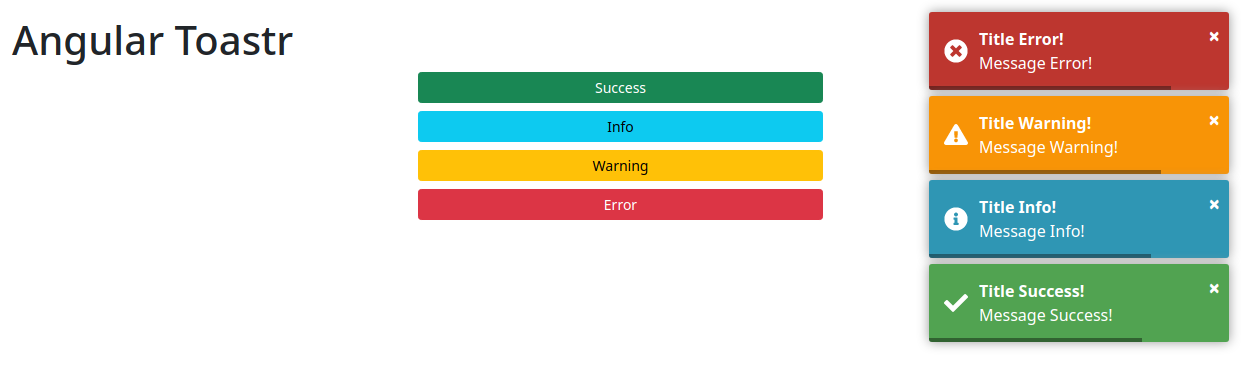
npm start > angular-toastr@1.0.0 start > ng serve ✔ Browser application bundle generation complete. Initial Chunk Files | Names | Size vendor.js | vendor | 2.70 MB styles.css | styles | 273.40 kB polyfills.js | polyfills | 128.51 kB scripts.js | scripts | 76.67 kB main.js | main | 12.35 kB runtime.js | runtime | 6.63 kB | Initial Total | 3.19 MB Build at: 2021-08-14T12:47:44.417Z - Hash: f001123d671f4d692c5a - Time: 11454ms ** Angular Live Development Server is listening on localhost:4200, open your browser on http://localhost:4200/ ** ✔ Compiled successfully.9. Ready! Access the URL http://localhost:4200/ and check if the application is working. See the application working on GitHub Pages and Stackblitz.
1. Clone the repository.
git clone git@github.com:rodrigokamada/angular-toastr.git2. Install the dependencies.
npm ci3. Run the application.
npm start