
YOLOv2 (You only look once) is one of the most popular algorithms for object detection. As the name implies, the predictions of objects, and their bounding boxes are calculated as a single forward pass through the convolutional neural network, making it suitable for real time object detection.
In this repository, I make custom preprocessing methods to be operated on the output of the YOLOv2, to detect common objects encountered while driving in an urban environment.
This program uses the COCO (Common Objects in Context) class list, which has 80 object categories. For reference, these classes are given in the file "coco_classes.txt", and the first few entries are :
person bicycle car motorbike aeroplane bus train truck boat traffic light fire hydrant stop sign parking meter bench bird cat dog horse sheep cow ... The training data consists of images labelled with the objects it contains, along with the bounding box for each object. The way this is done is in the form of a vector encoding 6 entities, as given below :
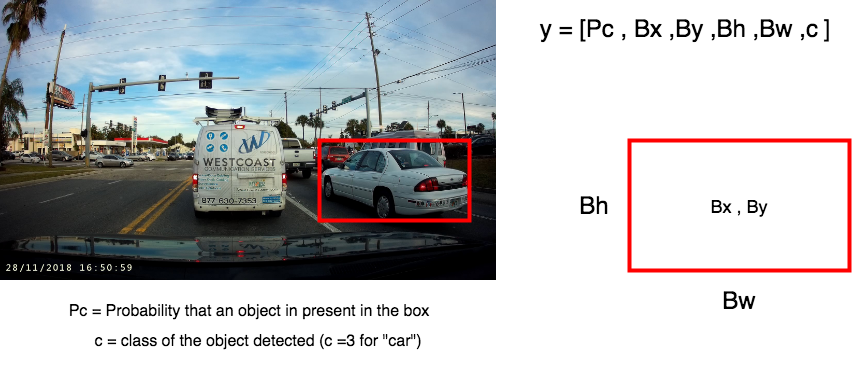
where Bx, By represents the centre of the box, and Bh and Bw are the height and width of the box respectively. The class label c is actually a vector of length 80, representing all the 80 classes.
YOLO calculates the probabilities and bounding boxes for objects in a single forward pass.
The way this is done is splitting the image into a 19x19 grid (different grid sizes are possible too) and detecting objects for each of the 19x19 boxes. However, this is not done sequentially, and is actually implemented as a convolution operation. Meaning that the individual filter shapes and the depth is chosen in such way that the output is 19x19xchannels.
Having done this, the value in the i,j pixel of the output, represents the information about detecting objects in the i,j block of the grid.
For example:
If
- Input image size is (448,448,3)
- Number of classes to predict = 25
- Grid size = (7,7)
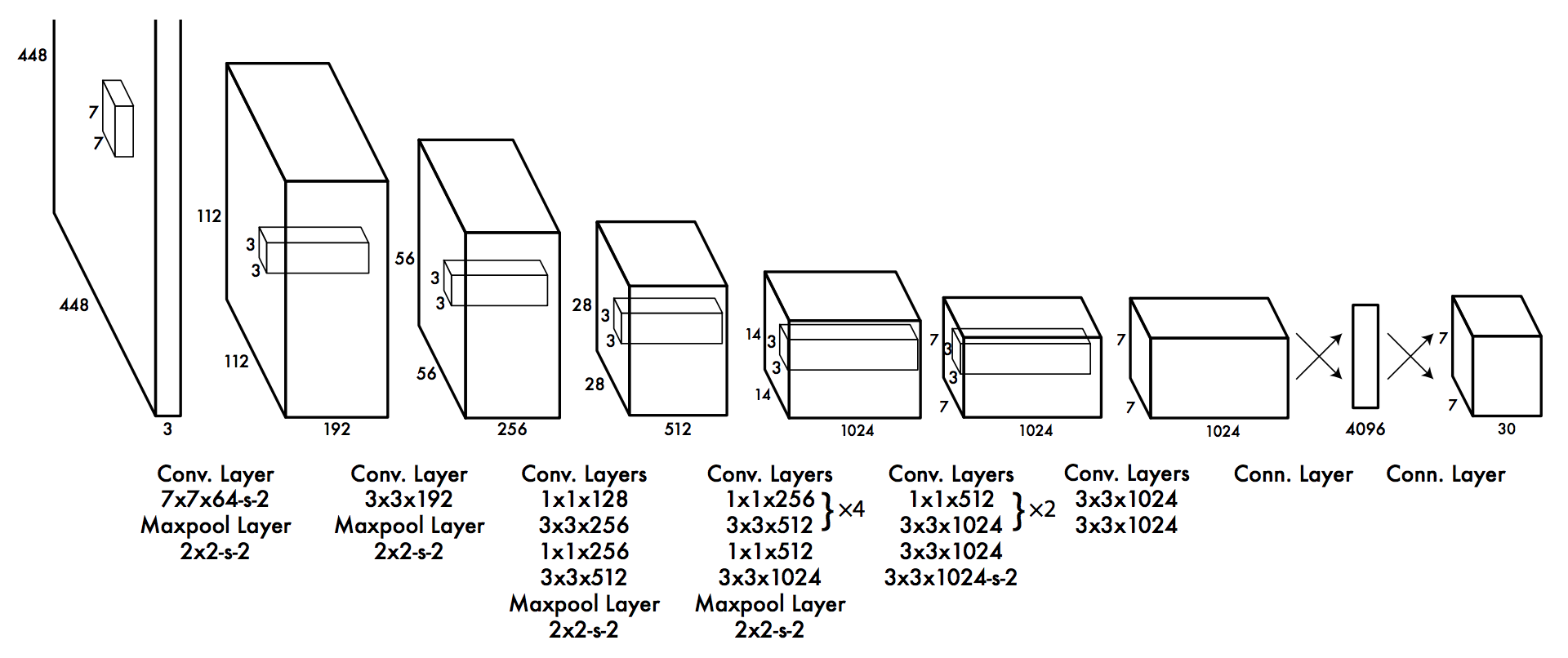
Then, each label vector will be of length 30 (Pc, Bx, By, Bw, Bh, +25 classes).
To have such an output shape, an example architecture will look like :
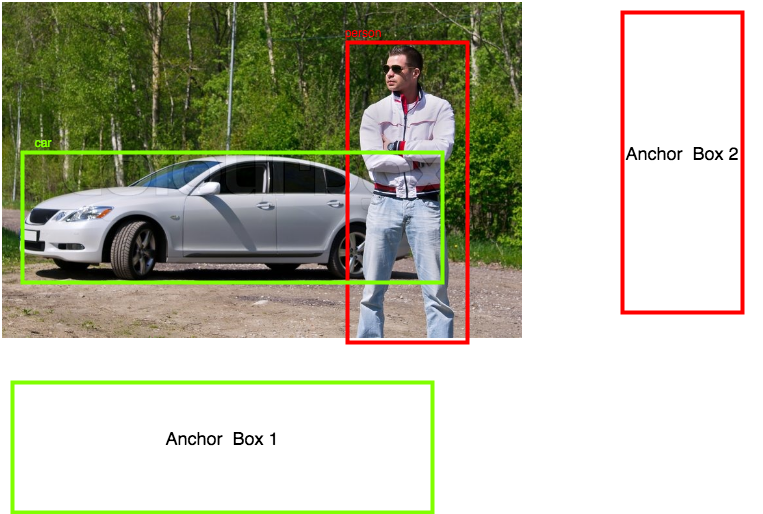
Anchor boxes are predefined boxes of fixed height and width. The idea is to use a finite number of anchor boxes, such that any object detected fits snugly inside at least one of the predefined boxes. The reason this is done is to limit the number of possible values of Bh and Bw (infinite) to only a few predefined values.
Anchor boxes are chosen based on application. The crux of the idea is that different objects fall in different ratios of height and width. For example, if the classes in this program only had "person" and "car" , we could've used only two anchor boxes :
This approach reduces computational cost, which is of essence particularly in real-time detection.
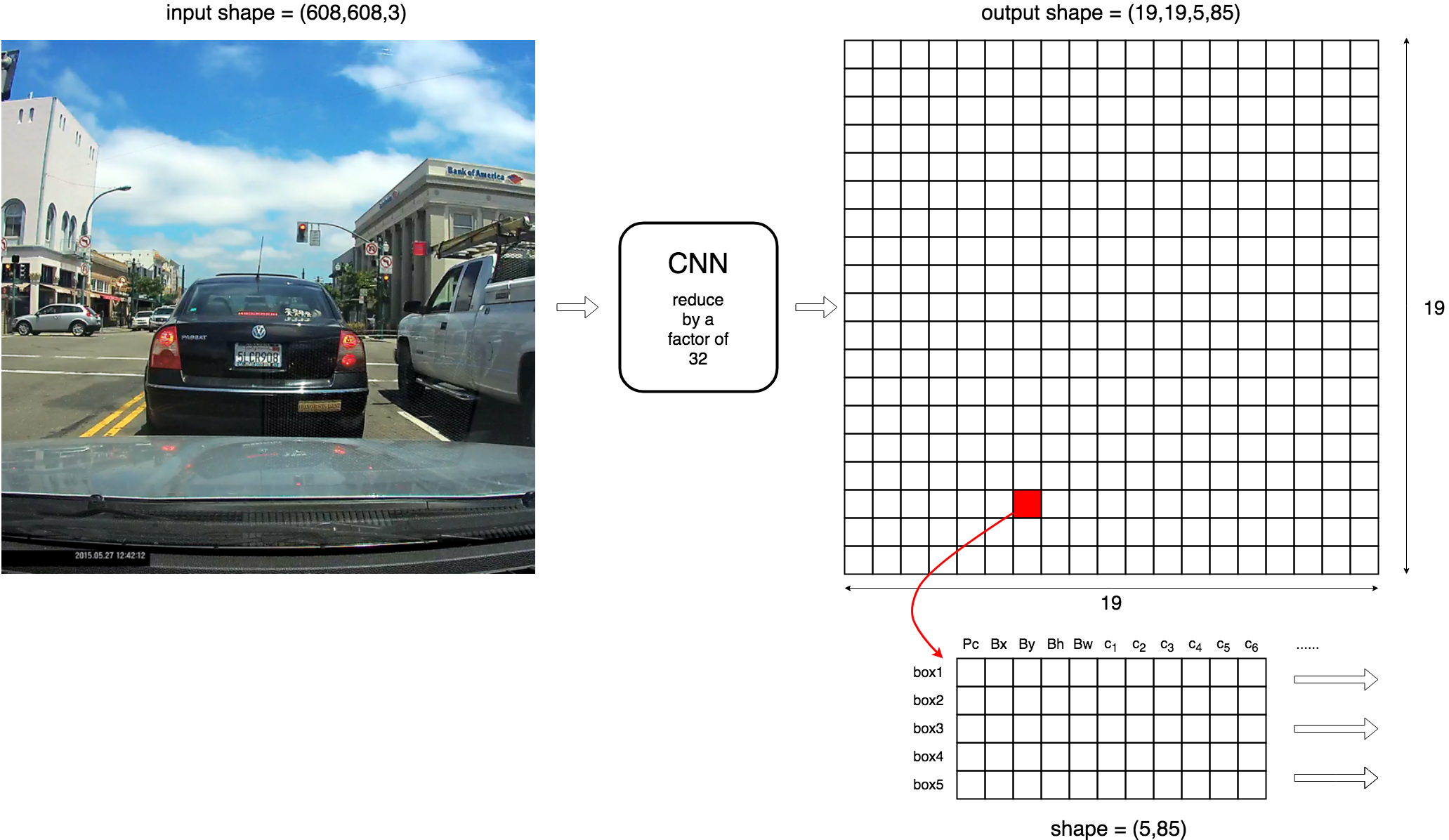
In this program, I am using an input images which are preprocessed into being 608x608 pixels. The grid size I am using is 19x19. Hence, the following specifications:
- Input shape is (m,608,608,3), where m is the number of images per batch.
- Number of anchor boxes = 5
- Number of classes to predict = 80
- Output shape is therefore (m,19,9,5,85)
If the output shape is confusing, think about it as returning 5 boxes per block, and each of the 5 boxes has a 85 length vector which consists of [Pc,Bx,By,Bh,Bw, + 80 classes]
Graphically :
To predict objects and their bounding boxes,
- For each of the 361 boxes (192), we calculate probability scores by multiplying Pc by the individual class probabilities.


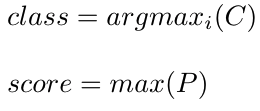
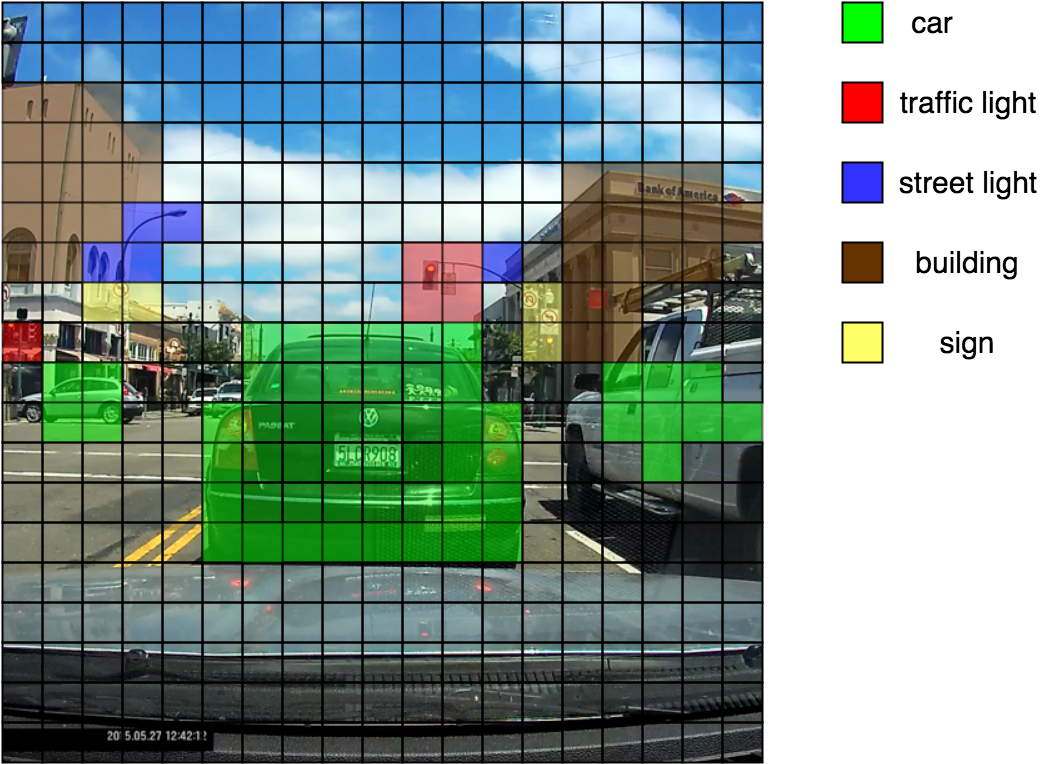
After doing this, if we colour each of the 361 blocks with its predicted class, it gives us a nice way to visualize what's being predicted :
Another way to visualize what's being predicted is to plot the bounding boxes themselves. Without any filtering, there is a large number of boxes, with many boxes pertaining to the same object :
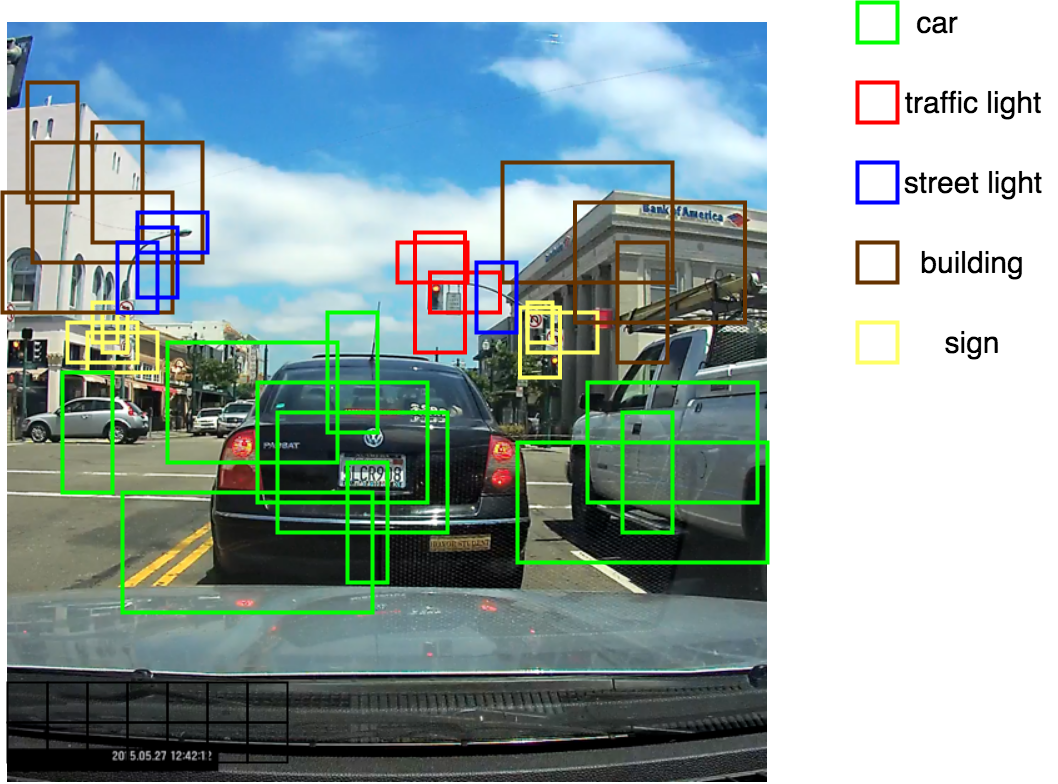
As is evident from the above figure, the yolo algorithm outputs many boxes, most of which are irrelevant/redundant.Hence we need a way to filter and chuck out the unneeded boxes.
The first step, quite naturally, is to get rid of all the boxes which have a low probability of an object being detected. This can be done by constructing a boolean mask (tf.boolean_mask in tensorflow), and only keeping the boxes which have a probability of more than a certain threshold.
This step gets rid of anamolous detections of objects. However, even after such a filtering, we end up with many boxes for each object detected. But we only need one box. This bounding box is calculated using Non-max supression.
Non-max supression makes use of a concept called "intersection over union" or IoU. It takes as input two boxes, and ss the name implies, calculates the ratio of the intersection and union of the two boxes.
For example, given two boxes A and B , IoU is calculated as :
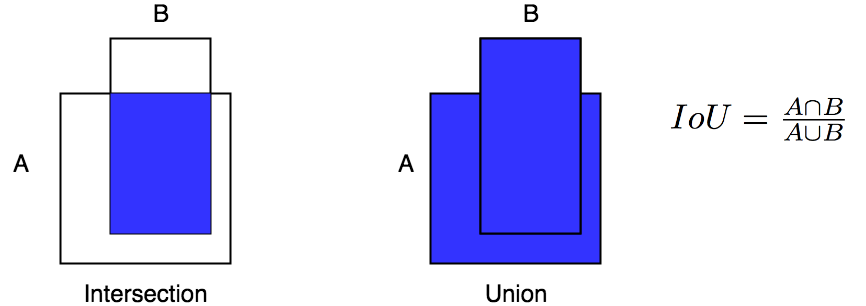
Having defined the IoU, non-max supression works as follows :
Repeat Until no boxes to process:
- Select the box with highest probability of detection.
- Remove all the boxes with a high IoU with the selected box.
- Mark the selected box as "processed"
This type of filtering makes sure that only one bounding box is returned per object detected. (Exceptions include conditions when there are more than one objects in one grid block, but I omit that case here)

I put this program to test, on footages shot around Berkeley, CA. I chose a time when the weather was good and there was a lot of sun.
The pretrained model was trained on images from drive.ai, which were labelled as given in the first section of this article. The model can be found in the folder "model"
The videos were recorded using iPhone 8, and then resized into 1280x720.
Internally, the program resizes these images into squares of (608,608), as described in the previous sections.
The tensorflow summary of the model used is given below :
__________________________________________________________________________________________________ Layer (type) Output Shape Param # Connected to ================================================================================================== input_1 (InputLayer) (None, 608, 608, 3) 0 __________________________________________________________________________________________________ conv2d_1 (Conv2D) (None, 608, 608, 32) 864 input_1[0][0] __________________________________________________________________________________________________ batch_normalization_1 (BatchNor (None, 608, 608, 32) 128 conv2d_1[0][0] __________________________________________________________________________________________________ leaky_re_lu_1 (LeakyReLU) (None, 608, 608, 32) 0 batch_normalization_1[0][0] __________________________________________________________________________________________________ max_pooling2d_1 (MaxPooling2D) (None, 304, 304, 32) 0 leaky_re_lu_1[0][0] __________________________________________________________________________________________________ conv2d_2 (Conv2D) (None, 304, 304, 64) 18432 max_pooling2d_1[0][0] __________________________________________________________________________________________________ batch_normalization_2 (BatchNor (None, 304, 304, 64) 256 conv2d_2[0][0] __________________________________________________________________________________________________ leaky_re_lu_2 (LeakyReLU) (None, 304, 304, 64) 0 batch_normalization_2[0][0] __________________________________________________________________________________________________ max_pooling2d_2 (MaxPooling2D) (None, 152, 152, 64) 0 leaky_re_lu_2[0][0] __________________________________________________________________________________________________ conv2d_3 (Conv2D) (None, 152, 152, 128 73728 max_pooling2d_2[0][0] __________________________________________________________________________________________________ batch_normalization_3 (BatchNor (None, 152, 152, 128 512 conv2d_3[0][0] __________________________________________________________________________________________________ leaky_re_lu_3 (LeakyReLU) (None, 152, 152, 128 0 batch_normalization_3[0][0] __________________________________________________________________________________________________ conv2d_4 (Conv2D) (None, 152, 152, 64) 8192 leaky_re_lu_3[0][0] __________________________________________________________________________________________________ batch_normalization_4 (BatchNor (None, 152, 152, 64) 256 conv2d_4[0][0] __________________________________________________________________________________________________ leaky_re_lu_4 (LeakyReLU) (None, 152, 152, 64) 0 batch_normalization_4[0][0] __________________________________________________________________________________________________ conv2d_5 (Conv2D) (None, 152, 152, 128 73728 leaky_re_lu_4[0][0] __________________________________________________________________________________________________ batch_normalization_5 (BatchNor (None, 152, 152, 128 512 conv2d_5[0][0] __________________________________________________________________________________________________ leaky_re_lu_5 (LeakyReLU) (None, 152, 152, 128 0 batch_normalization_5[0][0] __________________________________________________________________________________________________ max_pooling2d_3 (MaxPooling2D) (None, 76, 76, 128) 0 leaky_re_lu_5[0][0] __________________________________________________________________________________________________ conv2d_6 (Conv2D) (None, 76, 76, 256) 294912 max_pooling2d_3[0][0] __________________________________________________________________________________________________ batch_normalization_6 (BatchNor (None, 76, 76, 256) 1024 conv2d_6[0][0] __________________________________________________________________________________________________ leaky_re_lu_6 (LeakyReLU) (None, 76, 76, 256) 0 batch_normalization_6[0][0] __________________________________________________________________________________________________ conv2d_7 (Conv2D) (None, 76, 76, 128) 32768 leaky_re_lu_6[0][0] __________________________________________________________________________________________________ batch_normalization_7 (BatchNor (None, 76, 76, 128) 512 conv2d_7[0][0] __________________________________________________________________________________________________ leaky_re_lu_7 (LeakyReLU) (None, 76, 76, 128) 0 batch_normalization_7[0][0] __________________________________________________________________________________________________ conv2d_8 (Conv2D) (None, 76, 76, 256) 294912 leaky_re_lu_7[0][0] __________________________________________________________________________________________________ batch_normalization_8 (BatchNor (None, 76, 76, 256) 1024 conv2d_8[0][0] __________________________________________________________________________________________________ leaky_re_lu_8 (LeakyReLU) (None, 76, 76, 256) 0 batch_normalization_8[0][0] __________________________________________________________________________________________________ max_pooling2d_4 (MaxPooling2D) (None, 38, 38, 256) 0 leaky_re_lu_8[0][0] __________________________________________________________________________________________________ conv2d_9 (Conv2D) (None, 38, 38, 512) 1179648 max_pooling2d_4[0][0] __________________________________________________________________________________________________ batch_normalization_9 (BatchNor (None, 38, 38, 512) 2048 conv2d_9[0][0] __________________________________________________________________________________________________ leaky_re_lu_9 (LeakyReLU) (None, 38, 38, 512) 0 batch_normalization_9[0][0] __________________________________________________________________________________________________ conv2d_10 (Conv2D) (None, 38, 38, 256) 131072 leaky_re_lu_9[0][0] __________________________________________________________________________________________________ batch_normalization_10 (BatchNo (None, 38, 38, 256) 1024 conv2d_10[0][0] __________________________________________________________________________________________________ leaky_re_lu_10 (LeakyReLU) (None, 38, 38, 256) 0 batch_normalization_10[0][0] __________________________________________________________________________________________________ conv2d_11 (Conv2D) (None, 38, 38, 512) 1179648 leaky_re_lu_10[0][0] __________________________________________________________________________________________________ batch_normalization_11 (BatchNo (None, 38, 38, 512) 2048 conv2d_11[0][0] __________________________________________________________________________________________________ leaky_re_lu_11 (LeakyReLU) (None, 38, 38, 512) 0 batch_normalization_11[0][0] __________________________________________________________________________________________________ conv2d_12 (Conv2D) (None, 38, 38, 256) 131072 leaky_re_lu_11[0][0] __________________________________________________________________________________________________ batch_normalization_12 (BatchNo (None, 38, 38, 256) 1024 conv2d_12[0][0] __________________________________________________________________________________________________ leaky_re_lu_12 (LeakyReLU) (None, 38, 38, 256) 0 batch_normalization_12[0][0] __________________________________________________________________________________________________ conv2d_13 (Conv2D) (None, 38, 38, 512) 1179648 leaky_re_lu_12[0][0] __________________________________________________________________________________________________ batch_normalization_13 (BatchNo (None, 38, 38, 512) 2048 conv2d_13[0][0] __________________________________________________________________________________________________ leaky_re_lu_13 (LeakyReLU) (None, 38, 38, 512) 0 batch_normalization_13[0][0] __________________________________________________________________________________________________ max_pooling2d_5 (MaxPooling2D) (None, 19, 19, 512) 0 leaky_re_lu_13[0][0] __________________________________________________________________________________________________ conv2d_14 (Conv2D) (None, 19, 19, 1024) 4718592 max_pooling2d_5[0][0] __________________________________________________________________________________________________ batch_normalization_14 (BatchNo (None, 19, 19, 1024) 4096 conv2d_14[0][0] __________________________________________________________________________________________________ leaky_re_lu_14 (LeakyReLU) (None, 19, 19, 1024) 0 batch_normalization_14[0][0] __________________________________________________________________________________________________ conv2d_15 (Conv2D) (None, 19, 19, 512) 524288 leaky_re_lu_14[0][0] __________________________________________________________________________________________________ batch_normalization_15 (BatchNo (None, 19, 19, 512) 2048 conv2d_15[0][0] __________________________________________________________________________________________________ leaky_re_lu_15 (LeakyReLU) (None, 19, 19, 512) 0 batch_normalization_15[0][0] __________________________________________________________________________________________________ conv2d_16 (Conv2D) (None, 19, 19, 1024) 4718592 leaky_re_lu_15[0][0] __________________________________________________________________________________________________ batch_normalization_16 (BatchNo (None, 19, 19, 1024) 4096 conv2d_16[0][0] __________________________________________________________________________________________________ leaky_re_lu_16 (LeakyReLU) (None, 19, 19, 1024) 0 batch_normalization_16[0][0] __________________________________________________________________________________________________ conv2d_17 (Conv2D) (None, 19, 19, 512) 524288 leaky_re_lu_16[0][0] __________________________________________________________________________________________________ batch_normalization_17 (BatchNo (None, 19, 19, 512) 2048 conv2d_17[0][0] __________________________________________________________________________________________________ leaky_re_lu_17 (LeakyReLU) (None, 19, 19, 512) 0 batch_normalization_17[0][0] __________________________________________________________________________________________________ conv2d_18 (Conv2D) (None, 19, 19, 1024) 4718592 leaky_re_lu_17[0][0] __________________________________________________________________________________________________ batch_normalization_18 (BatchNo (None, 19, 19, 1024) 4096 conv2d_18[0][0] __________________________________________________________________________________________________ leaky_re_lu_18 (LeakyReLU) (None, 19, 19, 1024) 0 batch_normalization_18[0][0] __________________________________________________________________________________________________ conv2d_19 (Conv2D) (None, 19, 19, 1024) 9437184 leaky_re_lu_18[0][0] __________________________________________________________________________________________________ batch_normalization_19 (BatchNo (None, 19, 19, 1024) 4096 conv2d_19[0][0] __________________________________________________________________________________________________ conv2d_21 (Conv2D) (None, 38, 38, 64) 32768 leaky_re_lu_13[0][0] __________________________________________________________________________________________________ leaky_re_lu_19 (LeakyReLU) (None, 19, 19, 1024) 0 batch_normalization_19[0][0] __________________________________________________________________________________________________ batch_normalization_21 (BatchNo (None, 38, 38, 64) 256 conv2d_21[0][0] __________________________________________________________________________________________________ conv2d_20 (Conv2D) (None, 19, 19, 1024) 9437184 leaky_re_lu_19[0][0] __________________________________________________________________________________________________ leaky_re_lu_21 (LeakyReLU) (None, 38, 38, 64) 0 batch_normalization_21[0][0] __________________________________________________________________________________________________ batch_normalization_20 (BatchNo (None, 19, 19, 1024) 4096 conv2d_20[0][0] __________________________________________________________________________________________________ space_to_depth_x2 (Lambda) (None, 19, 19, 256) 0 leaky_re_lu_21[0][0] __________________________________________________________________________________________________ leaky_re_lu_20 (LeakyReLU) (None, 19, 19, 1024) 0 batch_normalization_20[0][0] __________________________________________________________________________________________________ concatenate_1 (Concatenate) (None, 19, 19, 1280) 0 space_to_depth_x2[0][0] leaky_re_lu_20[0][0] __________________________________________________________________________________________________ conv2d_22 (Conv2D) (None, 19, 19, 1024) 11796480 concatenate_1[0][0] __________________________________________________________________________________________________ batch_normalization_22 (BatchNo (None, 19, 19, 1024) 4096 conv2d_22[0][0] __________________________________________________________________________________________________ leaky_re_lu_22 (LeakyReLU) (None, 19, 19, 1024) 0 batch_normalization_22[0][0] __________________________________________________________________________________________________ conv2d_23 (Conv2D) (None, 19, 19, 425) 435625 leaky_re_lu_22[0][0] ================================================================================================== Total params: 50,983,561 Trainable params: 50,962,889 Non-trainable params: 20,672 __________________________________________________________________________________________________ Here are the results :
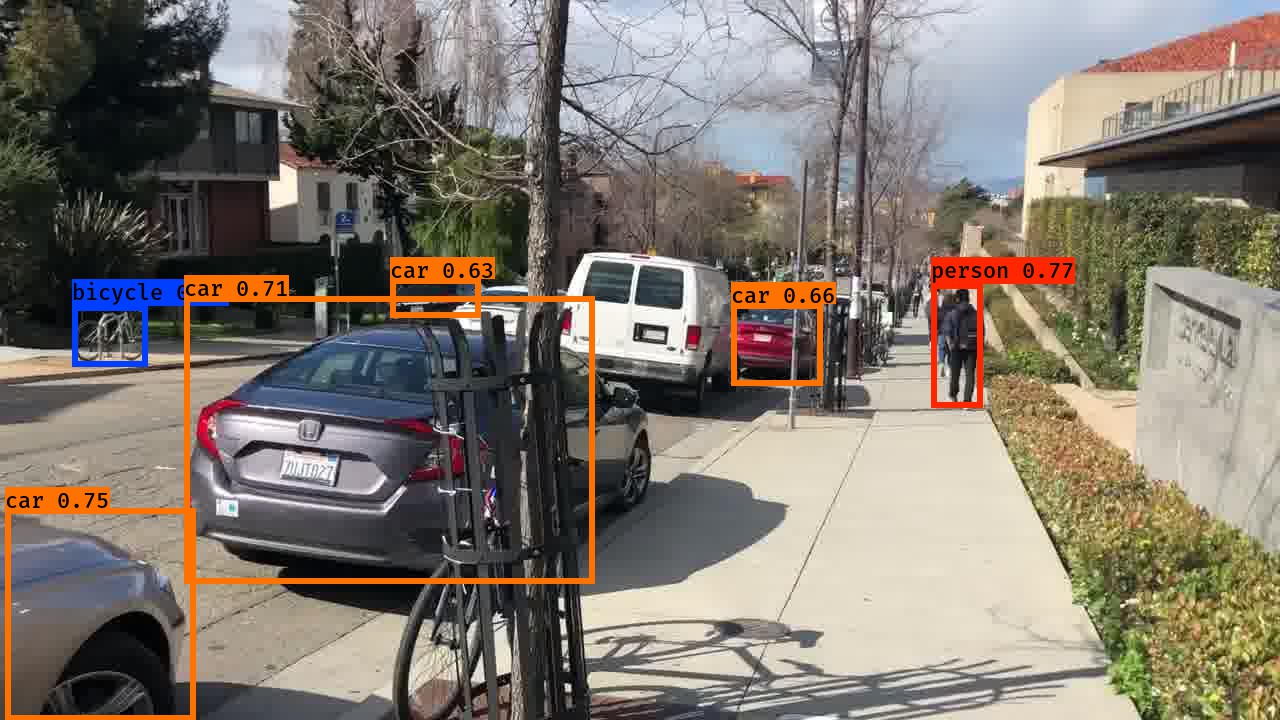
As can be seen in the above image, not all instances of the predicted classes are detected. For example, there are two cars and a bicycle which did not get detected in the above image.
This is because I am using only 5 anchor boxes for simplicity, and not all instances of the classes might fall into the five anchor boxes at every frame of the video.
Feel free to try running the code using more anchor boxes. The heights and widths of the anchor boxes can be modified in the folder "anchors"
Finally, here is a GIF of a video that I passed through this program.

If you analyse it frame by frame, you will notice that it still makes a lot of mistakes. Most of the mistakes are in the form of missing out some objects.
Some of them are outright stupid, like this one :
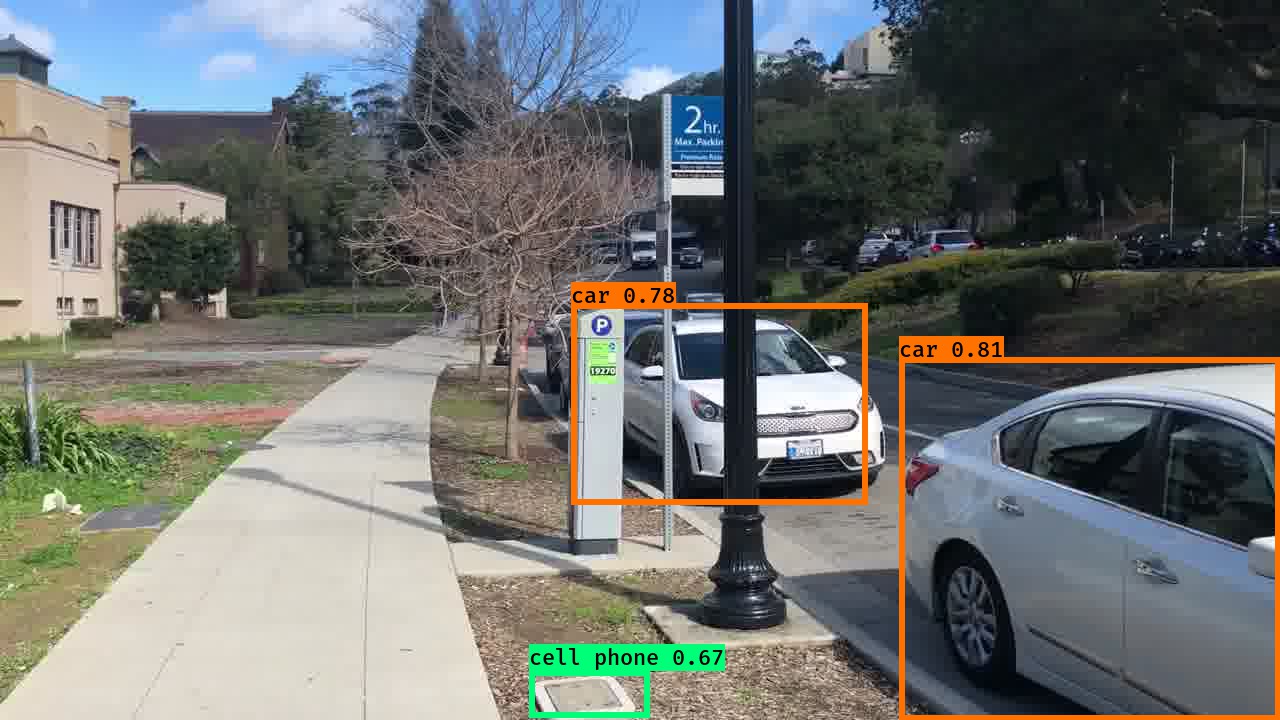
But overall, even this basic model performs well. Especially regarding important classes like "car" and "person".