A lightweight markdown editor library with perfect WYSIWYG alignment using an invisible textarea overlay technique. Includes optional toolbar. ~93KB minified with all features.
🎮 Try it out: Interactive demos on overtype.dev
- Basic Editor - Minimal setup with live preview
- With Toolbar - Full formatting toolbar
- Multiple Instances - Several editors on one page
- View Modes - Preview synchronization
- Themes - Light/dark theme switching
- All Features - Complete markdown showcase
- 👻 Invisible textarea overlay - Transparent input layer overlaid on styled preview for seamless editing
- 🎨 Global theming - Solar (light) and Cave (dark) themes that apply to all instances
- ⌨️ Keyboard shortcuts - Common markdown shortcuts (Cmd/Ctrl+B for bold, etc.)
- 📱 Mobile optimized - Responsive design with mobile-specific styles
- 🔄 DOM persistence aware - Recovers from existing DOM (perfect for HyperClay and similar platforms)
- 🚀 Lightweight - ~93KB minified
- 🎯 Optional toolbar - Clean, minimal toolbar with all essential formatting
- ✨ Smart shortcuts - Keyboard shortcuts with selection preservation
- 📝 Smart list continuation - GitHub-style automatic list continuation on Enter
- 🔧 Framework agnostic - Works with React, Vue, vanilla JS, and more
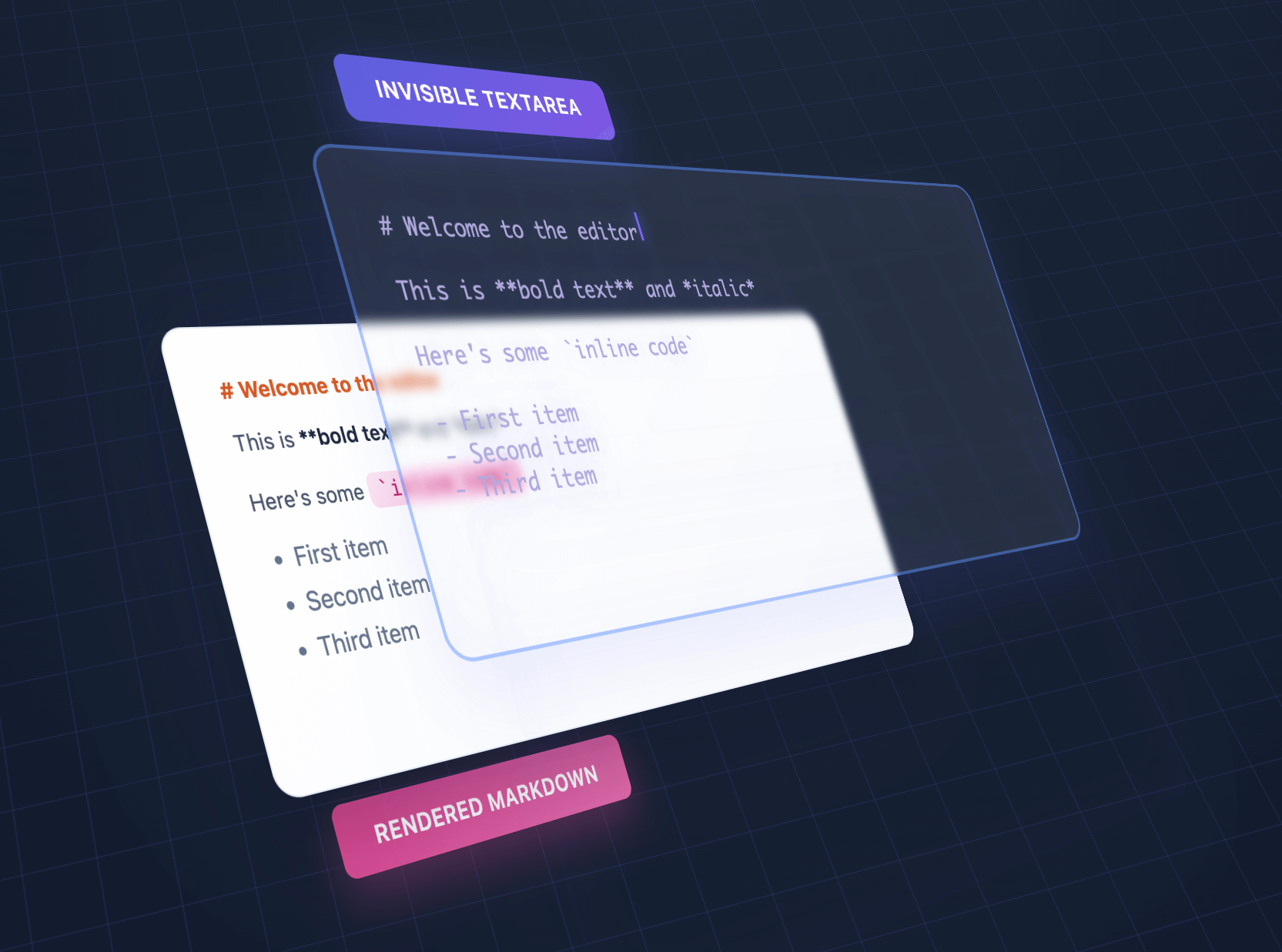
We overlap an invisible textarea on top of styled output, giving the illusion of editing styled text using a plain textarea.
| Feature | OverType | HyperMD | Milkdown | TUI Editor | EasyMDE |
|---|---|---|---|---|---|
| Size | ~93KB | 364.02 KB | 344.51 KB | 560.99 KB | 323.69 KB |
| Dependencies | Bundled | CodeMirror | ProseMirror + plugins | Multiple libs | CodeMirror |
| Setup | Single file | Complex config | Build step required | Complex config | Moderate |
| Approach | Invisible textarea | ContentEditable | ContentEditable | ContentEditable | CodeMirror |
| Mobile | Perfect native | Issues common | Issues common | Issues common | Limited |
| Markdown syntax | Visible | Hidden | Hidden | Toggle | Visible |
| Advanced features | Basic | Full | Full | Full | Moderate |
| Best for | Simple, fast, mobile | Full WYSIWYG | Modern frameworks | Enterprise apps | Classic editing |
Choose OverType when you need:
- Tiny bundle size (10x smaller than alternatives)
- Zero dependencies - single file that works immediately
- Perfect native browser features (undo/redo, mobile keyboards, spellcheck)
- Dead-simple integration without build tools
- Easy to understand, modify, and extend
- Excellent mobile support with visible markdown syntax
Choose other editors when you need:
- Full WYSIWYG with hidden markdown syntax
- Advanced features like tables, diagrams, or collaborative editing
- Rich plugin ecosystems
- Enterprise features and extensive customization
- Framework-specific integration (React, Vue, etc.)
- Complex multi-layered architecture for deep customization
npm install overtype<script src="https://unpkg.com/overtype/dist/overtype.min.js"></script>// Create a single editor const [editor] = new OverType('#editor', { value: '# Hello World', theme: 'solar' }); // Get/set content editor.getValue(); editor.setValue('# New Content'); // Change theme for this instance editor.setTheme('cave');<div id="editor" style="height: 400px;"></div> <script> const [editor] = new OverType('#editor', { placeholder: 'Start typing markdown...', value: '# Welcome\n\nStart writing **markdown** here!', onChange: (value, instance) => { console.log('Content changed:', value); } }); </script>// Enable default toolbar with all formatting buttons const [editor] = new OverType('#editor', { toolbar: true, value: '# Document\n\nSelect text and use the toolbar!' }); // Default toolbar: Bold, Italic, Code | Link | H1, H2, H3 | Lists, Tasks | Quote | View ModeCustom Toolbar (v2.0):
import OverType, { toolbarButtons } from 'overtype'; const [editor] = new OverType('#editor', { toolbar: true, toolbarButtons: [ toolbarButtons.bold, toolbarButtons.italic, toolbarButtons.separator, { name: 'save', icon: '<svg>...</svg>', title: 'Save', action: ({ editor, getValue }) => { localStorage.setItem('draft', getValue()); } } ] }); // Available: bold, italic, code, link, h1, h2, h3, bulletList, // orderedList, taskList, quote, separator, viewModeSee examples/custom-toolbar.html for complete examples.
Three modes available via toolbar dropdown or programmatically:
editor.showNormalEditMode(); // Default WYSIWYG editing editor.showPlainTextarea(); // Raw markdown, no preview editor.showPreviewMode(); // Read-only preview with clickable linksGitHub-style checkboxes render in preview mode:
const [editor] = new OverType('#editor', { value: '- [ ] Todo\n- [x] Done', toolbar: true // Use view mode dropdown to see checkboxes }); // Edit mode: Shows `- [ ]` and `- [x]` syntax (preserves alignment) // Preview mode: Renders actual checkbox inputsimport { codeToHtml } from 'shiki'; // Global highlighter (all instances) OverType.setCodeHighlighter((code, lang) => codeToHtml(code, { lang, theme: 'nord' }) ); // Per-instance override const [editor] = new OverType('#editor', { codeHighlighter: (code, lang) => myHighlighter(code, lang) });See docs/SYNTAX_HIGHLIGHTING.md for complete guide.
The toolbar and keyboard shortcuts work together seamlessly:
- Cmd/Ctrl + B - Bold
- Cmd/Ctrl + I - Italic
- Cmd/Ctrl + K - Insert link
- Cmd/Ctrl + Shift + 7 - Numbered list
- Cmd/Ctrl + Shift + 8 - Bullet list
All shortcuts preserve text selection, allowing you to apply multiple formats quickly.
// Initialize multiple editors at once const editors = OverType.init('.markdown-editor', { theme: 'cave', fontSize: '16px' }); // Each editor is independent editors.forEach((editor, index) => { editor.setValue(`# Editor ${index + 1}`); });// Use with form validation const [editor] = new OverType('#message', { placeholder: 'Your message...', textareaProps: { required: true, maxLength: 500, name: 'message' } }); // The textarea will work with native form validation document.querySelector('form').addEventListener('submit', (e) => { const content = editor.getValue(); // Form will automatically validate required field });const [editor] = new OverType('#editor', { theme: { name: 'my-theme', colors: { bgPrimary: '#faf0ca', bgSecondary: '#ffffff', text: '#0d3b66', h1: '#f95738', h2: '#ee964b', h3: '#3d8a51', strong: '#ee964b', em: '#f95738', link: '#0d3b66', code: '#0d3b66', codeBg: 'rgba(244, 211, 94, 0.2)', blockquote: '#5a7a9b', hr: '#5a7a9b', syntaxMarker: 'rgba(13, 59, 102, 0.52)', cursor: '#f95738', selection: 'rgba(244, 211, 94, 0.4)' } } });Generate HTML previews or export the rendered content:
const [editor] = new OverType('#editor', { value: '# Title\n\n**Bold** text with [links](https://example.com)' }); // Get the raw markdown const markdown = editor.getValue(); // Returns: "# Title\n\n**Bold** text with [links](https://example.com)" // Get rendered HTML with syntax markers (for debugging/inspection) const html = editor.getRenderedHTML(); // Returns HTML with <span class="syntax-marker"> elements visible // Get clean HTML for export (no OverType-specific markup) const cleanHTML = editor.getRenderedHTML({ cleanHTML: true }); // Returns clean HTML suitable for saving/exporting // Convenience method for clean HTML const exportHTML = editor.getCleanHTML(); // Same as getRenderedHTML({ cleanHTML: true }) // Get the current preview element's HTML (actual DOM content) const previewHTML = editor.getPreviewHTML(); // Returns exactly what's shown in the editor's preview layer // Example: Export clean HTML to server const htmlToSave = editor.getCleanHTML(); // No syntax markers // Example: Clone exact preview appearance document.getElementById('clone').innerHTML = editor.getPreviewHTML();Enable a built-in stats bar that shows character, word, and line counts:
// Enable stats bar on initialization const [editor] = new OverType('#editor', { showStats: true }); // Show or hide stats bar dynamically editor.showStats(true); // Show editor.showStats(false); // Hide // Custom stats format const [editor] = new OverType('#editor', { showStats: true, statsFormatter: (stats) => { // stats object contains: { chars, words, lines, line, column } return `<span>${stats.chars} characters</span> <span>${stats.words} words</span> <span>${stats.lines} lines</span> <span>Line ${stats.line}, Col ${stats.column}</span>`; } });The stats bar automatically adapts to your theme colors using CSS variables.
function MarkdownEditor({ value, onChange }) { const ref = useRef(); const editorRef = useRef(); useEffect(() => { const [instance] = OverType.init(ref.current, { value, onChange }); editorRef.current = instance; return () => editorRef.current?.destroy(); }, []); useEffect(() => { if (editorRef.current && value !== editorRef.current.getValue()) { editorRef.current.setValue(value); } }, [value]); return <div ref={ref} style={{ height: '400px' }} />; }Import and use the markdown parser without the full editor for server-side rendering, static site generation, or browser extensions:
// Import just the parser import { MarkdownParser } from 'overtype/parser'; // Parse markdown to HTML const html = MarkdownParser.parse('# Hello World\n\nThis is **bold** text.'); // Use in Node.js for SSR app.get('/preview', (req, res) => { const markdown = req.body.content; const html = MarkdownParser.parse(markdown); res.json({ html }); }); // Use in static site generator const posts = markdownFiles.map(file => ({ content: MarkdownParser.parse(file.content), metadata: file.metadata })); // Use in browser extension chrome.runtime.onMessage.addListener((request, sender, sendResponse) => { if (request.markdown) { const html = MarkdownParser.parse(request.markdown); sendResponse({ html }); } });Benefits:
- No DOM dependencies required
- Smaller bundle when you only need parsing
- Same markdown rendering as the editor
- Perfect for headless/server-side use cases
new OverType(target, options)Parameters:
target- Selector string, Element, NodeList, or Array of elementsoptions- Configuration object (see below)
Returns: Array of OverType instances (always an array, even for single element)
{ // Typography fontSize: '14px', lineHeight: 1.6, fontFamily: 'monospace', padding: '16px', // Theme - 'solar', 'cave', or custom theme object theme: 'solar', // Custom colors (override theme colors) colors: { h1: '#e63946', h2: '#457b9d', // ... any color variable }, // Mobile styles (applied at <= 640px) mobile: { fontSize: '16px', padding: '12px', lineHeight: 1.5 }, // Behavior autofocus: false, placeholder: 'Start typing...', value: '', // Auto-resize autoResize: false, // Auto-expand height with content minHeight: '100px', // Minimum height when autoResize is enabled maxHeight: null, // Maximum height (null = unlimited) // Native textarea properties textareaProps: { required: true, maxLength: 500, name: 'content', // Any HTML textarea attribute }, // Toolbar toolbar: false, // Enable/disable toolbar toolbarButtons: [], // Custom button array (v2.0) // Defaults to all built-in buttons when toolbar: true // Syntax highlighting codeHighlighter: null, // Function: (code, lang) => html // Overrides global OverType.setCodeHighlighter() // Smart lists smartLists: true, // Enable GitHub-style list continuation on Enter // Stats bar showStats: false, // Enable/disable stats bar statsFormatter: (stats) => { // Custom stats format return `${stats.chars} chars | ${stats.words} words`; }, // Callbacks onChange: (value, instance) => {}, onKeydown: (event, instance) => {} }// Get current markdown content editor.getValue() // Set markdown content editor.setValue(markdown) // Get rendered HTML of the current content editor.getRenderedHTML() // With syntax markers (for debugging) editor.getRenderedHTML({ cleanHTML: true }) // Clean HTML without OverType markup editor.getCleanHTML() // Alias for getRenderedHTML({ cleanHTML: true }) // Get the current preview element's HTML editor.getPreviewHTML() // Actual DOM content from preview layer // Change theme (instance-specific, overrides global theme) editor.setTheme('cave') // Built-in theme name editor.setTheme(customThemeObject) // Custom theme // Set code highlighter (instance-specific) editor.setCodeHighlighter((code, lang) => highlightedHTML) editor.setCodeHighlighter(null) // Disable for this instance // View modes editor.showNormalEditMode() // Switch to normal edit mode (default) editor.showPlainTextarea() // Switch to plain textarea mode editor.showPreviewMode() // Switch to preview mode // Focus/blur editor.focus() editor.blur() // Show or hide stats bar editor.showStats(true) // Show stats editor.showStats(false) // Hide stats // Check if initialized editor.isInitialized() // Re-initialize with new options editor.reinit(options) // Destroy the editor editor.destroy()// Set global theme (affects all instances without instance themes) OverType.setTheme('cave') // Built-in theme OverType.setTheme(customTheme) // Custom theme object OverType.setTheme('solar', { h1: '#custom' }) // Override specific colors // Set global code highlighter (affects all instances without instance highlighter) OverType.setCodeHighlighter((code, lang) => highlightedHTML) OverType.setCodeHighlighter(null) // Disable global highlighting // Note: Instance methods override global settings // Initialize multiple editors (same as constructor) OverType.init(target, options) // Get instance from element OverType.getInstance(element) // Destroy all instances OverType.destroyAll() // Access themes OverType.themes.solar OverType.themes.cave| Shortcut | Action |
|---|---|
| Cmd/Ctrl + B | Toggle bold |
| Cmd/Ctrl + I | Toggle italic |
| Cmd/Ctrl + K | Wrap in code |
| Cmd/Ctrl + Shift + K | Insert link |
| Cmd/Ctrl + Shift + 7 | Toggle numbered list |
| Cmd/Ctrl + Shift + 8 | Toggle bullet list |
- Headers -
# H1,## H2,### H3 - Bold -
**text**or__text__ - Italic -
*text*or_text_ - Strikethrough -
~~text~~or~text~(GFM) - Code -
`inline code` - Code blocks -
```language - Links -
[text](url) - Lists -
- item,* item,1. item - Task lists -
- [ ] todo,- [x] done(GFM, renders in preview mode) - Blockquotes -
> quote - Horizontal rule -
---,***, or___
Note: Syntax remains visible in edit mode (e.g., **bold** shows markers). Use preview mode for full rendering.
OverType provides a fully-featured native Web Component <overtype-editor> with Shadow DOM encapsulation and a declarative HTML API.
Quick example:
<overtype-editor value="# Hello OverType!" theme="solar" height="300px" toolbar> </overtype-editor>📖 Complete Web Component Documentation
Features include:
- Complete style isolation with Shadow DOM
- 15 reactive HTML attributes
- Framework-agnostic (React, Vue, Angular)
- Built-in themes (Solar, Cave)
- Custom events API
- Zero configuration required
Old options removed:
// ❌ No longer supported { customToolbarButtons: [...], hideButtons: [...], buttonOrder: [...] }New approach:
// ✅ v2.0: Single explicit array import { toolbarButtons } from 'overtype'; { toolbar: true, toolbarButtons: [ toolbarButtons.bold, toolbarButtons.italic, { name: 'custom', icon: '...', action: ({ editor, getValue }) => {} } ] }If using default toolbar (toolbar: true with no customization), no changes needed.
See examples/custom-toolbar.html for migration examples.
OverType is designed to work with platforms that persist DOM across page loads (like HyperClay):
// Safe to call multiple times - will recover existing editors OverType.init('.editor'); // The library will: // 1. Check for existing OverType DOM structure // 2. Recover content from existing textarea if found // 3. Re-establish event bindings // 4. Or create fresh editor if no existing DOMCheck the examples folder for complete examples:
basic.html- Simple single editormultiple.html- Multiple independent editorscustom-theme.html- Theme customizationcustom-toolbar.html- Custom toolbar buttons (v2.0)dynamic.html- Dynamic creation/destruction
Due to the transparent textarea overlay approach, OverType has some intentional design limitations:
Images () are not rendered. Variable-height images would break the character alignment between textarea and preview.
All text must use a monospace font to maintain alignment. Variable-width fonts would cause the textarea cursor position to drift from the visual text position.
All content must use the same font size. Different sizes for headers or other elements would break vertical alignment.
All markdown formatting characters remain visible (e.g., **bold** shows the asterisks). This is intentional - hiding them would break the 1:1 character mapping.
Links are clickable with Cmd/Ctrl+Click only. Direct clicking would interfere with text editing since clicks need to position the cursor in the textarea.
These limitations are what enable OverType's core benefits: perfect native textarea behavior, tiny size, and zero complexity.
# Install dependencies npm install # Development build with watch npm run dev # Production build npm run build # Run tests npm test # Check bundle size npm run size- Chrome 62+
- Firefox 78+
- Safari 16+
- Edge (Chromium)
Requires support for:
- CSS Custom Properties
- ES6 features
- Lookbehind assertions in RegExp (for italic parsing)
OverType uses a unique invisible textarea overlay approach:
-
Two perfectly aligned layers:
- Invisible textarea (top) - handles input and cursor
- Styled preview div (bottom) - shows formatted markdown
-
Character-perfect alignment:
- Monospace font required
- No size changes in styling
- Syntax markers remain visible
-
Single source of truth:
- Textarea content drives everything
- One-way data flow: textarea → parser → preview
Special thanks to:
- Josh Doman - Fixed inline code formatting preservation (#6), improved code fence detection (#19)
- kbhomes - Fixed text selection desynchronization during overscroll (#17)
- Kristián Kostecký - Fixed toolbar option being ignored in reinit() (#62)
- Lyric Wai - Fixed double-escaping of links (#64), reported code block alignment issues (#65)
- kozi - Reported link tooltip issues in Firefox (#68), toolbar positioning (#69), theme synchronization issues (#70, #71)
- merlinz01 - Initial TypeScript definitions implementation (#20)
- ChasLui - Web component implementation (under review) (#40)
- davidlazar - Suggested view mode feature for toggling overlay and preview modes (#24)
- Yukai Huang - Syntax highlighting support (under review) (#35)
- Rognoni - Suggested custom toolbar button API (#61)
- Deyan Gigov - Reported checkbox rendering issue in preview mode (#60)
- Ned Twigg - Browser extension developer feedback, gitcasso extension (#59)
- Victor - Suggested exporting MarkdownParser for standalone use (#58)
- Bernhard Weichel - Reported mode switching scroll sync bug (#52)
- Colin Devroe - Reported theme API confusion (#54)
- Max Bernstein - Fixed typo in website (#11)
MIT
Contributions are welcome! Please feel free to submit a Pull Request.
Built with the radical idea that sometimes dumb ideas work.
Ready for another radical idea?
Let's remove every layer of the web application stack.
Hyperclay by @panphora allows you to make a web app in a single, portable, self-updating, vanilla HTML file. No frameworks, no build steps, no deployment pipelines. Just a single HTML file that persists its own state and can be edited live.
Think of it as a Google Document for interactive code, where the UI, logic, and data all live in one self-modifying file. Share apps instantly, edit them directly, use them offline.