7

I have spent the past couple of days working on this and am going around in circles.

My question is based around the answer I accepted in this post: stackoverflow question

I now have my data moved from a single 400 column table to a much more managable database structure with many thanks to Damir Sudarevic.

My database looks like this:
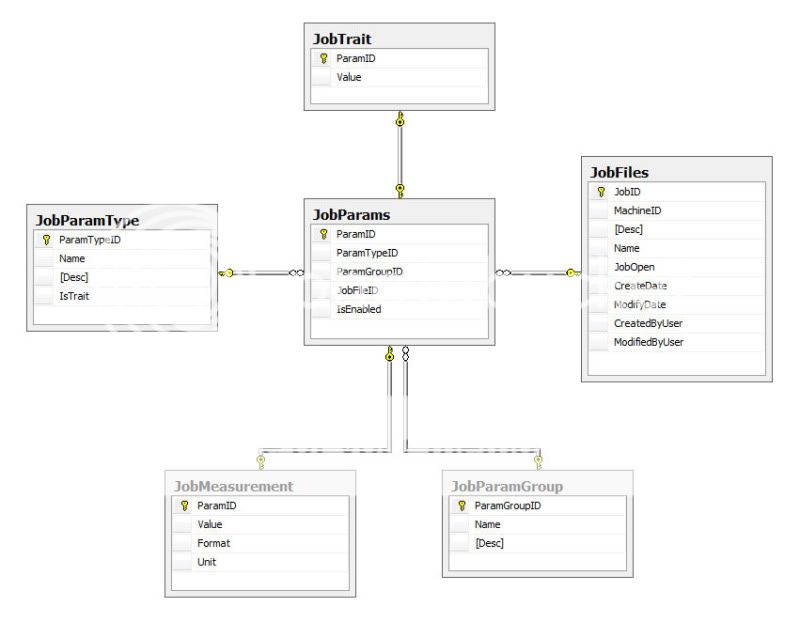
alt text

 CREATE TABLE JobFiles ( JobID UNIQUEIDENTIFIER PRIMARY KEY, MachineID UNIQUEIDENTIFIER REFERENCES Machines(MachineID), [Desc] NVARCHAR(MAX), Name NVARCHAR(255), JobOpen BIT, [CreateDate] DATETIME NOT NULL DEFAULT GETDATE(), [ModifyDate] DATETIME NOT NULL DEFAULT GETDATE(), [CreatedByUser] NVARCHAR(64) DEFAULT '', [ModifiedByUser] NVARCHAR(64) DEFAULT '') GO CREATE TABLE JobParamType ( ParamTypeID UNIQUEIDENTIFIER PRIMARY KEY, Name NVARCHAR(255), [Desc] NVARCHAR(MAX), IsTrait NVARCHAR) GO CREATE TABLE JobParamGroup ( ParamGroupID UNIQUEIDENTIFIER PRIMARY KEY, Name NVARCHAR(255), [Desc] NVARCHAR(MAX)) GO CREATE TABLE JobParams ( ParamID UNIQUEIDENTIFIER PRIMARY KEY, ParamTypeID UNIQUEIDENTIFIER REFERENCES JobParamType(ParamTypeID), ParamGroupID UNIQUEIDENTIFIER REFERENCES JobParamGroup(ParamGroupID), JobFileID UNIQUEIDENTIFIER REFERENCES JobFiles(JobID), IsEnabled BIT) GO -- Text based property CREATE TABLE JobTrait ( ParamID UNIQUEIDENTIFIER PRIMARY KEY REFERENCES JobParams(ParamID), Value NVARCHAR(MAX) ) GO -- Numeric based property CREATE TABLE JobMeasurement ( ParamID UNIQUEIDENTIFIER PRIMARY KEY REFERENCES JobParams(ParamID), Value FLOAT, Format NVARCHAR(20), Unit NVARCHAR(MAX) ) GO 

However, for a particular function of my application I need to list every JobParamType.Name row as columns containing a JobMeasurement.Value or JobTrait.Value as its data for each JobFiles.Name.

JobParamType.IsTrait is used to determine if a value is a Measurement or Trait.

i.e.

JobName | ParamName1 | ParamName2 | ParamName3 ... | ParamName400 "MyJob" MesurementValue TraitValue MesurementValue ... TraitValue "TestJob" MesurementValue TraitValue MesurementValue ... TraitValue "Job2" MesurementValue TraitValue MesurementValue ... TraitValue etc 

I have been playing with pivoting tables and have managed to get the columns from the JobParamType table by looking at examples and following them but it is now getting quite complicated because my data is split between several tables and it is starting to make my head hurt!!!

DECLARE @cols NVARCHAR(MAX) SELECT @cols = STUFF(( SELECT DISTINCT TOP 10 PERCENT '],[' + tParams.Name FROM dbo.JobParamType AS tParams ORDER BY '],[' + tParams.Name FOR XML PATH('') ), 1, 2, '') + ']' print @cols 

I am hoping someone could help me with the pivoting and getting the data from multiple tables.

I hope this makes sense and I look forward to your help and discussions.

Thank you in advanced.

1 Answer 1

8

I will post a few examples from this model -- because I already have them. Both models are very similar, so you should not have too much trouble adopting this technique.

When it comes to headache, I find that the simplest way is to go step by step, and optimize later.

Step 1.
Create a view to flatten the model; (see the model)

CREATE VIEW dbo.vProperties AS SELECT m.MachineID AS [Machine ID] ,s.SetupID AS [Setup ID] ,p.PropertyID AS [Property ID] ,t.PropertyTypeID AS [Property Type ID] ,m.Name AS [Machine Name] ,s.Name AS [Setup Name] ,t.Name AS [Property Type Name] ,t.IsTrait AS [Is Trait] ,x.Value AS [Measurement Value] ,x.Unit AS [Unit] ,y.Value AS [Trait] FROM dbo.Machine AS m JOIN dbo.Setup AS s ON s.MachineID = m.MachineID JOIN dbo.Property AS p ON p.SetupID = s.SetupID JOIN dbo.PropertyType AS t ON t.PropertyTypeID = p.PropertyTypeID LEFT JOIN dbo.Measurement AS x ON x.PropertyID = p.PropertyID LEFT JOIN dbo.Trait AS y ON y.PropertyID = p.PropertyID 

Step 2.

Create a view to generate only [Setup Name], [Property Type Name], [Value]; note that in this one the measurement value and trait end up in the same column. You would probably use JobName, ParameterTypeName, Value

CREATE VIEW dbo.vSetupValues AS SELECT [Setup Name] ,[Property Type Name] ,COALESCE(cast([Measurement Value] AS varchar(50)), [Trait]) AS [Val] FROM dbo.vProperties 

Step 3.

Create list of properties (Parameters) with a column to order by

DECLARE @Props TABLE ( id int IDENTITY (1,1) ,PropName varchar(50) ); INSERT INTO @Props (PropName) SELECT DISTINCT [Name] FROM dbo.PropertyType 

Step 4.

Now I will dynamically create the query text

DECLARE @qw TABLE( id int IDENTITY (1,1) , txt nchar(500) ) INSERT INTO @qw (txt) SELECT 'SELECT' UNION SELECT '[Setup Name]' ; INSERT INTO @qw (txt) SELECT ',MAX(CASE [Property Type Name] WHEN ''' + PropName + ''' THEN Val ELSE NULL END) AS [' + PropName + ']' FROM @Props ORDER BY id; INSERT INTO @qw (txt) SELECT 'FROM dbo.vSetupValues' UNION SELECT 'GROUP BY [Setup Name]' UNION SELECT 'ORDER BY [Setup Name]'; 

Step 5.

And here is the text of the query, form this point I can package this into a stored procedure, another view, or into a variable to use as dynamic sql.

SELECT txt FROM @qw 

returns

SELECT [Setup Name] ,MAX(CASE [Property Type Name] WHEN 'Diameter LSL' THEN [Val] ELSE NULL END) AS [Diameter LSL] ,MAX(CASE [Property Type Name] WHEN 'Diameter USL' THEN [Val] ELSE NULL END) AS [Diameter USL] ,MAX(CASE [Property Type Name] WHEN 'Force LSL' THEN [Val] ELSE NULL END) AS [Force LSL] ,MAX(CASE [Property Type Name] WHEN 'Force USL' THEN [Val] ELSE NULL END) AS [Force USL] ,MAX(CASE [Property Type Name] WHEN 'Leak LSL' THEN [Val] ELSE NULL END) AS [Leak LSL] ,MAX(CASE [Property Type Name] WHEN 'Leak USL' THEN [Val] ELSE NULL END) AS [Leak USL] ,MAX(CASE [Property Type Name] WHEN 'Press Travel LSL' THEN [Val] ELSE NULL END) AS [Press Travel LSL] ,MAX(CASE [Property Type Name] WHEN 'Press Travel USL' THEN [Val] ELSE NULL END) AS [Press Travel USL] ,MAX(CASE [Property Type Name] WHEN 'Seal Height LSL' THEN [Val] ELSE NULL END) AS [Seal Height LSL] ,MAX(CASE [Property Type Name] WHEN 'Seal Height USL' THEN [Val] ELSE NULL END) AS [Seal Height USL] FROM dbo.vSetupValues GROUP BY [Setup Name] ORDER BY [Setup Name] 

And if I run this:
alt text
(source: damirsystems.com)


UPDATE: fixed bug at step 4, was missing max() and added results example.

Sign up to request clarification or add additional context in comments.

9 Comments

Thank you... your time and efforts are very much appreciated. Bit more complicated than I first though this task would be so will be sifting through your example today and will break it down into steps.
Damir, Your a genius, thank you. That works perfectly. Just one last question. How would I run this command like you have above. Step 5 "SELECT txt FROM @qw" display the command in a table (via SQL Management Studio) and I have to copy and paste it into a new query. Again, thank you
The idea is to "package" the final query into a view, a procedure or a variable -- depending on how often your list of parameters may change. If those 400 parameters change few times a year, use view and build changes manually. If they change daily, put this into a variable and execute as dynamic sql -- also automate steps 3 and 4.
Note: in previous comment "how often do parameters change" refers to adding new parameters to the list or renaming them -- not changing values of parameters.
the parameters could have new ones added and deleted, probably not daily though. What I am trying to achieve is to put the final select query into a variable so that I can execute it as dynamic sql via a Stored Procedure. I thought this would be the easiest bit but I am struggling to work this bit out.
|

Start asking to get answers

Find the answer to your question by asking.

Ask question

Explore related questions

See similar questions with these tags.