158

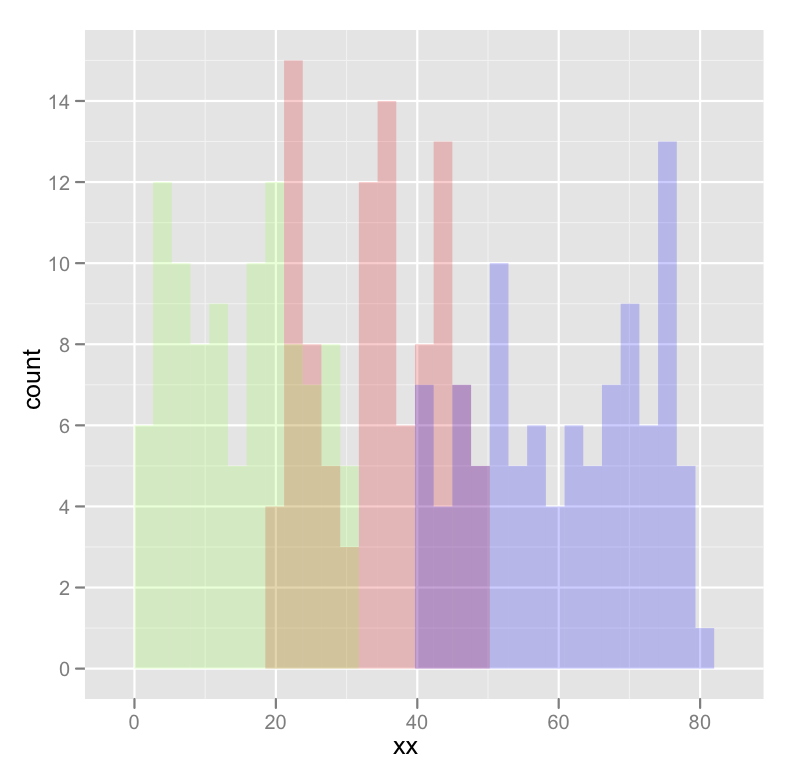
I am new to R and am trying to plot 3 histograms onto the same graph. Everything worked fine, but my problem is that you don't see where 2 histograms overlap - they look rather cut off.

When I make density plots, it looks perfect: each curve is surrounded by a black frame line, and colours look different where curves overlap.

Can someone tell me if something similar can be achieved with the histograms in the 1st picture? This is the code I'm using:

lowf0 <-read.csv (....) mediumf0 <-read.csv (....) highf0 <-read.csv(....) lowf0$utt<-'low f0' mediumf0$utt<-'medium f0' highf0$utt<-'high f0' histogram<-rbind(lowf0,mediumf0,highf0) ggplot(histogram, aes(f0, fill = utt)) + geom_histogram(alpha = 0.2) 
1
  • 4
    The hyperlinks to the histogram and the density plot are broken Commented Sep 19, 2016 at 14:47

3 Answers 3

318

Using @joran's sample data,

ggplot(dat, aes(x=xx, fill=yy)) + geom_histogram(alpha=0.2, position="identity") 

Note that geom_histogram() default is position="stack".

see "position adjustment" within geom_histogram documentation

Sign up to request clarification or add additional context in comments.

9 Comments

I think this should be the top answer since it avoids repeating code
position = 'identity' isn't just a more readable answer, it gels more nicely with more complicated plots, such as mixed calls to aes() and aes_string().
This answer will also automatically display a legend to the colors, whereas the answer by @joran won't. The legend can then be modified using, e.g. scale_fill_manual(). This function can also be used to modify the colors in the histograms.
Also, be sure that the variable used in fill is a factor.
Personally I think stackoverflow should list the most upvoted answer first. The "correct answer" only represents one person's opinion.
|
129

Your current code:

ggplot(histogram, aes(f0, fill = utt)) + geom_histogram(alpha = 0.2) 

is telling ggplot to construct one histogram using all the values in f0 and then color the bars of this single histogram according to the variable utt.

What you want instead is to create three separate histograms, with alpha blending so that they are visible through each other. So you probably want to use three separate calls to geom_histogram, where each one gets it's own data frame and fill:

ggplot(histogram, aes(f0)) + geom_histogram(data = lowf0, fill = "red", alpha = 0.2) + geom_histogram(data = mediumf0, fill = "blue", alpha = 0.2) + geom_histogram(data = highf0, fill = "green", alpha = 0.2) + 

Here's a concrete example with some output:

dat <- data.frame(xx = c(runif(100,20,50),runif(100,40,80),runif(100,0,30)),yy = rep(letters[1:3],each = 100)) ggplot(dat,aes(x=xx)) + geom_histogram(data=subset(dat,yy == 'a'),fill = "red", alpha = 0.2) + geom_histogram(data=subset(dat,yy == 'b'),fill = "blue", alpha = 0.2) + geom_histogram(data=subset(dat,yy == 'c'),fill = "green", alpha = 0.2) 

which produces something like this:

enter image description here

Edited to fix typos; you wanted fill, not colour.

5 Comments

This doesn't work when the subset has different size. Any idea how address this? (E.g. use data with 100 points on "a", 50 on "b").
One downside of this approach is that I had difficulty getting it to display a legend (though this could just be due to my lack of knowledge). The other answer below by @kohske will by default display a legend which can then be modified (along with the specific colors displayed on the histogram) with, e.g. scale_fill_manual().
exactly, how can we add legend to this??
@shenglih For a legend, kohske's answer below is better. His answer is also just generally better.
where does f0 come from?
62

While only a few lines are required to plot multiple/overlapping histograms in ggplot2, the results are't always satisfactory. There needs to be proper use of borders and coloring to ensure the eye can differentiate between histograms.

The following functions balance border colors, opacities, and superimposed density plots to enable the viewer to differentiate among distributions.

Single histogram:

plot_histogram <- function(df, feature) { plt <- ggplot(df, aes(x=eval(parse(text=feature)))) + geom_histogram(aes(y = ..density..), alpha=0.7, fill="#33AADE", color="black") + geom_density(alpha=0.3, fill="red") + geom_vline(aes(xintercept=mean(eval(parse(text=feature)))), color="black", linetype="dashed", size=1) + labs(x=feature, y = "Density") print(plt) } 

Multiple histogram:

plot_multi_histogram <- function(df, feature, label_column) { plt <- ggplot(df, aes(x=eval(parse(text=feature)), fill=eval(parse(text=label_column)))) + geom_histogram(alpha=0.7, position="identity", aes(y = ..density..), color="black") + geom_density(alpha=0.7) + geom_vline(aes(xintercept=mean(eval(parse(text=feature)))), color="black", linetype="dashed", size=1) + labs(x=feature, y = "Density") plt + guides(fill=guide_legend(title=label_column)) } 

Usage:

Simply pass your data frame into the above functions along with desired arguments:

plot_histogram(iris, 'Sepal.Width') 
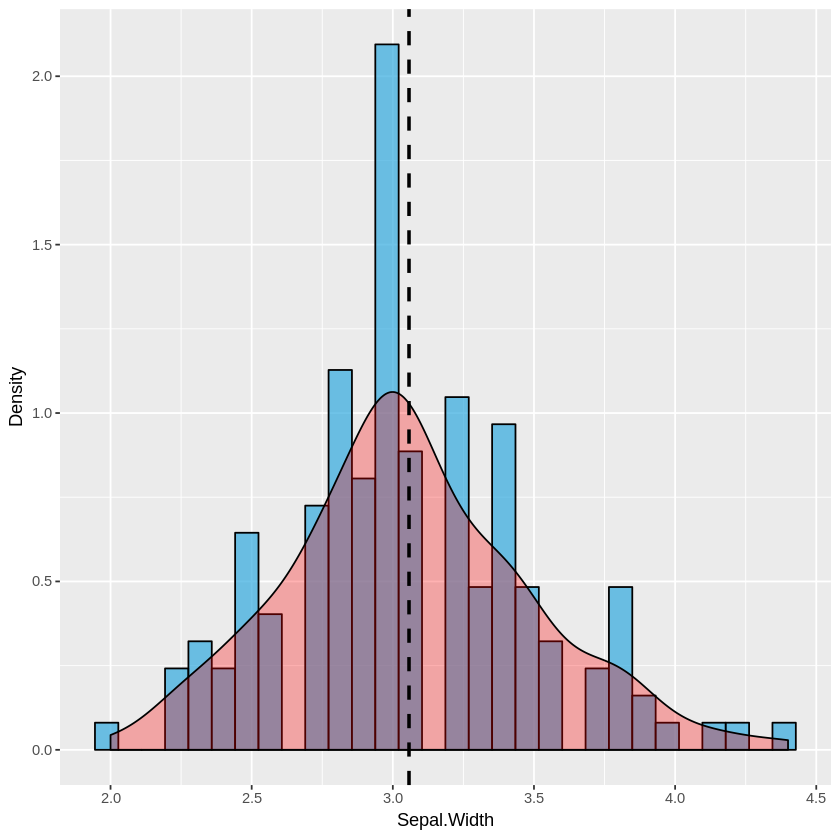
enter image description here

plot_multi_histogram(iris, 'Sepal.Width', 'Species') 
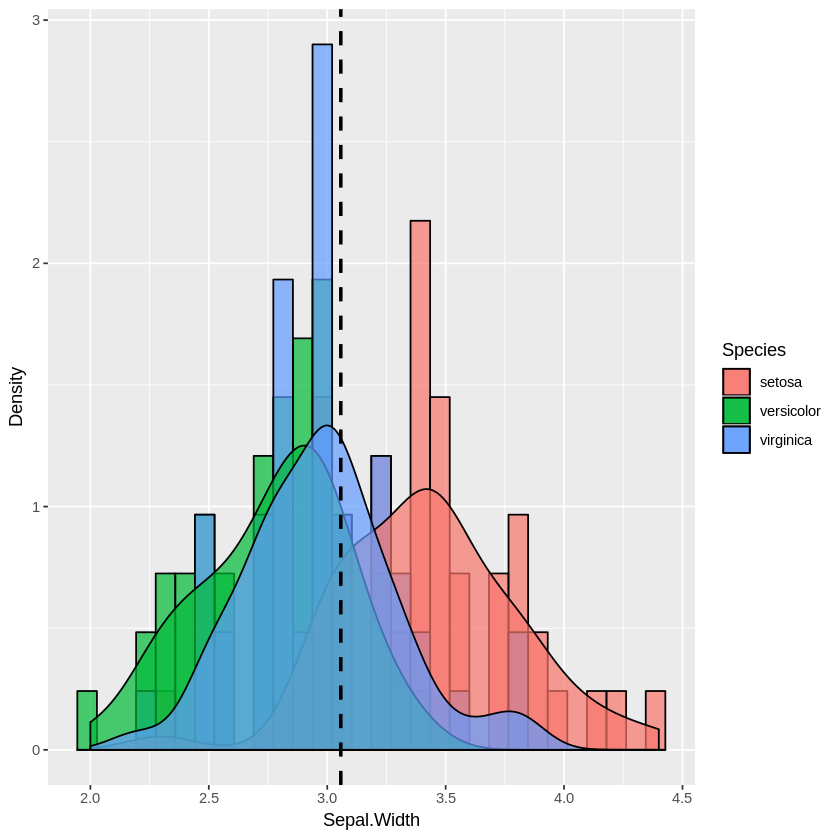
enter image description here

The extra parameter in plot_multi_histogram is the name of the column containing the category labels.

We can see this more dramatically by creating a dataframe with many different distribution means:

a <-data.frame(n=rnorm(1000, mean = 1), category=rep('A', 1000)) b <-data.frame(n=rnorm(1000, mean = 2), category=rep('B', 1000)) c <-data.frame(n=rnorm(1000, mean = 3), category=rep('C', 1000)) d <-data.frame(n=rnorm(1000, mean = 4), category=rep('D', 1000)) e <-data.frame(n=rnorm(1000, mean = 5), category=rep('E', 1000)) f <-data.frame(n=rnorm(1000, mean = 6), category=rep('F', 1000)) many_distros <- do.call('rbind', list(a,b,c,d,e,f)) 

Passing data frame in as before (and widening chart using options):

options(repr.plot.width = 20, repr.plot.height = 8) plot_multi_histogram(many_distros, 'n', 'category') 
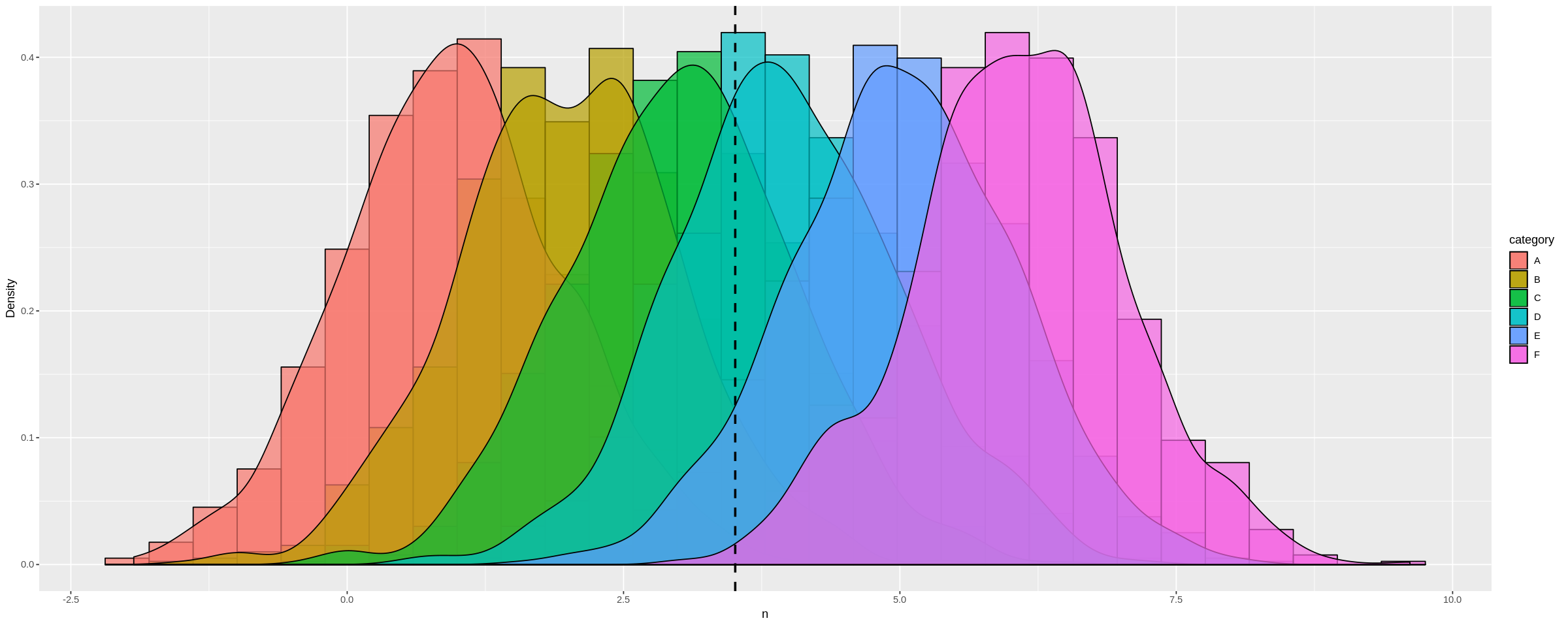
enter image description here

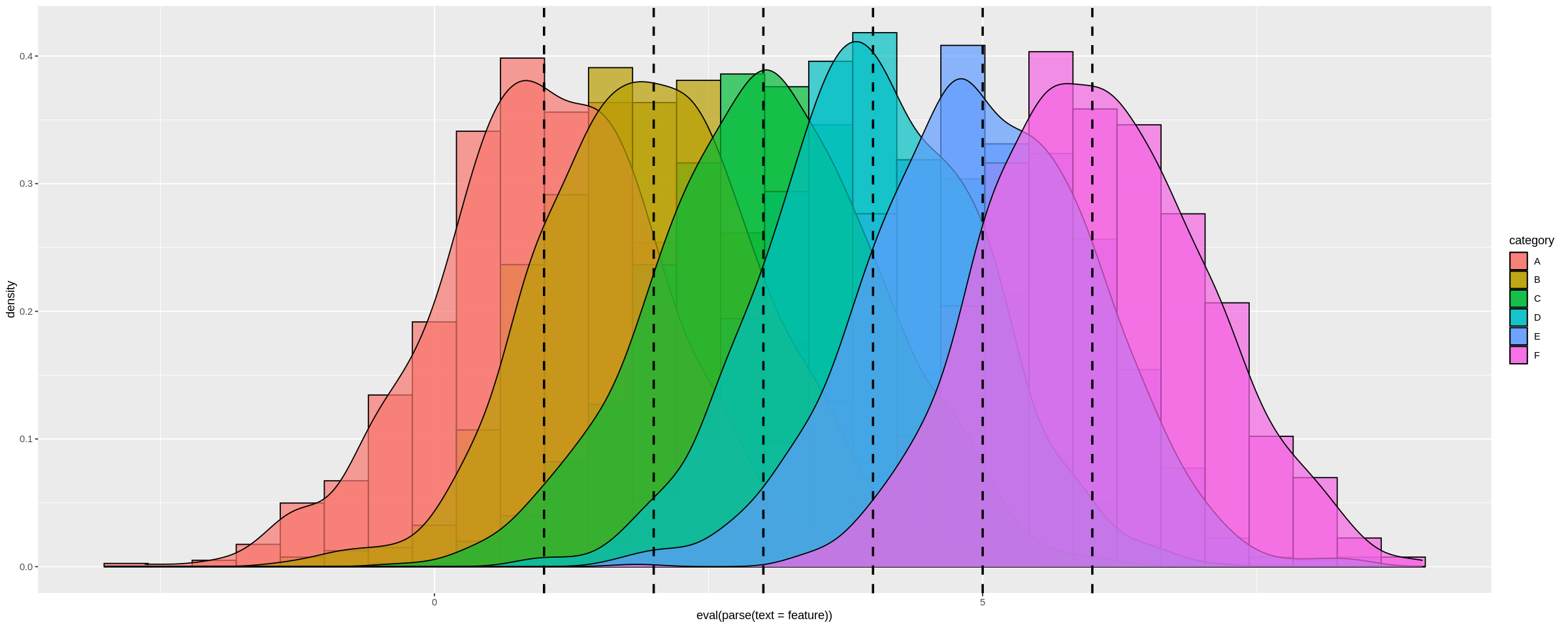
To add a separate vertical line for each distribution:

plot_multi_histogram <- function(df, feature, label_column, means) { plt <- ggplot(df, aes(x=eval(parse(text=feature)), fill=eval(parse(text=label_column)))) + geom_histogram(alpha=0.7, position="identity", aes(y = ..density..), color="black") + geom_density(alpha=0.7) + geom_vline(xintercept=means, color="black", linetype="dashed", size=1) labs(x=feature, y = "Density") plt + guides(fill=guide_legend(title=label_column)) } 

The only change over the previous plot_multi_histogram function is the addition of means to the parameters, and changing the geom_vline line to accept multiple values.

Usage:

options(repr.plot.width = 20, repr.plot.height = 8) plot_multi_histogram(many_distros, "n", 'category', c(1, 2, 3, 4, 5, 6)) 

Result:
enter image description here

Since I set the means explicitly in many_distros I can simply pass them in. Alternatively you can simply calculate these inside the function and use that way.

7 Comments

This is very useful, hopefully gets more attention.
@EdwardTyler Very true. I wish I could upvote this more than once!
This is great! The only thing I wish was improved is the vertical line. It was good if we could get separate vertical lines for each distribution.
@mah65 see updated answer
@Julien The answer has 51 votes at time of comment. Not to mention other comments that have found my answer extremely helpful. Programming isn't about knowing an exact answer it's about the general concept/pattern, which can be applied universally. My answer is solid.
|

Start asking to get answers

Find the answer to your question by asking.

Ask question

Explore related questions

See similar questions with these tags.