PostgreSqlAutoDocPlugin
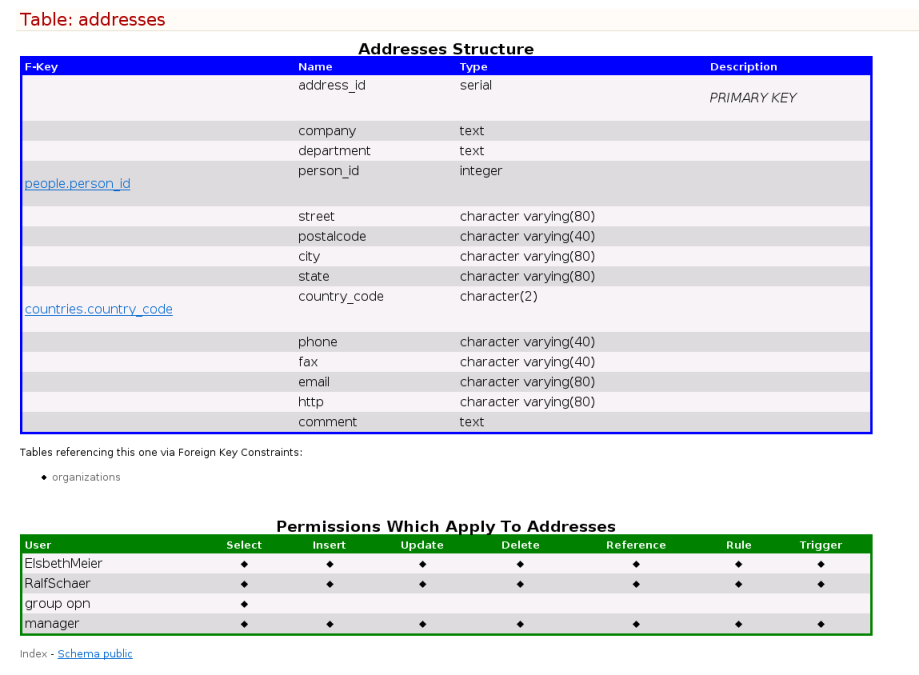
The plugin allows to generate a automatical documentatation of a PostgreSQL database, each time the topic is posted. It uses the system callpostgresql_autodoc available on Linux OS. The postgresql_autodoc writes a HTML file in the plugin directory. The Plugin inserts the documentation content of the file into the topic. Syntax Rules
The plugin synthax is: %POSTGRESQLAUTODOC{host="host" [port="port"] database="database" user="user"}% The host is the postgresql server, the port is the database server port, the database is the name of the database to connect to, the user is the login name for the database connection. The Plugin checks if the logged-in TWiki user is allowed to make a database connection. The user must be listed in the TWiki configuration hash $TWiki::cfg{Plugins}{PostgreSqlAutoDocPlugin}{Acl} of the local TWiki configuration file lib/LocalSite.cfg: # ACL's for the PostgreSqlAutoDoc plugin $TWiki::cfg{Plugins}{PostgreSqAutoDocPlugin}{Acl} = "FirstnameLastname, ..."; If this is the case, the plugin makes a database connection as user user. The password is taken from the configuration file %POSTGRESQLSELECT_ACCESS in the home directory /%POSTGRESQLSELECT_HOME%/FirstnameLastname/ which must contain a line as: *:*:*:*:passwordThis file must be readable for the Apache UID.
Changing the Layout
The layout of thepostgresql_doc is controled by the Perl Template file /usr/share/postgresql-autodoc/html.tmpl. You find a proposed sample in the attachments. Security Considerations
The plugin executes a system call, but forks the cgi process and executes the Perlexec command in the child process, so to by-pass the Bash interpreter, while reading the taint command arguments.  Be aware that only those TWiki users can execute the plugin, which are allowed to run the psql command on your database! You can controle the topic access that initialises the plugin with the TWiki ACL's:
 * Set ALLOWTOPICVIEW = FirstnameLastname
 The plugin should be used with the Secure Socket Layer SSL.
 Screenshot
Plugin Settings
- One line description, is shown in the TextFormattingRules topic:
- Set SHORTDESCRIPTION = Automatical documentation plugin for postgreSQL database
- Debug plugin: (See output in
data/debug.txt)- Set DEBUG = 0
- Set the default postgresql port number:
- Set POSTGRESQLAUTODOC_PORT= 5432
- Set the home directory:
- Set POSTGRESQLAUTODOC_HOME= /home
- Set the password access file:
- Set POSTGRESQLAUTODOC_ACCESS = .pgpass
Plugin Installation Instructions
- Download the ZIP file from the Plugin web (see below)
- Unzip
PostgreSqlAutoDocPlugin.zipin your twiki installation directory. Content:File: Description: data/TWiki/PostgreSqlAutoDocPlugin.txtPlugin topic data/TWiki/PostgreSqlAutoDocPlugin.txt,vPlugin topic repository lib/TWiki/Plugins/PostgreSqlAutoDocPlugin.pmPlugin Perl module lib/TWiki/Plugins/PostgreSqlAutoDocPluginPlugin/PostgreSqlAutoDoc.pmPlugin main Perl CGI module - Define the ACL's hash
$TWiki::cfg{Plugins}{PostgreSqlSelectPlugin}{Acl}in the TWiki locale configuration filelib/LocalSite.cfg. - Define in the user home directory
/%POSTGRESQLSELECT_HOME%for database access file%POSTGRESQLSELECT_ACCESS%file (as descripted above). - Configure the Plugin:
- TWiki 4.0 and up: Run the configure script to enable the Plugin
- Change the Plugin settings as needed
Plugin Info
| Plugin Author: | TWiki:Main.RalfSchaer |
| Copyright: | © 2006, TWiki:Main.RalfSchaer |
| License: | GPL ( GNU General Public License) |
| Plugin Version: | 1 Nov 2006 (V1.000) |
| Change History: | |
| 1 Nov 2006: | Initial version |
| TWiki Dependency: | $TWiki::Plugins::VERSION 1.1 |
| CPAN Dependencies: | |
| Other Dependencies: | postgresql_autodoc, fork, waitpid |
| Perl Version: | 5 |
| Benchmarks: | GoodStyle nn%, FormattedSearch nn%, PostgreSqlAutoDocPlugin nn% |
| Plugin Home: | http://TWiki.org/cgi-bin/view/Plugins/PostgreSqlAutoDocPlugin |
| Feedback: | http://TWiki.org/cgi-bin/view/Plugins/PostgreSqlAutoDocPluginDev |
| Appraisal: | http://TWiki.org/cgi-bin/view/Plugins/PostgreSqlAutoDocPluginAppraisal |
- 1 Nov 2006 

| I | Attachment | History | Action | Size | Date | Who | Comment |
|---|---|---|---|---|---|---|---|
 zip zip | PostgreSqlAutoDocPlugin.zip | r1 | manage | 101.1 K | 2006-11-02 - 08:04 | UnknownUser | <nop>PostgreSql Auto Doc Plugin |
 tmpl tmpl | html.tmpl | r1 | manage | 10.3 K | 2006-11-01 - 22:43 | UnknownUser | postgresql_autodoc HTML Template |

Topic revision: r3 - 2006-11-02 - PeterThoeny


 Site map
 Blog web

 Index
Index Search
 Search extensions
 Search by tags
 Changes
 Notifications
 RSS Feed
 Statistics
 Preferences
 Community
  Readme first!
 Rate extensions!
 Add-Ons
  Development topics
 Idea topics
 Plugins
  Development topics
 Idea topics
 Skins
Skins  Development topics
 Idea topics
 Code Contribs
  Development topics
 Idea topics


 Account


 Ideas, requests, problems regarding TWiki? Send feedback. Ask community in the support forum.
Copyright © 1999-2026 by the contributing authors. All material on this collaboration platform is the property of the contributing authors.