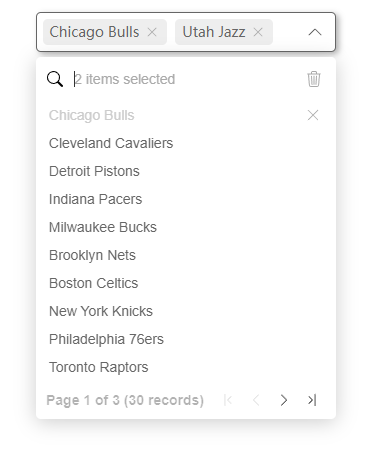



SelectPage for Vue3, a select items components provides the list of items with pagination



If you are using vue 2.x version, please use v-selectpage 2.x version instead
Documentation and examples please visit below sites
The jQuery version: SelectPage
- Display contents with pagination
- I18n support
- Select single / multiple options
- Tags form for multiple selection
- Keyboard navigation
- Searchable
- Provide display forms such as list view and table view
- Customization of row / cell content rendering
- Core module that can be used independently
I18n support languages
- Chinese Simplified
- English
- Japanese
- Arabic
- Spanish
- German
- Romanian
- French
- Portuguese-Brazil
- Polish
- Dutch
- Chinese Traditional
- Russian
- Turkish

Install v-selectpage to your project
# npm npm i v-selectpage # yarn yarn add v-selectpage # pnpm pnpm add v-selectpageQuick start example
<template> <SelectPageList key-prop="id" label-prop="name" @fetch-data="fetchData" /> </template> <script setup lang="ts"> import { SelectPageList } from 'v-selectpage' import type { PageParameters, FetchDataCallback } from 'v-selectpage' function fetchData (data: PageParameters, callback: FetchDataCallback) { // pagination information and search keyword const { search, pageNumber, pageSize } = data // request parameters const parameters = { search, pageNumber, pageSize, ... } // fetch data list with pagination state doDataRequest(parameters) .then(resp => { /** * Return data format for example * { * list: object[], // current page data list * total: number // result count * } */ callback(resp.list, resp.total) }) .catch(() => { // clear the data list if necessary when request fails callback([], 0) }) } </script>Set default selected items
<template> <SelectPageTable language="zh-chs" v-model="selected" :multiple="true" :columns="columns" @fetch-data="fetchData" @fetch-selected-data="fetchSelectedData" /> </template> <script setup lang="ts"> import { ref } from 'vue' import { SelectPageTable } from 'v-selectpage' import type { SelectPageKey, FetchSelectedDataCallback, PageParameters, FetchDataCallback, SelectPageTableColumn } from 'v-selectpage' const selected = ref<SelectPageKey[]>([2, 4, 7]) const columns: SelectPageTableColumn[] = [ { title: 'Id', data: 'id' }, { title: 'Team name', data: row => `${row.abbr} - ${row.name}`, width: 250 }, { title: 'Description', data: 'desc' } ] // fetch current page data function fetchData (data: PageParameters, callback: FetchDataCallback) { ... } // fetch selected items data function fetchSelectedData (keys: SelectPageKey[], callback: FetchSelectedDataCallback) { // get data models by keys doDataRequest({ keys }).then(resp => { callback(resp) }) } </script>List view for Single selection
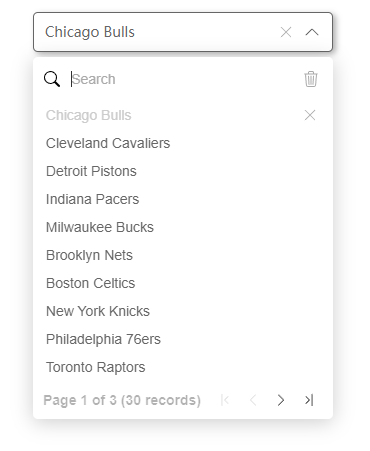
List view for multiple selection with tags form
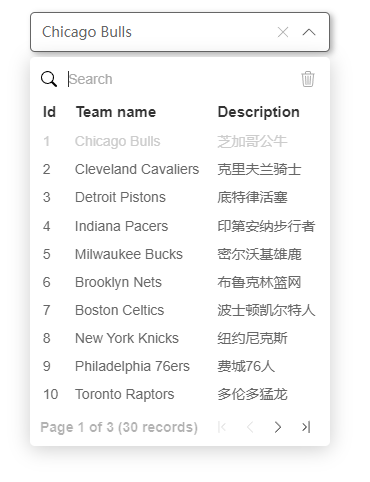
Table view for single selection
- v-dropdown - The dropdown container
