短信服务 Spring Boot Starter,目前只支持腾讯和阿里短信服务,腾讯和阿里云短信均已验证,期待各位小伙伴合作完善这个 starter。
短信服务在用户注册、登录、找回密码等相关操作中,可以让用户使用更加便捷,越来越多的公司都采用短信验证的方式让用户进行操作,从而提高用户的实用性。
- 由于v0.0.1版本是直接将三个版本依赖同时引入,属于强依赖,因此在使用的过程中需要配置指定使用哪个短信服务商地址, 考虑到在使用短信发送的过程中带来一定的不方便,将所有相关的强依赖移除,从而减轻依赖关系。
- 使用的方式相对v0.0.1的区别不大,只是需要单独引入对应的短信服务商的依赖即可快速上手。
- 最新版本为v0.0.3,支持发送记录缓存功能。
- IntelliJ IDEA 2018.2.5+
- Maven 3.5+
- JDK 1.8+
<dependency> <groupId>com.github.jackieonway.sms</groupId> <artifactId>sms-spring-boot-starter</artifactId> <version>0.0.2</version> <!-- 腾讯短信依赖 --> <!-- <dependency> <groupId>com.tencentcloudapi</groupId> <artifactId>tencentcloud-sdk-java</artifactId> <version>3.1.83</version> </dependency>--> <!-- 阿里短信依赖 --> <!--<dependency> <groupId>com.aliyun</groupId> <artifactId>aliyun-java-sdk-core</artifactId> <version>4.4.1</version> </dependency>--> <!-- 云之讯短信依赖 --> <!--<dependency> <groupId>com.github.jackieonway.sms</groupId> <artifactId>ucpass-client</artifactId> <version>0.0.2</version> </dependency>--> <!-- 赛邮短信依赖 --> <!--<dependency> <groupId>com.github.jackieonway.sms</groupId> <artifactId>submail-client</artifactId> <version>0.0.2</version> </dependency>--> </dependency>spring: jackieonway: sms: sms-type: tencent # 短信服务商,默认为ali security-key: your security-key # 短信的私钥 appid: your appid # 短信的应用id sign: your sign # 短信的签名 region: 如果是阿里云短信,请参考以下配置:
spring: jackieonway: sms: sms-type: ali # 短信服务商,默认为ali access-key: your aliyun access-key-id # 阿里云短信服务的公钥 security-key: your aliyun access-key-secret # 阿里云短信服务的私钥 domain: # 阿里云 域名 region: cn-hangzhou # 阿里云短信服务的区域id version: 如果是云之讯短信,请参考以下配置:
spring: jackieonway: sms: sms-type: ucpass # 短信服务商 ,默认为ali appid: access-key: your ucpass access-key-id #云之讯短信服务的公钥 security-key: your ucpass access-key-secret # 云之讯短信服务的私钥 domain: open.ucpaas.com # 云之讯短信服务地址 such as open.ucpaas.com如果是赛邮,请参考以下配置:
spring: jackieonway: sms: sms-type: submail # 短信服务商,默认为ali appid: # 赛邮appId security-key: # 赛邮appkey@SpringBootApplication @EnabledSmsAutoConfiguration public class SmsDemoApplication { public static void main(String[] args) { SpringApplication.run(SmsDemoApplication.class, args); } }相对于 0.0.1 版本的短信服务,从 0.0.2 开始,依赖取消了版本的强依赖性,这样就需要在使用的时候显示引入相关依赖,使用注入 SmsService 时,直接注入即可 现在支持 阿里、腾讯、云之讯短信服务
@Autowired private SmsService smsService;参考示例如下:
@RestController public class HelloController { @Autowired private SmsService smsService; @GetMapping("/tencent") public Object tencent() { // 具体配置请参照具体运营商 // your template params String[] paramst = {"5678","5"}; TencentSmsRequest tencentSmsRequest = new TencentSmsRequest(); tencentSmsRequest.setPhoneNumber(new String[]{"your cellphone"}); tencentSmsRequest.setParams(paramst); return smsService.sendTemplateSms("328921", tencentSmsRequest); } /* @GetMapping("/ali") public Object ali() { // 具体配置请参照具体运营商 AliSmsRequest aliSmsRequest = new AliSmsRequest(); aliSmsRequest.setPhoneNumbers(new String[]{"18600000000"}); aliSmsRequest.setTemplateParam("{\"code\":\"123456\"}"); aliSmsRequest.setSignName("xx科技"); return smsService.sendTemplateSms("SMS_148614533",aliSmsRequest); }*/ }访问 http://localhost:8080/tencent 
访问 http://localhost:8080/ali ,短信发送成功:
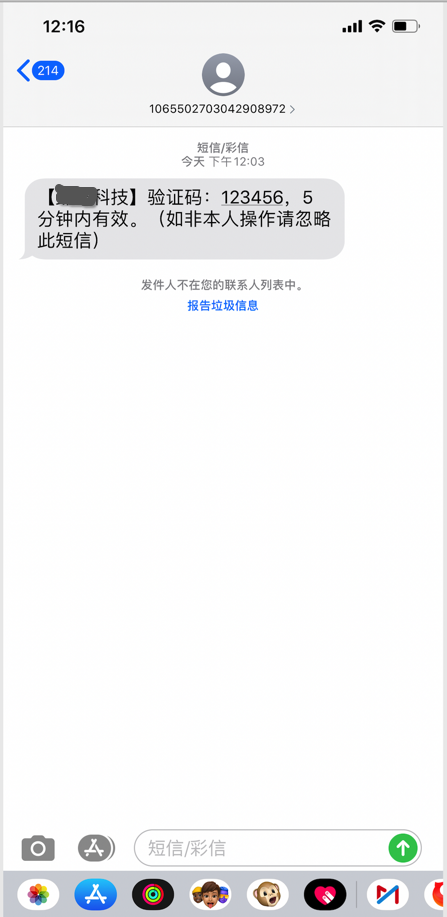
/** * 单个发送短信 * @param params 根据对应的短信服务商所需信息填写 */ public Object sendSms(Integer type,Object params); /** * 单个发送模板短信 * @param tempalteId 短信模板id * @param params 根据对应的短信服务商所需信息填写 */ public Object sendTemplateSms(String tempalteId, Object params); /** * 批量发送短信 * @param params 根据对应的短信服务商所需信息填写 */ public Object sendBatchSms(int type,Object params); /** * 批量发送模板短信 * @param tempalteId 短信模板id * @param params 根据对应的短信服务商所需信息填写 */ public Object sendBatchTemplateSms(String tempalteId, Object params); /** * 异步发送模板短信 * @param tempalteId 短信模板id * @param params 根据对应的短信服务商所需信息填写 */ void asyncSendTemplateSms(@NonNull String templateId, BaseRequest params); /** * 异步批量发送模板短信 * @param tempalteId 短信模板id * @param params 根据对应的短信服务商所需信息填写 */ void asnycSendBatchTemplateSms(@NonNull String templateId, BaseRequest params); 目前腾讯短信服务、阿里云短信服务和云之讯短信服务均已验证成功,希望各位小伙伴共同完善该 starter,觉得有用请 starter 该项目。如果只想使用而腾讯云、阿里云等短信业务的话,按照 Demo 使用即可。
1. Fork 本仓库到自己的仓库 2. 从dev分支新建自己的分支 3. 修改或增加代码 4. 提交 Pull Requests ,等待审核合并 <dependency> <groupId>com.github.jackieonway.sms</groupId> <artifactId>sms-spring-boot-starter</artifactId> <version>0.0.3-SNAPSHOT</version> <!-- 腾讯短信依赖 --> <!--<dependency> <groupId>com.github.qcloudsms</groupId> <artifactId>qcloudsms</artifactId> <version>1.0.6</version> </dependency>--> <!-- 阿里短信依赖 --> <!--<dependency> <groupId>com.aliyun</groupId> <artifactId>aliyun-java-sdk-core</artifactId> <version>4.4.1</version> </dependency>--> <!-- 云之讯短信依赖 --> <!--<dependency> <groupId>com.github.jackieonway.sms</groupId> <artifactId>ucpass-client</artifactId> <version>0.0.3-SNAPSHOT</version> </dependency>--> <!-- 赛邮短信依赖 --> <!--<dependency> <groupId>com.github.jackieonway.sms</groupId> <artifactId>submail-client</artifactId> <version>0.0.3-SNAPSHOT</version> </dependency>--> </dependency> <repositories> <repository> <id>mavenRepoCenter</id> <name>Maven Development Snapshot Repository</name> <url>https://oss.sonatype.org/content/repositories/snapshots</url> <releases> <enabled>false</enabled> </releases> <snapshots> <enabled>true</enabled> </snapshots> </repository> </repositories>感谢参与提出意见或参与贡献的小伙伴
云之讯短信服务提供: @bigbearLoveTingting 赛邮云短信服务提供: @hb0730
参与贡献人员 : @flanliulf @hb0730