9
$\begingroup$

I've actually solved this, but I think its still a useful question which I don't think is easy to answer with existing questions.

As soon as I'd built my ANET-A8 (Prusa i3 DIY kit), I found I was having problems with the extruder crashing into the bed. Although I thought I'd adjusted the bed leveling OK, the calibration seemed to keep getting messed up.

I tracked this down to two factors. First, I was winding the extruder head up some distance before loading the filament and starting a print. Second, at roughly half-way up the axis, the right-hand thread seemed to be getting stuck (more often when moving up than down).

What wasn't clear (and not mentioned in the building instructions) was what might cause this problem.

$\endgroup$
5
  • $\begingroup$ Is it correct to use the prusa tag for clones? $\endgroup$ Commented Nov 21, 2016 at 10:47
  • $\begingroup$ (thanx for creating it) $\endgroup$ Commented Nov 21, 2016 at 11:00
  • $\begingroup$ @SeanHoulihane There's no such thing as a "clone". The Prusa design is open-source and in my opinion, "Prusa" refers to any number of designs. $\endgroup$ Commented Nov 21, 2016 at 12:54
  • $\begingroup$ @TomvanderZanden Thanks for clarifying - I edited the tag :) $\endgroup$ Commented Nov 21, 2016 at 13:10
  • $\begingroup$ In many open source projects the name is trademark, while the designs are copyleft, the company still wants to maintain their brand (and reputation). However, I don't know Prusa's feelings on it. $\endgroup$ Commented May 11, 2017 at 19:16

3 Answers 3

6
$\begingroup$

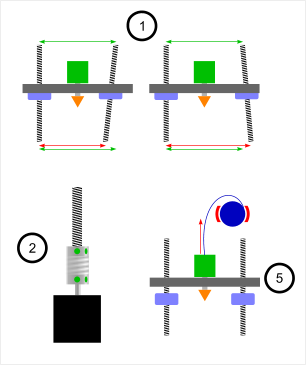
I assume you did everything according to the instructions but here is a checklist of what could be possibly wrong:

  1. Friction - check if you can rotate/move parts without lot of resistance
  2. Screws - check if screws on couplings are tight and they don't slide over a shaft or thread
  3. Stepsticks - check if they are cooled properly and similar (as there are two of them)
  4. Carriage nuts on threads - check if they do not slide out of their nests while [the x-axis] carriage goes up
  5. Filament - check if filament unrolls without resistance which can eventually cause [the x-axis] carriage to hang.

IMO #2 and #3 are the most possible cause

Diagram of issues 1, 2 and 5

$\endgroup$
8
  • $\begingroup$ caret nut is a new term for me. $\endgroup$ Commented Nov 21, 2016 at 11:01
  • $\begingroup$ well - here is top left elem (prusa i2) where such nut sits 3dprinter.my/cart/images/… more or less the same is in prusa i3 $\endgroup$ Commented Nov 21, 2016 at 11:11
  • $\begingroup$ I don't think caret nut is a real word. It is probably a mistranslation. $\endgroup$ Commented Nov 21, 2016 at 12:53
  • $\begingroup$ With (2), I had the spindle and the thread pressed tight together, the coupling was unable to bend... $\endgroup$ Commented Nov 21, 2016 at 15:46
  • 1
    $\begingroup$ @TomvanderZanden - I think caret should actually be carriage $\endgroup$ Commented Nov 21, 2016 at 16:58
3
$\begingroup$

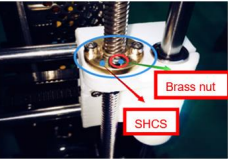
So after reading the instructions more carefully, ANET do cover this in their operating instructions under troubleshooting. On closer inspection, I realised that the brass nut following the right hand thread seemed to be out of alignment with the stepper at the bottom. Fiddling with the flexible coupling helped a bit, but what I needed to do was place the assembly at the tight point, slacken the 3 bolts marked SHCS in the diagram, then tighten them again. I was expecting I might need to open out the holes, or re-make the white (factory printed) part, but this wasn't necessary.

From ANET manual

$\endgroup$
5
  • 1
    $\begingroup$ ha! so there is caret nut :) it's good to hear you've solved it (btw: my suspicion about 1. assembling according to instruction was priviledged) ;) and 2. that there is a problem was priviledged too) $\endgroup$ Commented Nov 21, 2016 at 11:42
  • 1
    $\begingroup$ I don't think caret nut is a real word. It is probably a mistranslation. $\endgroup$ Commented Nov 21, 2016 at 12:53
  • 1
    $\begingroup$ @darthpixel - I would wager that caret actually means carriage, as in the x-axis carriage. Mostly because of the phrase in Tom's answer, which can eventually hang caret, which probably should be which can eventually hang [the x-axis] carriage $\endgroup$ Commented Nov 21, 2016 at 16:57
  • $\begingroup$ where did you find this under troubleshooting, I think Im having the same issue. Can't find what you are refereing to. $\endgroup$ Commented Apr 4, 2017 at 21:38
  • 1
    $\begingroup$ Found it in the A8 Operation instruction-1.1.pdf file provided on the SD card, page 66 $\endgroup$ Commented Jan 20, 2019 at 12:50
0
$\begingroup$

From http://3daddict.com/anet-3d-printer-common-mistakes-fix/

The motor shaft and the threading rod must have space between them in the flexible coupler.

That means unlocking the coupler from the motor shaft and moving it up a bit, in the end the threaded rod nearly touches the printer top hole instead of having like a 1cm gap. This will allow the coupler to flex, and thus should handle small misalignments of the brass nut.

That's about point 2 of @darth-pixel answer, but before locking the screws, make sure to have empty space between rod and motor shaft

$\endgroup$

You must log in to answer this question.

Start asking to get answers

Find the answer to your question by asking.

Ask question

Explore related questions

See similar questions with these tags.