















StackFlow AI Platform
Devices & Quick Start
Models
Qwen3
DeepSeek-R1
Applications
CV Vision Application
Vision Language Model (VLM)
Large Language Model (LLM)
Voice Assistant
LLM630 Compute Kit - StackFlow API Yolo11n Demo
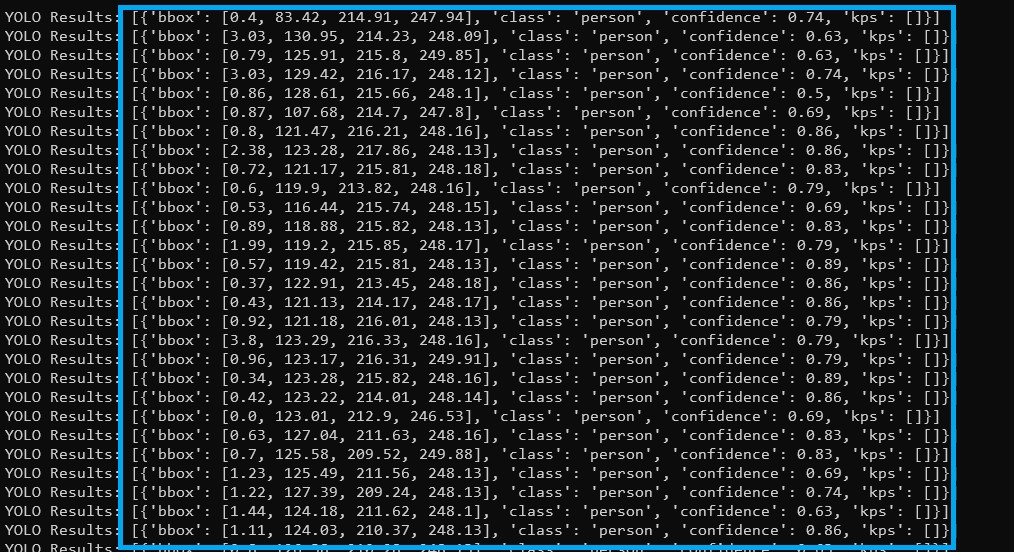
This demo shows how to run a script on the LLM630 Compute Kit to obtain YOLO detection results via the StackFlow API and print them to the terminal.
1. Preparation
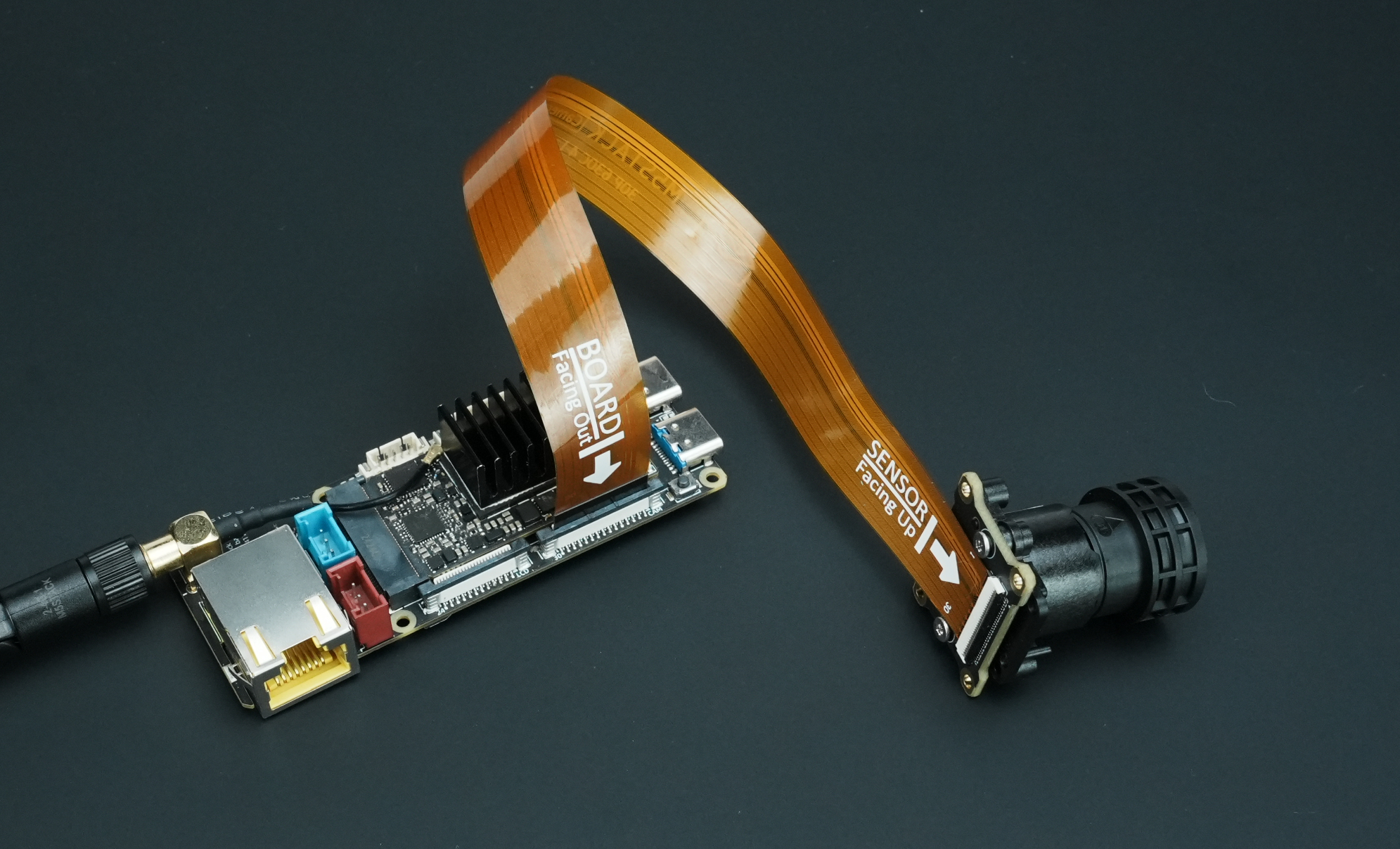
- Before powering on the device, connect the CamModule SC850SL camera to the LLM630 Compute Kit using an FPC cable as shown below:
- Refer to the LLM630 Compute Kit UART / ADB / SSH Debugging Guide to learn how to configure the network and file transfer, and obtain the device’s IP address.
- Refer to the LLM630 Compute Kit Software Update Guide to install the following software and model packages:
apt install llm-camera llm-yolo # SoftWare PackageNote
The CSI camera uses AI-ISP, which provides excellent image quality in low-light environments but uses half of the NPU performance. The default YOLO models cannot run when AI-ISP is enabled. Use the command below to install YOLO models compatible with AI-ISP:
apt install llm-model-yolo11n-npu1 llm-model-yolo11n-pose-npu1 llm-model-yolo11n-hand-pose-npu1 # Model Package2. Client Script
Download the client test script and ensure that your PC is on the same network as the LLM630 Compute Kit. Copy and save the script below. If running from your PC, provide the actual IP address of the LLM630 Compute Kit:
python llm-yolo.py --host 192.168.20.24If you run the script directly on the device, upload the file to the LLM630 Compute Kit and run it without providing the --host parameter:
adb push llm-yolo.py /rootadb shellcd /root python3 llm-yolo.pyimport argparse import json import select import socket import sys import time import platform if platform.system() == "Windows": import msvcrt def create_tcp_connection(host, port): sock = socket.socket(socket.AF_INET, socket.SOCK_STREAM) sock.connect((host, port)) return sock def send_json(sock, data): json_data = json.dumps(data, ensure_ascii=False) + '\n' sock.sendall(json_data.encode('utf-8')) recv_buffer = "" def receive_response(sock): global recv_buffer while '\n' not in recv_buffer: part = sock.recv(4096).decode('utf-8') if not part: break recv_buffer += part if '\n' in recv_buffer: line, recv_buffer = recv_buffer.split('\n', 1) return line.strip() else: line, recv_buffer = recv_buffer, "" return line.strip() def close_connection(sock): if sock: sock.close() def create_init_data(response_format, deivce, enoutput, frame_height, frame_width, enable_webstream, rtsp): return { "request_id": "camera_001", "work_id": "camera", "action": "setup", "object": "camera.setup", "data": { "response_format": "image.yuvraw.base64" if response_format =="yuv" else "image.jpeg.base64", "input": deivce, "enoutput": enoutput, "frame_width": frame_width, "frame_height": frame_height, "enable_webstream": enable_webstream, "rtsp": "rtsp.1280x720.h265" if rtsp == "h265" else "rtsp.1280x720.h264", } } def parse_setup_response(response_data): error = response_data.get('error') if error and error.get('code') != 0: print(f"Error Code: {error['code']}, Message: {error['message']}") return None return response_data.get('work_id') def reset(sock): sent_request_id = 'reset_000' reset_data = { "request_id": sent_request_id, "work_id": "sys", "action": "reset" } ping_data = { "request_id": "ping_000", "work_id": "sys", "action": "ping" } send_json(sock, reset_data) while True: try: send_json(sock, ping_data) time.sleep(1) except (BrokenPipeError, ConnectionResetError, OSError) as e: return # Sock disconnection indicates reset is complete def setup(sock, init_data): sent_request_id = init_data['request_id'] send_json(sock, init_data) while True: response = receive_response(sock) response_data = json.loads(response) if response_data.get('request_id') == sent_request_id: return parse_setup_response(response_data) def exit_session(sock, deinit_data): send_json(sock, deinit_data) print("Exit") def parse_inference_response(response_data): error = response_data.get('error') if error and error.get('code') != 0: print(f"Error Code: {error['code']}, Message: {error['message']}") return None return { "work_id": response_data.get("work_id"), "object": response_data.get("object"), "data": response_data.get("data") } def parse_yolo_result(data): results = [] for item in data: bbox = [float(x) for x in item.get('bbox', [])] kps = [float(x) for x in item.get('kps', [])] cls = item.get('class', '') conf = float(item.get('confidence', 0)) results.append({ 'bbox': bbox, 'class': cls, 'confidence': conf, 'kps': kps }) return results def main(args): sock = create_tcp_connection(args.host, args.port) frame_width, frame_height = args.imgsz try: print("Reset...") reset(sock) close_connection(sock) sock = create_tcp_connection(args.host, args.port) print("Setup Camera...") init_data = create_init_data( response_format = args.format, enoutput=args.enoutput, deivce=args.device, frame_height=frame_height, frame_width=frame_width, enable_webstream=args.webstream, rtsp=args.rtsp ) camera_work_id = setup(sock, init_data) if camera_work_id is not None: print(f"Camera setup with work_id: {camera_work_id}") else: print("Camera setup failed.") return print("Setup Yolo...") yolo_init_data = { "request_id": "yolo_001", "work_id": "yolo", "action": "setup", "object": "yolo.setup", "data": { "model": args.model, "response_format": "yolo.box", "input": camera_work_id, "enoutput": True, } } yolo_work_id = setup(sock, yolo_init_data) if yolo_work_id is not None: print(f"Yolo setup with work_id: {yolo_work_id}") else: print("Yolo setup failed.") return while True: if platform.system() == "Windows": if msvcrt.kbhit(): key = msvcrt.getwch() if key == 'q': print("Quit by user.") break else: if sys.stdin in select.select([sys.stdin], [], [], 0)[0]: key = sys.stdin.readline().strip() if key == 'q': print("Quit by user.") break response = receive_response(sock) if not response: continue response_data = json.loads(response) Rawdata = parse_inference_response(response_data) if Rawdata is None: break work_id = Rawdata.get("work_id") object = Rawdata.get("object") data = Rawdata.get("data") if work_id == yolo_work_id and object == "yolo.box": yolo_results = parse_yolo_result(data) print(f"YOLO Results: {yolo_results}") exit_session(sock, { "request_id": "yolo_exit", "work_id": yolo_work_id, "action": "exit" }) exit_session(sock, { "request_id": "camera_exit", "work_id": camera_work_id, "action": "exit" }) time.sleep(3) # Allow time for the exit command to be processed finally: close_connection(sock) if __name__ == "__main__": parser = argparse.ArgumentParser(description="TCP Client to send JSON data.") parser.add_argument("--host", type=str, default="localhost", help="Server hostname (default: localhost)") parser.add_argument("--port", type=int, default=10001, help="Server port (default: 10001)") parser.add_argument("--device", type=str, default="axera_single_sc850sl", help="Camera name, i.e. axera_single_sc850sl or /dev/video0") parser.add_argument("--enoutput", type=bool, default=False, help="Whether to output image data") parser.add_argument("--format", "--output-format", type=str, default="yuv", help="Output image data format, i.e. jpeg or yuv") parser.add_argument("--imgsz", "--img", "--img-size", nargs="+", type=int, default=[320, 320], help="image (h, w)") parser.add_argument("--webstream", action="store_true", help="Enable webstream") parser.add_argument("--rtsp", default="h264", help="rtsp output, i.e. h264 or h265") parser.add_argument("--model", type=str, default="yolo11n-npu1", help="Model name, i.e. yolo11n-npu1 or yolo11n-pose-npu1, yolo11n-hand-pose-npu1") args = parser.parse_args() main(args)Parameter Description
- host: IP address of the LLM630 Compute Kit
- port: TCP communication port (default: 10001)
- device: Camera name; for MIPI CSI, use
'axera_single_sc850sl'. For USB video cameras, specify like'/dev/video0' - enoutput: Whether to output image data (default: False)
- format: Output image format (default:
'yuv'; options:'jpeg') - imgsz: Output image resolution (default:
320x320) - webstream: Enable web streaming (default: off). If enabled, visit
http://IP:8989/in a browser (replace IP with your device's IP) - rtsp: RTSP stream format (
h264orh265) - model: YOLO model to load. Default is
'yolo11n-npu1'. Other options:'yolo11n-pose-npu1','yolo11n-hand-pose-npu1'
3. Start Interaction
The terminal will print YOLO detection results.