AI agents working together like a medieval guild to conquer Minecraft tasks 🤖⚔️




Watch AI agents collaborate to gather resources, craft items, and place blocks autonomously
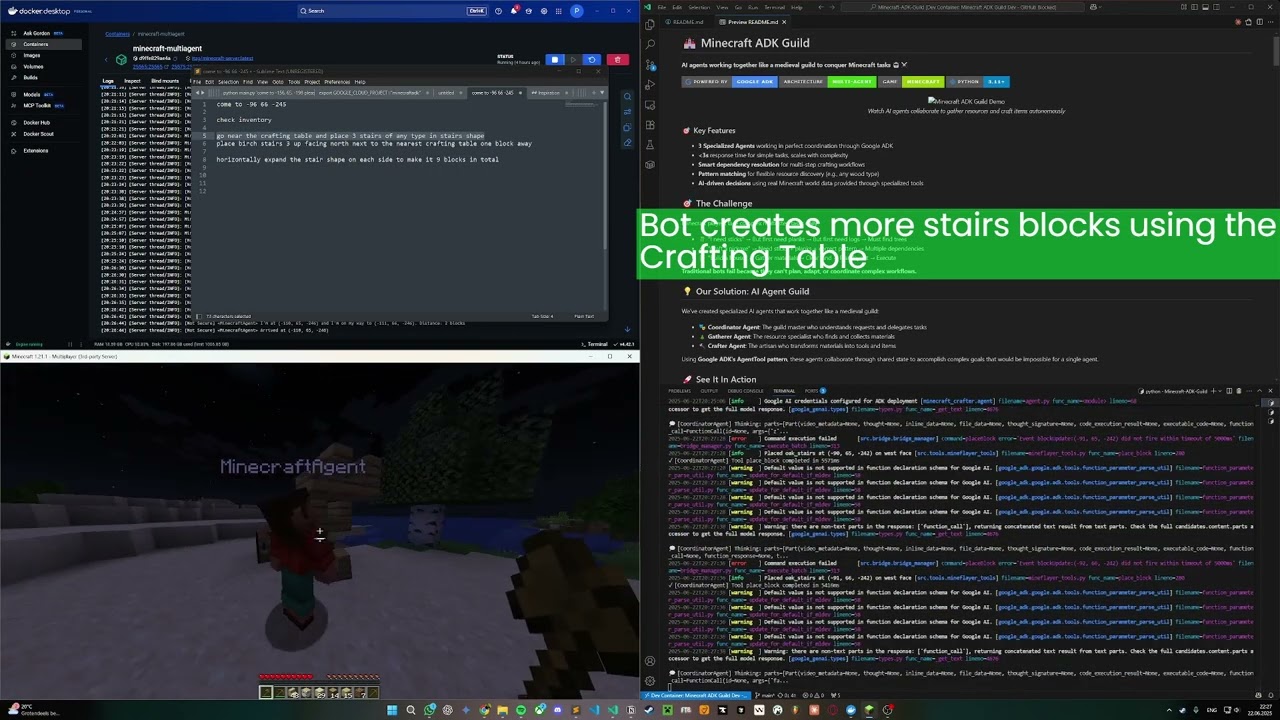
- 🎬 Demo
- 🎯 Key Features
- 🎯 The Challenge
- 💡 Our Solution: AI Agent Guild
- 🚀 See It In Action
- 🏗️ Architecture
- ✨ Advanced Features
- 📁 Project Structure
- 📦 Installation
- 🎮 Usage Examples
- 🔬 Technical Deep Dive
- 🛠️ Extending the Guild
- 🤝 Contributing
- 📈 Future Vision
- 📄 License
- 🙏 Acknowledgments
- 3 Specialized Agents working in perfect coordination through Google ADK
- <3s response time for simple tasks, scales with complexity
- Smart dependency resolution for multi-step crafting workflows
- Pattern matching for flexible resource discovery (e.g., any wood type)
- AI-driven decisions using real Minecraft world data provided through specialized tools
Minecraft players face complex multi-step tasks daily:
- 🪵 "I need sticks" → But first need planks → But first need logs → Must find trees
- ⛏️ "Craft a pickaxe" → Need sticks + planks + correct pattern → Multiple dependencies
- 🏗️ "Build a house" → Gather materials → Clear land → Plan layout → Execute
Traditional bots fail because they can't plan, adapt, or coordinate complex workflows.
We've created specialized AI agents that work together like a medieval guild:
- 🎭 Coordinator Agent: The guild master who understands requests and delegates tasks
- 🌲 Gatherer Agent: The resource specialist who finds and collects materials
- 🔨 Crafter Agent: The artisan who transforms materials into tools and items
Using Google ADK's AgentTool pattern, these agents collaborate through shared state to accomplish complex goals that would be impossible for a single agent.
# Simple commands trigger complex multi-agent workflows python main.py "craft a wooden pickaxe" # Example output: 💭 [CoordinatorAgent] Thinking: I need to craft a wooden pickaxe... 🔧 [CoordinatorAgent] Calling tool: get_inventory ✓ [CoordinatorAgent] Tool get_inventory completed in 217ms → [CoordinatorAgent] Delegating to GathererAgent 🌲 [GathererAgent] Searching for oak_log within 32 blocks... ✓ [GathererAgent] Found 15 oak logs, gathering 3... → [CoordinatorAgent] Delegating to CrafterAgent 🔨 [CrafterAgent] Crafting oak_planks from oak_log... ✓ [CrafterAgent] Successfully crafted 12 oak_planks 🔨 [CrafterAgent] Crafting stick from oak_planks... ✓ [CrafterAgent] Successfully crafted 8 sticks 🔨 [CrafterAgent] Crafting wooden_pickaxe... ✓ [CrafterAgent] Successfully crafted 1 wooden_pickaxe ✅ Successfully crafted a wooden pickaxe! It's now in your inventory.python main.py --interactive Minecraft Agent> gather 10 oak logs ✓ Gathered 10 oak logs near position (123, 64, -456) Minecraft Agent> craft planks ✓ Crafted 40 oak planks from 10 oak logs Minecraft Agent> craft sticks ✓ Crafted 32 sticks from 8 oak planks Minecraft Agent> what's in my inventory? Your inventory contains: 32 oak planks, 32 sticks
- AgentTool Pattern: Sub-agents (Gatherer, Crafter) are exposed as tools to the Coordinator
- Structured Outputs: Each agent returns results via
output_keyto session state - Minecraft Data Access: Real game data (blocks, items, recipes) provided through MinecraftDataService (ref: minecraft-data)
- Tool Wrapping: Mineflayer bot functions wrapped as ADK-compatible async tools
- Session Persistence: State maintained across all interactions in a session
-
🎯 Coordinator Agent (Strategic Layer)
- Natural language understanding
- Multi-step planning and dependency resolution
- Sub-agent orchestration
- Result interpretation and user communication
-
🌲 Gatherer Agent (Resource Layer)
- Pattern-based block finding (
*_logfinds all wood types) - Pathfinding and navigation
- Efficient resource collection
- Inventory management
- Pattern-based block finding (
-
🔨 Crafter Agent (Creation Layer)
- Recipe knowledge and validation
- Material requirement checking
- Multi-step crafting workflows
- Success/failure reporting
Our Python↔JavaScript Bridge enables:
- Real-time bidirectional communication
- Event streaming from game to agents
- Command queuing and prioritization
- Automatic reconnection and error recovery
- AgentTool Pattern: Sub-agents are tools that return structured results
- Shared State: Agents communicate through persistent session state
- Smart Delegation: Coordinator knows which agent to use for each task
- Result Verification: Never assumes success - always checks actual outcomes
- Dependency Resolution: Automatically figures out prerequisite tasks
- Pattern Matching:
find_blocks("*_log")finds any type of wood - Context Awareness: Understands "nearby", "there", relative directions
- Failure Recovery: Graceful handling with helpful suggestions
- Structured Logging: JSON logs for analysis, colored console for development
- Configuration Management: Environment-based config with validation
- Error Boundaries: Comprehensive error handling at every layer
- Type Safety: Pydantic models for internal data validation
- Cloud Deployment: Successfully deployed to GCP (see
feature/gcp-deploymentbranch)- Agents deployed on Google Agent Engine ✅
- Minecraft server on Compute Engine ✅
- Bot connectivity issues prevented merging (Users could connect to the server but the bot couldn't)
- CLI Mode: One-off commands for scripts
- Interactive Mode: Persistent session with command history
- Web UI: Test agents without Minecraft server (via
adk web) - API Mode: RESTful endpoints for external integration
minecraft-adk-guild/ ├── minecraft_coordinator/ # Guild master agent │ ├── agent.py # AgentTool orchestration │ ├── prompt.py # Coordination instructions │ └── callbacks.py # Logging callbacks ├── minecraft_gatherer/ # Resource specialist agent │ ├── agent.py # Collection logic │ └── prompt.py # Gathering instructions ├── minecraft_crafter/ # Crafting specialist agent │ ├── agent.py # Recipe execution │ └── prompt.py # Crafting instructions ├── src/ │ ├── bridge/ # Python↔JavaScript communication │ ├── minecraft/ # Mineflayer bot implementation │ ├── tools/ # ADK tool wrappers │ └── minecraft_data_service.py # Game data lookups ├── main.py # Entry point for CLI/interactive mode └── docs/ # Documentation and diagrams - Python 3.11+
- Node.js 18+
- Minecraft Java Edition 1.21+ (only needed if you want to join the same game yourself)
- Google AI API Key (Get one here)
# Clone the repository git clone https://github.com/yourusername/minecraft-adk-guild.git cd minecraft-adk-guild # Install dependencies npm install pip install -e . # Configure environment cp .env.example .env # Edit .env with your API key# Test agent reasoning with ADK Web UI adk web # Open http://localhost:8000 # Select "minecraft_coordinator" from dropdown # Try commands like "craft a pickaxe" to see agent coordination
Note: The ADK Web UI cannot fully connect the bot to an actual Minecraft server, but it demonstrates agent interactions, tool calls, and decision-making processes as shown in the image above. For full bot functionality, use python main.py --interactive.
# Start your Minecraft server (1.21+) # Then run: python main.py "check inventory"# Build and run with Docker Compose docker-compose up -d # Execute commands docker-compose exec bot python main.py "gather wood"# Inventory management python main.py "check inventory" python main.py "toss 10 dirt" # Resource gathering python main.py "gather wood" # Finds any type of logs python main.py "gather 5 oak logs" # Specific type python main.py "mine stone" # Searches underground # Crafting operations python main.py "craft sticks" # Handles dependencies python main.py "craft wooden sword" # Multi-step crafting # World interaction python main.py "move to 100 64 -200" python main.py "remove the stairs nearby" # Contextual understanding# Complex multi-step task python main.py "prepare for mining" # Agents will: # 1. Check if you have a pickaxe # 2. If not, gather wood # 3. Craft planks and sticks # 4. Craft wooden pickaxe # 5. Report ready status-
AgentTool Pattern
tools = [ AgentTool(agent=gatherer_agent), AgentTool(agent=crafter_agent), ]
-
Structured Output with State
gatherer = LlmAgent( name="GathererAgent", output_key="gathering_result", # Results go to state instruction=GATHERER_PROMPT, )
-
Session Persistence
session_service = InMemorySessionService() # State persists across all commands in session
- ⚡ Response Time: <3s for simple tasks, scales with complexity
- 🎯 Pathfinding: Handles 100+ block distances efficiently
- 📊 State Management: O(1) state access with ADK session state
- 🔄 Concurrent Operations: WebSocket + async for parallel tasks
- 🧠 Context Window: Efficient prompt design keeps tokens <2K per request
- 📈 Scalability: Add new agents without modifying existing ones
- 🌐 Real Game Data: 3000+ Minecraft items/blocks/recipes available to agents thanks to minecraft-data

The interactive mode implements a sophisticated command processing pipeline that maintains persistent state across all interactions:
-
User Input Stage: Commands enter through a non-blocking input thread, allowing the system to process previous commands while accepting new ones.
-
Command Queue: All commands are added to an async queue (
asyncio.Queue), ensuring proper ordering and preventing race conditions. -
Background Processor: A dedicated coroutine continuously monitors the queue, pulling commands as they arrive and processing them sequentially.
-
Agent Execution: The Coordinator Agent receives each command with full session context, enabling it to reference previous actions and maintain conversation continuity.
-
State Persistence: Every tool execution automatically updates the ADK session state, creating a growing knowledge base throughout the session.
-
Response Display: Results stream back to the user in real-time, with agent thoughts and tool calls visible for transparency.
- Non-blocking: Users can type new commands while previous ones process
- Ordered Execution: Commands always execute in the order received
- State Continuity: "craft planks" followed by "craft sticks" works seamlessly
- Error Recovery: Failed commands don't crash the session
- Resource Efficiency: Single bot connection serves entire session
Add new specialist agents easily:
# Create a new specialist builder_agent = LlmAgent( name="BuilderAgent", instruction="You are a construction specialist...", output_key="building_result", tools=building_tools, ) # Add to coordinator's toolkit tools.append(AgentTool(agent=builder_agent))# Install dev dependencies pip install -e ".[dev]" # Run tests pytest # Run linting black . && ruff check . # Test with ADK Web UI adk web- 🏰 Building Agent: Construct structures from blueprints
- 🛡️ Combat Agent: Defend against mobs
- 🌾 Farming Agent: Automate crop cultivation
- 🔍 Explorer Agent: Map new territories
- 🤝 Social Agent: Interact with other players
This project is licensed under the MIT License - see LICENSE for details.
- Google ADK team for the powerful multi-agent framework
- Mineflayer community for the excellent Minecraft bot library
- Minecraft for being an amazing sandbox for AI experimentation