





This repository contains the Python client library for the InfluxDB 2.0.
Note: Use this client library with InfluxDB 2.x and InfluxDB 1.8+. For connecting to InfluxDB 1.7 or earlier instances, use the influxdb-python client library. The API of the influxdb-client-python is not the backwards-compatible with the old one - influxdb-python.
This section contains links to the client library documentation.
- Querying data
- using the Flux language
- into csv, raw data, flux_table structure, Pandas DataFrame
- How to queries
- Writing data using
- Line Protocol
- Data Point
- RxPY Observable
- Pandas DataFrame
- How to writes
- InfluxDB 2.0 API client for management
- the client is generated from the swagger by using the openapi-generator
- organizations & users management
- buckets management
- tasks management
- authorizations
- health check
- ...
- InfluxDB 1.8 API compatibility
- Advanced Usage
InfluxDB python library uses RxPY - The Reactive Extensions for Python (RxPY).
Python 3.6 or later is required.
Note
It is recommended to use ciso8601 with client for parsing dates. ciso8601 is much faster than built-in Python datetime. Since it's written as a C module the best way is build it from sources:
Windows:
You have to install Visual C++ Build Tools 2015 to build ciso8601 by pip.
conda:
Install from sources: conda install -c conda-forge/label/cf202003 ciso8601.
The python package is hosted on PyPI, you can install latest version directly:
pip install 'influxdb-client[ciso]'Then import the package:
import influxdb_clientInstall via Setuptools.
python setup.py install --user(or sudo python setup.py install to install the package for all users)
Please follow the Installation and then run the following:
from influxdb_client import InfluxDBClient, Point from influxdb_client.client.write_api import SYNCHRONOUS bucket = "my-bucket" client = InfluxDBClient(url="http://localhost:8086", token="my-token", org="my-org") write_api = client.write_api(write_options=SYNCHRONOUS) query_api = client.query_api() p = Point("my_measurement").tag("location", "Prague").field("temperature", 25.3) write_api.write(bucket=bucket, record=p) ## using Table structure tables = query_api.query('from(bucket:"my-bucket") |> range(start: -10m)') for table in tables: print(table) for row in table.records: print (row.values) ## using csv library csv_result = query_api.query_csv('from(bucket:"my-bucket") |> range(start: -10m)') val_count = 0 for row in csv_result: for cell in row: val_count += 1A client can be configured via *.ini file in segment influx2.
The following options are supported:
url- the url to connect to InfluxDBorg- default destination organization for writes and queriestoken- the token to use for the authorizationtimeout- socket timeout in ms (default value is 10000)verify_ssl- set this to false to skip verifying SSL certificate when calling API from https serverssl_ca_cert- set this to customize the certificate file to verify the peerconnection_pool_maxsize- set the number of connections to save that can be reused by urllib3auth_basic- enable http basic authentication when talking to a InfluxDB 1.8.x without authentication but is accessed via reverse proxy with basic authentication (defaults to false)profilers- set the list of enabled Flux profilers
self.client = InfluxDBClient.from_config_file("config.ini")[influx2] url=http://localhost:8086 org=my-org token=my-token timeout=6000 verify_ssl=False
A client can be configured via environment properties.
Supported properties are:
INFLUXDB_V2_URL- the url to connect to InfluxDBINFLUXDB_V2_ORG- default destination organization for writes and queriesINFLUXDB_V2_TOKEN- the token to use for the authorizationINFLUXDB_V2_TIMEOUT- socket timeout in ms (default value is 10000)INFLUXDB_V2_VERIFY_SSL- set this to false to skip verifying SSL certificate when calling API from https serverINFLUXDB_V2_SSL_CA_CERT- set this to customize the certificate file to verify the peerINFLUXDB_V2_CONNECTION_POOL_MAXSIZE- set the number of connections to save that can be reused by urllib3INFLUXDB_V2_AUTH_BASIC- enable http basic authentication when talking to a InfluxDB 1.8.x without authentication but is accessed via reverse proxy with basic authentication (defaults to false)INFLUXDB_V2_PROFILERS- set the list of enabled Flux profilers
self.client = InfluxDBClient.from_env_properties()The Flux Profiler package provides performance profiling tools for Flux queries and operations.
You can enable printing profiler information of the Flux query in client library by:
- set QueryOptions.profilers in QueryApi,
- set
INFLUXDB_V2_PROFILERSenvironment variable, - set
profilersoption in configuration file.
When the profiler is enabled, the result of flux query contains additional tables "profiler/*". In order to have consistent behaviour with enabled/disabled profiler, FluxCSVParser excludes "profiler/*" measurements from result.
Example how to enable profilers using API:
q = ''' from(bucket: stringParam) |> range(start: -5m, stop: now()) |> filter(fn: (r) => r._measurement == "mem") |> filter(fn: (r) => r._field == "available" or r._field == "free" or r._field == "used") |> aggregateWindow(every: 1m, fn: mean) |> pivot(rowKey:["_time"], columnKey: ["_field"], valueColumn: "_value") ''' p = { "stringParam": "my-bucket", } query_api = client.query_api(query_options=QueryOptions(profilers=["query", "operator"])) csv_result = query_api.query(query=q, params=p)Example of a profiler output:
=============== Profiler: query =============== from(bucket: stringParam) |> range(start: -5m, stop: now()) |> filter(fn: (r) => r._measurement == "mem") |> filter(fn: (r) => r._field == "available" or r._field == "free" or r._field == "used") |> aggregateWindow(every: 1m, fn: mean) |> pivot(rowKey:["_time"], columnKey: ["_field"], valueColumn: "_value") ======================== Profiler: profiler/query ======================== result : _profiler table : 0 _measurement : profiler/query TotalDuration : 8924700 CompileDuration : 350900 QueueDuration : 33800 PlanDuration : 0 RequeueDuration : 0 ExecuteDuration : 8486500 Concurrency : 0 MaxAllocated : 2072 TotalAllocated : 0 flux/query-plan : digraph { ReadWindowAggregateByTime11 // every = 1m, aggregates = [mean], createEmpty = true, timeColumn = "_stop" pivot8 generated_yield ReadWindowAggregateByTime11 -> pivot8 pivot8 -> generated_yield } influxdb/scanned-bytes: 0 influxdb/scanned-values: 0 =========================== Profiler: profiler/operator =========================== result : _profiler table : 1 _measurement : profiler/operator Type : *universe.pivotTransformation Label : pivot8 Count : 3 MinDuration : 32600 MaxDuration : 126200 DurationSum : 193400 MeanDuration : 64466.666666666664 =========================== Profiler: profiler/operator =========================== result : _profiler table : 1 _measurement : profiler/operator Type : *influxdb.readWindowAggregateSource Label : ReadWindowAggregateByTime11 Count : 1 MinDuration : 940500 MaxDuration : 940500 DurationSum : 940500 MeanDuration : 940500.0 The WriteApi supports synchronous, asynchronous and batching writes into InfluxDB 2.0. The data should be passed as a InfluxDB Line Protocol, Data Point or Observable stream.
Important: The WriteApi in batching mode (default mode) is suppose to run as a singleton. To flush all your data you should wrap the execution using ``with client.write_api(...) as write_api:`` statement or call ``_write_client.close()`` at the end of your script.
The default instance of WriteApi use batching.
stringorbytesthat is formatted as a InfluxDB's line protocol- Data Point structure
- Dictionary style mapping with keys:
measurement,tags,fieldsandtime - List of above items
- A
batchingtype of write also supports anObservablethat produce one of an above item - Pandas DataFrame
The batching is configurable by write_options:
| Property | Description | Default Value |
|---|---|---|
| batch_size | the number of data pointx to collect in a batch | 1000 |
| flush_interval | the number of milliseconds before the batch is written | 1000 |
| jitter_interval | the number of milliseconds to increase the batch flush interval by a random amount | 0 |
| retry_interval | the number of milliseconds to retry first unsuccessful write. The next retry delay is computed using exponential random backoff. The retry interval is used when the InfluxDB server does not specify "Retry-After" header. | 5000 |
| max_retry_time | maximum total retry timeout in milliseconds. | 180_000 |
| max_retries | the number of max retries when write fails | 5 |
| max_retry_delay | the maximum delay between each retry attempt in milliseconds | 125_000 |
| exponential_base | the base for the exponential retry delay, the next delay is computed using random exponential backoff as a random value within the interval retry_interval * exponential_base^(attempts-1) and retry_interval * exponential_base^(attempts). Example for retry_interval=5_000, exponential_base=2, max_retry_delay=125_000, total=5 Retry delays are random distributed values within the ranges of [5_000-10_000, 10_000-20_000, 20_000-40_000, 40_000-80_000, 80_000-125_000] | 2 |
from datetime import datetime, timedelta import pandas as pd import rx from pytz import UTC from rx import operators as ops from influxdb_client import InfluxDBClient, Point, WriteOptions with InfluxDBClient(url="http://localhost:8086", token="my-token", org="my-org") as _client: with _client.write_api(write_options=WriteOptions(batch_size=500, flush_interval=10_000, jitter_interval=2_000, retry_interval=5_000, max_retries=5, max_retry_delay=30_000, exponential_base=2)) as _write_client: """ Write Line Protocol formatted as string """ _write_client.write("my-bucket", "my-org", "h2o_feet,location=coyote_creek water_level=1.0 1") _write_client.write("my-bucket", "my-org", ["h2o_feet,location=coyote_creek water_level=2.0 2", "h2o_feet,location=coyote_creek water_level=3.0 3"]) """ Write Line Protocol formatted as byte array """ _write_client.write("my-bucket", "my-org", "h2o_feet,location=coyote_creek water_level=1.0 1".encode()) _write_client.write("my-bucket", "my-org", ["h2o_feet,location=coyote_creek water_level=2.0 2".encode(), "h2o_feet,location=coyote_creek water_level=3.0 3".encode()]) """ Write Dictionary-style object """ _write_client.write("my-bucket", "my-org", {"measurement": "h2o_feet", "tags": {"location": "coyote_creek"}, "fields": {"water_level": 1.0}, "time": 1}) _write_client.write("my-bucket", "my-org", [{"measurement": "h2o_feet", "tags": {"location": "coyote_creek"}, "fields": {"water_level": 2.0}, "time": 2}, {"measurement": "h2o_feet", "tags": {"location": "coyote_creek"}, "fields": {"water_level": 3.0}, "time": 3}]) """ Write Data Point """ _write_client.write("my-bucket", "my-org", Point("h2o_feet").tag("location", "coyote_creek").field("water_level", 4.0).time(4)) _write_client.write("my-bucket", "my-org", [Point("h2o_feet").tag("location", "coyote_creek").field("water_level", 5.0).time(5), Point("h2o_feet").tag("location", "coyote_creek").field("water_level", 6.0).time(6)]) """ Write Observable stream """ _data = rx \ .range(7, 11) \ .pipe(ops.map(lambda i: "h2o_feet,location=coyote_creek water_level={0}.0 {0}".format(i))) _write_client.write("my-bucket", "my-org", _data) """ Write Pandas DataFrame """ _now = datetime.now(UTC) _data_frame = pd.DataFrame(data=[["coyote_creek", 1.0], ["coyote_creek", 2.0]], index=[_now, _now + timedelta(hours=1)], columns=["location", "water_level"]) _write_client.write("my-bucket", "my-org", record=_data_frame, data_frame_measurement_name='h2o_feet', data_frame_tag_columns=['location'])Sometimes is useful to store same information in every measurement e.g. hostname, location, customer. The client is able to use static value or env property as a tag value.
The expressions:
California Miner- static value${env.hostname}- environment property
point_settings = PointSettings() point_settings.add_default_tag("id", "132-987-655") point_settings.add_default_tag("customer", "California Miner") point_settings.add_default_tag("data_center", "${env.data_center}") self.write_client = self.client.write_api(write_options=SYNCHRONOUS, point_settings=point_settings)self.write_client = self.client.write_api(write_options=SYNCHRONOUS, point_settings=PointSettings(**{"id": "132-987-655", "customer": "California Miner"}))In a init configuration file you are able to specify default tags by tags segment.
self.client = InfluxDBClient.from_config_file("config.ini")[influx2] url=http://localhost:8086 org=my-org token=my-token timeout=6000 [tags] id = 132-987-655 customer = California Miner data_center = ${env.data_center} You could also use a TOML format for the configuration file.
You are able to specify default tags by environment properties with prefix INFLUXDB_V2_TAG_.
Examples:
INFLUXDB_V2_TAG_IDINFLUXDB_V2_TAG_HOSTNAME
self.client = InfluxDBClient.from_env_properties()Data are writes in an asynchronous HTTP request.
from influxdb_client import InfluxDBClient, Point from influxdb_client.client.write_api import ASYNCHRONOUS client = InfluxDBClient(url="http://localhost:8086", token="my-token", org="my-org") write_api = client.write_api(write_options=ASYNCHRONOUS) _point1 = Point("my_measurement").tag("location", "Prague").field("temperature", 25.3) _point2 = Point("my_measurement").tag("location", "New York").field("temperature", 24.3) async_result = write_api.write(bucket="my-bucket", record=[_point1, _point2]) async_result.get() client.close()Data are writes in a synchronous HTTP request.
from influxdb_client import InfluxDBClient, Point from influxdb_client .client.write_api import SYNCHRONOUS client = InfluxDBClient(url="http://localhost:8086", token="my-token", org="my-org") write_api = client.write_api(write_options=SYNCHRONOUS) _point1 = Point("my_measurement").tag("location", "Prague").field("temperature", 25.3) _point2 = Point("my_measurement").tag("location", "New York").field("temperature", 24.3) write_api.write(bucket="my-bucket", record=[_point1, _point2]) client.close()The result retrieved by QueryApi could be formatted as a:
- Flux data structure: FluxTable, FluxColumn and FluxRecord
- Query bind parameters
- csv.reader which will iterate over CSV lines
- Raw unprocessed results as a
striterator - Pandas DataFrame
The API also support streaming FluxRecord via query_stream, see example below:
from influxdb_client import InfluxDBClient, Point, Dialect from influxdb_client.client.write_api import SYNCHRONOUS client = InfluxDBClient(url="http://localhost:8086", token="my-token", org="my-org") write_api = client.write_api(write_options=SYNCHRONOUS) query_api = client.query_api() """ Prepare data """ _point1 = Point("my_measurement").tag("location", "Prague").field("temperature", 25.3) _point2 = Point("my_measurement").tag("location", "New York").field("temperature", 24.3) write_api.write(bucket="my-bucket", record=[_point1, _point2]) """ Query: using Table structure """ tables = query_api.query('from(bucket:"my-bucket") |> range(start: -10m)') for table in tables: print(table) for record in table.records: print(record.values) print() print() """ Query: using Bind parameters """ p = {"_start": datetime.timedelta(hours=-1), "_location": "Prague", "_desc": True, "_floatParam": 25.1, "_every": datetime.timedelta(minutes=5) } tables = query_api.query(''' from(bucket:"my-bucket") |> range(start: _start) |> filter(fn: (r) => r["_measurement"] == "my_measurement") |> filter(fn: (r) => r["_field"] == "temperature") |> filter(fn: (r) => r["location"] == _location and r["_value"] > _floatParam) |> aggregateWindow(every: _every, fn: mean, createEmpty: true) |> sort(columns: ["_time"], desc: _desc) ''', params=p) for table in tables: print(table) for record in table.records: print(str(record["_time"]) + " - " + record["location"] + ": " + str(record["_value"])) print() print() """ Query: using Stream """ records = query_api.query_stream('from(bucket:"my-bucket") |> range(start: -10m)') for record in records: print(f'Temperature in {record["location"]} is {record["_value"]}') """ Interrupt a stream after retrieve a required data """ large_stream = query_api.query_stream('from(bucket:"my-bucket") |> range(start: -100d)') for record in large_stream: if record["location"] == "New York": print(f'New York temperature: {record["_value"]}') break large_stream.close() print() print() """ Query: using csv library """ csv_result = query_api.query_csv('from(bucket:"my-bucket") |> range(start: -10m)', dialect=Dialect(header=False, delimiter=",", comment_prefix="#", annotations=[], date_time_format="RFC3339")) for csv_line in csv_result: if not len(csv_line) == 0: print(f'Temperature in {csv_line[9]} is {csv_line[6]}') """ Close client """ client.close()Note
For DataFrame querying you should install Pandas dependency via pip install 'influxdb-client[extra]'.
Note
Note that if a query returns more then one table then the client generates a DataFrame for each of them.
The client is able to retrieve data in Pandas DataFrame format thought query_data_frame:
from influxdb_client import InfluxDBClient, Point, Dialect from influxdb_client.client.write_api import SYNCHRONOUS client = InfluxDBClient(url="http://localhost:8086", token="my-token", org="my-org") write_api = client.write_api(write_options=SYNCHRONOUS) query_api = client.query_api() """ Prepare data """ _point1 = Point("my_measurement").tag("location", "Prague").field("temperature", 25.3) _point2 = Point("my_measurement").tag("location", "New York").field("temperature", 24.3) write_api.write(bucket="my-bucket", record=[_point1, _point2]) """ Query: using Pandas DataFrame """ data_frame = query_api.query_data_frame('from(bucket:"my-bucket") ' '|> range(start: -10m) ' '|> pivot(rowKey:["_time"], columnKey: ["_field"], valueColumn: "_value") ' '|> keep(columns: ["location", "temperature"])') print(data_frame.to_string()) """ Close client """ client.close()Output:
result table location temperature 0 _result 0 New York 24.3 1 _result 1 Prague 25.3
The following example shows how to import dataset with dozen megabytes. If you would like to import gigabytes of data then use our multiprocessing example: import_data_set_multiprocessing.py for use a full capability of your hardware.
- sources - import_data_set.py
""" Import VIX - CBOE Volatility Index - from "vix-daily.csv" file into InfluxDB 2.0 https://datahub.io/core/finance-vix#data """ from collections import OrderedDict from csv import DictReader import rx from rx import operators as ops from influxdb_client import InfluxDBClient, Point, WriteOptions def parse_row(row: OrderedDict): """Parse row of CSV file into Point with structure: financial-analysis,type=ily close=18.47,high=19.82,low=18.28,open=19.82 1198195200000000000 CSV format: Date,VIX Open,VIX High,VIX Low,VIX Close\n 2004-01-02,17.96,18.68,17.54,18.22\n 2004-01-05,18.45,18.49,17.44,17.49\n 2004-01-06,17.66,17.67,16.19,16.73\n 2004-01-07,16.72,16.75,15.5,15.5\n 2004-01-08,15.42,15.68,15.32,15.61\n 2004-01-09,16.15,16.88,15.57,16.75\n ... :param row: the row of CSV file :return: Parsed csv row to [Point] """ """ For better performance is sometimes useful directly create a LineProtocol to avoid unnecessary escaping overhead: """ # from pytz import UTC # import ciso8601 # from influxdb_client.client.write.point import EPOCH # # time = (UTC.localize(ciso8601.parse_datetime(row["Date"])) - EPOCH).total_seconds() * 1e9 # return f"financial-analysis,type=vix-daily" \ # f" close={float(row['VIX Close'])},high={float(row['VIX High'])},low={float(row['VIX Low'])},open={float(row['VIX Open'])} " \ # f" {int(time)}" return Point("financial-analysis") \ .tag("type", "vix-daily") \ .field("open", float(row['VIX Open'])) \ .field("high", float(row['VIX High'])) \ .field("low", float(row['VIX Low'])) \ .field("close", float(row['VIX Close'])) \ .time(row['Date']) """ Converts vix-daily.csv into sequence of datad point """ data = rx \ .from_iterable(DictReader(open('vix-daily.csv', 'r'))) \ .pipe(ops.map(lambda row: parse_row(row))) client = InfluxDBClient(url="http://localhost:8086", token="my-token", org="my-org", debug=True) """ Create client that writes data in batches with 50_000 items. """ write_api = client.write_api(write_options=WriteOptions(batch_size=50_000, flush_interval=10_000)) """ Write data into InfluxDB """ write_api.write(bucket="my-bucket", record=data) write_api.close() """ Querying max value of CBOE Volatility Index """ query = 'from(bucket:"my-bucket")' \ ' |> range(start: 0, stop: now())' \ ' |> filter(fn: (r) => r._measurement == "financial-analysis")' \ ' |> max()' result = client.query_api().query(query=query) """ Processing results """ print() print("=== results ===") print() for table in result: for record in table.records: print('max {0:5} = {1}'.format(record.get_field(), record.get_value())) """ Close client """ client.close()- sources - iot_sensor.py
""" Efficiency write data from IOT sensor - write changed temperature every minute """ import atexit import platform from datetime import timedelta import psutil as psutil import rx from rx import operators as ops from influxdb_client import InfluxDBClient, WriteApi, WriteOptions def on_exit(db_client: InfluxDBClient, write_api: WriteApi): """Close clients after terminate a script. :param db_client: InfluxDB client :param write_api: WriteApi :return: nothing """ write_api.close() db_client.close() def sensor_temperature(): """Read a CPU temperature. The [psutil] doesn't support MacOS so we use [sysctl]. :return: actual CPU temperature """ os_name = platform.system() if os_name == 'Darwin': from subprocess import check_output output = check_output(["sysctl", "machdep.xcpm.cpu_thermal_level"]) import re return re.findall(r'\d+', str(output))[0] else: return psutil.sensors_temperatures()["coretemp"][0] def line_protocol(temperature): """Create a InfluxDB line protocol with structure: iot_sensor,hostname=mine_sensor_12,type=temperature value=68 :param temperature: the sensor temperature :return: Line protocol to write into InfluxDB """ import socket return 'iot_sensor,hostname={},type=temperature value={}'.format(socket.gethostname(), temperature) """ Read temperature every minute; distinct_until_changed - produce only if temperature change """ data = rx\ .interval(period=timedelta(seconds=60))\ .pipe(ops.map(lambda t: sensor_temperature()), ops.distinct_until_changed(), ops.map(lambda temperature: line_protocol(temperature))) _db_client = InfluxDBClient(url="http://localhost:8086", token="my-token", org="my-org", debug=True) """ Create client that writes data into InfluxDB """ _write_api = _db_client.write_api(write_options=WriteOptions(batch_size=1)) _write_api.write(bucket="my-bucket", record=data) """ Call after terminate a script """ atexit.register(on_exit, _db_client, _write_api) input()The following example demonstrate a simplest way how to write and query date with the InfluxDB Cloud.
At first point you should create an authentication token as is described here.
After that you should configure properties: influx_cloud_url, influx_cloud_token, bucket and org in a influx_cloud.py example.
The last step is run a python script via: python3 influx_cloud.py.
- sources - influx_cloud.py
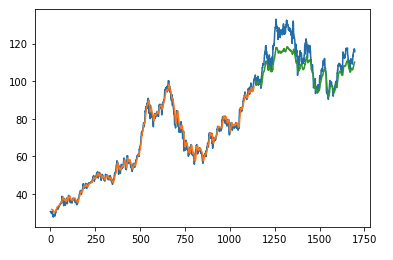
""" Connect to InfluxDB 2.0 - write data and query them """ from datetime import datetime from influxdb_client import Point, InfluxDBClient from influxdb_client.client.write_api import SYNCHRONOUS """ Configure credentials """ influx_cloud_url = 'https://us-west-2-1.aws.cloud2.influxdata.com' influx_cloud_token = '...' bucket = '...' org = '...' client = InfluxDBClient(url=influx_cloud_url, token=influx_cloud_token) try: kind = 'temperature' host = 'host1' device = 'opt-123' """ Write data by Point structure """ point = Point(kind).tag('host', host).tag('device', device).field('value', 25.3).time(time=datetime.utcnow()) print(f'Writing to InfluxDB cloud: {point.to_line_protocol()} ...') write_api = client.write_api(write_options=SYNCHRONOUS) write_api.write(bucket=bucket, org=org, record=point) print() print('success') print() print() """ Query written data """ query = f'from(bucket: "{bucket}") |> range(start: -1d) |> filter(fn: (r) => r._measurement == "{kind}")' print(f'Querying from InfluxDB cloud: "{query}" ...') print() query_api = client.query_api() tables = query_api.query(query=query, org=org) for table in tables: for row in table.records: print(f'{row.values["_time"]}: host={row.values["host"]},device={row.values["device"]} ' f'{row.values["_value"]} °C') print() print('success') except Exception as e: print(e) finally: client.close()The first example shows how to use client capabilities to predict stock price via Keras, TensorFlow, sklearn:
The example is taken from Kaggle.
- sources - stock-predictions.ipynb

Result:
The second example shows how to use client capabilities to realtime visualization via hvPlot, Streamz, RxPY:
- sources - realtime-stream.ipynb

You could find all examples at GitHub: influxdb-client-python/examples.
InfluxDBClient does not enable gzip compression for http requests by default. If you want to enable gzip to reduce transfer data's size, you can call:
from influxdb_client import InfluxDBClient _db_client = InfluxDBClient(url="http://localhost:8086", token="my-token", org="my-org", enable_gzip=True)The delete_api.py supports deletes points from an InfluxDB bucket.
from influxdb_client import InfluxDBClient client = InfluxDBClient(url="http://localhost:8086", token="my-token") delete_api = client.delete_api() """ Delete Data """ start = "1970-01-01T00:00:00Z" stop = "2021-02-01T00:00:00Z" delete_api.delete(start, stop, '_measurement="my_measurement"', bucket='my-bucket', org='my-org') """ Close client """ client.close()InfluxDB 1.8.0 introduced forward compatibility APIs for InfluxDB 2.0. This allow you to easily move from InfluxDB 1.x to InfluxDB 2.0 Cloud or open source.
The following forward compatible APIs are available:
| API | Endpoint | Description |
|---|---|---|
| query_api.py | /api/v2/query | Query data in InfluxDB 1.8.0+ using the InfluxDB 2.0 API and Flux (endpoint should be enabled by flux-enabled option) |
| write_api.py | /api/v2/write | Write data to InfluxDB 1.8.0+ using the InfluxDB 2.0 API |
| health() | /health | Check the health of your InfluxDB instance |
For detail info see InfluxDB 1.8 example.
By default the client uses a retry strategy only for batching writes (for more info see Batching). For other HTTP requests there is no one retry strategy, but it could be configured by retries parameter of InfluxDBClient.
For more info about how configure HTTP retry see details in urllib3 documentation.
from urllib3 import Retry from influxdb_client import InfluxDBClient retries = Retry(connect=5, read=2, redirect=5) client = InfluxDBClient(url="http://localhost:8086", token="my-token", org="my-org", retries=retries)The Python's datetime doesn't support precision with nanoseconds so the library during writes and queries ignores everything after microseconds.
If you would like to use datetime with nanosecond precision you should use pandas.Timestamp that is replacement for python datetime.datetime object and also you should set a proper DateTimeHelper to the client.
- sources - nanosecond_precision.py
from influxdb_client import Point, InfluxDBClient from influxdb_client.client.util.date_utils_pandas import PandasDateTimeHelper from influxdb_client.client.write_api import SYNCHRONOUS """ Set PandasDate helper which supports nanoseconds. """ import influxdb_client.client.util.date_utils as date_utils date_utils.date_helper = PandasDateTimeHelper() """ Prepare client. """ client = InfluxDBClient(url="http://localhost:8086", token="my-token", org="my-org") write_api = client.write_api(write_options=SYNCHRONOUS) query_api = client.query_api() """ Prepare data """ point = Point("h2o_feet") \ .field("water_level", 10) \ .tag("location", "pacific") \ .time('1996-02-25T21:20:00.001001231Z') print(f'Time serialized with nanosecond precision: {point.to_line_protocol()}') print() write_api.write(bucket="my-bucket", record=point) """ Query: using Stream """ query = ''' from(bucket:"my-bucket") |> range(start: 0, stop: now()) |> filter(fn: (r) => r._measurement == "h2o_feet") ''' records = query_api.query_stream(query) for record in records: print(f'Temperature in {record["location"]} is {record["_value"]} at time: {record["_time"]}') """ Close client """ client.close()# start/restart InfluxDB2 on local machine using docker ./scripts/influxdb-restart.sh # install requirements pip install -e . --user pip install -e .\[extra\] --user pip install -e .\[test\] --user # run unit & integration tests pytest testsBug reports and pull requests are welcome on GitHub at https://github.com/influxdata/influxdb-client-python.
The gem is available as open source under the terms of the MIT License.