Playing around with Event Driven Architectures is hard! The goal of this project is to simplify playing around with EDAs - and to use technologies, best practices and approaches that may easily be extrapolated to a production-ready state.
Everything is based on Docker, so basically we boot a lot of stuff on startup via docker-compose. Let's have a deeper look. There is
If you do EDA the messaging way you need a broker. A broker that's able to replay messages, that has persistent messages, a broker that's scalable and highly available - in short: you need Kafka.
We included a build and deployment pipeline. Jobs are added to Jenkins via Job DSL, which creates CI-, Sonar- and Docker-Build-and-Deployment-Jobs for each microservice specified in one simple configuration file (https://github.com/codecentric/event-driven-microservices-platform-config/blob/master/edmp-project-configuration.json). That way you just create a Maven-based microservice in a new Github repository, add it to the configuration file above and our Jenkins-Job-DSL-Seedjob will pick it up, create jobs for it and deploy it on every change.
If the microservice happens to be a Spring Boot based microservice, it can be automatically registered in our always running Spring Boot Admin instance for easy monitoring.
Spring Cloud Config exposes a Github repository as a central place for configuration data, and that data can be consumed via a REST API. Of course, if you're using Spring Boot, there's a convenient way to consume this data via a special Spring Boot starter.
There are three sample apps to get you started - two Spring Cloud Stream applications that write / read to / from Kafka, and one standalone application that uses its own private Redis. These sample apps are not started by docker-compose but by automatically generated Jenkins jobs.
The following diagram gives a quick overview of the different tools we are using in this project.
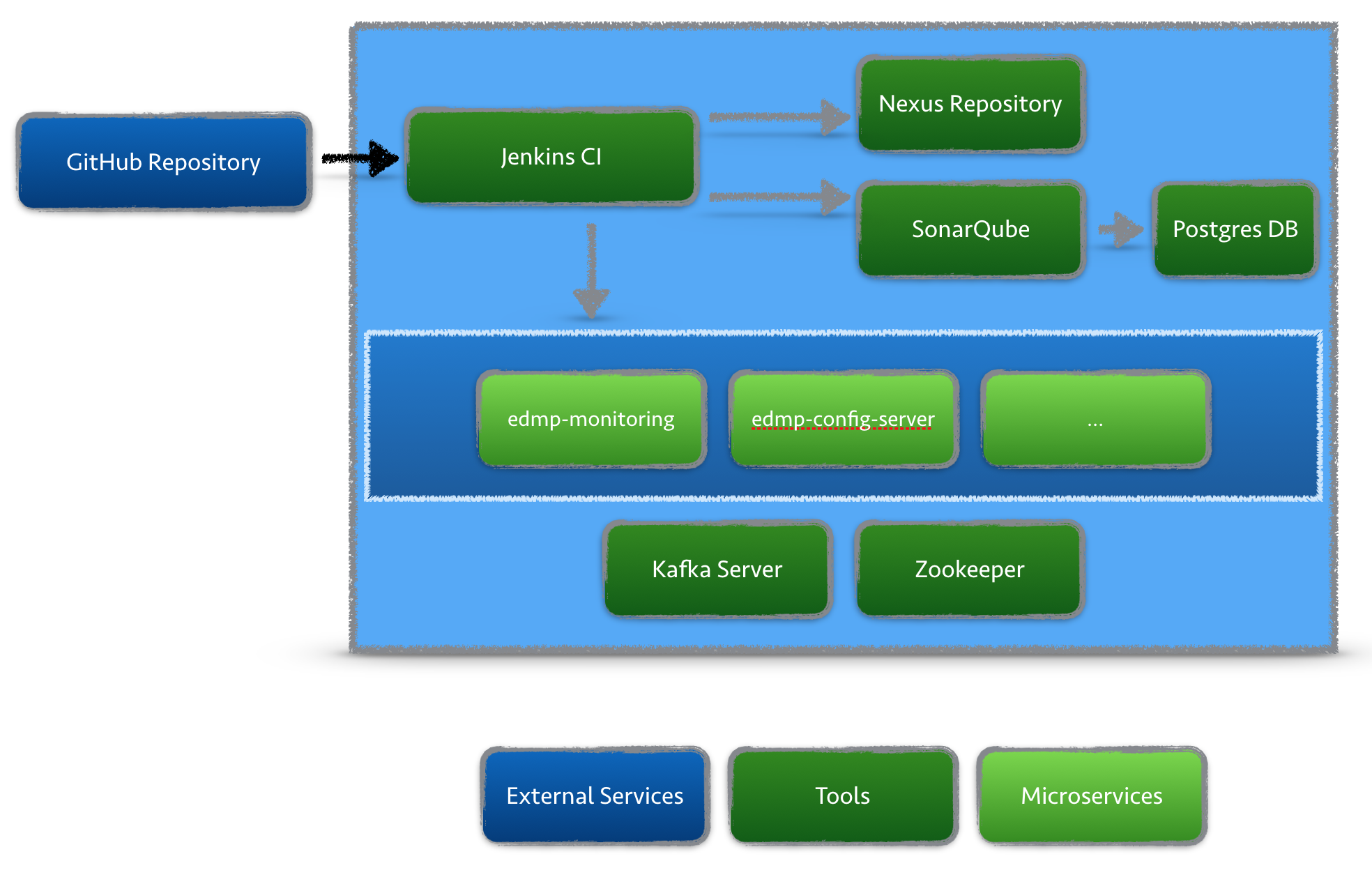
What are the tools used for?
- Jenkins
- Job DSL generates Build & Deploy Jobs for all Microservices
- Build & Deploys Microservices
- Builds / Starts / Stops Docker Container
- Nexus
- Stores Build Artifacts
- SonarQube
- Stores Static Code Analysis Results
- Kafka / Zookeeper Server
- Distributed Messaging System / Coordination System
- Microservices Docker Container
- Sample Message Driven Microservices
- https://github.com/codecentric/event-driven-microservices-platform-config
- https://github.com/codecentric/edmp-sample-app
- https://github.com/codecentric/edmp-sample-stream-source
- https://github.com/codecentric/edmp-sample-stream-sink
You should have Docker Toolbox installed, see https://www.docker.com/toolbox
I am using docker-compose to start several docker container at once. Since all containers run in a single VM (virtualbox), this VM needs enough memory.
Ensure that you are using version 0.3.0 or greater of docker-machine
$ docker-machine version docker-machine version 0.6.0, build e27fb87 Start the machine, using the --virtualbox-memory option to increase it’s memory. I also recommend using the --virtualbox-disk-size option to increate it's disk size. I use 6000 MB to accommodate all the docker images and 40000 MB to allow for enough disk space.
$ docker-machine create -d virtualbox --virtualbox-memory "6000" --virtualbox-disk-size "40000" default Running pre-create checks... Creating machine... (default) Creating VirtualBox VM... (default) Creating SSH key... (default) Starting VM... Waiting for machine to be running, this may take a few minutes... Machine is running, waiting for SSH to be available... Detecting operating system of created instance... Detecting the provisioner... Provisioning with boot2docker... Copying certs to the local machine directory... Copying certs to the remote machine... Setting Docker configuration on the remote daemon... Checking connection to Docker... Docker is up and running! To see how to connect Docker to this machine, run: docker-machine env default Configure shell environment to connect to your new Docker instance
$ eval "$(docker-machine env default)" To get all docker containers up and running use:
$ git clone git@github.com:codecentric/event-driven-microservices-platform.git $ cd event-driven-microservices-platform $ docker-compose up If you want to use your own Github repository for the EDMP configuration file and the Spring Cloud Config Server property files you have to change two lines in the docker-compose.yml. First, change the CONFIG_REPO environment variable for the edmp-config-server according to your needs:
edmp-config-server: image: codecentric/edmp-config-server ports: - "18888:8888" networks: - prodnetwork environment: CONFIG_REPO: "https://github.com/codecentric/event-driven-microservices-platform-config.git" Then, change the EDMP_CONFIG_URL environment variable for jenkins according to your needs:
jenkins: image: codecentric/edmp-jenkins:0.1 ports: - "18080:8080" links: - nexus:nexus - sonar:sonar volumes: - /var/run/docker.sock:/var/run/docker.sock - /usr/local/bin/docker:/usr/bin/docker environment: EDMP_CONFIG_URL: "https://raw.githubusercontent.com/codecentric/event-driven-microservices-platform-config/master/edmp-project-configuration.json" For local development build the local images first and start them using:
$ docker-compose -f docker-compose-dev.yml build $ docker-compose -f docker-compose-dev.yml up | Tool | Link | Credentials |
|---|---|---|
| Jenkins | http://${docker-machine ip default}:18080/ | no login required |
| SonarQube | http://${docker-machine ip default}:19000/ | admin/admin |
| Nexus | http://${docker-machine ip default}:18081/nexus | admin/admin123 |
| Docker Registry | http://${docker-machine ip default}:5000/ | |
| Spring Boot Admin | http://${docker-machine ip default}:10001/ | |
| Spring Cloud Config Server | http://${docker-machine ip default}:18888/${applicationname}/master | |
| Kafka Manager | http://${docker-machine ip default}:29000/ |
Error: Network timed out while trying to connect to https://index.docker.io/
Solution
# Add nameserver to DNS (probably need to do "sudo su" first) echo "nameserver 8.8.8.8" > /etc/resolv.conf # Restart the environment $ docker-machine restart default # Refresh your environment settings $ eval $(docker-machine env default) I also needed to do this inside the docker-machine:
$ docker-machine ssh default $ echo "nameserver 8.8.8.8" > /etc/resolv.conf # Login to Docker VM $ docker-machine ssh default # Run DHCP client $ sudo udhcpc # Restart docker process $ sudo /etc/init.d/docker restart This repository contains everything needed to deploy an event-driven microservices platform powered by Kafka, Jenkins, SonarQube, Nexus, and monitoring stacks on AWS.
Key components:
- Kafka for distributed event streaming
- Jenkins for CI/CD pipelines
- SonarQube for code quality analysis
- Nexus as artifact repository
- Prometheus/Grafana for monitoring and alerting
┌──────────────┐ ┌─────────────┐ │ Producers │ │ Consumers │ └──────┬───────┘ └──────┬──────┘ ▼ ▼ ┌───────────┐ Kafka ┌───────────┐ │ Topics │◀──────────▶│ Topics │ └───────────┘ └───────────┘ │ │ ▼ ▼ ┌──────────────┐ ┌─────────────┐ │Applications │ │Applications │ └──────┬───────┘ └──────┬──────┘ ▼ ▼ Jenkins, SonarQube, Nexus Monitoring (Prometheus/Grafana) - AWS CLI configured with appropriate credentials
- Terraform v1.12.1
- AWS Provider v6.3.0
- Helm v3.0.2 (for Kubernetes components)
- kubectl configured for your EKS cluster
- Clone this repository:
git clone https://github.com/your-org/event-driven-microservices-platform.git cd event-driven-microservices-platform - Initialize Terraform:
cd terraform terraform init -backend-config="path=state.tfstate"
- Provision infrastructure:
terraform apply
- Switch to the
.forgedirectory to deploy services:cd .forge ./deploy.sh - Monitor logs and service health:
./monitor-edmp.sh
- Access Jenkins at
http://<jenkins-domain> - Access Nexus at
http://<nexus-domain> - Produce and consume Kafka messages via provided scripts under
k8s/.
To destroy all provisioned resources:
cd .forge ./destroy.sh cd ../terraform terraform destroyContributions are welcome! Please fork the repo, create a feature branch, and submit a pull request. Be sure to run linting and tests before submitting.
This project is MIT licensed. See the LICENSE file for details.