A CLI tool for automatic CUcumber gherkin feature files generation from PLantuml activity diagram.






Cupl will help you transform .puml file of this diagram.
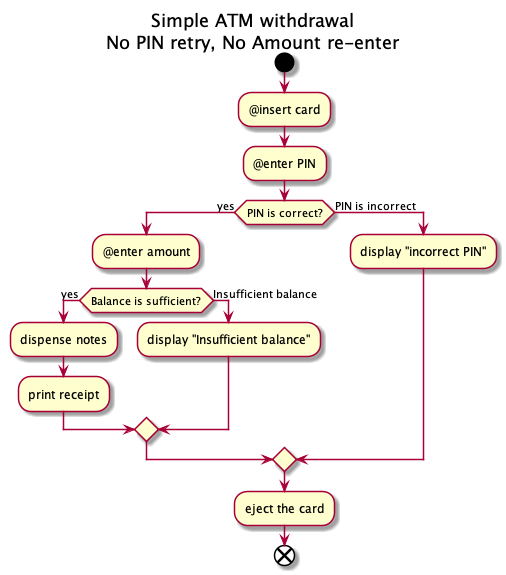
Into this Gherkin feature description
Feature: Simple ATM withdrawal No PIN retry, No Amount re-enter Scenario: Successful transaction Given Entered Correct PIN number And Balance is sufficient When enter amount Then dispense notes And print receipt And eject the card @important Scenario: Not enough money Given Entered Correct PIN number And Insufficient balance When enter amount Then display "Insufficient balance" And eject the card Scenario Outline: PIN is incorrect Given User's PIN is <pin> When insert card And User enters <input> Then display "incorrect PIN" And eject the card Examples: | pin | input | | 123456 | 325212 | | 123456 | |- User/Core activity must start with
@symbol, these will go toWhensteps of Gherkin file. - If condition must be a statement that end with
?, the question mark will be drop while parsing.
❌
is PIN correct?
✅
PIN is correct?
- Else branch must be descriptive.
❌
no
❌
false
✅
PIN is incorrect
- Activity must not contain (!), if it ends with !, the activity will be consider as an
Given.
- create a
.pumlfile and run
$ npx cupl FILE.puml Feature: ... ...- a
.cupl.jsonfile will be generated to allow you to
- Rename
Scenario( bynamefield). - Rename rename steps ( by
aliasdictionary) and insert parameters. - Rename add
@tagtoScenarioand steps (bytagsfield - array of strings). - Rename change Gherkin dialect.
- Provide examples.
Example:
{ "$schema": "https://raw.githubusercontent.com/cinoss/cupl/master/src/config.schema.json", "global": { "alias": { "PIN is correct": "Entered Correct PIN number" }, "dialect": "en" }, "paths": { "PIN is correct|Balance is sufficient": { "name": "Successful transaction" }, "PIN is correct|Insufficient balance": { "name": "Not enough money", "tags": ["important"] }, "PIN is incorrect": { "alias": { "PIN is incorrect": "User's PIN is <pin>", "enter PIN": "User enters <input>" }, "examples": [ ["pin", "input"], ["123456", "325212"], ["123456", ""] ] } } }- Run
cuplagain with-wflag to generate a file.
$ npx cupl -w FILE.puml Feature: ... ... Generated [FILE].feature successfully!$ npm install -g cupl $ cupl FILE running command... ...- Feature
- Example (or Scenario)
- Given, When, Then, And, But for steps (or *)
- Tags
- Examples
- Background
- Scenario Outline (or Scenario Template)
- Data Tables
- Rule
- Doc Strings
- Comments
-
start,stop,end -
if,elseif,endif -
title,end title -
note,end note - SDL (
|,<,>,/,],}) -
repeat,repeat while,backward,while,end while -
fork,end fork - Colors
- Arrow
- Connector
- Grouping
- Swimlanes
- Detach