前段时间 Harmony Next 不再兼容 Android 的消息满天飞,各个大厂也开始对纯血 HarmonyOS 进行适配了,普通开发者也可以下载 DevEco Studio 进行尝鲜,相信大部分同学已经尝过鲜了,甚至有一部分已经着手开始了适配计划了。
现在 HarmonyOS 4.0 的一些 API 还不太成熟,第三方SDK也在开发中,想复刻成熟的原生应用可能为时尚早,不过我们用 ArkTS 来画页面和实现一些简单的业务逻辑还绰绰有余的 。
最近公司也开始了复刻 HarmonyOS 版本的尝鲜计划,Android iOS 客户端开发全员上阵。我们的 iOS 小伙伴说,除了 SwiftUI,鸿蒙这套 ArkTS 画页面也太快了吧,根本停不下来;不过对于Android 开发来说,特别是之前写过RN、Flutter 或者Compose的来说,写起来无外乎换一套API,成本相对是比较小的。
不过我想吐槽一下 Harmony 的开发文档写的是真不怎么样
话不多说,直接开始。相信大家对 ArkTS 已经有一定了解,画布局已经不在话下。例如,用 RelativeContainer 画个 Hello World:
RelativeContainer() { Text('Hello World') .id("text") .alignRules({ center: { anchor: "__container__", align: VerticalAlign.Center }, middle: { anchor: "__container__", align: HorizontalAlign.Center }, }) } .width('100%') .height('100%')查看 RelativeContainer 的写法和文档,发现它就是 Android RelativeLayout 的 ArkTS 版本,与 RelativeLayout 的功能相同,同时又有一些不同:
- 增强了居中对齐功能,支持基于某个控件的某个方向的中间进行对齐
- 不支持基线对齐 (
baseline) - 所有子组件必须强制声明 id,不支持 id 有效性的检查(重复或者不存在的情况),Parent id 的关键字是
__container__ - 所有对齐的锚点
anchor不支持代码补全,只能靠手敲 - 对齐规则写法繁琐
- 不支持相互约束(Parent <-- A <---> B --> Parent)
属实是一点优点没学到,iOS同学写Xib的看了都直摇头。
那有没有方案来优化 RelativeContainer 对齐规则写法呢,经过对TS语法一顿研究,发现可以通过工具方法来优化 alignRules 的写法:
alignRules(AlignRuleOption) 的入参 AlignRuleOption 有如下属性:
| 属性名 | 功能 | 对应 Android RelativeLayout 属性(基于Parent对齐的属性没有写) |
|---|---|---|
| left | 当前控件左边基于anchor的(左边、右边和水平方向中间)对齐 | layout_alignLeft or layout_toRightOf |
| top | 当前控件上方基于anchor的(上方、下方和垂直方向中间)对齐 | layout_alignTop or layout_below |
| right | 当前控件右边基于anchor的(左边、右边和水平方向中间)对齐 | layout_alignRight or layout_toLeftOf |
| bottom | 当前控件下方基于anchor的(上方、下方和垂直方向中间)对齐 | layout_alignBottom or layout_above |
| center | 当前控件垂直方向中间基于anchor的(上方、下方和垂直方向中间)对齐 | layout_centerVertical,只支持基于父容器居中对齐 |
| middle | 当前控件水平方向中间基于anchor的(左边、右边和水平方向中间)对齐 | layout_centerHorizontal,只支持基于父容器居中对齐 |
它们每个属性都是 { anchor: "id", align: (VerticalAlign|HorizontalAlign).* } 的结构体,可以对这些结构体声明进行优化:
// 把 `__container__` 提取成常量 export const Parent = "__container__" // 声明垂直方向对齐属性结果类型 declare interface VerticalRule { anchor: string, align: VerticalAlign } // 声明水平方向对齐属性结果类型 declare interface HorizontalRule { anchor: string, align: HorizontalAlign } // 这两个接口主要是为了显示声明结构体属性类型 // API 9是可以不声明的 // API 10增强了代码检查需要声明返回值类型方法才可能return数据 export function toLeftOf(id: string): HorizontalRule { return { anchor: id, align: HorizontalAlign.Start } } export function toRightOf(id: string): HorizontalRule { return { anchor: id, align: HorizontalAlign.End } } export function centerHorizontalOf(id: string): HorizontalRule { return { anchor: id, align: HorizontalAlign.Center } } export function toTopOf(id: string): VerticalRule { return { anchor: id, align: VerticalAlign.Top } } export function toBottomOf(id: string): VerticalRule { return { anchor: id, align: VerticalAlign.Bottom } } export function centerVerticalOf(id: string): VerticalRule { return { anchor: id, align: VerticalAlign.Center } }修改上面Demo的代码
// 别忘了导包 import { centerHorizontalOf, centerVerticalOf, Parent, toBottomOf } from '../utils/RelativeContainerExtend'; RelativeContainer() { Text('Hello World') .id("text") .alignRules({ center: centerVerticalOf(Parent), middle: centerHorizontalOf(Parent), }) .backgroundColor(Color.Red) Text("Test") .id("test") .alignRules({ left: centerHorizontalOf("text"), top: toBottomOf("text") }) .backgroundColor(Color.Green) } .width('100%') .height('100%')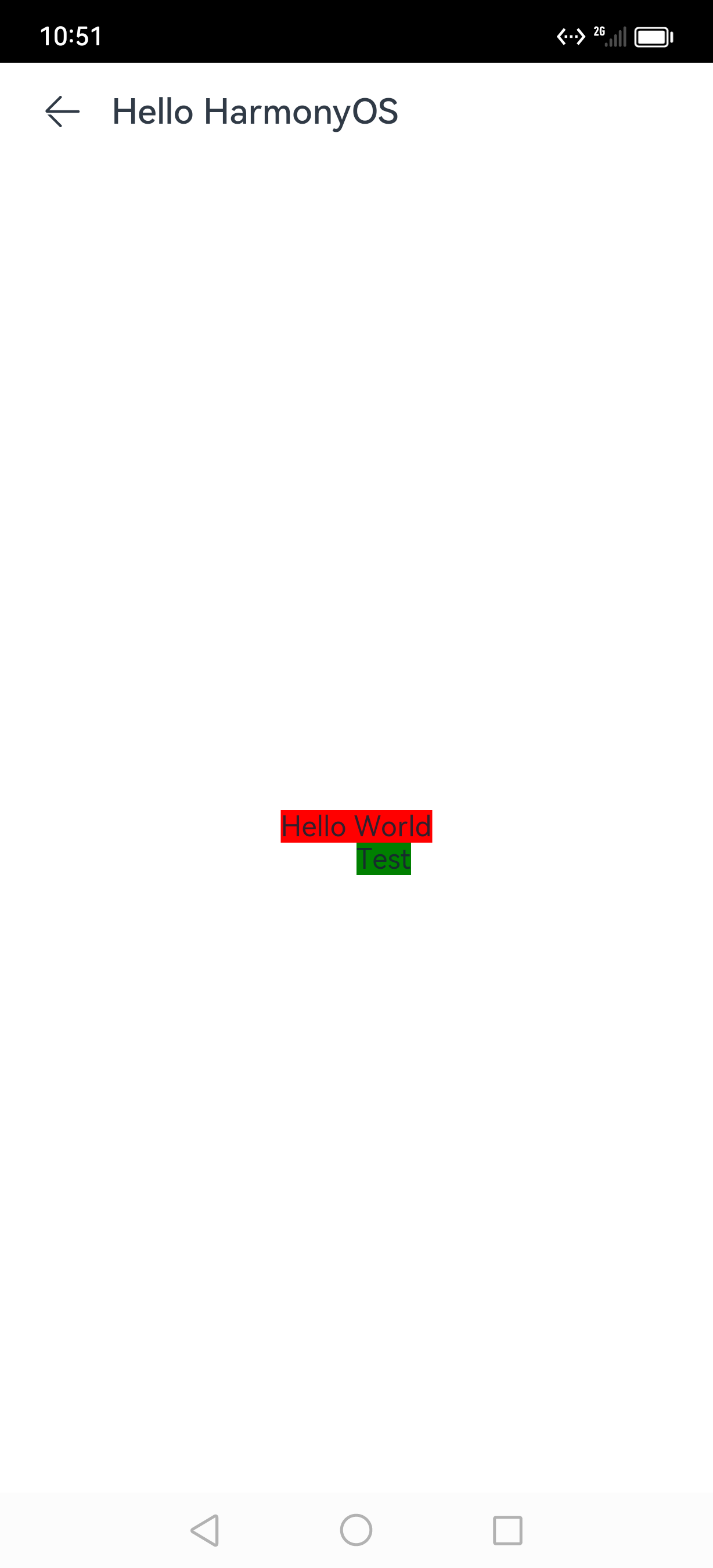
是不是以为到这里就结束了,No No No,我们还可以再进一步
我们可以让它更有 Android 特色,同时让API更明了。
通过上面的 和 RelativeLayout xml 属性进行对比表格,发现它不太适合 RelativeLayout xml 属性的那套命名,反而更像 ConstraintLayout 的位置约束属性,索性直接套 ConstraintLayout xml 的属性:leftToLeftOf,leftToRightOf 等等这些来扩展。首先声明支持的属性:
declare interface AlignRules { leftToLeftOf?: string, leftToRightOf?: string, rightToLeftOf?: string, rightToRightOf?: string, topToTopOf?: string, topToBottomOf?: string, bottomToTopOf?: string, bottomToBottomOf?: string, // 居中属性 centerOf?: string, centerHorizontalOf?: string, centerVerticalOf?: string, }然后添加一个方法将 AlignRules 转换为 AlignRuleOption,同时对一些居中情况进行特殊处理
/** * 构建相对布局规则 * @param rules * @returns */ export function buildRules(rules: AlignRules): AlignRuleOption { let _left: HorizontalRule | undefined = undefined if (rules.leftToLeftOf != null && rules.leftToRightOf != null) { throw Error("leftToLeftOf 和 leftToRightOf 不能同时约束") } else if (rules.leftToLeftOf != null) { _left = toLeftOf(rules.leftToLeftOf!) } else { _left = toRightOf(rules.leftToRightOf!) } let _right: HorizontalRule | undefined = undefined if (rules.rightToLeftOf != null && rules.rightToRightOf != null) { throw Error("rightToLeftOf 和 rightToRightOf 不能同时约束") } else if (rules.rightToLeftOf != null) { _right = toLeftOf(rules.rightToLeftOf!) } else { _right = toRightOf(rules.rightToRightOf!) } let _middle: HorizontalRule | undefined = undefined if ( rules.centerHorizontalOf != null || (_left != null && _right != null && _left.anchor == _right.anchor && _left.align == HorizontalAlign.Start && _right.align == HorizontalAlign.End) ) { _middle = rules.centerHorizontalOf != null ? centerHorizontalOf(rules.centerHorizontalOf!) : centerHorizontalOf(_left.anchor!) _left = undefined _right = undefined } let _top: VerticalRule | undefined = undefined if (rules.topToTopOf != null && rules.topToBottomOf != null) { throw Error("topToTopOf 和 topToBottomOf 不能同时约束") } else if (rules.topToTopOf != null) { _top = toTopOf(rules.topToTopOf!) } else { _top = toBottomOf(rules.topToBottomOf!) } let _bottom: VerticalRule | undefined = undefined if (rules.bottomToTopOf != null && rules.bottomToBottomOf != null) { throw Error("bottomToTopOf 和 bottomToBottomOf 不能同时约束") } else if (rules.bottomToTopOf != null) { _bottom = toTopOf(rules.bottomToTopOf!) } else { _bottom = toBottomOf(rules.bottomToBottomOf!) } let _center: VerticalRule | undefined = undefined if ( rules.centerVerticalOf != null || (_top != null && _bottom != null && _top.anchor == _bottom.anchor && _top.align == VerticalAlign.Top && _bottom.align == VerticalAlign.Bottom) ) { _center = rules.centerVerticalOf != null ? centerVerticalOf(rules.centerVerticalOf!) : centerVerticalOf(_top.anchor!) _top = undefined _bottom = undefined } if (rules.centerOf != null) { _middle = centerHorizontalOf(rules.centerOf) _center = centerVerticalOf(rules.centerOf) _left = undefined _right = undefined _top = undefined _bottom = undefined } return { left: _left, right: _right, middle: _middle, top: _top, bottom: _bottom, center: _center, } }再看看上面的Demo代码怎么写:
import { buildRules, Parent } from '../utils/RelativeContainerExtend'; @Extend(Text) function styling() { .fontSize(20) .fontWeight(FontWeight.Bold) .fontColor(Color.Black) } @Entry @Component struct Index { build() { Navigation() { RelativeContainer() { Text('Hello World') .margin(12) .styling() .id("text") .alignRules(buildRules({ centerOf: Parent })) .backgroundColor(Color.Red) Text("Left") .id("left") .styling() .alignRules(buildRules({ rightToLeftOf: "text", centerVerticalOf: "text" })) .backgroundColor(Color.Brown) Text("Right") .styling() .id("right") .alignRules(buildRules({ leftToRightOf: "text", centerVerticalOf: "text" })) .backgroundColor(Color.Green) Text("Top") .styling() .id("top") .alignRules(buildRules({ bottomToTopOf: "text", centerHorizontalOf: "text" })) .backgroundColor(Color.Yellow) Text("Bottom") .styling() .id("bottom") .alignRules(buildRules({ topToBottomOf: "text", centerHorizontalOf: "text" })) .backgroundColor(Color.Orange) } .width('100%') .height('100%') } .width('100%') .height('100%') .title("Hello HarmonyOS") .titleMode(NavigationTitleMode.Mini) } }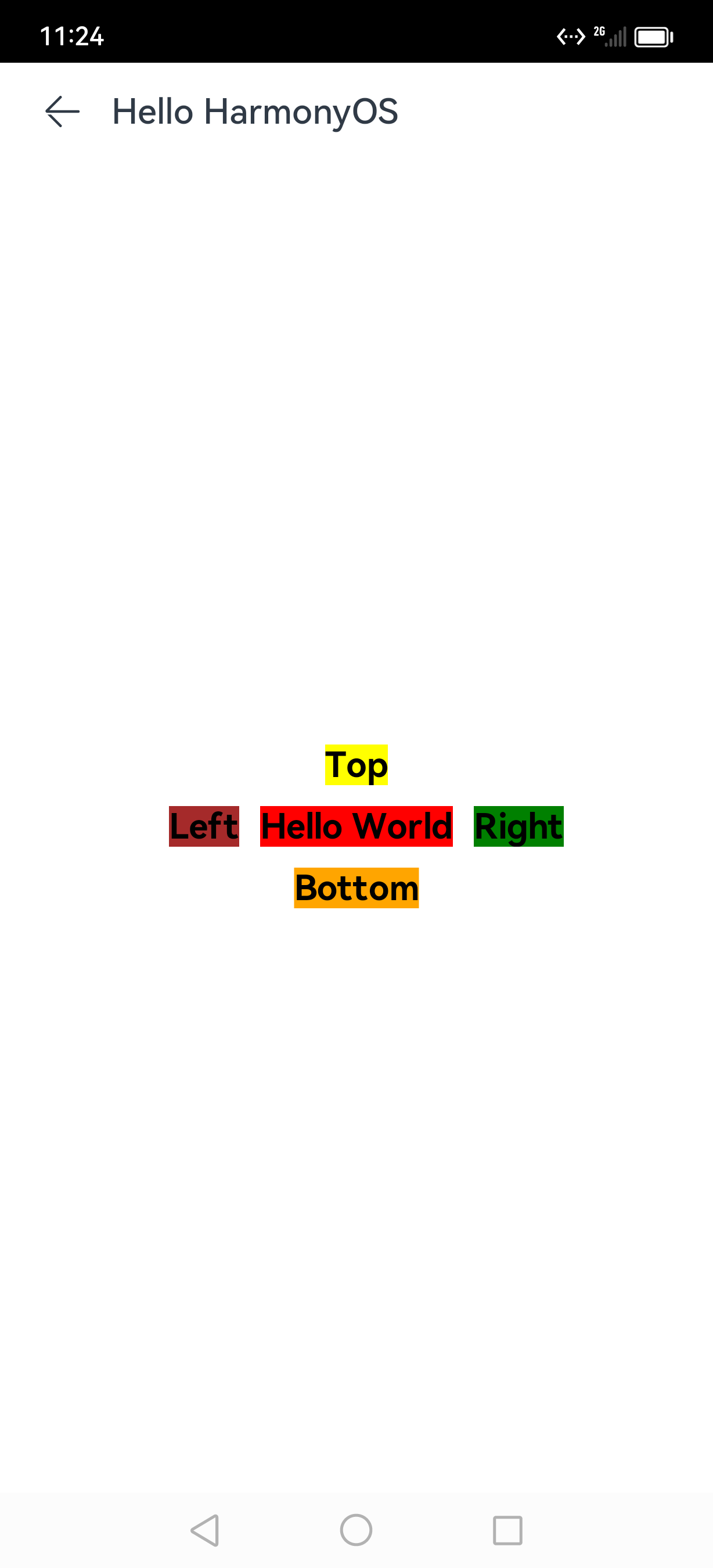
到此对 RelativeContainer 的扩展也就结束了,期盼已久的完整代码马上就来
直接将RelativeContainerExtend.ets复制到项目中即可使用