
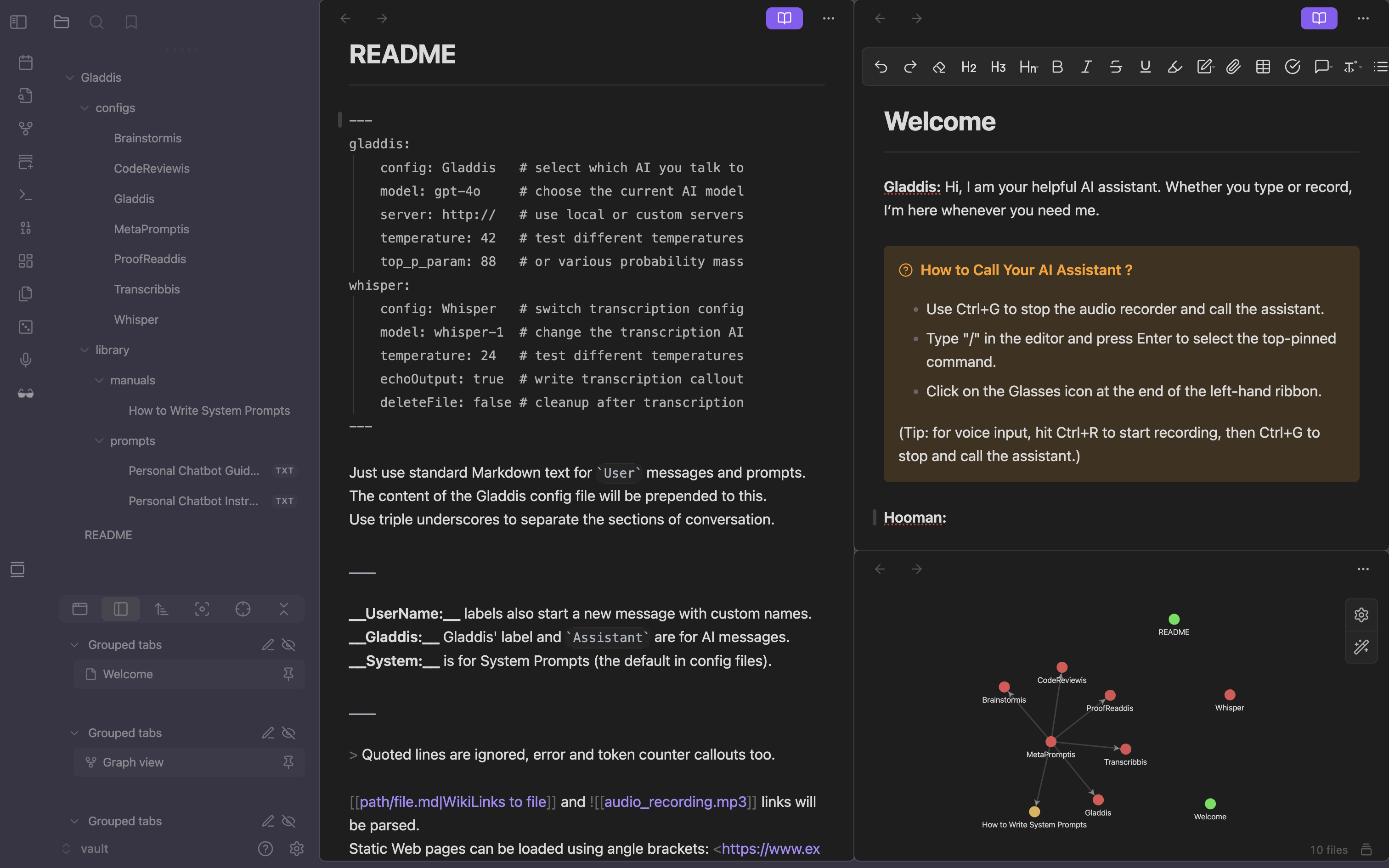
Obsidian exists to help you build a second brain. Gladdis exists to give that brain a pen (let it do the writing for once), ears (talking is easier than typing) and multiple split personalities (give your system prompts names). Further plans for v1.0 include: a brush (let it paint like an artist), a voice (listening is easier than reading), an internal monologue (together we are more than our sum) and the ability to execute code (what could possibly go wrong ?).
- Native Markdown Syntax: the conversation window is any open Markdown file, the streaming LLM response is appended.
- Whisper Transcription: audio files WikiLinks are auto-transcribed, use the Obsidian "audio recorder" core plugin.
- Document Loading: text files WikiLinks are auto-loaded, just drag and drop files into the conversation window.
- PDF & Web Support: load PDF WikiLinks just like text files, load web pages external links as well using
<URL>. - Image Vision AIs: send images to vision-supporting LLMs using local WikiLinks or Markdown external web links.
- System Prompts: name your system prompts, create personalities and use FrontMatter to choose whom to talk to.
Download the Plugin Demo Vault in ZIP or TGZ to try it out !
Gladdis provides 3 commands, map them to hotkeys in the settings or create buttons with the Commander plugin.
- Chat with Gladdis: the main command to perform the full processing, including the call to the LLM model.
- Process the Content: to check that all links and transcriptions are correct, and get a full token count.
- Process the Prompt (or Selection): to check just the prompt or selection and get a specific token count.
The settings panel lets you specify the plugin data folder, your OpenAI API key, and the FrontMatter defaults.
- Data Root Path: Gladdis will search for config files in the
configssubfolder, and will write the chat and call logs in thehistorysubfolder. - OpenAI Secret Key: create an OpenAI API account, generate an API key and paste it in the settings panel.
- FrontMatter Defaults: adjust the various defaults for the Gladdis and Whisper options.
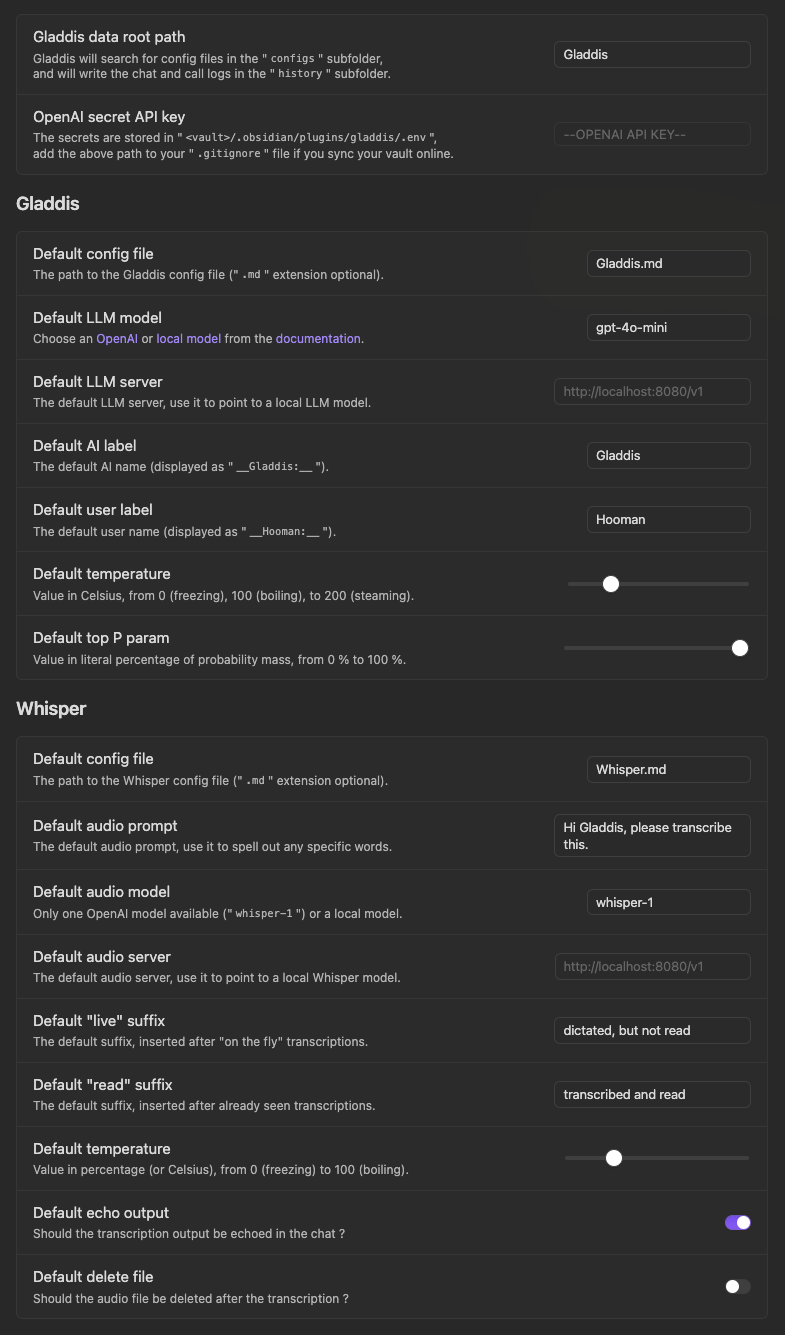
The defaults from the settings panel can be overridden using FrontMatter in any conversation or config file.
--- gladdis: config: Gladdis # select which AI you talk to model: gpt-4o # choose the current AI model server: http:// # use local or custom servers temperature: 42 # test different temperatures top_p_param: 88 # or various probability mass whisper: config: Whisper # switch transcription config model: whisper-1 # change the transcription AI temperature: 24 # test different temperatures echoOutput: true # write transcription callout deleteFile: false # cleanup after transcription ---The same familiar Obsidian syntax from your notes is used for the conversation history (it's all just text).
Just use standard Markdown text for `User` messages and prompts. The content of the Gladdis config file will be prepended to this. Use triple underscores to separate the sections of conversation. ___ __UserName:__ labels also start a new message with custom names. __Gladdis:__ Gladdis' label and `Assistant` are for AI messages. __System:__ is for System Prompts (the default in config files). ___ > Quoted lines are ignored, error and token counter callouts too. [[path/file.md|WikiLinks to file]] and ![[audio_recording.mp3]] will be parsed. Static Web pages can be loaded using angle brackets: <https://www.example.com>. The very last message is the prompt, the LLM response streams below.The following OpenAI models are supported via the paying API:
| Label | Tokens | Vision | Notes |
|---|---|---|---|
o3-mini | 200 k | OpenAI's latest reasoning model designed to excel at science, math, and coding tasks. | |
o1-mini | 128 k | OpenAI's first reasoning model designed to solve hard problems across domains. | |
gpt-4o | 128 k | ✅ | OpenAI's high-intelligence flagship model for complex, multi-step tasks. |
gpt-4o-mini | 128 k | ✅ | OpenAI's affordable and intelligent small model for fast, lightweight tasks. |
chatgpt-4o-latest | 128 k | ✅ | Dynamic model continuously updated to the current version of GPT-4o in ChatGPT. |
gpt-4-turbo | 128 k | ✅ | The latest GPT-4 Turbo model with vision capabilities (GPT-4o is cheaper and faster). |
gpt-3.5-turbo | 16 k | The latest GPT-3.5 Turbo model with higher accuracy (GPT-4o mini is cheaper and more capable). |
Open-Source models can be used locally via Ollama or LocalAI:
| Label | Tokens | Vision | Notes |
|---|---|---|---|
llama3.3 | 128 k | Meta's new 70B model with similar performance to the Llama 3.1 405B model. | |
llama3.2-vision | 128 k | ✅ | Meta's image reasoning generative models in both 11B and 90B model sizes. |
llama3.2 | 128 k | Meta's new 1B and 3B models optimized for multilingual dialogue use cases. | |
llama3.1 | 128 k | Meta's 8B, 70B and 405B models with overall stronger reasoning capabilities. | |
phi4 | 16 k | Microsoft's new Phi 4 "Medium" (14B) open model with a 16k context window. | |
phi3.5-vision | 128 k | ✅ | Microsoft's Phi 3 and 3.5 "Mini" (3.8B) models with vision capabilities. |
phi3.5 / phi3 | 128 k | Microsoft's new Phi 3.5 "Mini" (3.8B) and Phi 3 "Medium" (14B) open models. | |
qwen2.5 | 32 k | Alibaba Cloud's Qwen multilingual Chinese models ranging from 0.5B to 72B. | |
gemma2 | 8 k | Google's Gemma 2B, 9B and 27B models featuring a brand new architecture. | |
llava | 4 k | ✅ | Family of Large Language-and-Vision Assistant models between 7B and 34B. |
- Image & Audio Out: create images with DALL·E, speak with ElevenLabs or other API accessible models.
- Code Execution: add Templater code to your prompts, run any code the AI generates (are you sure ?!).
- AI-2-AI Prompt: let your various AI configs talk to each other, create your own "Council of Gladdises".
- Open the "Community plugins" tab in the settings.
- Click the "Browse" button and search for "Gladdis".
- Click the "Install" button and enable the plugin.
- Install the Beta Reviewers Auto-update Tool plugin.
- Follow the instructions for "Adding a beta plugin".
- Download the
main.js&manifest.jsonfiles from the latest release into your vault's plugins folder:<vault>/.obsidian/plugins/gladdis/.
Feel free to open new issues or submit PRs, while the Gladdis community is growing.
Gladdis is created by Aurélien Stébé, a senior French freelance Toptal Software Engineer.