Move to Understand a 3D Scene: Bridging Visual Grounding and Exploration for Efficient and Versatile Embodied Navigation




Ziyu Zhu, Xilin Wang, Yixuan Li, Zhuofan Zhang, Xiaojian Ma, Yixin Chen, Baoxiong Jia, Wei Liang, Qian Yu, Zhidong Deng📧, Siyuan Huang📧, Qing Li📧
This repository is the official implementation of the Arxiv paper "Move to Understand a 3D Scene: Briding Visual Grounding and Exploration for Efficient and Versatile Embodied Navigation".
Paper | arXiv | Project | Checkpoints
- [ 2025.07 ] Release training and evaluation.
- [ 2025.07 ] Release data and checkpoints.
- [ 2025.08 ] Release data collection scripts.
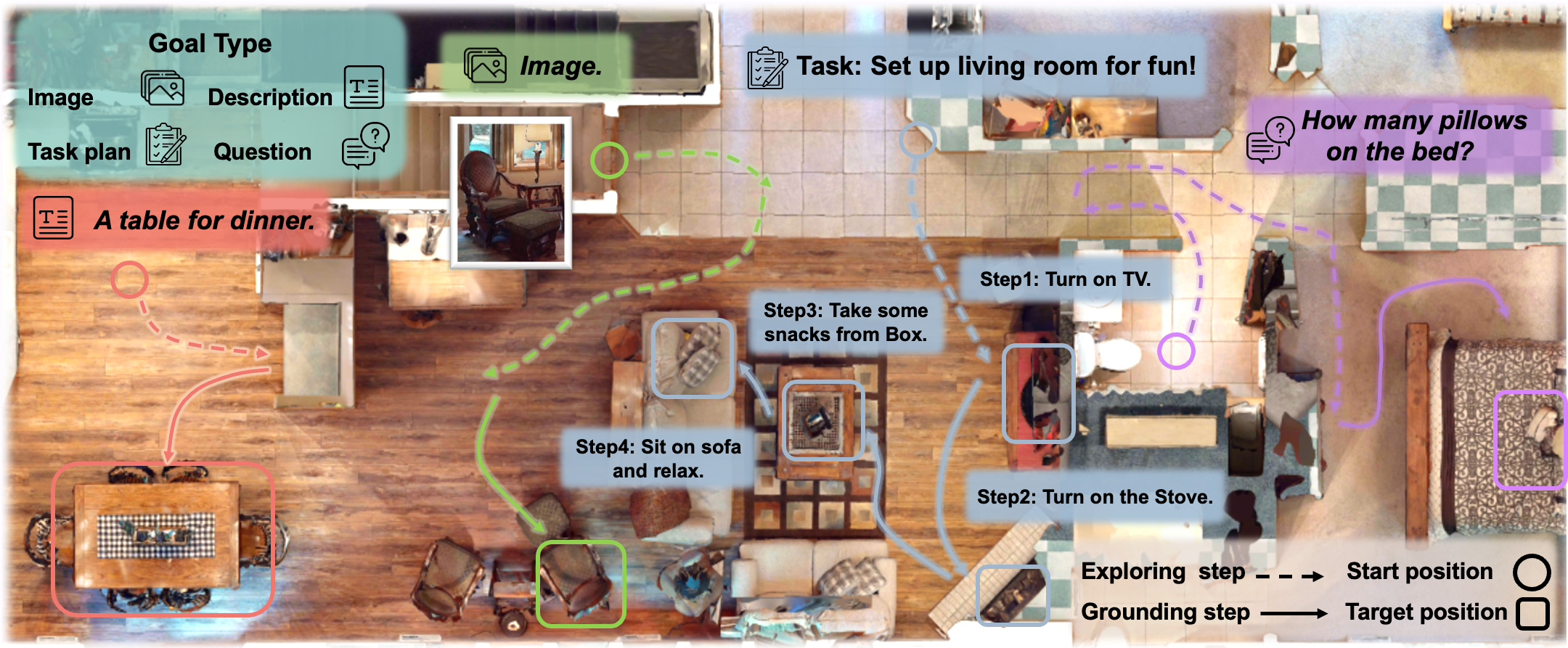
Embodied scene understanding requires not only comprehending visual-spatial information that has been observed but also determining where to explore next in the 3D physical world. Existing 3D Vision-Language (3D-VL) models primarily focus on grounding objects in static observations from 3D reconstruction, such as meshes and point clouds, but lack the ability to actively perceive and explore their environment. To address this limitation, we introduce Move to Understand (MTU3D), a unified framework that integrates active perception with 3D vision-language learning, enabling embodied agents to effectively explore and understand their environment. . Extensive evaluations across various embodied navigation and question-answering benchmarks show that MTU3D outperforms state-of-the-art reinforcement learning and modular navigation approaches by 14%, 27%, 11%, and 3% in success rate on HM3D-OVON, GOAT-Bench, SG3D, and A-EQA, respectively. MTU3D's versatility enables navigation using diverse input modalities, including categories, language descriptions, and reference images. The deployment on a real robot demonstrates MTU3D's effectiveness in handling real-world data. These findings highlight the importance of bridging visual grounding and exploration for embodied intelligence.
- Install conda package
conda create -n envname python=3.8 conda activate envname pip3 install torch==2.0.0 pip3 install torchvision==0.15.1 python3 -m pip install nvidia-cudnn-cu11==8.7.0.84 pip3 install -r requirements.txt - Install Minkowski Engine
git clone https://github.com/NVIDIA/MinkowskiEngine.git sudo apt install python3-distutils conda install openblas-devel -c anaconda cd MinkowskiEngine python setup.py install --blas_include_dirs=${CONDA_PREFIX}/include --blas=openblas - Install FastSAM, link is here FastSAM
put checkpoint to ./hm3d-online/FastSAM/FastSAM-x.pt
cd hm3d-online git clone https://github.com/CASIA-IVA-Lab/FastSAM.git cd FastSAM pip install -r requirements.txt cd ../.. - Install HabitatSim and HabitatLab
conda install habitat-sim=0.2.3 headless -c conda-forge -c aihabitat -y git clone --branch v0.2.3 git@github.com:facebookresearch/habitat-lab.git cd habitat-lab pip install -e habitat-lab pip install -e habitat-baselines - download sceneverse data from scene_verse_base and change
data.scene_verse_baseto sceneverse data directory. - download stage1 data for embodied segmentation training from stage1 and change
data.embodied_baseto download data directory. - download feature saved from stage1 from stage1_feat and change
data.embodied_featto download data directory. - download vle data from vle_stage2 and change
data.embodied_vleto download data directory. - change
embodied_scan_dirin hm3d-online/*-nav.py to stage1 data directory. - download hm3d data from hm3d and change
hm3d_data_base_pathin hm3d-online/*.-nav.py. - download embodied navigation benchmark data from embodied-bench and change
data_set_pathandnavigation_data_pathin hm3d-online/*.nav.py.
- download mtu3d-ckeckpoints, and change
pq3d_stage1_pathandpq3d_stage2_pathin hm3d-online/*-nav.py.
Stage 1 low-level percetpion training
python3 run.py --config-path configs/embodied-pq3d-final --config-name embodied_scan_instseg.yaml Stage 2 vision-langauge-exploration pre-training
python3 run.py --config-path configs/embodied-pq3d-final --config-name embodied_vle.yaml Stage 3 navigation dataset specific fine-tuning
python3 run.py --config-path configs/embodied-pq3d-final --config-name embodied_vle.yaml data.train=[{specific_dataset}] pretrain_ckpt_path={stage2_pretrained_path} For multi-gpu training usage, we use four GPU in our experiments.
python launch.py --mode ${launch_mode} \ --qos=${qos} --partition=${partition} --gpu_per_node=4 --port=29512 --mem_per_gpu=80 \ --config {config} \ To debug, use
python3 ... debug.flag=True debug.debug_size=10 mkdir output_dirs export PYTHONPATH=./:./hm3d-online:./hm3d-online/FastSAM export MAGNUM_LOG=quiet HABITAT_SIM_LOG=quiet export YOLO_VERBOSE=False Change path in hm3d-nav.py. Edit run_nav.sh.
bash run_nav.sh Change path in goat-nav.py. Edit run_nav.sh.
bash run_nav.sh Change path in sg3d-nav.py. Edit run_nav.sh.
bash run_nav.sh We provide data collection scripts in vle_collection folder.
We would like to thank the authors of Vil3dref, Mask3d, Openscene, Xdecoder, and 3D-VisTA for their open-source release.
@article{zhu2025mtu, title = {Move to Understand a 3D Scene: Bridging Visual Grounding and Exploration for Efficient and Versatile Embodied Navigation}, author = {Zhu, Ziyu and Wang, Xilin and Li, Yixuan and Zhang, Zhuofan and Ma, Xiaojian and Chen, Yixin and Jia, Baoxiong and Liang, Wei and Yu, Qian and Deng, Zhidong and Huang, Siyuan and Li, Qing}, journal = {International Conference on Computer Vision (ICCV)}, year = {2025} }