hugo new site mysite cd mysitegit submodule add git@github.com:MeiK2333/github-style.git themes/github-styleIf you just installed the theme, it is already in the latest version. If not, you can update using the below commands
cd themes/github-style git pullThen, you need to rename the previous posts folder to post
cd <you-project-folder> mv content/posts content/posthugo new readme.md echo '`Hello World!`' > content/readme.md--- pin: true --- Hugo will create a post with draft: true, change it to false in order for it to show in the website.
hugo new post/title_of_the_post.md --- title: "title" date: 2019-10-22T18:46:47+08:00 draft: false summary: "The summary content" --- Use <!--more--> to separate content that will display in the posts page as abstraction and the rest of the content. This is different from summary, as summary will not appear in the post.
--- title: "title" date: 2019-10-22T18:46:47+08:00 draft: false --- abstraction show in the post page <!--more--> other content add to config.toml
lastmod = true [frontmatter] lastmod = ["lastmod", ":fileModTime", ":default"]Use gitalk to support comments
add to config.toml
enableGitalk = true [params.gitalk] clientID = "Your client ID" clientSecret = "Your client secret" repo = "repo" owner = "Your Github username" admin = "Your Github username" id = "location.pathname" labels = "gitalk" perPage = 30 pagerDirection = "last" createIssueManually = true distractionFreeMode = falseIn you post add math: true to front matter
--- katex: math --- Then the katex script will auto render the string enclosed by delimiters.
# replace ... with latex formula display inline \\( ... \\) display block $$ ... $$ 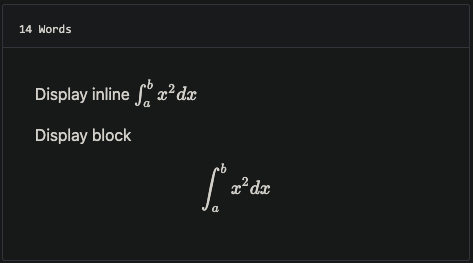
you can add MathJax:true to frontmatter
mathJax: true Add your files in the static folder and list them in the custom_css and custom_js parameters
For example, with static/css/custom.css and static/js/custom.js, add to config.toml
[params] custom_css = ["css/custom.css"] custom_js = ["js/custom.js"]baseURL = "https://meik2333.com/" languageCode = "zh-cn" title = "MeiK's blog" theme = "github-style" pygmentsCodeFences = true pygmentsUseClasses = true [params] author = "MeiK" description = "In solitude, where we are least alone." github = "MeiK2333" facebook = "MeiK2333" twitter = "MeiK2333" linkedin = "MeiK2333" instagram = "MeiK2333" tumblr = "MeiK2333" email = "meik2333@gmail.com" url = "https://meik2333.com" keywords = "blog, google analytics" rss = true lastmod = true userStatusEmoji = "😀" favicon = "/images/github.png" avatar = "/images/avatar.png" headerIcon = "/images/GitHub-Mark-Light-32px.png" location = "China" enableGitalk = true custom_css = ["css/custom.css"] custom_js = ["js/custom.js"] [params.gitalk] clientID = "Your client ID" clientSecret = "Your client secret" repo = "repo" owner = "MeiK2333" admin = "MeiK2333" id = "location.pathname" labels = "gitalk" perPage = 15 pagerDirection = "last" createIssueManually = true distractionFreeMode = false [[params.links]] title = "Link" href = "https://github.com/meik2333" [[params.links]] title = "Link2" href = "https://meik2333.com" icon = "https://meik2333.com/images/avatar.png" [frontmatter] lastmod = ["lastmod", ":fileModTime", ":default"] [services] [services.googleAnalytics] ID = "UA-123456-789" You can create a collapsible block like this:
{{<details "summary title">}} block content {{</details>}} And it will show like this:
summary title
block content
add to config.toml
[params] enableSearch = true [outputs] home = ["html", "json"] [outputFormats.json] mediaType = "application/json" baseName = "index" isPlainText = falseWe can do local search now, it is implemented by fuse.js.
There are various way to deploy to github, here is a link to official document.
Here is an sample. Note line 22 have env HUGO_ENV="production", makes sure googleAnalysis is loaded during production, but is not loaded when we are testing it in localhost.
#!/bin/sh if [ "`git status -s`" ] then echo "The working directory is dirty. Please commit any pending changes." exit 1; fi echo "Deleting old publication" rm -rf public mkdir public git worktree prune rm -rf .git/worktrees/public/ echo "Checking out gh-pages branch into public" git worktree add -B gh-pages public origin/gh-pages echo "Removing existing files" rm -rf public/* echo "Generating site" env HUGO_ENV="production" hugo -t github-style echo "Updating gh-pages branch" cd public && git add --all && git commit -m "Publishing to gh-pages (publish.sh)" #echo "Pushing to github" #git push --allThen you can verify the site is working and use git push --all to push the change to github. If you don't want to check again every time, you can uncomment the #git push --all in the script.
- 重写标题导航,那玩意儿引入的 JS 在控制台报错。