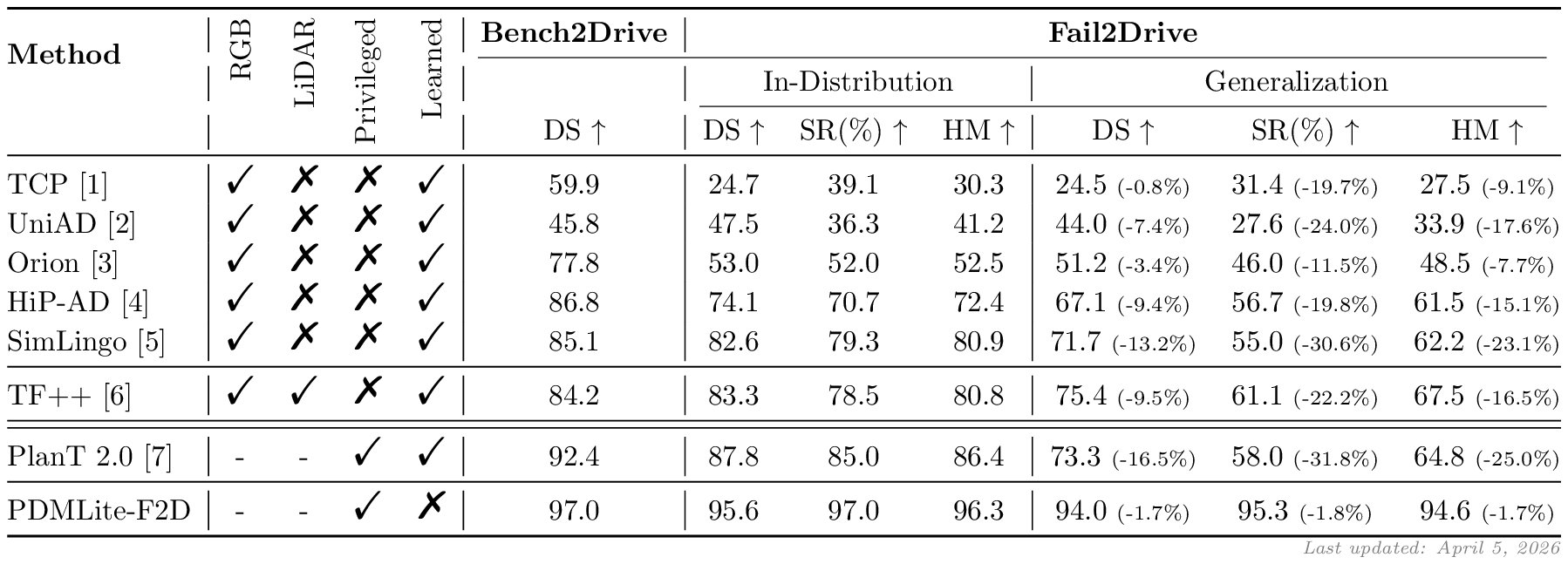
Fail2Drive is the first CARLA v2 benchmark designed to test closed-loop generalization on truly unseen long-tail scenarios. By pairing each shifted route with an in-distribution reference scenario, it exposes substantial hidden failure modes in current state-of-the-art driving models.

- 17 unseen scenarios for evaluation of true generalization.
- 30 novel assets including animals, visual noise, and adversarial obstacles.
- Paired route design enables quantification of generalization gap.
- 100 route pairs in diverse environments and configurations.
- Toolbox for creating custom obstacles and routes.

If you want to introduce Fail2Drive into an existing CARLA project, we provide a lightweight plugin installation on the plugin branch. The installation below includes the
carla_garagemodels to provide a starting point for new users.
After a quick installation, you can already explore the benchmark manually, run baseline agents, and start testing custom scenarios.
# 1. Clone this repository git clone https://github.com/autonomousvision/fail2drive.git cd fail2drive # 2. Set up the Fail2Drive CARLA simulator mkdir f2d_carla curl -L \ https://huggingface.co/datasets/SimonGer/fail2drive/resolve/main/fail2drive_simulator.tar.gz \ | tar -xz -C f2d_carla # 3. Create the conda environment conda env create -f environment.yml conda activate fail2drive # NOTE: The pip installed carla==0.9.15 should work, but may cause warnings in some places. # If you want to install the official Fail2Drive PythonAPI you can find it at: # f2d_carla/PythonAPI/carla/dist/carla-0.9.15-cp310-cp310-linux_x86_64.whl # 4. Set environment variables source env_vars.sh # Ready to start experimenting!To run any of the experiments below, start CARLA in a second terminal:
bash ${CARLA_ROOT}/CarlaUE4.shTips for usage with reduced computational resources
- Run CARLA with
-RenderOffscreento prevent the spectator window from opening. - Run CARLA with
-quality-level=Lowto reduce rendering cost. Do not use this for final evaluation. - Run CARLA and the model on different GPUs by specifying
-graphicsadapter=[id].
python leaderboard/leaderboard/leaderboard_evaluator.py \ --agent ${WORK_DIR}/leaderboard/leaderboard/autoagents/human_agent_keyboard.py \ --routes ${WORK_DIR}/fail2drive_split/Generalization_PedestriansOnRoad_1085.xmlpython leaderboard/leaderboard/leaderboard_evaluator_local.py \ --agent ${WORK_DIR}/team_code/visu_agent.py \ --track MAP \ --routes ${WORK_DIR}/fail2drive_split/Generalization_PedestriansOnRoad_1085.xmlBefore running the model, download the checkpoint into the checkpoints folder:
mkdir -p checkpoints/tfpp wget -P checkpoints/tfpp \ https://huggingface.co/SimonGer/TFv5/resolve/main/all_towns/model_0030_0.pth \ https://huggingface.co/SimonGer/TFv5/resolve/main/all_towns/config.jsonThen run TransFuser++ with the LIVE_VISU flag to inspect the model inputs live:
LIVE_VISU=1 python leaderboard/leaderboard/leaderboard_evaluator_local.py \ --routes ${WORK_DIR}/fail2drive_split/Generalization_PedestriansOnRoad_1085.xml \ --agent ${WORK_DIR}/team_code/sensor_agent.py \ --agent-config ${WORK_DIR}/checkpoints/tfppAs an offline benchmark, users have access to the full evaluation routes and assets. To prevent overfitting and keep Fail2Drive fair, we establish the following rules:
-
No training on Fail2Drive scenarios. Models must not use the routes, scenario definitions, or assets introduced in Fail2Drive for training or fine-tuning. The benchmark serves strictly as a held-out test set.
-
External pretraining is allowed. Pretraining on large-scale real-world datasets, internet-scale multimodal corpora, foundation models, or VLM/LLM backbones is permitted. Such general visual or linguistic knowledge is considered part of the model prior and not a violation of the benchmark.
-
Leaderboard entry. We encourage users to submit final scores through the public evaluation repository via pull request in the offical Leaderboard repository. This enables consistent comparison and facilitates transparent benchmarking.
We provide tools to evaluate models on the full benchmark using a SLURM cluster. The slurm_evaluate.py script automatically submits jobs up to a limit specified by eval_num_jobs.txt and monitors the evaluation. Small modifications are necessary to adapt this script to your specific cluster and model. Look for NOTE and TODO comments in the script.
If you run into problems during evaluations, feel free to open an issue!
To obtain the final scores, use the tools/f2d_result_parser.py script.
python tools/f2d_result_parser.py /path/to/results --method MyMethodWe provide tools to generate new routes using the customizable scenarios and novel assets provided by Fail2Drive.

You can find the documentation for these tools here.
To share and browse community-created scenarios, visit our scenario hub here.