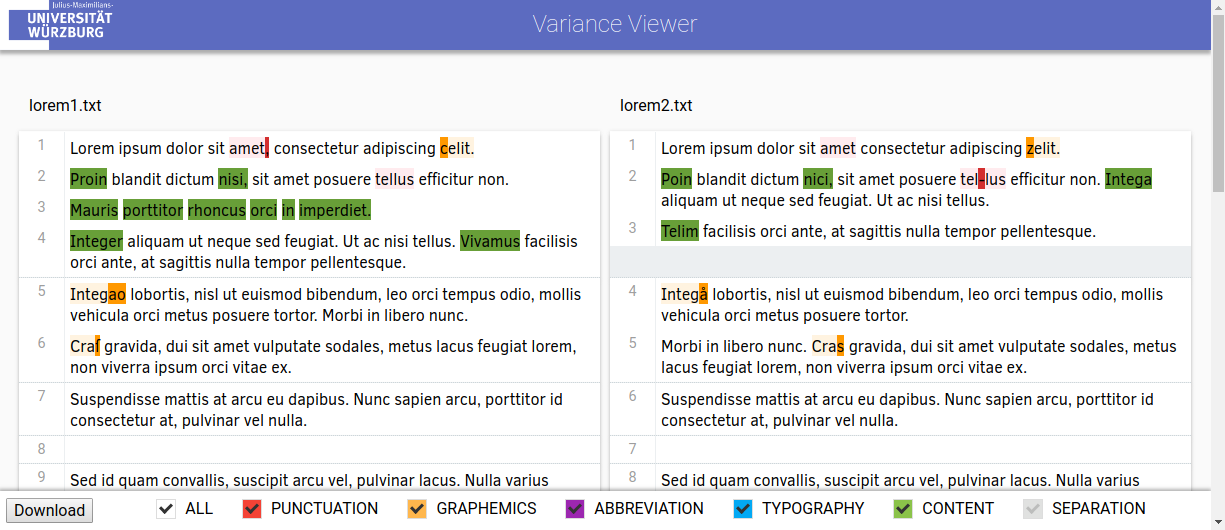
Variance-Viewer is an automatic open-source tool for text comparison with an extendable rule based variance analysis. Documents are compared on word basis, while their variance is displayed on character basis.
Plain text documents, as well as TEI documents are supported as input, while pdf, TEI and json are supported as an output format. The json output format is simple and can for example be examined further with the semantic analysis tool webAthen
This tool has been created in a project of the Chair of Computer Science VI - Artificial Intelligence and Applied Computer Science of the University of Würzburg, in the working group of Prof. Dr. Frank Puppe.
Additional information about developing for the Variance-Viewer see here and more information about the functionality and procedures see here.
- Install and setup Docker
- Build Docker Image
docker-compose build
- Create and run Docker container
docker-compose up
This guide uses tomcat 8 and Ubuntu (please adjust accordingly for your setup)
- Install required packages:
apt-get install tomcat8 maven openjdk-8-jdk - Clone Repository:
git clone https://github.com/cs6-uniwue/Variance-Viewer.git - Compile:
mvn clean install -f Variance-Viewer/pom.xml - Copy or link the created war file to tomcat:
- Copy:
sudo cp Variance-Viewer/target/Variance-Viewer.war /var/lib/tomcat8/webapps/Variance-Viewer.war - Link:
sudo ln -s $PWD/Variance-Viewer/target/Variance-Viewer.war /var/lib/tomcat8/webapps/Variance-Viewer.war
- Copy:
- Start Tomcat:
systemctl start tomcat8- (Restart Tomcat via
systemctl restart tomcat8) - (To start Tomcat automatically at system boot
systemctl enable tomcat8)
- (Restart Tomcat via
This guide uses eclipse to simplify the setup
- Install Eclipse IDE for Enterprise Java Developers from the official website
- Download tomcat 8 or up from the official website
- Create a tomcat server in eclipse:
- Open
Window->Show View->Other...->Server->Servers - Click prompt to add a new server, select
Apache->Tomcat <version> Server->Next-> set your Tomcat installation directory ->Finish.
- Open
- Clone Repository:
File->Import->Git->Projects from Git->Clone URI-> SetURI: https://github.com/cs6-uniwue/Variance-Viewer.git->[✓] master->Next >->Next >->Import as gernal project->Finish
- Set as Maven Project:
- Import Project
- Right click on
Variance-Viewer->Configure->Convert to Maven Project->Finish
- Right click on
- Update maven project (if not updated automatically)
- Right click on
Variance-Viewer->Maven->Update Project...->OK
- Right click on
- Start Variance-Viewer
- Right click on
Variance-Viewer->Run As->Run on Server.
- Right click on
This guid uses Homebrew (please adjust accordingly for your setup)
- Install Homebrew (see https://brew.sh/).
- Install required packages:
brew cask install javabrew install tomcat git maven
- (Verify tomcat installation):
brew services listtomcat should be listed in the output of this command
- Clone Repository:
git clone https://github.com/cs6-uniwue/Variance-Viewer.git
- Compile:
- run
mvn clean install -f Variance-Viewer/pom.xml.
- run
- Copy or link the created war file to tomcat
- Copy:
cp Variance-Viewer/target/Variance-Viewer.war /usr/local/Cellar/tomcat/[version]/libexec/webapps/Variance-Viewer.war - Link:
ln -s $PWD/Variance-Viewer/target/Variance-Viewer.war /usr/local/Cellar/tomcat/[version]/libexec/webapps/Variance-Viewer.war
- Copy:
- Start Tomcat:
brew services start tomcat- (Restart Tomcat via
brew services restart tomcat)
Start tomcat (and Variance-Viewer) as described in the installation guide.
Open localhost:8080/Variance-Viewer in your browser of choice. (Recommended: Google Chrome/Chromium)
Variance-Viewer contains a default configuration file (src/webapp/WEB-INF/default.txt) with a few settings that can be set before running the application. A user can also provide a configuration file by adding it at the home menu, with a typical settings file being as follows: (Lines starting with "#" are comments and will not be interpreted)
# User defined Variances :Punctuations[MISSING|#f44336]: , ; / - . ? ! — – ´ :Punctuations: :Graphemes[REPLACEMENT|#ffb74d]: y i c t u v ſ s ſs ss ß ss å ao & et ce ze ci zi co ko ca ka cu ku ä ae ö oe ü ue :Graphemes: :OneDifference[DISTANCE|#a3e302]: 0 1 :OneDifference: # Additional Settings :css: .wide{letter-spacing: 3px;} .sizeXL{font-size: x-large;} .sizeXXL{font-size: xx-large;} .straight{text-decoration: underline;} .initial{text-decoration: underline;} :css: :contenttags: head p :contenttags: (The currently used default settings file, can be downloaded when opening the application and selecting default(⇓) )
The Variance-Viewer allows users to define variance types in addition to pre-existing ones. These types can be added to a settings file, which can be selected before the text comparisons.
The pre-existing ones include:
- TYPOGRAPHY - Only present in TEI texts. Represents the changes in how text is displayed (utilizes the rend attribute) e.g.
<p rend="xxl">Test</p>changed to<p>Test</p>. - SEPARATION - Represents the separation changes between multiple tokens. e.g. "Thistest" changed to "This test".
- CONTENT - The fallback variance type for all changes that can not be classified as any other variance.
In addition to the existing variance types, users can define their own, as follows:
:<name>[<type>|<color>]: <rules/settings> :<name>: <name>: Name to use for ones variance type (Any combination of letters and numbers, starting with a letter)
<type>: One of the following user definable variances:
- MISSING (M): (sequence of) characters missing in one word but present in the other. e.g. missing characters "x" with "Testx" changed to "Test".
- DISTANCE (D): levenshtein distance on character basis between two words (with min and max distance). e.g. min distance:0 and max distance:2 with "Test" changed to "Text".
- REPLACEMENT (R): Changes between words, where a sequence of characters of one word are changed to another sequence of characters in the other word. e.g. Replacement Rule "ae ä" with "Bär" changed to "Baer".
<color>: In hex-code defined rgb color to represent a variance type. e.g. "#ff0000" for red.
<rules/settings>: Variance specific rules and settings of the variances in . MISSING (M): Character (sequences) separated by whitespaces. e.g.
a b cd e f g DISTANCE (D): Min and max distance value, separated by whitespace. e.g.
0 3 REPLACEMENT (R): A list of (bidirectional) replacement rules. Each rule is in one line and separates the replacement by a space. e.g.
ae a ß ss NOTE: Previous settings files only allowed predefined variance classes. Those settings files will still work, but we recommend using the above syntax in the future.
In addition to the variance settings, Variance-Viewer allows the configuration of the following settings:
The :css: tag allows the user to specify the visual appearance of the viewer. A specific font for example or a visual appearance for TEI render attributes (rend) can be set here. Render types are named equally as in the TEI documents specified and an example for a wide rend class could be as follows:
:css: .wide{ letter-spacing: 3px; } :css: This tool supports the comparison of TEI documents. Text between tags, that are specified here, are tokenized and compared. The following setting will compare every text between head and p tags between two TEI documents:
:contenttags: head p :contenttags: (You normally do not need to change this setting and it is only used in the comparison of TEI documents).