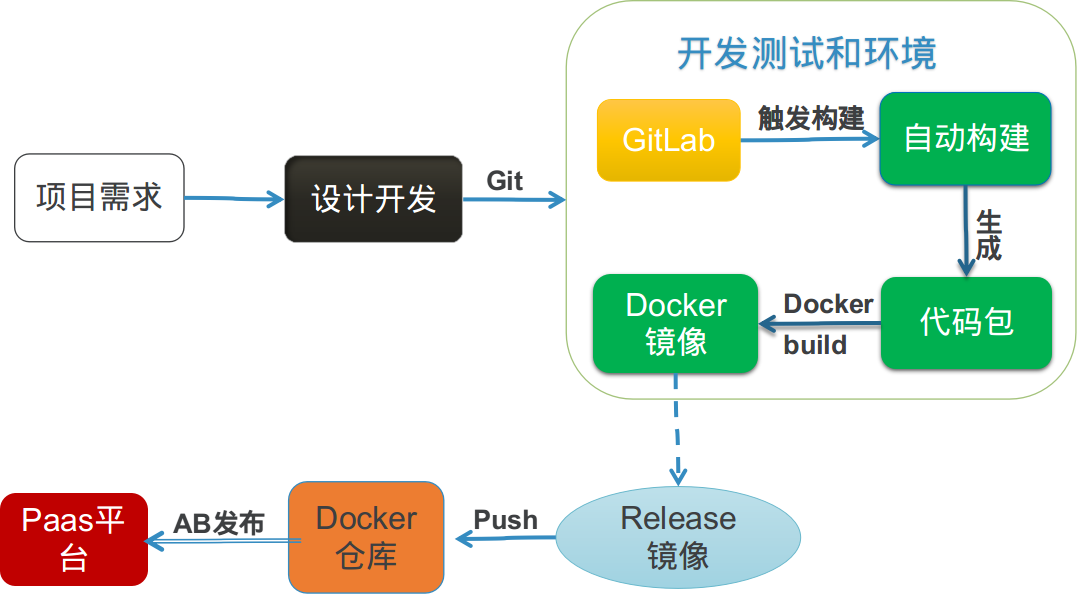
openshift提供paas平台
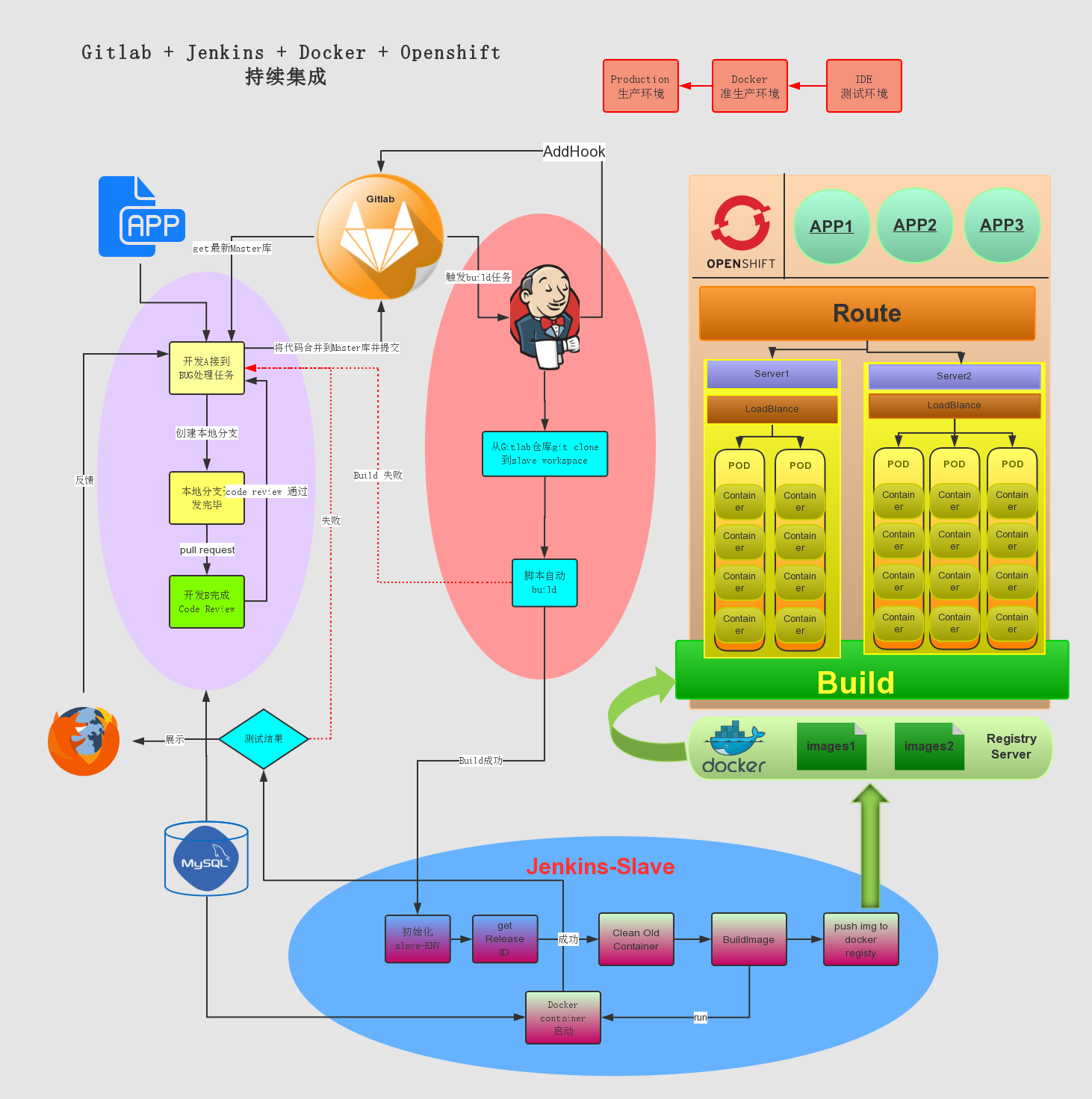
- Install and configure the necessary dependencies
sudo yum install curl policycoreutils openssh-server openssh-clients sudo systemctl enable sshd sudo systemctl start sshd sudo yum install postfix sudo systemctl enable postfix sudo systemctl start postfix sudo firewall-cmd --permanent --add-service=http sudo systemctl reload firewalld- Add the GitLab package server and install the package
curl -sS https://packages.gitlab.com/install/repositories/gitlab/gitlab-ce/script.rpm.sh | sudo bash sudo yum install gitlab-ce- Configure and start GitLab
sudo gitlab-ctl reconfigure- 安装jenkins源
sudo wget -O /etc/yum.repos.d/jenkins.repo http://pkg.jenkins.io/redhat-stable/jenkins.repo sudo rpm --import http://pkg.jenkins.io/redhat-stable/jenkins.io.key- 执行安装命令
yum install jenkinspass
yum install docker修改jenkins slave机器下/etc/sysconfig/docker为如下: 目的:调用docker remote api
OPTIONS='--selinux-enabled --log-driver=journald -H=0.0.0.0:2375 -H=unix:///var/run/docker.sock'#!/bin/bash #get the commitid file get_gitlog(){ cd /root/web/workspace/rdc-slave git log > ../gitlog cd CID="" } #init the env init_env(){ echo "[openshit] name=openshit baseurl=http://yum.paas.com/openshift/ gpgcheck=0 enabled=1 [oc] name=oc baseurl=http://yum.paas.com/oc gpgcheck=0 enabled=1 [rhel] name=rhel baseurl=http://yum.paas.com/rhel7 gpgcheck=0 enabled=1">/etc/yum.repos.d/openshift.repo echo "nameserver 192.168.39.155" > /etc/resolv.conf yum install docker -y yum install git -y echo 'INSECURE_REGISTRY='--insecure-registry registry.paas.com:5000''>>/etc/sysconfig/docker } #get the latest commit_id of the project get_cid(){ CID=`awk 'NR==1,NR==1 {print $2}' /root/web/workspace/gitlog` } #init dockerfile init_dockerfile(){ echo "From rdc/base:v3" >/root/web/workspace/Dockerfile echo "COPY rdc-slave /var/www/rdc">>/root/web/workspace/Dockerfile cd } #build the images build_image(){ cd /root/web/workspace docker build --rm -t rdc:$CID . } #push the new images push_images(){ docker tag rdc:$CID registry.paas.com:5000/rdc:$CID docker push registry.paas.com:5000/rdc:$CID } #clear the rdc container clear_container(){ docker stop rdc && docker rm rdc &>clean_log } #start the new rdc container start_container(){ docker run -d -p 81:80 --name rdc rdc:$CID /sbin/init } echo "---------------------------init env and get gitlog--------------------------------------" echo "" echo "" sleep1 init_env get_gitlog echo "---------------------------get the commit id--------------------------------------" echo "" echo "" sleep 1 get_cid echo "---------------------------init the dockerfile------------------------------------" echo "" echo "" sleep 1 init_dockerfile echo "---------------------------begin build new image----------------------------------" echo "" echo "" sleep 1 build_image echo "---------------------------begin clear container----------------------------------" echo "" echo "" sleep 1 clear_container echo "---------------------------start the container------------------------------------" echo "" echo "" sleep 1 start_container sleep 10使用openshift作为paas平台
- 安装openshift-server,openshift-clinet,docker-registry
- 在openshift-client端执行创建模板文件rdc.json,内容如下
{ "kind": "Template", "apiVersion": "v1", "metadata": { "name": "rdc-devops", "creationTimestamp": null, "annotations": { "description": "rdc-devops", "iconClass": "icon-mysql-database", "tags": "rdc-devops" } }, "objects": [ { "kind": "Service", "apiVersion": "v1", "metadata": { "name": "rdc-webservice", "creationTimestamp": null }, "spec": { "ports": [ { "name": "rdc-webport", "protocol": "TCP", "port": 80, "targetPort": 80, "nodePort": 0 } ], "selector": { "name": "rdc-webservice" }, "portalIP": "", "type": "ClusterIP", "sessionAffinity": "None" }, "status": { "loadBalancer": {} } }, { "kind": "DeploymentConfig", "apiVersion": "v1", "metadata": { "name": "rdc-webservice", "creationTimestamp": null }, "spec": { "strategy": { "type": "Recreate", "resources": {} }, "triggers": [ { "type": "ConfigChange" } ], "replicas": 1, "selector": { "name": "rdc-webservice" }, "template": { "metadata": { "creationTimestamp": null, "labels": { "name": "rdc-webservice" } }, "spec": { "containers": [ { "name": "rdc-webservice", "image": "rdc:v1.3", "command": ["/usr/sbin/httpd", "-D", "FOREGROUND"], "ports": [ { "containerPort": 80, "protocol": "TCP" } ], "env": [], "resources": {}, "volumeMounts": [ ], "terminationMessagePath": "/dev/termination-log", "imagePullPolicy": "IfNotPresent", "capabilities": {}, "securityContext": { "capabilities": {}, "privileged": false } } ], "volumes": [ ], "restartPolicy": "Always", "dnsPolicy": "ClusterFirst" } } }, "status": {} }, { "kind": "Route", "apiVersion": "v1", "metadata": { "name": "rdc", "creationTimestamp": null, "labels": { "template": "rdc-devops" } }, "spec": { "host": "rdc.apps.paas.com", "to": { "kind": "Service", "name": "rdc-webservice" }, "port": { "targetPort": "80" } }, "status": {} } ], "labels": { "template": "rdc-webservice" } } - 部署+上线
登录: oc login master.paas.com:8443 --username=redhat --password=welcome1 创建project: oc new-project rdcloud 创建模板: oc create -f rdc.json -n rdcloud 应用模板: oc new-app --template=rdc-devops -n rdcloud 检查: curl http://rdc.apps.paas.com/rdc/