Arduino Menu Library for a limited RAM usage devices or heavy menus.
Library are using Progmem Memory to store texts, so the RAM is used for behaviour execution only.
Out of the box:
- Small RAM usage
- Friendly menu configs
- Nested submenus support
- Number formatting helpers
- Number field editing with limits and step
- Text field editing
- Actions support
- Base classes for the custom inputs and outputs
[missed ::cry::]
cd ~/Documents/Arduino/libraries/ git clone git@github.com:el-fuego/Arduino-progmem-menu.git..or download, unpack and place Arduino-progmem-menu folder at libraries manually.
Install additional drivers for the LCD screen support:
- https://github.com/duinoWitchery/hd44780
- https://github.com/carlosefr/pcd8544
https://github.com/marcoschwartz/LiquidCrystal_I2C
// Setup Library and devices: #include <Arduino-progmem-menu.h> #include "outputs/lcd-hd44780/LcdHd44780Output.h" #include "inputs/analog-joystick/AnalogJoystick.h" hd44780_I2Cexp lcd(0x3F); Menu::AnalogJoystickInput menuInput(A6, A7); Menu::LcdHd44780Output menuOutput(&lcd); // Setup variables to edit: int firstAreaSqure = 124; int secondAreaSqure = 546; char text[] = "abc324"; // Setup action handlers: void turnLedOn() { digitalWrite(LED_BUILTIN, HIGH); } // Create menu to be nested: MENU(squareArea, "Area sett.", (Menu::MENU_STYLE::NAME_HIDDEN_FOR_CHILD_LIST | Menu::MENU_STYLE::HORIZONTAL_CHILD_LIST) ,NUMBER_FIELD(firstAreaSqureMenu, "from ", firstAreaSqure, Menu::to3Digits, " m^2", 0, 1000, 10) ,NUMBER_FIELD(secondAreaSqureMenu, "to ", secondAreaSqure, Menu::to3Digits, " m^2", 0, 1000, 1) ); // Create main menu: MENU(main, "My Settings", (0 | Menu::MENU_STYLE::NAME_HIDDEN_FOR_CHILD_LIST) ,SUBMENU(squareArea) // nested submenu ,TEXT_FIELD(myTextField, "Text Field '", text, "'") // Editable text ,ACTION(turnLedOnAction, "Turn LED ON", turnLedOn) // Function call ); // Initialize and display menu: void setup() { lcd.init(); lcd.backlight(); Menu::controller->init(&mainMenu, &menuInput, &menuOutput); } void loop() { Menu::controller->update(); }- All menu types / SerialOutput example
- LCD Display i2c HD44780 example
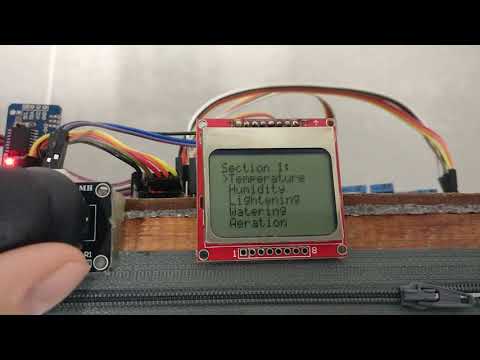
- LCD Display PCD8544 example
- Base class for custom Input devices and implementation example
- Base class for custom Output devices and implementation example
MENU() macros - creates new menu:
MENU(id, String text, Menu::MENU_STYLE styles, MENU_ITEMS...);Styles available:
NAME_HIDDEN_FOR_CHILD_LIST- Name visibility for child listHORIZONTAL_CHILD_LIST- Child place style (horizontal or vertical)INLINE_CHILD_LIST- Style at parent list (inline or nested)
Usage example:
MENU( myMenu, // id "Cool Menu Name", // Text Menu::MENU_STYLE::NAME_HIDDEN_FOR_CHILD_LIST | Menu::MENU_STYLE::HORIZONTAL_CHILD_LIST, // Styles // Menu items: NUMBER_FIELD(...), SUBMENU(...) );..add , BLANK() after the action if menu should display 1 item only:
MENU(..., // Menu items: NUMBER_FIELD(...), // Single item BLANK() // need to add BLANK() item );SUBMENU() macros - adds nested menu:
SUBMENU(submenuId)Usage example:
MENU(..., SUBMENU(myMenu));ACTION() macros - creates menu-item to fire function:
ACTION(id, String text, void (*onEnter)())Usage example:
MENU(..., ACTION( mySave, // id "Save", // Text doSave // Callback ) )NUMBER_FIELD() macros - creates menu-item for number edit:
NUMBER_FIELD( id, const char* textBefore, unsigned int* value, char* (*formatValue)(unsigned int value), const char* textAfter, const unsigned int minValue, const unsigned int maxValue, const unsigned int valueStep )Formatters available:
- toTime - "01:00AM" for 60 (minutes) - toTime24 - "01:00" for 60 (minutes) - toPeriod - "01m" for < 60 (minutes) | "01h" for > 60 - toNumber - "1" for 1 - to2Digits - "01" - to3Digits - "001" - to4Digits - "0001" - to5Digits - "00001" - to6Digits - "000001" - to7Digits - "0000001" - to8Digits - "00000001" - to9Digits - "000000001" - to10Digits - "0000000001"Usage example:
MENU(..., NUMBER_FIELD( distance, // id "Distance ", // Text before distanceValue, // Variable to change toNumber, // Value formatter " m.", // Text after 0, // min 50, // max 1 // step ) )TEXT_FIELD() macros - creates menu-item for text edit:
TEXT_FIELD( id, const char* textBefore, char* value, const char* textAfter )Usage example:
MENU(..., TEXT_FIELD( message, // id "Edit: '", // Text before messageText, // Variable to change "'" // Text after ) )Use it in if menu should display 1 item only.
MENU(..., // Menu items: NUMBER_FIELD(...), // Single item BLANK() // need to add BLANK() item );Define symbol in your code to override default value.
#define SELECTED_LINE_START_SYMBOL ">" #define UNSELECTED_LINE_START_SYMBOL " " #define SELECTED_VALUE_START_SYMBOL ">" #define UNSELECTED_VALUE_START_SYMBOL " " #define ACTIVE_VALUE_START_SYMBOL " " #define UNACTIVE_VALUE_START_SYMBOL " " #define MENU_NAME_END_SYMBOL ":" #define OUTPUT_LINES_COUNT 255