


WearMenu is an Android Wear Menu implementation
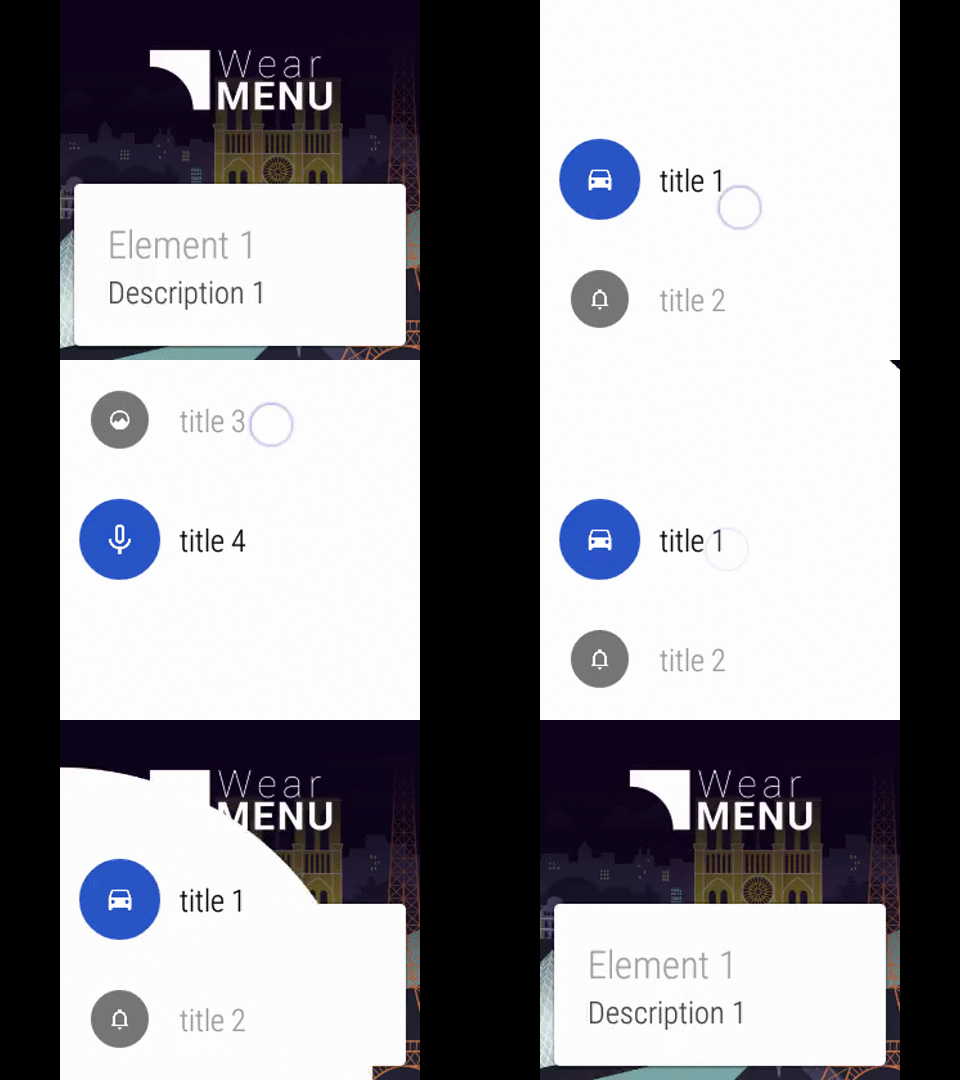
In your wear module 
compile 'com.github.florent37:wearmenu:1.0.0@aar'Add WearMenu above your GridViewPager
<?xml version="1.0" encoding="utf-8"?> <com.github.florent37.WearMenu xmlns:android="http://schemas.android.com/apk/res/android" xmlns:app="http://schemas.android.com/apk/res-auto" android:layout_width="match_parent" android:layout_height="match_parent" android:id="@+id/wear_menu" app:wearMenuPosition="bottomLeft" > <android.support.wearable.view.GridViewPager android:id="@+id/pager" android:layout_width="match_parent" android:layout_height="match_parent" android:keepScreenOn="true"/> <android.support.wearable.view.DotsPageIndicator android:id="@+id/page_indicator" android:layout_width="wrap_content" android:layout_height="wrap_content" android:layout_gravity="center_horizontal|bottom" android:layout_marginBottom="5dp"/> </com.github.florent37.WearMenu>You can change the opening direction of the WearMenu
<com.github.florent37.WearMenu app:wearMenuPosition="bottomLeft" app:wearMenuPosition="bottomRight" app:wearMenuPosition="topLeft" app:wearMenuPosition="topRight"To open/close manually the WearMenu
WearMenu wearMenu = (WearMenu) findViewById(R.id.wear_menu); wearMenu.toggle();In your activity, customise the wear list menu
wearMenu.setMenuElements( new String[]{ "title 1", "title 2", "title 3", "title 4" });You can display elements with icons
wearMenu.setMenuElements( new String[]{ "title 1", "title 2", "title 3", "title 4" }, new Drawable[]{ getResources().getDrawable(R.drawable.icon1), getResources().getDrawable(R.drawable.icon2), getResources().getDrawable(R.drawable.icon3), getResources().getDrawable(R.drawable.icon4) });And get back the selected element
wearMenu.setWearMenuListener(new WearMenu.WearMenuListener() { @Override public void onWearMenuListClicked(int position) { } });You can display a custom view in WearMenu
<com.github.florent37.WearMenu xmlns:android="http://schemas.android.com/apk/res/android" xmlns:app="http://schemas.android.com/apk/res-auto" android:layout_width="match_parent" android:layout_height="match_parent" android:id="@+id/wear_menu" app:wearMenuLayout="@layout/myCustomView" app:wearMenuPosition="bottomLeft" >Changing colors & backgrounds
<com.github.florent37.WearMenu xmlns:android="http://schemas.android.com/apk/res/android" xmlns:app="http://schemas.android.com/apk/res-auto" android:layout_width="match_parent" android:layout_height="match_parent" android:id="@+id/wear_menu" app:wearMenuPosition="bottomLeft" app:wearMenuListTextColor="@color/blue" app:wearMenuListSelectedColor="@color/red" app:wearMenuListBackground="@color/black" >Modify animation duration (500ms by default)
<com.github.florent37.WearMenu xmlns:android="http://schemas.android.com/apk/res/android" xmlns:app="http://schemas.android.com/apk/res-auto" android:layout_width="match_parent" android:layout_height="match_parent" android:id="@+id/wear_menu" app:wearMenuPosition="bottomLeft" app:wearMenuDuration="300" >- Adding circle animation from touch position
- Enabling fill list from xml layout
- Adding preview for tools: package
- Adding custom colors for each list element
Looking for contributors, feel free to fork !
If you want to learn wear development : http://tutos-android-france.com/developper-une-application-pour-les-montres-android-wear/.
Author: Florent Champigny www.florentchampigny.com/


Pictures by Logan Bourgouin
Copyright 2015 florent37, Inc. Licensed under the Apache License, Version 2.0 (the "License"); you may not use this file except in compliance with the License. You may obtain a copy of the License at http://www.apache.org/licenses/LICENSE-2.0 Unless required by applicable law or agreed to in writing, software distributed under the License is distributed on an "AS IS" BASIS, WITHOUT WARRANTIES OR CONDITIONS OF ANY KIND, either express or implied. See the License for the specific language governing permissions and limitations under the License.