




Converts Optical Flow .flo files to images .png and optionally compiles them to a video .mp4 via ffmpeg
Easiest option to install flowiz is to grab the latest package from PyPI repo
pip install flowiz -UAlternatively you may install the package directly from github repo
pip install git+https://github.com/georgegach/flowiz/Or you can run setup.py to build it yourself locally
git clone https://github.com/georgegach/flowiz.git cd flowiz python setup.py install --userMake sure you have requirements installed along with an ffmpeg to compile a video. requirements.txt contains latest working versions of this package. Feel free to use pip-upgrader.
pip install -r requirements.txt apt install ffmpeg # pacman -S ffmpegFirst dockerize cloned repo
git clone https://github.com/georgegach/flowiz.git cd flowiz docker build . -t myflowiz:latestThen launch the container with port 8000 exposed
docker run -it -p 8000:8000 myflowiz:latestFinally, fire up http://localhost:8000 in your favorite browserH
https://hub.docker.com/repository/docker/georgegach/flowiz
docker run -it -p 8000:8000 georgegach/flowiz:latestPackage can be used both from the command line and python script.
The following script grabs .flo files from ./demo/flo/ directory and converts into .png saving in the same directory
python -m flowiz demo/flo/*.floYou can pass output directory for .png images via -o or --outdir parameter
python -m flowiz demo/flo/*.flo --outdir demo/png/You may compile converted .png images into a 24 fps .mp4 clip by passing -v or --videodir parameter with a video output directory (without a filename)
python -m flowiz demo/flo/*.flo -o demo/png --videodir demo/mp4Pass -r or --framerate parameter to control the framerate of compiled video
python -m flowiz demo/flo/*.flo -o demo/png -v demo/mp4 --framerate 2Relevant python code is available in demo/test.ipynb notebook. Here's an excerpt:
import flowiz as fz files = glob.glob('demo/flo/*.flo') img = fz.convert_from_file(files[0]) plt.imshow(img)
In case you need to visualize U V channels separately from your numpy floArray:
uv = fz.convert_from_flow(floArray, mode='UV') axarr[0].imshow(uv[...,0], cmap=plt.get_cmap('binary')) axarr[1].imshow(uv[...,1], cmap=plt.get_cmap('binary'))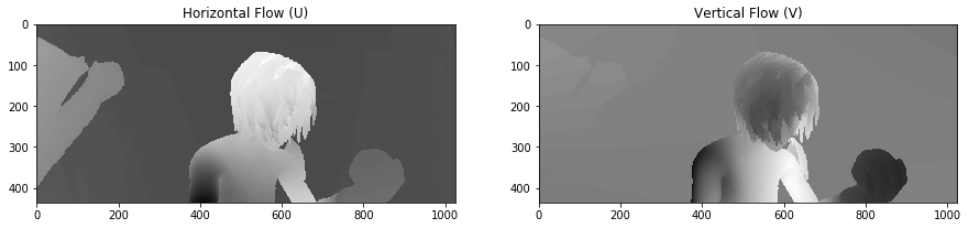
Beta version of the flowiz graphical user interface is now accessible via flowiz.gui package. It is packaged using ChrisKnott / Eel and available via default web browser. To run the GUI simply type:
python -m flowiz.guiUpon launching the web app, drag and drop or choose .flo file(s) using the open file dialog. Files will be converted using the python backend and placed in a temporary directory flowiz/gui/web/guitemp. Upon every session temporary directory will be emptied to avoid unnecessary polution.
Mockup of the GUI is available at georgegach.github.io/flowiz

$ python -m flowiz -h usage: __main__.py [-h] [--outdir OUTDIR] [--videodir VIDEODIR] [--framerate FRAMERATE] input [input ...] positional arguments: input Input file(s). (e.g.: __ ./demo/flo/*.flo) optional arguments: -h, --help show this help message and exit --outdir OUTDIR, -o OUTDIR Output directory path. Default: same directory as [.flo] files. (e.g.: __ -o ./demo/png/) --videodir VIDEODIR, -v VIDEODIR Compiles [.mp4] video from [.png] images if parameter is passed. Parameter requires video output directory path without a filename. (e.g.: __ -v ./demo/mp4/) --framerate FRAMERATE, -r FRAMERATE Frames per second of the video. (e.g.: __ -r 2)$ python -m flowiz.gui -h usage: __main__.py [-h] [--mode MODE] optional arguments: -h, --help show this help message and exit --mode MODE GUI engine: "chrome", "edge", "electron", "browser". Use "None" when working with Docker.The library is based on Midlebury's Vision Project MATLAB code: http://vision.middlebury.edu/flow/ Original credits to Daniel Scharstein (C++) and Deqing Sun (MATLAB)
Q: But what kind of name is
flowiz?
A: The kind you choose whenflowkit,flowtools,flowlib,flowlabare already taken.
Q: Future work?
A: Some of theTo-Dofeatures are listed below with no determined timeline. If you'd like to contribute with the said features or something completely new, you mayand issue a pull request.
- Ported from Matlab
flow_code - Project is available on PyPI
- Dockerized
- GUI
- Improve Front to Back-end throughput performance