Example plots
If the default style (color, dashes, and glyph shapes) work for you then the plotutil package makes creating line and points plots very easy:

package main import ( "math/rand" "gonum.org/v1/plot" "gonum.org/v1/plot/plotter" "gonum.org/v1/plot/plotutil" "gonum.org/v1/plot/vg" ) func main() { rand.Seed(int64(0)) p := plot.New() p.Title.Text = "Plotutil example" p.X.Label.Text = "X" p.Y.Label.Text = "Y" err := plotutil.AddLinePoints(p, "First", randomPoints(15), "Second", randomPoints(15), "Third", randomPoints(15)) if err != nil { panic(err) } // Save the plot to a PNG file. if err := p.Save(4*vg.Inch, 4*vg.Inch, "points.png"); err != nil { panic(err) } } // randomPoints returns some random x, y points. func randomPoints(n int) plotter.XYs { pts := make(plotter.XYs, n) for i := range pts { if i == 0 { pts[i].X = rand.Float64() } else { pts[i].X = pts[i-1].X + rand.Float64() } pts[i].Y = pts[i].X + 10*rand.Float64() } return pts }If you need more fine-grained control it is available too:

package main import ( "image/color" "math/rand" "gonum.org/v1/plot" "gonum.org/v1/plot/plotter" "gonum.org/v1/plot/vg" "gonum.org/v1/plot/vg/draw" ) func main() { // Get some random points rand.Seed(int64(0)) n := 15 scatterData := randomPoints(n) lineData := randomPoints(n) linePointsData := randomPoints(n) // Create a new plot, set its title and // axis labels. p := plot.New() p.Title.Text = "Points Example" p.X.Label.Text = "X" p.Y.Label.Text = "Y" // Draw a grid behind the data p.Add(plotter.NewGrid()) // Make a scatter plotter and set its style. s, err := plotter.NewScatter(scatterData) if err != nil { panic(err) } s.GlyphStyle.Color = color.RGBA{R: 255, B: 128, A: 255} // Make a line plotter and set its style. l, err := plotter.NewLine(lineData) if err != nil { panic(err) } l.LineStyle.Width = vg.Points(1) l.LineStyle.Dashes = []vg.Length{vg.Points(5), vg.Points(5)} l.LineStyle.Color = color.RGBA{B: 255, A: 255} // Make a line plotter with points and set its style. lpLine, lpPoints, err := plotter.NewLinePoints(linePointsData) if err != nil { panic(err) } lpLine.Color = color.RGBA{G: 255, A: 255} lpPoints.Shape = draw.PyramidGlyph{} lpPoints.Color = color.RGBA{R: 255, A: 255} // Add the plotters to the plot, with a legend // entry for each p.Add(s, l, lpLine, lpPoints) p.Legend.Add("scatter", s) p.Legend.Add("line", l) p.Legend.Add("line points", lpLine, lpPoints) // Save the plot to a PNG file. if err := p.Save(4*vg.Inch, 4*vg.Inch, "points.png"); err != nil { panic(err) } } // randomPoints returns some random x, y points. func randomPoints(n int) plotter.XYs { pts := make(plotter.XYs, n) for i := range pts { if i == 0 { pts[i].X = rand.Float64() } else { pts[i].X = pts[i-1].X + rand.Float64() } pts[i].Y = pts[i].X + 10*rand.Float64() } return pts }You can override the Axis.Tick.Marker function to make your own custom tick marks. Some people like commas separating the place values of numbers:
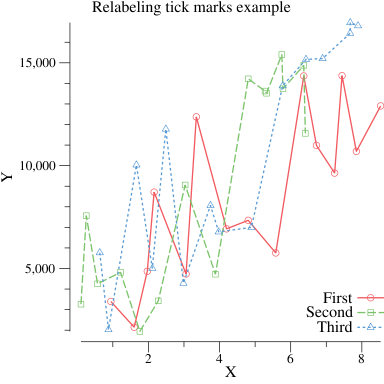
package main import ( "math/rand" "gonum.org/v1/plot" "gonum.org/v1/plot/plotter" "gonum.org/v1/plot/plotutil" "gonum.org/v1/plot/vg" ) func main() { rand.Seed(int64(0)) p := plot.New() p.Title.Text = "Relabeling tick marks example" p.X.Label.Text = "X" p.Y.Label.Text = "Y" // Use a custom tick marker interface implementation with the Ticks function, // that computes the default tick marks and re-labels the major ticks with commas. p.Y.Tick.Marker = commaTicks{} err := plotutil.AddLinePoints(p, "First", randomPoints(15), "Second", randomPoints(15), "Third", randomPoints(15)) if err != nil { panic(err) } // Save the plot to a PNG file. if err := p.Save(4*vg.Inch, 4*vg.Inch, "points_commas.png"); err != nil { panic(err) } } // RandomPoints returns some random x, y points. func randomPoints(n int) plotter.XYs { pts := make(plotter.XYs, n) for i := range pts { if i == 0 { pts[i].X = rand.Float64() } else { pts[i].X = pts[i-1].X + rand.Float64() } pts[i].Y = (pts[i].X + 10*rand.Float64()) * 1000 } return pts } type commaTicks struct{} // Ticks computes the default tick marks, but inserts commas // into the labels for the major tick marks. func (commaTicks) Ticks(min, max float64) []plot.Tick { tks := plot.DefaultTicks{}.Ticks(min, max) for i, t := range tks { if t.Label == "" { // Skip minor ticks, they are fine. continue } tks[i].Label = addCommas(t.Label) } return tks } // AddCommas adds commas after every 3 characters from right to left. // NOTE: This function is a quick hack, it doesn't work with decimal // points, and may have a bunch of other problems. func addCommas(s string) string { rev := "" n := 0 for i := len(s) - 1; i >= 0; i-- { rev += string(s[i]) n++ if n%3 == 0 { rev += "," } } s = "" for i := len(rev) - 1; i >= 0; i-- { s += string(rev[i]) } return s }
package main import ( "math/rand" "gonum.org/v1/plot" "gonum.org/v1/plot/plotter" "gonum.org/v1/plot/plotutil" ) func main() { // Get some data. n, m := 5, 10 pts := make([]plotter.XYer, n) for i := range pts { xys := make(plotter.XYs, m) pts[i] = xys center := float64(i) for j := range xys { xys[j].X = center + (rand.Float64() - 0.5) xys[j].Y = center + (rand.Float64() - 0.5) } } plt, err := plot.New() if err != nil { panic(err) } // Create two lines connecting points and error bars. For // the first, each point is the mean x and y value and the // error bars give the 95% confidence intervals. For the // second, each point is the median x and y value with the // error bars showing the minimum and maximum values. mean95, err := plotutil.NewErrorPoints(plotutil.MeanAndConf95, pts...) if err != nil { panic(err) } medMinMax, err := plotutil.NewErrorPoints(plotutil.MedianAndMinMax, pts...) if err != nil { panic(err) } plotutil.AddLinePoints(plt, "mean and 95% confidence", mean95, "median and minimum and maximum", medMinMax) plotutil.AddErrorBars(plt, mean95, medMinMax) // Add the points that are summarized by the error points. plotutil.AddScatters(plt, pts[0], pts[1], pts[2], pts[3], pts[4]) plt.Save(4*vg.Inch, 4*vg.Inch, "errpoints.png") }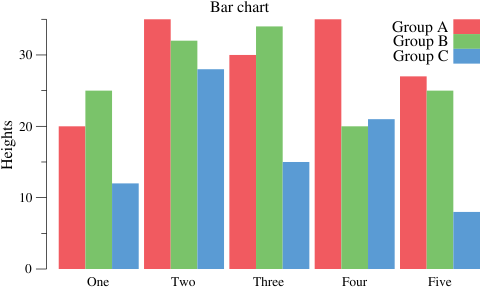
package main import ( "gonum.org/v1/plot" "gonum.org/v1/plot/plotter" "gonum.org/v1/plot/plotutil" "gonum.org/v1/plot/vg" ) func main() { groupA := plotter.Values{20, 35, 30, 35, 27} groupB := plotter.Values{25, 32, 34, 20, 25} groupC := plotter.Values{12, 28, 15, 21, 8} p := plot.New() p.Title.Text = "Bar chart" p.Y.Label.Text = "Heights" w := vg.Points(20) barsA, err := plotter.NewBarChart(groupA, w) if err != nil { panic(err) } barsA.LineStyle.Width = vg.Length(0) barsA.Color = plotutil.Color(0) barsA.Offset = -w barsB, err := plotter.NewBarChart(groupB, w) if err != nil { panic(err) } barsB.LineStyle.Width = vg.Length(0) barsB.Color = plotutil.Color(1) barsC, err := plotter.NewBarChart(groupC, w) if err != nil { panic(err) } barsC.LineStyle.Width = vg.Length(0) barsC.Color = plotutil.Color(2) barsC.Offset = w p.Add(barsA, barsB, barsC) p.Legend.Add("Group A", barsA) p.Legend.Add("Group B", barsB) p.Legend.Add("Group C", barsC) p.Legend.Top = true p.NominalX("One", "Two", "Three", "Four", "Five") if err := p.Save(5*vg.Inch, 3*vg.Inch, "barchart.png"); err != nil { panic(err) } }
package main import ( "image/color" "math" "gonum.org/v1/plot" "gonum.org/v1/plot/plotter" "gonum.org/v1/plot/vg" ) func main() { p := plot.New() p.Title.Text = "Functions" p.X.Label.Text = "X" p.Y.Label.Text = "Y" // A quadratic function x^2 quad := plotter.NewFunction(func(x float64) float64 { return x * x }) quad.Color = color.RGBA{B: 255, A: 255} // An exponential function 2^x exp := plotter.NewFunction(func(x float64) float64 { return math.Pow(2, x) }) exp.Dashes = []vg.Length{vg.Points(2), vg.Points(2)} exp.Width = vg.Points(2) exp.Color = color.RGBA{G: 255, A: 255} // The sine function, shifted and scaled // to be nicely visible on the plot. sin := plotter.NewFunction(func(x float64) float64 { return 10*math.Sin(x) + 50 }) sin.Dashes = []vg.Length{vg.Points(4), vg.Points(5)} sin.Width = vg.Points(4) sin.Color = color.RGBA{R: 255, A: 255} // Add the functions and their legend entries. p.Add(quad, exp, sin) p.Legend.Add("x^2", quad) p.Legend.Add("2^x", exp) p.Legend.Add("10*sin(x)+50", sin) p.Legend.ThumbnailWidth = 0.5 * vg.Inch // Set the axis ranges. Unlike other data sets, // functions don't set the axis ranges automatically // since functions don't necessarily have a // finite range of x and y values. p.X.Min = 0 p.X.Max = 10 p.Y.Min = 0 p.Y.Max = 100 // Save the plot to a PNG file. if err := p.Save(4*vg.Inch, 4*vg.Inch, "functions.png"); err != nil { panic(err) } }
package main import ( "image/color" "math" "math/rand" "gonum.org/v1/plot" "gonum.org/v1/plot/plotter" "gonum.org/v1/plot/vg" "github.com/gonum/stat/distuv" ) func main() { // Draw some random values from the standard // normal distribution. rand.Seed(int64(0)) v := make(plotter.Values, 10000) for i := range v { v[i] = rand.NormFloat64() } // Make a plot and set its title. p := plot.New() p.Title.Text = "Histogram" // Create a histogram of our values drawn // from the standard normal. h, err := plotter.NewHist(v, 16) if err != nil { panic(err) } // Normalize the area under the histogram to // sum to one. h.Normalize(1) p.Add(h) // The normal distribution function norm := plotter.NewFunction(distuv.UnitNormal.Prob) norm.Color = color.RGBA{R: 255, A: 255} norm.Width = vg.Points(2) p.Add(norm) // Save the plot to a PNG file. if err := p.Save(4*vg.Inch, 4*vg.Inch, "hist.png"); err != nil { panic(err) } }
package main import ( "math/rand" "gonum.org/v1/plot" "gonum.org/v1/plot/plotter" "gonum.org/v1/plot/vg" ) func main() { // Get some data to display in our plot. rand.Seed(uint64(0)) n := 10 uniform := make(plotter.Values, n) normal := make(plotter.Values, n) expon := make(plotter.Values, n) for i := 0; i < n; i++ { uniform[i] = rand.Float64() normal[i] = rand.NormFloat64() expon[i] = rand.ExpFloat64() } // Create the plot and set its title and axis label. p := plot.New() p.Title.Text = "Box plots" p.Y.Label.Text = "Values" // Make boxes for our data and add them to the plot. w := vg.Points(20) b0, err := plotter.NewBoxPlot(w, 0, uniform) b0.FillColor = color.RGBA{127, 188, 165, 1} if err != nil { panic(err) } b1, err := plotter.NewBoxPlot(w, 1, normal) b1.FillColor = color.RGBA{127, 188, 165, 1} if err != nil { panic(err) } b2, err := plotter.NewBoxPlot(w, 2, expon) b2.FillColor = color.RGBA{127, 188, 165, 1} if err != nil { panic(err) } p.Add(b0, b1, b2) // Set the X axis of the plot to nominal with // the given names for x=0, x=1 and x=2. p.NominalX("Uniform\nDistribution", "Normal\nDistribution", "Exponential\nDistribution") if err := p.Save(3*vg.Inch, 4*vg.Inch, "boxplot.png"); err != nil { panic(err) } }Or, the same plot using the plotutil package:
package main import ( "math/rand" "gonum.org/v1/plot" "gonum.org/v1/plot/plotter" "gonum.org/v1/plot/plotutil" "gonum.org/v1/plot/vg" ) func main() { // Get some data to display in our plot. rand.Seed(int64(0)) n := 10 uniform := make(plotter.Values, n) normal := make(plotter.Values, n) expon := make(plotter.Values, n) for i := 0; i < n; i++ { uniform[i] = rand.Float64() normal[i] = rand.NormFloat64() expon[i] = rand.ExpFloat64() } // Create the plot and set its title and axis label. p := plot.New() p.Title.Text = "Box plots" p.Y.Label.Text = "Values" // Make boxes for our data and add them to the plot. err := plotutil.AddBoxPlots(p, vg.Points(20), "Uniform\nDistribution", uniform, "Normal\nDistribution", normal, "Exponential\nDistribution", expon) if err != nil { panic(err) } if err := p.Save(3*vg.Inch, 4*vg.Inch, "boxplot.png"); err != nil { panic(err) } }
package main import ( "math/rand" "gonum.org/v1/plot" "gonum.org/v1/plot/plotter" "gonum.org/v1/plot/vg" ) func main() { // Get some data to display in our plot. rand.Seed(int64(0)) n := 10 uniform := make(plotter.Values, n) normal := make(plotter.Values, n) expon := make(plotter.Values, n) for i := 0; i < n; i++ { uniform[i] = rand.Float64() normal[i] = rand.NormFloat64() expon[i] = rand.ExpFloat64() } // Create the plot and set its title and axis label. p := plot.New() p.Title.Text = "Horizontal box plots" p.X.Label.Text = "Values" // Make horizontal boxes for our data and add // them to the plot. w := vg.Points(20) b0, err := plotter.MakeHorizBoxPlot(w, 0, uniform) if err != nil { panic(err) } b1, err := plotter.MakeHorizBoxPlot(w, 1, normal) if err != nil { panic(err) } b2, err := plotter.MakeHorizBoxPlot(w, 2, expon) if err != nil { panic(err) } p.Add(b0, b1, b2) // Set the Y axis of the plot to nominal with // the given names for y=0, y=1 and y=2. p.NominalY("Uniform\nDistribution", "Normal\nDistribution", "Exponential\nDistribution") if err := p.Save(4*vg.Inch, 3*vg.Inch, "boxplot-horiz.png"); err != nil { panic(err) } }
package main import ( "math/rand" "gonum.org/v1/plot" "gonum.org/v1/plot/plotter" ) func main() { // Get some data to display in our plot. rand.Seed(int64(0)) n := 10 uniform := make(plotter.Values, n) normal := make(plotter.Values, n) expon := make(plotter.Values, n) for i := 0; i < n; i++ { uniform[i] = rand.Float64() normal[i] = rand.NormFloat64() expon[i] = rand.ExpFloat64() } // Create the plot and set its title and axis label. p := plot.New() p.Title.Text = "Quartile plots" p.Y.Label.Text = "Values" // Make boxes for our data and add them to the plot. q0, err := plotter.NewQuartPlot(0, uniform) if err != nil { panic(err) } q1, err := plotter.NewQuartPlot(1, normal) if err != nil { panic(err) } q2, err := plotter.NewQuartPlot(2, expon) if err != nil { panic(err) } p.Add(q0, q1, q2) // Set the X axis of the plot to nominal with // the given names for x=0, x=1 and x=2. p.NominalX("Uniform\nDistribution", "Normal\nDistribution", "Exponential\nDistribution") if err := p.Save(3*vg.Inch, 4*vg.Inch, "quartile.png"); err != nil { panic(err) } }
package main import ( "image/color" "math/rand" "gonum.org/v1/plot" "gonum.org/v1/plot/plotter" "gonum.org/v1/plot/vg" ) func main() { rand.Seed(int64(0)) n := 10 bubbleData := randomTriples(n) p := plot.New() p.Title.Text = "Bubbles" p.X.Label.Text = "X" p.Y.Label.Text = "Y" bs, err := plotter.NewScatter(bubbleData) if err != nil { panic(err) } bs.Color = color.RGBA{R: 196, B: 128, A: 255} p.Add(bs) if err := p.Save(4*vg.Inch, 4*vg.Inch, "bubble.png"); err != nil { panic(err) } } // randomTriples returns some random x, y, z triples // with some interesting kind of trend. func randomTriples(n int) plotter.XYZs { data := make(plotter.XYZs, n) for i := range data { if i == 0 { data[i].X = rand.Float64() } else { data[i].X = data[i-1].X + 2*rand.Float64() } data[i].Y = data[i].X + 10*rand.Float64() data[i].Z = data[i].X } return data }Also see the Creating Custom Plotters page for details on how the Bubbles plotter was implemented.