gout 是go写的http 客户端,为提高工作效率而开发



- 支持设置 GET/PUT/DELETE/PATH/HEAD/OPTIONS
- 支持设置请求 http header(可传 struct,map,array,slice 等类型)
- 支持设置 URL query(可传 struct,map,array,slice,string 等类型)
- 支持设置 json 编码到请求 body 里面(可传struct, map, string, []byte 等类型)
- 支持设置 xml 编码到请求 body 里面(可传struct, string, []byte 等类型)
- 支持设置 yaml 编码到请求 body 里面(可传struct, map, string, []byte 等类型)
- 支持设置 protobuf 编码到请求 body里面(可传struct)
- 支持设置 form-data(可传 struct, map, array, slice 等类型)
- 支持设置 x-www-form-urlencoded(可传 struct,map,array,slice 等类型)
- 支持设置 io.Reader,uint/uint8/uint16...int/int8...string...[]byte...float32,float64 至请求 body 里面
- 支持解析响应body里面的json,xml,yaml至结构体里(BindJSON/BindXML/BindYAML)
- 支持解析响应body的内容至io.Writer, uint/uint8...int/int8...string...[]byte...float32,float64
- 支持解析响应header至结构体里
- 支持接口性能benchmark,可控制压测一定次数还是时间,可控制压测频率
- 支持retry-backoff,可以指定重试条件
- 支持发送裸http数据包
- 支持导出curl命令
- 传入自定义*http.Client
- 支持请求中间件(https://github.com/antlabs/gout-middleware)
- 支持响应中间件ResponseUse
- 支持设置chunked数据格式发送
- 支持body, header的数据校验
- 支持通过build tag自由选择不同的json序列化方式(可选jsoniter,go_json,sonic等)
- 等等更多
Details

-
- GET POST PUT DELETE PATH HEAD OPTIONS
- Query Parameters
- http header *Do not convert http headers
- http body
- proxy
- cookie
- context
- unix socket
- http2 doc
- debug mode
go get github.com/guonaihong/gout examples 目录下面的例子,都是可以直接跑的。如果觉得运行例子还是不明白用法,可以把你迷惑的地方写出来,然后提issue
cd _example # GOPROXY 是打开go module代理,可以更快下载模块 # 第一次运行需要加GOPROXY下载模块,模块已安装的直接 go run 01-color-json.go 即可 env GOPROXY=https://goproxy.cn go run 01-color-json.goGout默认使用语言内置的encoding/json包。但是如果你想使用其他的json包,可以通过build tag来修改。
go build -tags=jsoniter .go build -tags=go_json .go build -tags="sonic avx" .package main import ( "fmt" "github.com/guonaihong/gout" "time" ) // 用于解析 服务端 返回的http body type RspBody struct { ErrMsg string `json:"errmsg"` ErrCode int `json:"errcode"` Data string `json:"data"` } // 用于解析 服务端 返回的http header type RspHeader struct { Sid string `header:"sid"` Time int `header:"time"` } func main() { rsp := RspBody{} header := RspHeader{} //code := 0 err := gout. // POST请求 POST("127.0.0.1:8080"). // 打开debug模式 Debug(true). // 设置查询字符串 SetQuery(gout.H{"page": 10, "size": 10}). // 设置http header SetHeader(gout.H{"X-IP": "127.0.0.1", "sid": fmt.Sprintf("%x", time.Now().UnixNano())}). // SetJSON设置http body为json // 同类函数有SetBody, SetYAML, SetXML, SetForm, SetWWWForm SetJSON(gout.H{"text": "gout"}). // BindJSON解析返回的body内容 // 同类函数有BindBody, BindYAML, BindXML BindJSON(&rsp). // 解析返回的http header BindHeader(&header). // http code // Code(&code). // 结束函数 Do() // 判断错误 if err != nil { fmt.Printf("send fail:%s\n", err) } } /* > POST /?page=10&size=10 HTTP/1.1 > Sid: 15d9b742ef32c130 > X-Ip: 127.0.0.1 > Content-Type: application/json > { "text": "gout" } */package main import ( "github.com/guonaihong/gout" ) func main() { url := "https://github.com" // 发送GET方法 gout.GET(url).Do() // 发送POST方法 gout.POST(url).Do() // 发送PUT方法 gout.PUT(url).Do() // 发送DELETE方法 gout.DELETE(url).Do() // 发送PATH方法 gout.PATCH(url).Do() // 发送HEAD方法 gout.HEAD(url).Do() // 发送OPTIONS gout.OPTIONS(url).Do() }package main import ( "github.com/guonaihong/gout" ) type testURLTemplateCase struct { Host string } func main() { url := "https://{{.Host}}" // 发送GET方法 gout.GET(url, testURLTemplateCase{Host:"www.qq.com"}).Do() // 发送POST方法 gout.POST(url, testURLTemplateCase{Host:"www.github.com"}).Do() // 发送PUT方法 gout.PUT(url, testURLTemplateCase{Host:"www.baidu.com"}).Do() // 发送DELETE方法 gout.DELETE(url, testURLTemplateCase{Host:"www.google.com"}).Do() // 发送PATH方法 gout.PATCH(url, testURLTemplateCase{Host:"www.google.com"}).Do() // 发送HEAD方法 gout.HEAD(url, testURLTemplateCase{Host:"www.google.com"}).Do() // 发送OPTIONS gout.OPTIONS(url, testURLTemplateCase{Host:"www.google.com"}).Do() }package main import ( "fmt" "github.com/guonaihong/gout" "time" ) func main() { err := gout. //设置GET请求和url,:8080/test.query是127.0.0.1:8080/test.query的简写 GET(":8080/test.query"). //打开debug模式 Debug(true). //设置查询字符串 SetQuery(gout.H{ "q1": "v1", "q2": 2, "q3": float32(3.14), "q4": 4.56, "q5": time.Now().Unix(), "q6": time.Now().UnixNano(), "q7": time.Now().Format("2006-01-02")}). //结束函数 Do() if err != nil { fmt.Printf("%s\n", err) return } } /* > GET /test.query?q1=v1&q2=2&q3=3.14&q4=4.56&q5=1574081600&q6=1574081600258009213&q7=2019-11-18 HTTP/1.1 > < HTTP/1.1 200 OK < Content-Length: 0 */ package main import ( "github.com/guonaihong/gout" ) func main() { code := 0 err := gout. //发送GET请求 :8080/testquery是127.0.0.1:8080/testquery简写 GET(":8080/testquery"). // 设置查询字符串 SetQuery( /*看下面支持的情况*/ ). //解析http code,如不关心服务端返回状态吗,不设置该函数即可 Code(&code). Do() if err != nil { } } /* SetQuery支持的类型有 * string * map[string]interface{},可以使用gout.H别名 * struct * array, slice(长度必须是偶数) */ // 1.string SetQuery("check_in=2019-06-18&check_out=2018-06-18") // 2.gout.H 或者 map[string]interface{} SetQuery(gout.H{ "check_in":"2019-06-18", "check_out":"2019-06-18", }) // 3.struct type testQuery struct { CheckIn string `query:checkin` CheckOut string `query:checkout` } SetQuery(&testQuery{CheckIn:2019-06-18, CheckOut:2019-06-18}) // 4.array or slice // ?active=enable&action=drop SetQuery([]string{"active", "enable", "action", "drop"})`与SetHeader API唯一的区别就是不修改header名. 大部分情况用SetHeader,如果有不修改header的需求再使用SetHeaderRaw。
package main import ( "fmt" "github.com/guonaihong/gout" "time" ) func main() { err := gout. //设置GET请求和url,:8080/test.header是127.0.0.1:8080/test.header的简写 GET(":8080/test.header"). //设置debug模式 Debug(true). //设置请求http header SetHeaderRaw(gout.H{ "h1": "v1", "h2": 2, "h3": float32(3.14), "h4": 4.56, "h5": time.Now().Unix(), "h6": time.Now().UnixNano(), "h7": time.Now().Format("2006-01-02")}). Do() if err != nil { fmt.Printf("%s\n", err) return } } /* > GET /test.header HTTP/1.1 > h2: 2 > h3: 3.14 > h4: 4.56 > h5: 1574081686 > h6: 1574081686471347098 > h7: 2019-11-18 > h1: v1 > < HTTP/1.1 200 OK < Content-Length: 0 */package main import ( "fmt" "github.com/guonaihong/gout" "time" ) func main() { err := gout. //设置GET请求和url,:8080/test.header是127.0.0.1:8080/test.header的简写 GET(":8080/test.header"). //设置debug模式 Debug(true). //设置请求http header SetHeader(gout.H{ "h1": "v1", "h2": 2, "h3": float32(3.14), "h4": 4.56, "h5": time.Now().Unix(), "h6": time.Now().UnixNano(), "h7": time.Now().Format("2006-01-02")}). Do() if err != nil { fmt.Printf("%s\n", err) return } } /* > GET /test.header HTTP/1.1 > H2: 2 > H3: 3.14 > H4: 4.56 > H5: 1574081686 > H6: 1574081686471347098 > H7: 2019-11-18 > H1: v1 > < HTTP/1.1 200 OK < Content-Length: 0 */package main import ( "fmt" "github.com/guonaihong/gout" "time" ) // 和解析json类似,如要解析http header需设置header tag type rspHeader struct { Total int `header:"total"` Sid string `header:"sid"` Time time.Time `header:"time" time_format:"2006-01-02"` } func main() { rsp := rspHeader{} err := gout. // :8080/test.header是 http://127.0.0.1:8080/test.header的简写 GET(":8080/test.header"). //打开debug模式 Debug(true). //解析请求header至结构体中 BindHeader(&rsp). //结束函数 Do() if err != nil { fmt.Printf("%s\n", err) return } fmt.Printf("rsp header:\n%#v \nTime:%s\n", rsp, rsp.Time) } /* > GET /test.header HTTP/1.1 > < HTTP/1.1 200 OK < Content-Length: 0 < Sid: 1234 < Time: 2019-11-18 < Total: 2048 */Details
package main import ( "fmt" "github.com/guonaihong/gout" ) type testHeader struct { CheckIn string `header:checkin` CheckOut string `header:checkout` } func main() { t := testHeader{} code := 0 err := gout. GET(":8080/testquery"). Code(&code). SetHeader( /*看下面支持的类型*/ ). BindHeader(&t). Do() if err != nil { fmt.Printf("fail:%s\n", err) } }- BindHeader支持的类型有 结构体
// struct type testHeader struct { CheckIn string `header:checkin` CheckOut string `header:checkout` }- SetHeader支持的类型有
/* map[string]interface{},可以使用gout.H别名 struct array, slice(长度必须是偶数) */ // gout.H 或者 map[string]interface{} SetHeader(gout.H{ "check_in":"2019-06-18", "check_out":"2019-06-18", }) // struct type testHeader struct { CheckIn string `header:checkin` CheckOut string `header:checkout` } SetHeader(&testHeader{CheckIn:2019-06-18, CheckOut:2019-06-18}) // array or slice // -H active:enable -H action:drop SetHeader([]string{"active", "enable", "action", "drop"})数据校验使用 https://github.com/go-playground/validator 完成功能, 更多语法可看该文档.
import ( "fmt" "github.com/guonaihong/gout" ) type testValid struct { Val string `valid:"required"` } func main() { tv := testValid{} err := gout. // 设置POST方法和url POST(":8080/req/body"). //打开debug模式 Debug(true). //解析json, 并且当需要的字段没有值时, 返回错误 BindJSON(&tv). //结束函数 Do() if err != nil { fmt.Printf("%s\n", err) return } }response中间件,在Bind()之前执行。可以对response进行通用逻辑处理。 如果只需要闭包逻辑,则可以使用WithResponseMiddlerFunc,而不必创建一个结构体,下面的例子中对两种方法都进行了使用。
import ( "bytes" "encoding/json" "errors" "fmt" "github.com/gin-gonic/gin" "github.com/guonaihong/gout" "github.com/guonaihong/gout/middler" "io/ioutil" "log" "net/http" "time" ) // response拦截器修改示例 type demoResponseMiddler struct{} func (d *demoResponseMiddler) ModifyResponse(response *http.Response) error { // 修改responseBody。 因为返回值大概率会有 { code, data,msg} 等字段,希望进行统一处理 //这里想验证code. 如果不对就返回error。 对的话将 data中的内容写入body,这样后面BindJson的时候就可以直接处理业务了 all, err := ioutil.ReadAll(response.Body) if err != nil { return err } obj := make(map[string]interface{}) err = json.Unmarshal(all, &obj) if err != nil { return err } code := obj["code"] msg := obj["msg"] data := obj["data"] // Go中json中的数字经过反序列化会成为float64类型 if float64(200) != code { return errors.New(fmt.Sprintf("请求失败, code %d msg %s", code, msg)) } else { byt, _ := json.Marshal(&data) response.Body = ioutil.NopCloser(bytes.NewReader(byt)) return nil } } func demoResponse() *demoResponseMiddler { return &demoResponseMiddler{} } func main() { go server() //等会起测试服务 time.Sleep(time.Millisecond * 500) //用时间做个等待同步 responseUseExample() } func responseUseExample() { //成功请求 successRes := new(map[string]interface{}) err := gout.GET(":8080/success").ResponseUse( demoResponse(), // 注意这里使用了WithResponseMiddlerFunc middler.WithResponseMiddlerFunc(func(response *http.Response) error { // Do your magic return nil }), ).BindJSON(&successRes).Do() log.Printf("success请求 --> 响应 %s \n err %s \n ", successRes, err) //fail请求 failRes := new(map[string]interface{}) err = gout.GET(":8080/fail").ResponseUse(demoResponse()).BindJSON(&failRes).Do() log.Printf("fail请求 --> 响应 %s \n err %s \n ", successRes, err) } type Result struct { Code int `json:"code"` Msg string `json:"msg"` Data interface{} `json:"data"` } type Item struct { Id string `json:"id"` Name string `json:"name"` } func server() { router := gin.New() router.GET("/success", func(c *gin.Context) { c.JSON(200, Result{200, "请求成功了", Item{"001", "张三"}}) }) router.GET("/fail", func(c *gin.Context) { c.JSON(200, Result{500, "查询数据库出错了", nil}) }) router.Run() }// SetBody 设置string, []byte等类型数据到http body里面 // SetBody支持的更多数据类型可看下面 package main import ( "fmt" "github.com/guonaihong/gout" ) func main() { err := gout. // 设置POST方法和url POST(":8080/req/body"). //打开debug模式 Debug(true). // 设置非结构化数据到http body里面 // 设置json需使用SetJSON SetBody("send string"). //结束函数 Do() if err != nil { fmt.Printf("%s\n", err) return } } /* > POST /req/body HTTP/1.1 > send string < HTTP/1.1 200 OK < Content-Type: text/plain; charset=utf-8 < Content-Length: 2 */package main import ( "fmt" "github.com/guonaihong/gout" "net/http" ) func main() { header := make(http.Header) err := gout. // 设置POST方法和url POST(":8080/req/body"). //打开debug模式 Debug(true). // 获取所有的响应http header BindHeader(&header). //结束函数 Do() if err != nil { fmt.Printf("%s\n", err) return } }// BindBody bind body到string, []byte等类型变量里面 package main import ( "fmt" "github.com/guonaihong/gout" ) func main() { s := "" err := gout. // 设置GET 方法及url GET("www.baidu.com"). // 绑定返回值 BindBody(&s). // 结束函数 Do() if err != nil { fmt.Printf("%s\n", err) return } fmt.Printf("html size = %d\n", len(s)) }- io.Reader(SetBody 支持)
- io.Writer(BindBody 支持)
- int, int8, int16, int32, int64
- uint, uint8, uint16, uint32, uint64
- string
- []byte
- float32, float64
- struct
- array, slice
package main import ( "fmt" "github.com/guonaihong/gout" ) func main() { err := gout.POST(":8080/colorjson"). //打开debug模式 Debug(true). //设置json到请求body SetJSON( gout.H{ "str": "foo", "num": 100, "bool": false, "null": nil, "array": gout.A{"foo", "bar", "baz"}, "obj": gout.H{"a": 1, "b": 2}, }, ). Do() if err != nil { fmt.Printf("err = %v\n", err) } } /* > POST /colorjson HTTP/1.1 > Content-Type: application/json > { "array": [ "foo", "bar", "baz" ], "bool": false, "null": null, "num": 100, "obj": { "a": 1, "b": 2 }, "str": "foo" } */package main import ( "fmt" "github.com/guonaihong/gout" ) type rsp struct { ErrMsg string `json:"errmsg"` ErrCode int `json:"errcode"` } func main() { rsp := rsp{} err := gout. GET(":8080/colorjson"). //打开debug模式 Debug(true). //绑定响应json数据到结构体 BindJSON(&rsp). //结束函数 Do() if err != nil { fmt.Printf("err = %v\n", err) } }- SetJSONNotEscape 和SetJSON唯一的区别就是不转义HTML字符
err := gout.POST(ts.URL). Debug(true). SetJSONNotEscape(gout.H{"url": "http://www.com?a=b&c=d"}). Do() //> POST / HTTP/1.1 //> Content-Type: application/json //> //{ // "url": "http://www.com?a=b&c=d" //} //< HTTP/1.1 200 OK //< Date: Sun, 18 Dec 2022 14:05:21 GMT //< Content-Length: 0- SetYAML() 设置请求http body为yaml
- BindYAML() 解析响应http body里面的yaml到结构体里面
发送yaml到服务端,然后把服务端返回的yaml结果解析到结构体里面
type data struct { Id int `yaml:"id"` Data string `yaml:"data"` } var d1, d2 data var httpCode int err := gout.POST(":8080/test.yaml").SetYAML(&d1).BindYAML(&d2).Code(&httpCode).Do() if err != nil || httpCode != 200{ fmt.Printf("send fail:%s\n", err) }- SetXML() 设置请求http body为xml
- BindXML() 解析响应http body里面的xml到结构体里面
发送xml到服务端,然后把服务端返回的xml结果解析到结构体里面
type data struct { Id int `xml:"id"` Data string `xml:"data"` } var d1, d2 data var httpCode int err := gout.POST(":8080/test.xml").SetXML(&d1).BindXML(&d2).Code(&httpCode).Do() if err != nil || httpCode != 200{ fmt.Printf("send fail:%s\n", err) }- SetForm() 设置http body 为multipart/form-data格式数据
客户端发送multipart/form-data到服务端,curl用法等同go代码
curl -F mode=A -F text="good" -F voice=@./test.pcm -f voice2=@./test2.pcm url- 使用gout.H
package main import ( "fmt" "github.com/guonaihong/gout" ) func main() { code := 0 err := gout. POST(":8080/test"). // 打开debug模式 Debug(true). SetForm( gout.H{ "mode": "A", "text": "good", // 从文件里面打开 "voice": gout.FormFile("test.pcm"), "voice2": gout.FormMem("pcm"), }, ). //解析http code,如不关心可以不设置 Code(&code). Do() if err != nil { fmt.Printf("%s\n", err) } if code != 200 { } } /* > POST /test HTTP/1.1 > Content-Type: multipart/form-data; boundary=2b0685e5b98e540f80b247d5e7c1283807aa07e62b827543859a6db765a8 > --2b0685e5b98e540f80b247d5e7c1283807aa07e62b827543859a6db765a8 Content-Disposition: form-data; name="mode" A --2b0685e5b98e540f80b247d5e7c1283807aa07e62b827543859a6db765a8 Content-Disposition: form-data; name="text" good --2b0685e5b98e540f80b247d5e7c1283807aa07e62b827543859a6db765a8 Content-Disposition: form-data; name="voice"; filename="voice" Content-Type: application/octet-stream pcm pcm pcm --2b0685e5b98e540f80b247d5e7c1283807aa07e62b827543859a6db765a8 Content-Disposition: form-data; name="voice2"; filename="voice2" Content-Type: application/octet-stream pcm --2b0685e5b98e540f80b247d5e7c1283807aa07e62b827543859a6db765a8-- < HTTP/1.1 200 OK < Server: gurl-server < Content-Length: 0 */ - 使用结构体
type testForm struct { Mode string `form:"mode"` Text string `form:"text"` Voice string `form:"voice" form-file:"true"` //从文件中读取 Voice2 []byte `form:"voice2" form-file:"mem"` //从内存中构造 } type rsp struct{ ErrMsg string `json:"errmsg"` ErrCode int `json:"errcode"` } t := testForm{} r := rsp{} code := 0 err := gout.POST(url).SetForm(&t).ShoudBindJSON(&r).Code(&code).Do() if err != nil { }- 使用SetWWWForm函数实现发送x-www-form-urlencoded类型数据
package main import ( "fmt" "github.com/guonaihong/gout" ) func main() { code := 0 err := gout. POST(":8080/post"). // 打开debug模式 Debug(true). // 设置x-www-form-urlencoded数据 SetWWWForm( gout.H{ "int": 3, "float64": 3.14, "string": "test-www-Form", }, ). // 关心http code 返回值设置 Code(&code). Do() if err != nil { fmt.Printf("%s\n", err) return } if code != 200 { } } /* > POST /post HTTP/1.1 > Content-Type: application/x-www-form-urlencoded > float64=3.14&int=3&string=test-www-Form < HTTP/1.1 200 OK < Content-Length: 0 < Server: gurl-server */SetProtoBuf支持,protobuf序列化后的[]byte,或者生成的protobuf结构体指针
package main import ( "github.com/guonaihong/gout" ) func main() { httpCode := 0 err := GET(":8080/echo"). SetProtoBuf( /* protobuf 生成的结构体,必须传指针类型*/ ). Code(&httpCode). Do() }callback主要用在,服务端会返回多种格式body的场景, 比如404返回的是html, 200返回json。 这时候要用Callback挂载多种处理函数,处理不同的数据结构
func main() { r, str404 := Result{}, "" code := 0 err := gout.GET(":8080").Callback(func(c *gout.Context) (err error) { switch c.Code { case 200: //http code为200时,服务端返回的是json 结构 c.BindJSON(&r) case 404: //http code为404时,服务端返回是html 字符串 c.BindBody(&str404) } code = c.Code return nil }).Do() if err != nil { fmt.Printf("err = %s\n", err) return } fmt.Printf("http code = %d, str404(%s) or json result(%v)\n", code, str404, r) }func main() { resp, err := gout.GET(":8080").SetJSON(`{"test":"value"}`).Response() if resp != nil { defer resp.Body.Close() } }支持绑定多个对象, BindXXX函数可以多次调用。例子里面是BindJSON和BindBody
var responseStruct struct { Name string `json:"name"` Age int `json:"age"` } func main() { var responseStr string err := gout.GET("url"). SetQuery(gout.H{}). BindJSON(&responseStruct). BindBody(&responseStr). Do() if err != nil { return } log.Println(responseStr) }响应头里面指明压缩格式,使用AutoDecodeBody接口可以自动解压。
//Content-Encoding: gzip //Content-Encoding: deflate //Content-Encoding: br //gzip由标准库原生支持,不需要使用AutoDecodeBody接口,后两种由gout支持. func main() { gout.GET(url).AutoDecodeBody().BindBody(&s).Do() }setimeout是request级别的超时方案。相比http.Client级别,更灵活。
package main import ( "fmt" "github.com/guonaihong/gout" "time" ) func main() { err := gout.GET(":8080"). SetTimeout(2 * time.Second). Do() if err != nil { fmt.Printf("err = %v\n", err) } }- SetProxy 设置代理服务地址
package main import ( "fmt" "github.com/guonaihong/gout" "log" ) func main() { c := &http.Client{} s := "" err := gout. New(c). GET("www.qq.com"). // 设置proxy服务地址 SetProxy("http://127.0.0.1:7000"). // 绑定返回数据到s里面 BindBody(&s). Do() if err != nil { log.Println(err) return } fmt.Println(s) }- SetSOCKS5 设置socks5地址
package main import ( "fmt" "github.com/guonaihong/gout" "log" "net/http" ) func main() { c := &http.Client{} s := "" err := gout. New(c). GET("www.qq.com"). // 设置proxy服务地址 SetSOCKS5("127.0.0.1:7000"). // 绑定返回数据到s里面 BindBody(&s). Do() if err != nil { log.Println(err) return } fmt.Println(s) }- SetCookies设置cookie, 可以设置一个或者多个cookie
package main import ( "fmt" "github.com/guonaihong/gout" "net/http" ) func main() { // === 发送多个cookie ==== err := gout. // :8080/cookie是http://127.0.0.1:8080/cookie的简写 GET(":8080/cookie"). //设置debug模式 Debug(true). SetCookies( //设置cookie1 &http.Cookie{ Name: "test1", Value: "test1", }, //设置cookie2 &http.Cookie{ Name: "test2", Value: "test2", }, ). Do() if err != nil { fmt.Println(err) return } // === 发送一个cookie === err = gout. // :8080/cookie/one是http://127.0.0.1:8080/cookie/one的简写 GET(":8080/cookie/one"). //设置debug模式 Debug(true). SetCookies( //设置cookie1 &http.Cookie{ Name: "test3", Value: "test3", }, ). Do() fmt.Println(err) }使用SetBasicAuth接口
func main() { err := gout.POST(":8080/colorjson"). SetBasicAuth("userName", "password"). SetJSON(gout.H{"str": "foo", "num": 100, "bool": false, "null": nil, "array": gout.A{"foo", "bar", "baz"}, "obj": gout.H{"a": 1, "b": 2}, }).Do() if err != nil { fmt.Printf("err = %v\n", err) } }- WithContext设置context,可以取消http请求
package main import ( "context" "github.com/guonaihong/gout" "time" ) func main() { // 声明一个context ctx, cancel := context.WithCancel(context.Background()) //调用cancel可取消http请求 go func() { time.Sleep(time.Second) cancel() }() err := gout. GET("127.0.0.1:8080/cancel"). //设置GET请求以及需要访问的url WithContext(ctx). //设置context, 外层调用cancel函数就可取消这个http请求 Do() if err != nil { } }- UnixSocket可以把http底层通信链路由tcp修改为unix domain socket
下面的例子,会通过domain socket发送http GET请求,http body的内容是hello world
package main import ( "fmt" "github.com/guonaihong/gout" "net/http" ) func main() { c := http.Client{} g := gout. New(&c). UnixSocket("/tmp/test.socket") //设置unixsocket文件位置 err := g. GET("http://a/test"). //设置GET请求 SetBody("hello world"). //设置body内容 Do() fmt.Println(err) }go 使用https访问http2的服务会自动启用http2协议,这里不需要任何特殊处理
- https://http2.golang.org/ (bradfitz建的http2测试网址,里面大约有十来个测试地址,下面的例子选了一个)
package main import ( "fmt" "github.com/guonaihong/gout" ) func main() { s := "" err := gout. GET("https://http2.golang.org/reqinfo"). //设置GET请求和请求url Debug(true). //打开debug模式,可以看到请求数据和响应数据 SetBody("hello, ###########"). //设置请求body的内容,如果你的请求内容是json格式,需要使用SetJSON函数 BindBody(&s). //解析响应body内容 Do() //结束函数 if err != nil { fmt.Printf("send fail:%s\n", err) } _ = s }该模式主要方便调试用的,默认开启颜色高亮(如果要关闭颜色高亮,请往下看)
func main() { err := gout.POST(":8080/colorjson"). Debug(true). //打开debug模式 SetJSON(gout.H{"str": "foo", "num": 100, "bool": false, "null": nil, "array": gout.A{"foo", "bar", "baz"}, "obj": gout.H{"a": 1, "b": 2}, }).Do() if err != nil { fmt.Printf("err = %v\n", err) } }使用debug.NoColor()传入Debug函数关闭颜色高亮
import ( "github.com/guonaihong/gout" "github.com/guonaihong/gout/debug" ) func main() { err := gout.POST(":8080/colorjson"). Debug(debug.NoColor()). SetJSON(gout.H{"str": "foo", "num": 100, "bool": false, "null": nil, "array": gout.A{"foo", "bar", "baz"}, "obj": gout.H{"a": 1, "b": 2}, }).Do() if err != nil { fmt.Printf("err = %v\n", err) } }debug 自定义模式,可传递函数。下面演示用环境变量开启debug模式(只有传递IOS_DEBUG环境变量才输出日志)
package main import ( "fmt" "github.com/guonaihong/gout" "github.com/guonaihong/gout/debug" "os" ) func IOSDebug() debug.Apply { return gout.DebugFunc(func(o *debug.Options) { if len(os.Getenv("IOS_DEBUG")) > 0 { o.Debug = true } }) } func main() { s := "" err := gout. GET("127.0.0.1:8080"). // Debug可以支持自定义方法 // 可以实现设置某个环境变量才输出debug信息 // 或者debug信息保存到文件里面,可以看下_example/15-debug-save-file.go Debug(IOSDebug()). SetBody("test hello"). BindBody(&s). Do() fmt.Printf("err = %v\n", err) } // env IOS_DEBUG=true go run customize.godebug.Trace()可输出http各个阶段的耗时,比如dns lookup时间,tcp连接时间等等。可以很方便的做些性能调优。
package main import ( "fmt" "github.com/guonaihong/gout" "github.com/guonaihong/gout/debug" ) func openDebugTrace() { err := gout.POST(":8080/colorjson"). Debug(debug.Trace()). SetJSON(gout.H{"str": "foo", "num": 100, "bool": false, "null": nil, "array": gout.A{"foo", "bar", "baz"}, "obj": gout.H{"a": 1, "b": 2}, }).Do() if err != nil { fmt.Printf("err = %v\n", err) } }- output
=================== Trace Info(S): =================== DnsDuration : 0s ConnDuration : 868.623µs TLSDuration : 0s RequestDuration : 376.712µs WaitResponeDuration : 717.008µs ResponseDuration : 76.158µs TotalDuration : 2.13921ms =================== Trace Info(E): ===================debug.ToWriter可以传递任何io.Writer对象,比如bytes.Buffer, 文件等。。。
package main import ( "bytes" "fmt" "github.com/guonaihong/gout" "github.com/guonaihong/gout/debug" ) func main() { var buf bytes.Buffer err := gout.POST(":8080/colorjson"). Debug(debug.ToWriter(&buf, false)). SetJSON(gout.H{"str": "foo", "num": 100, "bool": false, "null": nil, "array": gout.A{"foo", "bar", "baz"}, "obj": gout.H{"a": 1, "b": 2}, }).Do() if err != nil { fmt.Printf("err = %v\n", err) } fmt.Println(buf.String()) }import ( "github.com/guonaihong/gout" "github.com/guonaihong/gout/debug" ) func main() { err := gout.POST(":8080/colorjson"). Debug(debug.ToFile("./req.txt", false)). SetJSON(gout.H{"str": "foo", "num": 100, "bool": false, "null": nil, "array": gout.A{"foo", "bar", "baz"}, "obj": gout.H{"a": 1, "b": 2}, }).Do() if err != nil { fmt.Printf("err = %v\n", err) } }package main import ( "fmt" "github.com/guonaihong/gout" "github.com/guonaihong/gout/debug" ) func main() { var buf bytes.Buffer err := gout.POST(":8080/colorjson"). Debug(debug.TraceJSONToWriter(&buf)). SetJSON(gout.H{"str": "foo", "num": 100, "bool": false, "null": nil, "array": gout.A{"foo", "bar", "baz"}, "obj": gout.H{"a": 1, "b": 2}, }).Do() if err != nil { fmt.Printf("err = %v\n", err) } fmt.Printf("%s", buf.String()) }下面的例子,起了20并发。对:8080端口的服务,发送3000次请求进行压测,内容为json结构
package main import ( "fmt" "github.com/guonaihong/gout" ) const ( benchNumber = 30000 benchConcurrent = 20 ) func main() { err := gout. POST(":8080"). //压测本地8080端口 SetJSON(gout.H{"hello": "world"}). //设置请求body内容 Filter(). //打开过滤器 Bench(). //选择bench功能 Concurrent(benchConcurrent). //并发数 Number(benchNumber). //压测次数 Do() if err != nil { fmt.Printf("%v\n", err) } }下面的例子,起了20并发。对:8080端口的服务,压测持续时间为10s,内容为json结构
package main import ( "fmt" "github.com/guonaihong/gout" "time" ) const ( benchTime = 10 * time.Second benchConcurrent = 30 ) func main() { err := gout. POST(":8080"). //压测本机8080端口 SetJSON(gout.H{"hello": "world"}). //设置请求body内容 Filter(). //打开过滤器 Bench(). //选择bench功能 Concurrent(benchConcurrent). //并发数 Durations(benchTime). //压测时间 Do() if err != nil { fmt.Printf("%v\n", err) } }下面的例子,起了20并发。对:8080端口的服务,压测总次数为3000次,其中每秒发送1000次。内容为json结构
package main import ( "fmt" "github.com/guonaihong/gout" ) const ( benchNumber = 3000 benchConcurrent = 20 ) func main() { err := gout. POST(":8080"). //压测本机8080端口 SetJSON(gout.H{"hello": "world"}). //设置请求body内容 Filter(). //打开过滤器 Bench(). //选择bench功能 Rate(1000). //每秒发1000请求 Concurrent(benchConcurrent). //并发数 Number(benchNumber). //压测次数 Do() if err != nil { fmt.Printf("%v\n", err) } }自定义压测函数,构造每次不一样的http request数据
package main import ( "fmt" "github.com/google/uuid" "github.com/guonaihong/gout" "github.com/guonaihong/gout/filter" "sync/atomic" ) func main() { i := int32(0) err := filter.NewBench(). Concurrent(30). //开30个go程 Number(30000). //压测30000次 Loop(func(c *gout.Context) error { // 下面的代码,每次生成不一样的http body 用于压测 uid := uuid.New() //生成uuid id := atomic.AddInt32(&i, 1) //生成id, 可以理解为++i,线程安全版本 c.POST(":1234").SetJSON(gout.H{"sid": uid.String(), "appkey": fmt.Sprintf("ak:%d", id), "text": fmt.Sprintf("test text :%d", id)}) return nil }).Do() if err != nil { fmt.Printf("err = %v\n", err) } }retry 功能使用带抖动功能和指数回退的算法实现backoff
package main import ( "fmt" "github.com/guonaihong/gout" "time" ) func main() { err := gout.HEAD("127.0.0.1:8080"). Debug(true). //打开debug模式 Filter(). //打开过滤器 Retry(). //打开重试模式 Attempt(5). //最多重试5次 WaitTime(500 * time.Millisecond). //基本等待时间 MaxWaitTime(3 * time.Second). //最长等待时间 Do() if err != nil { fmt.Printf("err = %v\n", err) } }指定重试条件,这里面的例子是服务端返回的状态码是209进行重试 完整代码
package main import ( "fmt" "github.com/guonaihong/gout" "github.com/guonaihong/gout/filter" "time" ) func useRetryFuncCode() { s := "" err := gout.GET(":8080/code").Debug(true).BindBody(&s).F(). Retry().Attempt(3).WaitTime(time.Millisecond * 10).MaxWaitTime(time.Millisecond * 50). Func(func(c *gout.Context) error { if c.Error != nil || c.Code == 209 { return filter.ErrRetry } return nil }).Do() fmt.Printf("err = %v\n", err) }指定条件进行重试,这里的例子是默认url不能访问,使用backup url进行访问 完整代码
package main import ( "fmt" "github.com/guonaihong/gout" "github.com/guonaihong/gout/core" "github.com/guonaihong/gout/filter" "time" ) func useRetryFunc() { // 获取一个没有服务绑定的端口 port := core.GetNoPortExists() s := "" err := gout.GET(":" + port).Debug(true).BindBody(&s).F(). Retry().Attempt(3).WaitTime(time.Millisecond * 10).MaxWaitTime(time.Millisecond * 50). Func(func(c *gout.Context) error { if c.Error != nil { c.SetHost(":1234") //必须是存在的端口 return filter.ErrRetry } return nil }).Do() fmt.Printf("err = %v\n", err) }package main import ( "fmt" "github.com/guonaihong/gout" ) func main() { s := `POST /colorjson HTTP/1.1 Host: 127.0.0.1:8080 User-Agent: Go-http-client/1.1 Content-Length: 97 Content-Type: application/json Accept-Encoding: gzip {"array":["foo","bar","baz"],"bool":false,"null":null,"num":100,"obj":{"a":1,"b":2},"str":"foo"} ` err := gout.NewImport().RawText(s).Debug(true).SetHost(":1234").Do() if err != nil { fmt.Printf("err = %s\n", err) return } }仅仅生成curl命令, 不会发送http请求
package main import ( "fmt" "github.com/guonaihong/gout" ) func main() { // 1.formdata err := gout.GET(":1234"). SetForm(gout.A{"text", "good", "mode", "A", "voice", gout.FormFile("./t8.go")}). Export().Curl().Do() // output: // curl -X GET -F "text=good" -F "mode=A" -F "voice=@./voice" "http://127.0.0.1:1234" // 2.json body err = gout.GET(":1234"). SetJSON(gout.H{"key1": "val1", "key2": "val2"}). Export().Curl().Do() // output: // curl -X GET -H "Content-Type:application/json" -d "{\"key1\":\"val1\",\"key2\":\"val2\"}" "http://127.0.0.1:1234" fmt.Printf("%v\n", err) }生成curl命令, 同时执行http请求, 在Curl()命令之行跟上GenAndSend()接口
package main import ( "fmt" "github.com/guonaihong/gout" ) func main() { // 1.formdata err := gout.GET(":1234"). SetForm(gout.A{"text", "good", "mode", "A", "voice", gout.FormFile("./t8.go")}). Export().Curl().GenAndSend().Do() // output: // curl -X GET -F "text=good" -F "mode=A" -F "voice=@./voice" "http://127.0.0.1:1234" // 2.json body err = gout.GET(":1234"). SetJSON(gout.H{"key1": "val1", "key2": "val2"}). Export().Curl().GenAndSend().Do() // output: // curl -X GET -H "Content-Type:application/json" -d "{\"key1\":\"val1\",\"key2\":\"val2\"}" "http://127.0.0.1:1234" fmt.Printf("%v\n", err) }使用New接口即可使用自己的http.Client对象
package main import ( "fmt" "net/http" "github.com/guonaihong/gout" ) func main() { c := &http.Client{} //http.Client里面有fd连接池,如果对这块优化不是太了解,只使用一个实例就行 err := gout.New(c). // New接口可传入http.Client对象 GET("www.qq.com"). Debug(true). Do() if err != nil { fmt.Printf("err = %s\n", err) return } }使用Chunked接口, 设置为"Transfer-Encoding: chunked"的数据编码方式
package main import ( "fmt" "github.com/guonaihong/gout" ) func main() { err := gout.POST(":8080"). Chunked(). SetBody("11111111111"). Do() if err != nil { fmt.Printf("err :%v\n", err) } } // 使用nc 起一个tcp服务, 使用上面的代码发起数据观察下结果 // nc -l 8080这里记录全局配置的方法, 后面所有的全局配置都推荐使用gout.NewWithOpt接口的实现
忽略ssl验证, 使用gout.WithInsecureSkipVerify()接口配置该功能, 传入gout.NewWithOpt接口即可生效.
import ( "github.com/guonaihong/gout" ) func main() { // globalWithOpt里面包含连接池, 这是一个全局可复用的对象 globalWithOpt := gout.NewWithOpt(gout.WithInsecureSkipVerify()) err := globalWithOpt.GET("url").Do() if err != nil { fmt.Printf("err = %v\n" ,err) return } }golang client库默认遇到301的状态码会自动跳转重新发起新请求, 你希望关闭这种默认形为, 那就使用下面的功能
import ( "github.com/guonaihong/gout" ) func main() { // globalWithOpt里面包含连接池, 这是一个全局可复用的对象, 一个进程里面可能只需创建1个 globalWithOpt := gout.NewWithOpt(gout.WithClose3xxJump()) err := globalWithOpt.GET("url").Do() if err != nil { fmt.Printf("err = %v\n" ,err) return } }gout.WithTimeout 为了让大家少用gout.SetTimeout而设计
import ( "github.com/guonaihong/gout" ) func main() { // globalWithOpt里面包含连接池, 这是一个全局可复用的对象, 一个进程里面可能只需创建1个 globalWithOpt := gout.NewWithOpt(gout.WithTimeout()) err := globalWithOpt.GET("url").Do() if err != nil { fmt.Printf("err = %v\n" ,err) return } }gout.WithUnixSocket 为了让大家少用.UnixSocket而设计
import ( "github.com/guonaihong/gout" ) func main() { // globalWithOpt里面包含连接池, 这是一个全局可复用的对象, 一个进程里面可能只需创建1个, 如果有多个不同的unixsocket,可以创建多个 globalWithOpt := gout.NewWithOpt(gout.WithUnixSocket("/tmp/test.socket")) err := globalWithOpt.GET("url").Do() if err != nil { fmt.Printf("err = %v\n" ,err) return } }gout.WithProxy 为了让大家少用.SetProxy而设计
import ( "github.com/guonaihong/gout" ) func main() { // globalWithOpt里面包含连接池, 这是一个全局可复用的对象, 一个进程里面可能只需创建1个, 如果有多个不同的proxy,可以创建多个 globalWithOpt := gout.NewWithOpt(gout.WithProxy("http://127.0.0.1:7000")) err := globalWithOpt.GET("url").Do() if err != nil { fmt.Printf("err = %v\n" ,err) return } }gout.WithSocks5 为了让大家少用.SetSOCKS5而设计
import ( "github.com/guonaihong/gout" ) func main() { // globalWithOpt里面包含连接池, 这是一个全局可复用的对象, 一个进程里面可能只需创建1个, 如果有多个不同的socks5,可以创建多个 globalWithOpt := gout.NewWithOpt(gout.WithSocks5("127.0.0.1:7000")) err := globalWithOpt.GET("url").Do() if err != nil { fmt.Printf("err = %v\n" ,err) return } }设置全局超时时间。可以简化一些代码。在使用全局配置默认你已经了解它会带来的一些弊端.
package main import ( "fmt" "github.com/guonaihong/gout" "time" ) func main() { gout.SetTimeout(time.Second * 1) err := gout.GET("www.baidu.com").Do() if err != nil { fmt.Printf("err is:%v\n") } }打开全局debug开关。
package main import ( "fmt" "github.com/guonaihong/gout" ) func main() { gout.SetDebug(true) err := gout.GET(":8080/colorjson").Do() if err != nil { fmt.Printf("err is:%v\n") } }gout 设计之初就考虑到要和gin协同工作的可能性,下面展示如何方便地使用gout转发gin绑定的数据。
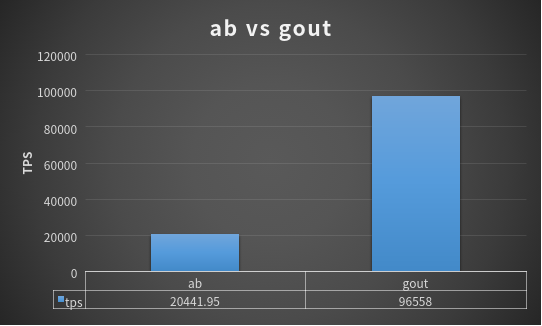
package main import ( "github.com/gin-gonic/gin" "github.com/guonaihong/gout" ) type testQuery struct { Size int `query:"size" form:"size"` // query tag是gout设置查询字符串需要的 Page int `query:"page" form:"page"` Ak string `query:"ak" form:"ak"` } //下一个服务节点 func nextSever() { r := gin.Default() r.GET("/query", func(c *gin.Context) { q := testQuery{} err := c.ShouldBindQuery(&q) if err != nil { return } c.JSON(200, q) }) r.Run(":1234") } func main() { go nextSever() r := gin.Default() // 演示把gin绑定到的查询字符串转发到nextServer节点 r.GET("/query", func(c *gin.Context) { q := testQuery{} // 绑定查询字符串 err := c.ShouldBindQuery(&q) if err != nil { return } // 开发转发, 复用gin所用结构体变量q code := 0 // http code err := gout. //发起GET请求 GET("127.0.0.1:1234/query"). //设置查询字符串 SetQuery(q). //关心http server返回的状态码 设置该函数 Code(&code). Do() if err != nil || code != 200 { /* todo Need to handle errors here */ } c.JSON(200, q) }) r.Run() } // http client // curl '127.0.0.1:8080/query?size=10&page=20&ak=test'下面是与apache ab的性能对比 _example/16d-benchmark-vs-ab.go