Chips EditText, Token EditText, Bubble EditText, Spannable EditText and etc.. There are many names of this control. Here I develop easy to understand , modify and integrate Chips Edit Text widget for Android
=============

Step 1: Clone git repor or download zip file
Step 2: Import ChipsEditTextLibrary in your eclipse workspace
Step 3: Create new Android project
Step 4: Set ChipsEditTextLibrary as reference of your project
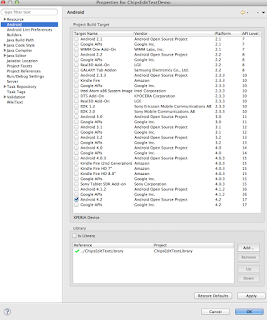
Right Click on Project -> Properties -> Android ->Add
Step 4: Open your xml layout file and add ChipsEditText control
<com.kpbird.chipsedittextlibrary.ChipsMultiAutoCompleteTextview android:id="@+id/chipsMultiAutoCompleteTextview1" android:layout_width="fill_parent" android:layout_height="wrap_content" android:layout_alignParentTop="true" android:ems="10" android:text="" > <requestFocus /> </com.kpbird.chipsedittextlibrary.ChipsMultiAutoCompleteTextview>Step 5: Open your Activity class and write following code.
package com.kpbird.chipsedittextdemo; import java.util.ArrayList; import android.app.Activity; import android.content.res.TypedArray; import android.os.Bundle; import android.util.Log; import com.kpbird.chipsedittextlibrary.ChipsAdapter; import com.kpbird.chipsedittextlibrary.ChipsItem; import com.kpbird.chipsedittextlibrary.ChipsMultiAutoCompleteTextview; public class MainActivity extends Activity { @Override protected void onCreate(Bundle savedInstanceState) { super.onCreate(savedInstanceState); setContentView(R.layout.activity_main); ChipsMultiAutoCompleteTextview ch = (ChipsMultiAutoCompleteTextview) findViewById(R.id.chipsMultiAutoCompleteTextview1); String[] countries = getResources().getStringArray(R.array.country); TypedArray imgs = getResources().obtainTypedArray(R.array.flags); ArrayList<ChipsItem> arrCountry = new ArrayList<ChipsItem>(); for (int i = 0; i < countries.length; i++) { arrCountry.add(new ChipsItem(countries[i], imgs .getResourceId(i, -1))); Log.i("Main Activity", arrCountry.get(i).getTitle() + " = " + arrCountry.get(i).getImageid()); } Log.i("MainActivity", "Array :" + arrCountry.size()); ChipsAdapter chipsAdapter = new ChipsAdapter(this, arrCountry); ch.setAdapter(chipsAdapter); } }Step 6: You need to use ChipsItem and ChipsAdapter to provide data. ChipsItem has two field 1. Title and 2. Image Id (R.drawable.android), In above sample I have created two array in string.xml for title and images.
For more detail please refer : http://www.kpbird.com/2013/02/android-chips-edittext-token-edittext_26.html