以jupyter notebook的形式,提供交互式的python3入门学习笔记,含练习题若干。
- Copyright(c) 2020 罗子牛 Luo, Ziniu.
- This project is licensed under the terms of the MIT license.
- Github: https://github.com/luozn15/Python3-Introduction-Notebook
-
Anaconda是一个包含180+的科学包及其依赖项的python发行版本。其包含的科学包包括:conda, numpy, scipy, jupyter notebook等。
-
建议安装Anaconda能快速搭建数据分析的环境,并方便日后管理多个python环境。
-
下载Anaconda Installer Anaconda Individual Edition, Your data science toolkit
-
打开Anaconda Installers开始安装,如果不清楚选项的含义,保留默认选项即可。
-
关于部分安装选项
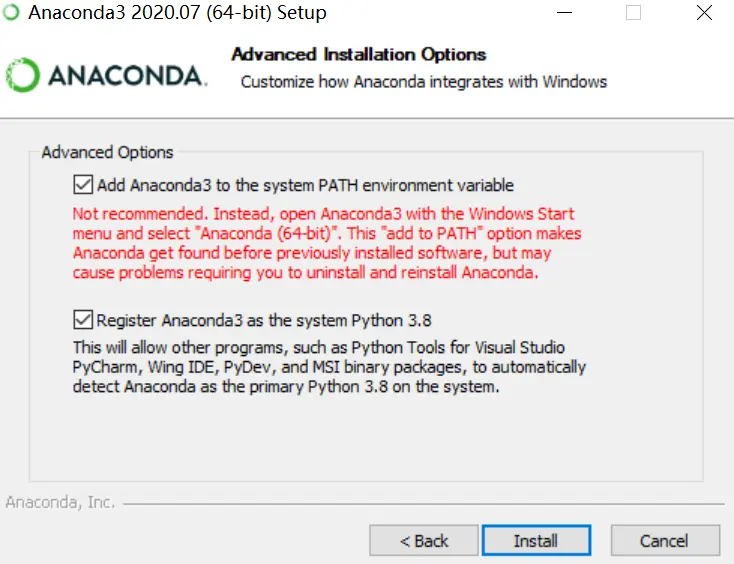
- [ ] 环境变量的添加 (Add Anaconda to the system PATH environment variable) - [ ] 系统首选python版本的注册 (Register Anaconda as the system Python 3.x)- Windows系统下,如果没有安装过python,两个都可以勾选。如不勾选,安装后的配置参考链接https://zhuanlan.zhihu.com/p/358641541。
- Mac系统自带python版本,不推荐勾选,请自行搜索方案。
- 进入某一工作目录下,从地址栏输入
jupyter notebook,回车
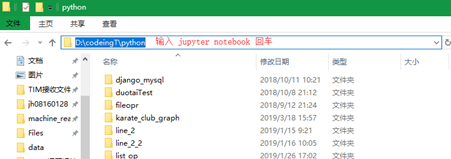
- 通常情况下,自动启动浏览器,进入如下jupyter界面
/pics/explorer.png)
- 点击Python3基础笔记.ipynb进入学习笔记。如果当前目录下没有,可以通过upload将该文件加载到当前目录。
- 大同小异,搜索关键字 Mac + jupyter notebook
-
- 简介与工具准备
- 1.1 Python历史
- 1.2 Anaconda安装
- 1.3 jupyter notebook使用
- 1.3.1 jupyter notebook 在线试用
- 1.3.2 本地使用jupyter notebook
- 1.3.3 新建个人目录/程序/终端环境
- 1.3.4 熟悉工具栏操作
- 1.3.5 熟悉快捷键操作
- 1.4 练习题:熟悉jupyter notebook操作
-
- python基础语法
- 2.1 = 赋值
- 2.2 print()与input()
- 2.3 注释
- 2.4 练习题:多边形面积
-
- python变量类型
- 3.1 数值类型 Number
- 3.1.1 算数运算符
- 3.1.2 比较运算符
- 3.1.3 逻辑运算符
- 3.2 字符串类型 String
- 3.2.1 字符串索引与切片
- 3.2.2 字符串split,join
- 3.3 元组 Tuple,列表 List,字典 Dictionary,集合Set
- 3.3.1 元组 Tuple
- 3.3.2 列表 List
- 3.3.3 字典 Dictionary
- 3.3.4 集合 Set
- 3.4 类型转换
- 3.5 练习题:字符串拼接整理
-
- 控制流
- 4.1 if-else
- 4.2 for 循环
- 4.3 while 循环
- 4.4 循环的跳过(continue)与退出(break)
- 4.5 练习题:操作列表、字典
-
- 函数 Function
- 5.1 常用的python内置函数
- 5.2 练习题:斐波那契函数封装
-
- 类 Class
- 6.1 类的继承
- 6.2 练习题:类的继承
-
- 模块
- 7.1 标准模块
- 7.2 第三方模块
-
- python+grasshopper