A lightweight Lightning Network web payment tool for LND. It uses Alex Bosworth's ln-service to communicate with LND both localy and remotely.
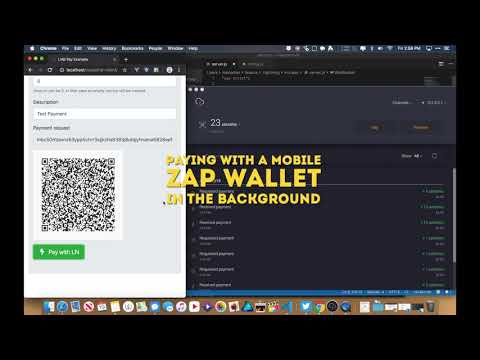
Install lnd-pay on your server:
git clone https://github.com/mariodian/lnd-pay.git cd lnd-pay npm install node server.js The basic setup requires you to send one ajax request to api/v0/invoices to create an invoice and then open websocket to listen for status changes.
The minimum code would look like this:
$.ajax({ method: "POST", url: 'http://localhost/api/v0/invoices', dataType: "json", data: { tokens: 100, // send 100 sat description: 'Test payment' // not required }, success: function(res) { const paymentRequest = res.request; let con = new WebSocket('ws://127.0.0.1:1337/ws'); con.onopen = function () { // Send invoice ID to server so it only checks for particular invoice status if (invoiceID) { con.send(invoiceID) } else { con.close(); } }; con.onmessage = function (message) { const json = JSON.parse(message.data); if (json.is_confirmed) { // Invoice paid // Change status to paid in UI } else { // Invoice not paid } }; } }); If you'd like to use LND Pay frontend in your React project please go to lnd-pay-react.
I've created a javascript plugin for easy communication with the backend right from your website.
It's built with jQuery, Bootstrap, Font Awesome and kjua (QR code library).
A minimum HTML template would look like this:
<!doctype html> <html lang="en"> <head> <meta charset="utf-8"> <link href="css/lndpay.css" rel="stylesheet"> <link href="css/bootstrap-4.3.1.min.css" rel="stylesheet"> <link href="css/fontawesome.min.css" rel="stylesheet"> <script type="text/javascript" src="js/jquery-3.4.1.min.js"></script> <script type="text/javascript" src="js/lndpay.jquery.js"></script> <script type="text/javascript" src="js/kjua-0.6.0.min.js"></script> </head> <script> $(document).ready(function(){ $('#lnd-pay').lndPay({ apiURL: 'http://localhost:11338/api/v0', wsURL: 'ws://127.0.0.1:11337/ws' }); }); </script> <body> <div id="lnd-pay"></div> </body> </html> By default an UI is created for you. The design is very similar to yalls.org.

If you do NOT want to display a payment QR code, remove kjua and lndpay.css from the HTML header.
{ apiURL: null, // API URL prefix to create invoice wsURL: null, // WebSocket url amount: null, // Invoice amount description: '', // Invoice description expire: 60, // Invoice expires in X minutes namespace: 'lndpay', // HTML lass namespace buildUI: true, // Build UI onCreateInvoice: null, // Callback when invoice get created (overwrites default) onPaid: null // Callback on successful payment (overwrites default) } You can also use your own UI by setting buildUI to false:
$('#lnd-pay').lndPay({ ... ... buildUI: false }); Make sure to follow this basic HTML template:
<div id="lnd-pay"> <input id="lndpay-amount" type="text"> <input id="lndpay-description" type="text"> <input id="lndpay-pay_req" readonly type="text" > <a href="#" id="lndpay-pay">Pay</a> <div id="lndpay-qr" class="qr-wrapper"></div> </div> You can set up custom HTML ID namespaces:
$('#lnd-pay').lndPay({ ... ... namespace: 'custom' }); You would then have to set HTML elements like this: id="custom-amount".
If you build your own UI, you don't have to load Bootstrap.
You can also add custom callbacks.
When used with a custom UI it overrides the default behaviour. It extends the behaviour of the default UI on the hand.
$('#lnd-pay').lndPay({ ..., ..., // Invoice created callback onCreateInvoice: function(obj, res) { // Display payment request in anyway you want. // To be notified about payment status via websocket you'll have to call openWebsocket obj.openWebSocket(res.id); }, // Invoice paid callback onPaid: function(res) { // Display a message about successful payment. // If you don't call this callback a default message will be displayed. }, }); Please have a look at an example folder to see the full working code.
If you like what I do, feel free to support me.