




Provides a string template tag that makes it easy to compose MySQL and PostgreSQL query strings from untrusted inputs by escaping dynamic values based on the context in which they appear.
$ npm install safesqlMySQL via
const { mysql } = require('safesql');PostgreSQL via
const { pg } = require('safesql');const { mysql, SqlId } = require('safesql'); const table = 'table'; const ids = [ 'x', 'y', 'z' ]; const str = 'foo\'"bar'; const query = mysql`SELECT * FROM \`${ table }\` WHERE id IN (${ ids }) AND s=${ str }`; console.log(query); // SELECT * FROM `table` WHERE id IN ('x', 'y', 'z') AND s='foo''"bar'mysql functions as a template tag.
Commas separate elements of arrays in the output.
mysql treats a ${...} between backticks (\`) as a SQL identifier.
A ${...} outside any quotes will be escaped and wrapped in appropriate quotes if necessary.
PostgreSQL differs from MySQL in important ways. Use pg for Postgres.
const { pg, SqlId } = require('safesql'); const table = 'table'; const ids = [ 'x', 'y', 'z' ]; const str = 'foo\'"bar'; const query = pg`SELECT * FROM "${ table }" WHERE id IN (${ ids }) AND s=${ str }`; console.log(query); // SELECT * FROM "table" WHERE id IN ('x', 'y', 'z') AND s=e'foo''\"bar'You can pass in an object to relate columns to values as in a SET clause above.
The output of mysql`...` has type SqlFragment so the NOW() function call is not re-escaped when used in ${data}.
const { mysql } = require('safesql'); const column = 'users'; const userId = 1; const data = { email: 'foobar@example.com', modified: mysql`NOW()` }; const query = mysql`UPDATE \`${column}\` SET ${data} WHERE \`id\` = ${userId}`; console.log(query); // UPDATE `users` SET `email` = 'foobar@example.com', `modified` = NOW() WHERE `id` = 1Since mysql returns a SqlFragment you can chain uses:
const { mysql } = require('safesql'); const data = { a: 1 }; const whereClause = mysql`WHERE ${data}`; console.log(mysql`SELECT * FROM TABLE ${whereClause}`); // SELECT * FROM TABLE WHERE `a` = 1An interpolation in a quoted string will not insert excess quotes:
const { mysql } = require('safesql') console.log(mysql`SELECT '${ 'foo' }' `) // SELECT 'foo' console.log(mysql`SELECT ${ 'foo' } `) // SELECT 'foo'Backticks end a template tag, so you need to escape backticks.
const { mysql } = require('safesql') console.log(mysql`SELECT \`${ 'id' }\` FROM \`TABLE\``) // SELECT `id` FROM `TABLE`Other escape sequences are raw.
const { mysql } = require('safesql') console.log(mysql`SELECT "\n"`) // SELECT "\n"Assuming
const { mysql, pg, SqlFragment, SqlId } = require('safesql')When called with an options bundle instead of as a template tag, mysql and pg return a template tag that uses those options.
The options object can contain any of { stringifyObjects, timeZone, forbidQualified } which have the same meaning as when used with sqlstring.
const timeZone = 'GMT' const date = new Date(Date.UTC(2000, 0, 1)) console.log(mysql({ timeZone })`SELECT ${date}`) // SELECT '2000-01-01 00:00:00.000'When used as a template tag, chooses an appropriate escaping convention for each ${...} based on the context in which it appears.
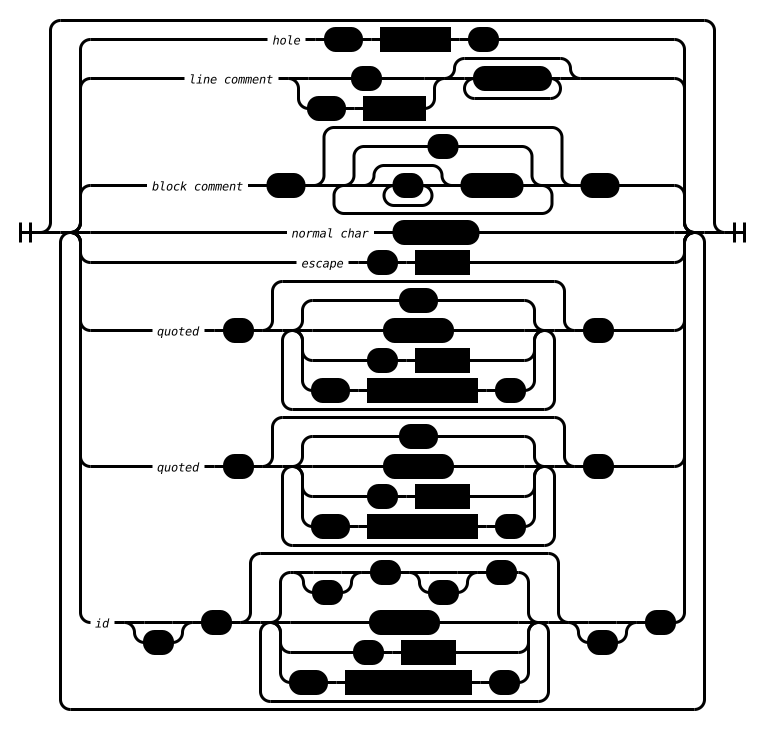
mysql handles ${...} inside quoted strings as if the template matched the following grammar:
When used as a template tag, chooses an appropriate escaping convention for each ${...} based on the context in which it appears.
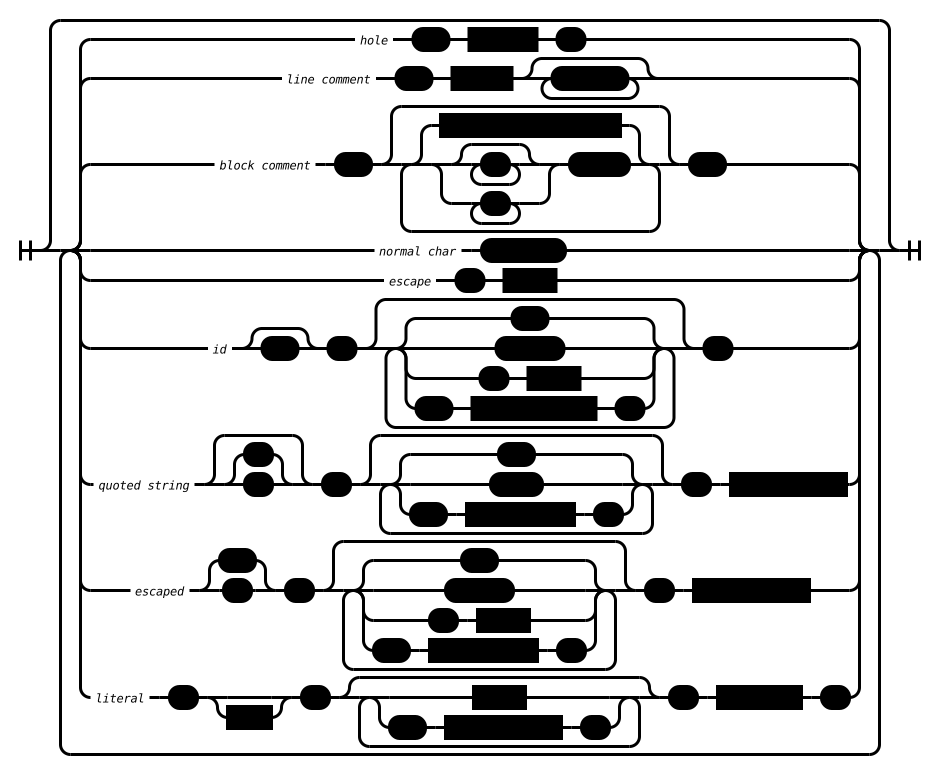
pg handles ${...} inside quoted strings as if the template matched the following grammar:
SqlFragment is a Mintable class that represents fragments of SQL that are safe to send to a database.
See minting for example on how to create instances, and why this is a tad more involved than just using new.
SqlId is a Mintable class that represents a SQL identifier.
See minting for example on how to create instances, and why this is a tad more involved than just using new.
A SqlId's content must be the raw text of a SQL identifier and creators should not rely on case folding by the database client.